What is PT1?
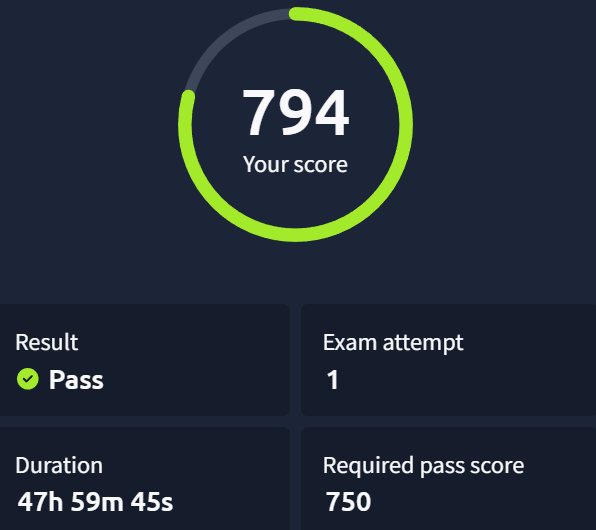
TryHackMe's PT1 (Junior Penetration Tester) is an entry-level certification requiring you to demonstrate fundamentals across web application security, network penetration testing, and Active Directory attacks. It's a real-world pentest simulation, including a structured report graded by AI. You have 48 hours and need at least 750/1000 points to pass. Web is worth 400 points, Network 360, and AD 240. You also get one free retake.
My personal difficulty ranking: Web > Network > AD — but I could have failed any of them or all of them if I was not serious about exam.
Web Application
This is the hardest section due to its size and the number of features to test. But fortunately for us the exam provides us with list of bugs which we have to look for.
Methodology that worked:
- First, understand what the application does as a whole before attempting exploitation.
- Map every feature on every page. For each feature, ask: what can this do, and what can I do with it? A login/signup/password reset form isn't just for SQL releated attacks — it could be XSS, brute force, account enumeration, and more.
- Route all traffic through Burp Suite from the start. It auto-generates a map of both the frontend and backend without any extra effort. But don't forget directory busting.
- Create multiple accounts and test vulnerabilities cross-account (IDOR being the obvious one).
- Work from a checklist. Copy your bug list into your notes, work through one feature at a time, check off what you've tested, then move on. Sequential testing saves hours.
- Ask you self what I can do with this feature?
Key things I learned the hard way:
- I found some exploitable vulnerabilities that don't yield flags. Don't let that spiral into a rabbit hole. Also I chased a race condition for too long — grouped requests were slow, looked suspicious, but it was a dead end (but this bug could exist elsewhere).
- Flags can be partial. Other half will be provided from some other end point or vulnerability. Overlapping characters help you join them.
Network (2 Machines — 1 Linux, 1 Windows)
The machines themselves aren't hard. The danger is tunnel vision and lack of enumeration.
- On the Linux box, I spent 5.5 hours on initial foothold because I ignored simple, obvious information and got lost in noise the running application was generating. Read what the box is telling you.
- Enumerate and connect dots that complex analysis misses.
- When stuck, backtrack and re-read your notes from the start.
- On the Windows machine, I found an alternate privilege escalation path. I avoided it intentionally — the report is AI-graded, and it expects the intended path. Stick to the obvious route.
Enumerate, connect the dots, backtrack if stuck for too long avoid tunnel vision for too long on a single thing.
Active Directory
Felt straightforward to me, likely because I had prepared specifically for it. But it has layers — it's not purely AD, it's a mix of AD, Windows fundamentals, and basic enumeration and exploitation.
Get comfortable with tools like nxc, bloodhound, sharphound, bloodhound python, impacket. Understand working, enumeration and exploitation of AD environments from the learning paths in detail.
The most important lesson: Treat this like a real engagement, not a CTF. You cannot reset user passwords or disrupt services. If you would normally do something in a CTF that changes account state, find a non-destructive alternative. The AI grader may penalise you for it. Practise non-disruptive methods before exam day.
Tunnelling: Ligolo-ng didn't work for me, SSH tunnelling didn't work either. Chisel worked. Have all three ready and don't waste time on one if it's failing.
Reporting — Don't Leave It Until the End
This cost me points and I'm certain it costs many others too.
- Report each vulnerability and machine as soon as you finish it. Don't wait until the end. Retracing steps hours later is slower and less accurate.
- The report is not a document — it's a structured panel with dropdowns to select vulnerability type, plus separate text boxes for reproduction steps and remediation(not for AD).
- The vulnerability dropdown matters a lot. Hypothetical example I found a vulnerability that was technically "local file read" caused by outdated software. In confusion I selected outdated software. I lost points. Selecting the wrong category loses points, even if your exploitation steps are correct. Think about the root cause, not just the symptom.
- Don't skip the Writing Pentest Reports room on TryHackMe. Practice! Even if you hack everything, poor reporting can fail you.
Build a Personal Mistake List
Before the exam, write down the things you personally forget under pressure. Mine included:
- Adding
Content-Typeheaders to POST requests. - Starting Responder for attacks that require user interaction (e.g., placing a file on an SMB share and waiting for NTLM capture).
- Checking whether a web app will have a simulated user open uploaded files.
- Check user description in AD environment.
- And more.
These seem obvious until you're 10 hours into an exam. Keep the list open on a second screen.
Luckily I have done a lot of CTFs and I know my weak points. As u go along the learning path material make notes of things u forget or get wrong.
Quick Recap
- Web — Burp from the start, feature-by-feature checklist, multiple accounts
- Network — Don't overthink it, basic enum wins
- AD — Non-destructive methods only, enumerate users, OUs etc
- Reporting — Report as you go, nail the vulnerability category
- General — Partial flags, avoid tunnel vision, keep a personal mistake list
Prepare from the recommended paths for this cert.
Good luck — it's a solid exam and genuinely worth taking seriously.