
In the cybersecurity world of 2026, where AI-driven threats and sprawling IoT ecosystems are the norm, one tool remains the undisputed king of the professional's toolkit: Nmap (Network Mapper).
Whether you are a sysadmin auditing a remote office or a security researcher hunting for a specific CVE, Nmap is your "digital eyes." But in 2026, simply typing nmap [target] isn't enough. To find the signals in the noise, you need to understand the art of the scan.
1.Why Nmap Still Matters in an AI World

While we now have automated scanners and AI security agents, they all rely on the same fundamental logic that Nmap pioneered. Nmap doesn't just tell you if a computer is "on"; it interrogates the target's TCP/IP stack to reveal its deepest secrets — its OS version, its hidden services, and even its vulnerabilities.
2. The Essential Toolkit: From Zero to Recon
To use Nmap like a pro, you need to move past basic discovery. Here are the four pillars of modern network scanning.
A. Host Discovery (The "Quiet" Check)
Before you scan 65,535 ports, you need to know who is actually home. Using a Ping Scan is the polite way to map a network without triggering every alarm in the building.
nmap -sn 192.168.1.0/24
- -sn: Tells Nmap to skip the port scan and only perform host discovery.
- Result: A clean list of active IP addresses and their MAC addresses.
B. The Stealth Scan (SYN Scan)
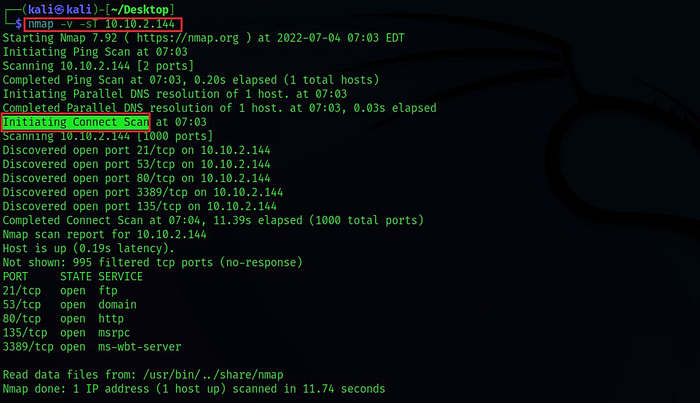
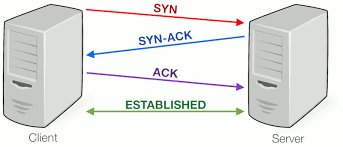
The default scan for most pros is the TCP SYN Scan. It's often called "half-open" scanning because it never completes the three-way handshake, making it harder for simple logs to catch.
sudo nmap -sS -T4 [target]
- -sS: Executes a SYN scan (requires root/sudo privileges).
- -T4: The "Aggressive" timing template. In 2026, modern networks handle this speed easily, saving you minutes of waiting.
C. Service and OS Fingerprinting
Knowing a port is "open" is useless if you don't know what's behind it. Is it an old version of Apache or a modern Nginx server?
nmap -sV -O [target]
- -sV: Probes open ports to determine service/version info.
- -O: Enables OS detection through TCP/IP stack fingerprinting.
3. The Power of the NSE (Nmap Scripting Engine)
This is where Nmap turns from a "scanner" into a "weapon." The NSE allows you to run scripts written in Lua to automate everything from vulnerability detection to brute-forcing.
Example: Scanning for common vulnerabilities (The 'vuln' group)
nmap --script vuln [target]
In 2026, the NSE library has grown to include scripts that can detect misconfigured cloud buckets, AI model endpoints, and even specific IoT vulnerabilities.
4. Bypassing Modern Defenses
In 2026, firewalls are smarter. If your scan is being blocked (showing as filtered), you might need to get creative.
- Fragment Packets (-f): Breaks the scan packets into tiny pieces to confuse simple packet filters.
- Decoys (-D): Send scans from "fake" IP addresses alongside your own.
nmap -D RND:10 [target](This makes it look like 10 random people are scanning the target at once!)
5. Interpreting the Results
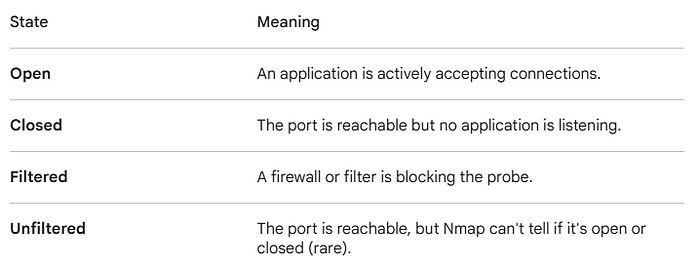
Nmap will return one of six states for a port. Understanding these is the difference between a junior and a senior analyst:
6. The Ethics of the Scan
Before you hit "Enter," remember the Golden Rule of 2026 Cybersecurity: Authorization is everything.
Scanning a network you don't own (or don't have explicit permission to test) can be interpreted as "intent to commit a crime" in many jurisdictions. Always use a lab environment, like Hack The Box or TryHackMe, to sharpen your skills.
Conclusion: Mastering the Map
Nmap is more than just a command; it is a philosophy of understanding the digital terrain. By mastering the flags, the timing, and the scripting engine, you aren't just scanning a network — you are reading its biography.
What is your favorite Nmap "one-liner"? Drop your most useful command in the comments below!