
Why is the WordPress ecosystem so fragile?
WordPress plugins and themes let site owners add new features quickly, but tens of thousands of such packages create a massive attack surface for security teams. Manual review is impossible at scale, and traditional static analysis tools often produce overwhelming lists of findings that require human triage. This is where Temodar Agent comes in. This open‑source project combines AI agents with traditional static analysis to accelerate and deepen WordPress security research .
Becoming an expert in contentious security reports requires both a good toolkit and a sound methodology. Temodar Agent aims to provide researchers with both.
What is Temodar Agent?
Temodar Agent is an AI‑powered WordPress plugin and theme security analysis platform built for researchers, product security teams, auditors and defenders . The application runs locally inside a Docker container and brings together AI agent workflows, multi‑provider large language model orchestration, Semgrep‑powered static analysis and risk‑based WordPress reconnaissance in a single interface . Instead of a simple chat box, it provides investigation threads that retain context; AI agents can dive deeply into a target and remember previous conversations.
This makes it especially appealing to bug bounty hunters looking for a local, open‑source tool to streamline reconnaissance and vulnerability triage.
What makes Temodar Agent unique?
Priority scanning and triage
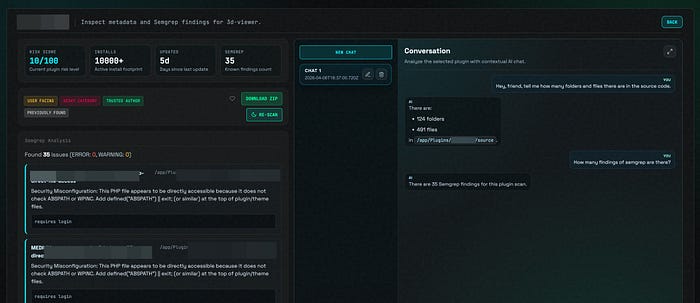
Temodar Agent automatically assesses the risk level of each plugin or theme. It offers WordPress plugin and theme scanning, filters based on install counts and update windows, identifies abandoned or user‑facing targets, and prioritizes packages using metadata and security signals . It shows scanning progress in real time and stores results locally for later comparison or review .
A multi‑agent AI workflow
Temodar Agent offers more than a chat bot; it provides a comprehensive AI agent workflow . You can open separate AI threads for each target, prepare the source code in a trusted workspace, and attach the following to the session:
- Conversation summary, analysis summary and findings summary — so past discussions don't disappear.
- Architecture notes and important files — preventing you from reconstructing lost context.
- Last prepared source path — so you know which code the agents looked at.
The platform also supports multiple AI execution strategies: agent, team, tasks, fanout and auto, enabling scenarios that range from single‑agent work to advanced multi‑agent workflows.
Semgrep for static analysis
Temodar Agent's strength in static analysis comes from its integration with Semgrep. By default, rulesets such as OWASP Top 10, PHP security and security audit are included . You can create your own rules, delete them, enable or disable them, or toggle them in bulk . Semgrep outputs are stored locally so you can revisit past scans and connect them to AI analyses. (extra 23 special rules)
Data privacy and local operation
Temodar Agent is not a cloud service. It runs locally via Docker and keeps your data on your machine. This means plugin or theme source code, Semgrep results and AI conversation history remain under your control. Requirements are minimal: having Docker installed and permission to run Docker commands .
Flexible provider configuration
The system can connect to multiple language model providers such as OpenAI, Anthropic, Copilot, Gemini and Grok. It lets you store different provider profiles, switch the active profile, manage model lists and test connections. This flexibility allows you to experiment with different models or select the one preferred by your organization.
How do you install it?
To run Temodar Agent, clone the repository and run the start script:
git clone https://github.com/xeloxa/temodar-agent.git
cd temodar-agent
chmod +x run.sh
./run.sh
The project prefers a Git checkout because the in‑app update mechanism relies on Git metadata . The run.sh script builds the Docker image if necessary, starts the container, exposes the local dashboard on port 8080 and mounts persistent directories for app state, plugin cache and Semgrep results .
After installation, visit http://127.0.0.1:8080 in your browser to open the Temodar Agent dashboard . From there you can launch scans, view risk labels and perform AI‑assisted analyses.

A typical workflow
An analysis cycle with Temodar Agent proceeds through these steps :
- Start Temodar Agent using ./run.sh.
- Open the local dashboard and launch a scan for a WordPress plugin or theme.
- Review the risk labels and prioritized targets produced on the dashboard.
- Run Semgrep on a selected target or across the session and review the results.
- Open an AI thread for deeper investigation and prepare the source code for the agents.
- Follow the analysis summaries, findings and recommendations produced by the AI agents.
- Save your scanning and analysis sessions for future comparison.
While the script is running, press R to rebuild and restart everything, Q to stop the app or Ctrl+C to exit . These controls are handy for quick iterations and re‑runs.
Who is it for?
Temodar Agent is designed for several profiles:
- Security researchers and consultants: To quickly prioritize large numbers of plugins, make static analysis results actionable and conduct deep investigations via AI.
- Product security teams: To regularly scan supply‑chain components and document risks.
- Auditors and compliance teams: To perform plugin‑ and theme‑level compliance checks and reporting.
- Defenders and developers: To understand the security posture of the packages they use and contribute back when necessary.
- Bug bounty hunters: To triage large plugin and theme ecosystems quickly, identify high‑risk targets, and use AI‑assisted workflows for deeper vulnerability research.
The project also serves as a Semgrep operations layer, giving you complete control over detection logic and rule management .
Responsibility and ethics
Temodar Agent is intended only for authorized security research, defensive analysis and educational use . Do not use it against systems, plugins, themes or environments you do not own or have explicit permission to test. The authors and contributors are not responsible for any damage, service disruption or legal consequences arising from misuse . Always ensure your testing is authorized and compliant with applicable laws and disclosure policies.
Conclusion: Where depth meets speed
As the WordPress ecosystem continues to grow, security researchers need to strengthen their toolkit. Temodar Agent merges AI with Semgrep to accelerate scanning while enabling in‑depth investigation. Running locally via Docker protects your data, and multi‑provider support gives you flexibility to work with different models. If you want to make sense of a long, complex list of plugins, organize findings systematically and take advantage of AI‑powered insights, Temodar Agent deserves a place in your toolchain.
Github Repo: https://github.com/xeloxa/temodar-agent