Phase 1: Preparation & Capture
The first step in any authentication-based attack is to capture a baseline request. This requires:
- Setting up the Proxy: Configuring your browser to use Burp Suite's proxy. This allows all traffic between your browser and the target server to be intercepted and analyzed.
- Capturing the Login Attempt: Navigate to the application's login page and enter dummy credentials (e.g.,
invalid-userandinvalid-password). The goal is to generate aPOST /loginrequest that contains your test parameters. - Inspecting the History: Navigate to the Proxy tab and then to HTTP history. Find the
POST /loginrequest you just generated. This request is your foundation.
In my test, I located a specific login request made to ...web-security-academy.net, as seen below:
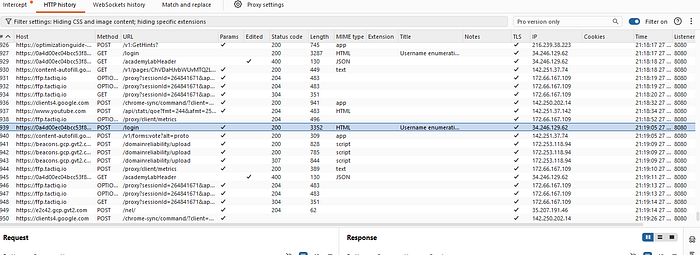
Burp Suite Proxy HTTP history with intercepted POST /login requests.
Phase 2: Username Enumeration
With the target request in hand, we now transition from observation to attack.
- Identify the Payload Position: Right-click the captured
POST /loginrequest and select Send to Intruder. In the Intruder "Positions" tab, Burp will automatically highlight potential payload positions. For our purposes, we are only targeting theusernameparameter.
- Snippet Setup: Set the attack type to Sniper. Highlight the entire value of the
usernameparameter and click Add § to mark it. It should look something like:username=§invalid-user§&password=invalid-password. We will keep the password static for this phase.

- Configure the Payload: Go to the Payloads tab. Ensure the payload type is set to Simple list. Paste or load your wordlist of candidate usernames. In a real-world scenario, this might be a list of top 10,000 common usernames, but for this lab, I had a specific list of 244 entries.
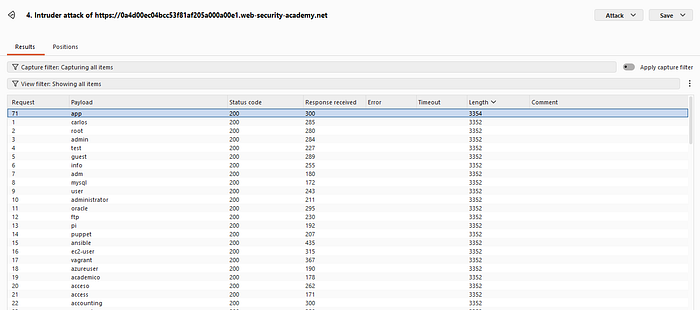
- Analyze the Results: Click Start attack. Once the attack is complete, the results table will show you a variety of columns including Payload, Status, Length, and Response Received. We need to identify any response that differs from the norm. Sorting by the Length column is a powerful technique.
- The Enumeration Signal: While most responses in my test were a length of 3352, one specific payload, "app", generated a response with a different length: 3354.
This differential response confirms the username enumeration. While an attack on an invalid username might trigger a generic message like "Invalid username," the response for a valid username often triggers a more specific message like "Incorrect password," confirming that the user "app" exists on the system.
Phase 3: Password Brute-Force
We have narrowed our target surface down to a single, confirmed user: app. This makes a brute-force attack highly targeted and significantly more efficient.
- Update the Position: Return to the Intruder Positions tab. Clear your existing payload position. Replace the
usernamevalue with the confirmed nameapp. Move the payload marker (§§) exclusively to thepasswordfield. The new structure should be:username=app&password=§§. The attack type remains Sniper.
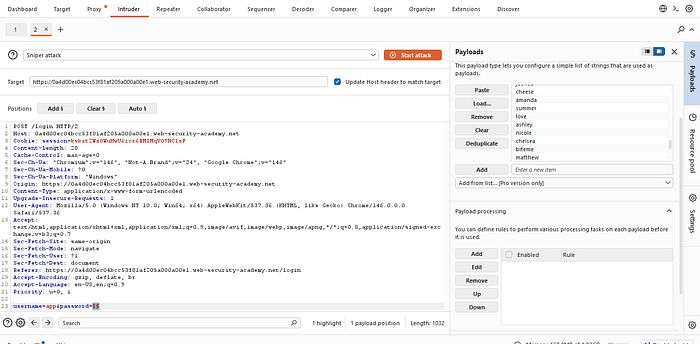
Run the Brute-Force: In the Payloads tab, clear the previous username list and paste your list of candidate passwords. For this lab, I was working with a list of common passwords. Click Start attack.
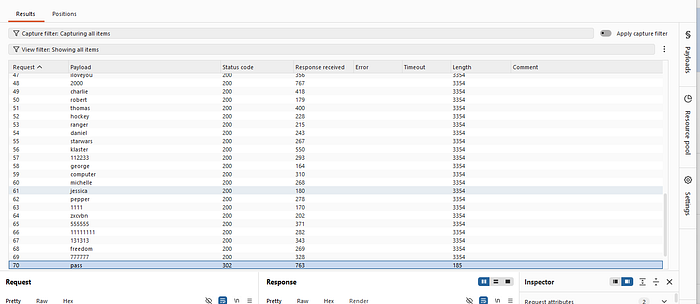
Identify the Success: This attack will generate numerous standard 200 OK status codes for every invalid password. We are looking for the singular exception that indicates success. In authentication, this is often a 302 Found, which indicates that the application is redirecting the user to a dashboard or profile page.
The Key to the Account: One specific password payload, "pass", successfully triggered that 302 Found response. A closer examination of that request and response in the results window would reveal additional indicators of success, such as unique session set-cookie headers.
Conclusion and Mitigation Strategies
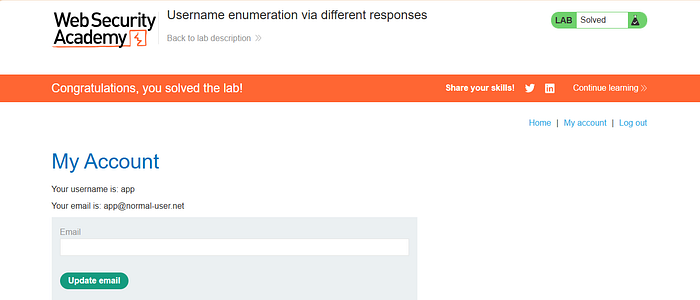
By the end of the second attack, I had a confirmed valid credential pair: app and pass. I was then able to log into the application and access the user account page, successfully solving the lab.
The Golden Rule of Authentication Security:
An application's authentication endpoints should never reveal whether a specific username exists. To achieve this, implement the following best practices:
- Consistent Error Messages: Use generic error messages that apply to either a bad username or a bad password. Example: "Invalid username or password."
- Prevent Timing Attacks: Implement mechanisms to ensure the application takes a similar amount of time to process a request regardless of whether the username exists.
- Account Lockout & Rate Limiting: Prevent automated brute-force attempts by locking an account after a certain number of failed login attempts or by throttling multiple login requests from the same IP address
This methodology demonstrates the fundamental power of security testing tools like Burp Suite Intruder and underscores how small information leaks can lead to significant account takeovers.