
Technology has a simple promise: make things easier. Log in faster. Share faster. Pay faster. Scan instead of typing. Remember passwords so humans don't have to. From a user-experience perspective, convenience is progress.
From a security perspective, convenience is often an attack surface.
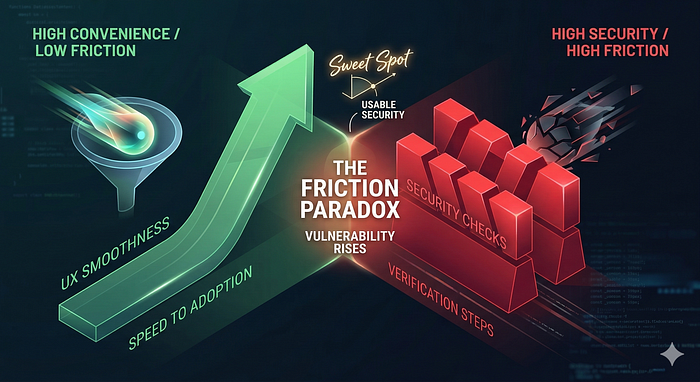
This tension is not accidental. Security systems work by introducing friction: verification steps, restrictions, and deliberate checks. A good user experience tries to remove friction. When these two goals collide, subtle vulnerabilities appear — not because developers are careless, but because the system is optimized for speed and ease rather than adversarial thinking.
Understanding this conflict is essential for anyone building secure systems.
The Friction Paradox
Security fundamentally slows things down. Authentication asks a user to prove their identity. Authorization checks permissions. Input validation inspects data. Rate limits prevent abuse.
User-experience design, on the other hand, tries to eliminate delays and interruptions. Modern products compete on smoothness. A login that takes three seconds instead of one feels outdated. A checkout page with five steps instead of two feels broken.
So engineers build shortcuts:
- Password autofill
- Single sign-on
- QR code scanning
- Clipboard copying
- One-click authentication links
Each shortcut removes friction for legitimate users. But attackers operate within the same system. When friction disappears, so do some defensive barriers.
Security vulnerabilities frequently emerge at these intersections.
Autofill: When the Browser Becomes the Attacker's Assistant
Password managers and browser autofill dramatically improve usability. They also encourage stronger passwords because users no longer need to remember them.
However, autofill systems depend heavily on the context in which a login form appears. Some attacks have attempted to exploit autofill behavior by creating hidden or deceptive input fields that mimic login forms.
If a browser automatically inserts saved credentials into a malicious form, a script on the page may attempt to capture them.
This does not mean password managers are unsafe — in fact, they are generally safer than human memory. But the design illustrates a broader pattern: a feature designed for convenience can become a potential data-exposure mechanism if context validation is insufficient.
The browser tries to help the user. Attackers exploit that helpfulness.
Modern password managers restrict autofill through domain matching and other safeguards. However, earlier research demonstrated that deceptive or hidden forms could sometimes trigger credential autofill, allowing malicious scripts to capture them.
OAuth and the Illusion of Trust
Single sign-on systems allow users to authenticate using an existing account. Instead of creating new credentials for every website, users can choose "Sign in with Google", "Sign in with Microsoft", or another identity provider.
From a usability perspective, this is excellent design. It reduces password reuse and speeds up onboarding.
However, attackers exploit a subtle psychological shortcut.
Users often assume that if a page displays a familiar authentication button, the request must be legitimate. Phishing sites mimic the appearance of OAuth login screens or redirect flows. Victims believe they are interacting with a trusted identity provider when, in fact, they are submitting credentials to an attacker-controlled page.
Another variant involves malicious OAuth applications requesting excessive permissions. Users often approve these requests quickly because the login flow feels familiar and trusted.
Technically, OAuth itself is not broken. The vulnerability emerges from the interaction between interface design and human trust signals.
Convenience conditions users to trust familiar patterns without careful verification.
QR Codes: The Invisible URL
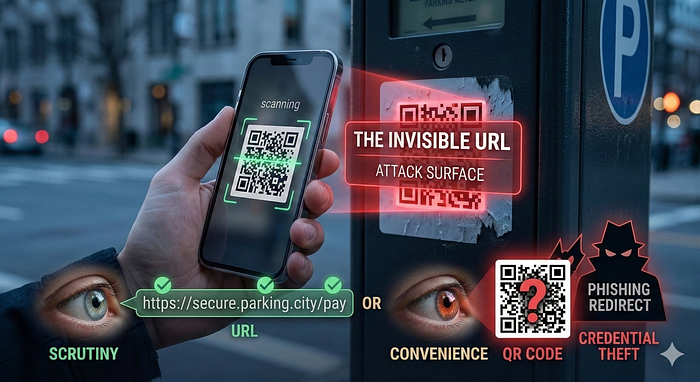
QR codes are another convenience innovation. Instead of typing a long URL into a device, a user scans an image and is instantly redirected.
The problem is that QR codes hide the destination entirely.
Humans are surprisingly good at spotting suspicious links when they can read them. A domain name with small spelling errors often triggers suspicion. But when scanning a QR code, the user sees only a black-and-white square.
Attackers exploit this blindness.
Malicious QR codes have been placed on parking meters, restaurant tables, public posters, and payment terminals. A user scans the code expecting to reach a legitimate service, but instead lands on a phishing page designed to steal credentials or payment information.
Because the interaction feels quick and effortless, users rarely pause to verify the destination.
Convenience removes the moment where critical thinking normally occurs.
The Clipboard: A Quiet Data Channel
Copy and paste feels harmless. It is one of the most basic interactions in computing.
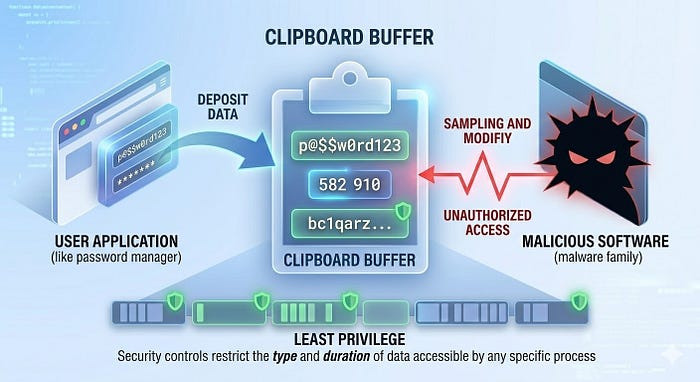
Yet the clipboard is effectively a temporary shared memory space between applications. Anything copied — passwords, authentication tokens, cryptocurrency addresses, private notes — may exist there for a short time.
Certain malware families monitor clipboard activity and replace copied cryptocurrency addresses with attacker-controlled addresses. When the victim pastes the address during a transaction, funds are sent to the attacker instead.
Other malicious software scans the clipboard contents for sensitive strings such as API keys or login credentials.
On many desktop systems the clipboard is shared memory accessible to multiple applications, making it attractive for malware monitoring.
The clipboard was designed purely for convenience. Security was not its original design goal. As a result, it can become an unexpected channel for data exfiltration.
The Structural Conflict
These examples reveal a recurring pattern.
Security mechanisms aim to ensure that every action is verified and intentional. Convenience mechanisms aim to make actions effortless and automatic.
The more invisible a process becomes, the easier it is for attackers to manipulate it.
A login that requires conscious steps encourages users to notice anomalies. An automatic login may mask the signs of a malicious request.
In other words, automation improves usability but sometimes reduces awareness.
This is not an argument against convenience features. Modern computing would be unbearable without them. Instead, it highlights the need for security thinking during interface design.
Designing for Both Security and Usability
Effective systems recognize that usability and security must coexist.
Several design strategies help balance these goals:
Context verification
Applications should ensure that automatic actions occur only in trusted environments. For example, password managers restrict autofill behavior based on domain matching.
User visibility
Important actions should remain visible to the user. Unlike clickable links on a desktop, QR codes remove the ability to hover and preview the destination before interacting.
Least privilege
Applications and extensions should access only the minimal data required for their functions, reducing the risk of data leakage through features such as the clipboard.
Defense in depth
Convenience features should never be the sole line of defense. Additional safeguards, such as anomaly detection, device verification, and behavioral analysis, help mitigate abuse.
Security becomes stronger when convenience mechanisms are designed with adversaries in mind.
The Lesson Behind the Pattern
Many security failures do not originate in complex cryptography errors or advanced exploits. They emerge from everyday features built to make technology feel seamless.
Attackers pay close attention to these seams.
The more frictionless a system becomes, the more carefully its invisible mechanisms must be designed. Otherwise, the system quietly shifts power toward the attacker, who benefits from automation just as much as the user.
Convenience is not, by nature, the enemy of security. But convenience without adversarial thinking creates opportunities that attackers rarely ignore.
In cybersecurity, every shortcut deserves a second look.
Yours securely, KbhattSec