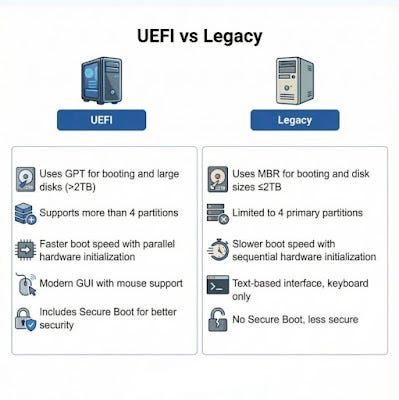
- Partitioning: GPT vs. MBR How your firmware interacts with your storage drives affects usable space.
- GPT (GUID Partition Table): Used with UEFI, supports drives larger than 2.2 TB (up to 9.4 ZB theoretically), and allows nearly unlimited partitions (Windows limits this to 128).
- MBR (Master Boot Record): Used with Legacy BIOS, limited to 2 TB of addressable space. Larger drives may have unallocated space that cannot be used.
2. Boot Speed & Initialization
- Parallel Initialization (UEFI): UEFI can initialize multiple hardware components at the same time, resulting in faster cold boot times.
- Sequential Initialization (Legacy): BIOS checks and starts hardware one at a time, creating delays during startup.
3. Security (Secure Boot) A major distinction for modern OS like Windows 11.
- Secure Boot (UEFI only): Ensures only digitally signed, trusted software loads during boot, preventing rootkits and pre-boot malware.
- Legacy: Lacks this verification, leaving systems more vulnerable to sophisticated attacks.
4. User Interface
- UEFI: Provides a modern graphical interface with mouse support, high-resolution graphics, and options to access the internet or update firmware directly.
- Legacy: Uses a text-based interface, navigable only with a keyboard.