
Hello fellow hunters, hope you're all doing great! If you've been using Burp Suite for web application testing or bug bounty hunting, you've probably run into this:
- Memory usage keeps increasing (500MB → 1GB → even more)
- Storage fills up quickly
- Burp becomes slow, laggy, or completely unresponsive

At first glance, it feels like a system limitation It's not. This is a configuration issue, and most people are fixing it the wrong way.
⚠️ The Mistake!
Most people assume:
- My RAM isn't enough
- "Burp is just heavy
- I need to keep restarting it
So they try:
- Restarting Burp
- Clearing HTTP history
- Filtering file extensions
None of these actually solves the root cause.
What's Actually Happening?
Burp logs everything by default: images, JS, media, and background traffic.
You're basically making it store the entire internet.
Why This Hurts?
- Storage fills
- Slow performance
- Noisy data
Real vulnerabilities get buried..
Wrong Fixes!
These might seem helpful, but they don't solve the real issue:
- Filtering extensions
- Restarting Burp Suite
- Clearing proxy history
They treat the symptoms, not the cause.
The Real Fix:
1. Set Target Scope
Go to: Target → Scope → Add your target domain
Example:
target.com
*.target.com
Without this, Burp treats everything as in-scope by default.
2. Stop Logging Out-of-Scope Traffic
Go to: Proxy → Options → Proxy history logging
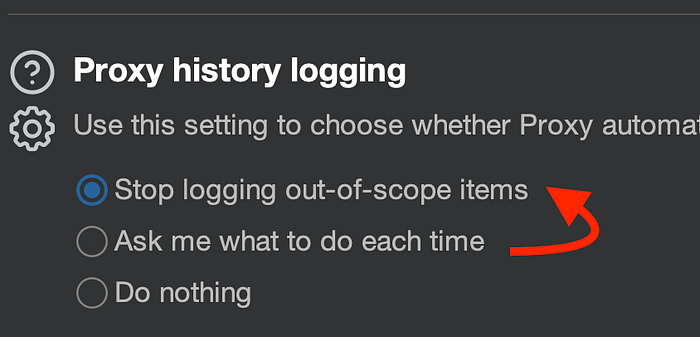
Enable stop logging for out-of-scope traffic.
3. Block Out-of-Scope Traffic Completely
Go to: Proxy → Options → Miscellaneous

Enable the option to Don't send items to Proxy history or live tasks, if out of scope
Pro Tip:
If you want the custom regex filters I personally use in Burp, drop a comment, and I'll share my advanced setup.
Conclusion:
Burp Suite is powerful, but only when configured correctly.
The problem isn't your system. The problem is how Burp is handling traffic.
Fix this once, and you'll immediately notice:
- Faster performance
- Lower memory usage
- Cleaner, more relevant data
- Better vulnerability discovery
Thanks for reading, happy hacking! 🔥
Connect with me:
- Twitter: @likith_teki
- LinkedIn: likithteki