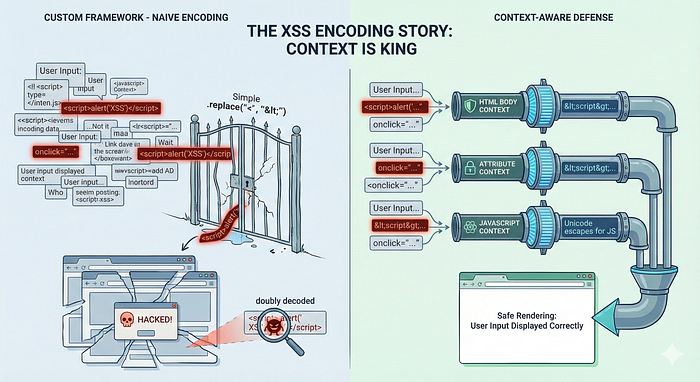
Why "Context" is the most important word in web security, and why your .replace('<', '<') function isn't enough.
If you are using modern frameworks like React, Angular, or Vue, you are spoiled. These frameworks handle the heavy lifting of Cross-Site Scripting (XSS) protection automatically. They treat data as data, not as executable code.
But what if you are building a custom framework? What if you are maintaining a legacy vanilla JS application? Or what if you just need to manually render some HTML?
Suddenly, the safety net is gone, and you are staring down the barrel of the web's most persistent vulnerability: XSS.
In this article, we'll look at why the standard approach to encoding fails, the trap of "double decoding," and how to secure your custom rendering pipeline properly.
The Fallacy: "One Encoding Fits All"
The most common mistake developers make when securing a custom framework is assuming that "HTML Encoding" is a silver bullet.
You might think: "If I just convert < to < and > to >, I'm safe, right?"
Wrong.
Security depends entirely on where the data is being rendered. Let's look at a classic example where a developer applies standard HTML encoding to a user's input inside a JavaScript context.
HTML
<button onclick="alert('{{ html(userInput) }}')">Click me</button>The developer expects the user to type a name. But the attacker types this: '); alert(document.cookie); //
Because standard HTML encoding generally doesn't escape single quotes (')—since they are safe in an HTML body context—the browser renders this:
HTML
<button onclick="alert('');alert(document.cookie); //')">Click me</button>The result? The browser sees two valid JavaScript statements. The trailing characters are commented out, and the attacker's script executes. The "HTML Encoding" did absolutely nothing to stop this because the context was JavaScript, not HTML Body.
Context is King
To prevent XSS, you must change your encoding strategy based on where the data lands in the DOM. There is no universal "safe" function.
- HTML Body:
<div>{{ data }}</div> - Action: HTML Entity Encoding.
- HTML Attributes:
<input value="{{ data }}"> - Action: HTML Attribute Encoding.
- JavaScript:
<script>var x = "{{ data }}"</script> - Action: JavaScript Unicode Escaping.
- CSS:
style="font-family: {{ data }}" - Action: CSS Hex Encoding.
- URL:
<a href="/search?q={{ data }}"> - Action: URL Encoding.
The Rule: Identify the sink (where the data is going) first, then choose the encoding.
The "Home-Grown" Library Trap
Another dangerous anti-pattern is writing your own encoding functions using simple regex replacement.
JavaScript
// PLEASE DON'T DO THIS
input.replace("<", "<").replace(">", ">");
This naive approach misses edge cases that attackers love to exploit:
- Single vs. Double quotes.
- Backslashes (which can escape the escape characters).
- Invisible control characters.
- Browser-specific Unicode normalization quirks.
The Solution: Use battle-tested libraries maintained by security experts.
- Java: OWASP Java Encoder.
- JavaScript: DOMPurify (for sanitization) or dedicated encoding libraries.
These libraries are updated when new bypass techniques are discovered. Your regex from 2019 is not.
The Danger of Double Encoding (and Decoding)
When building custom rendering engines, data often passes through multiple layers of the stack. This creates two distinct problems.
1. The Visual Bug (Double Encoding)
If your backend encodes data, and your frontend framework encodes it again, the user sees garbage like <script>. This is ugly, but usually safe.
2. The Security Hole (Double Decoding)
This is where things get scary. If you decode data and then pass it to a dangerous sink (like innerHTML), you re-arm the trap.
Consider this "broken" decoding function:
HTML
<div id="output"></div>
<script>
  // 1. Attacker input (Safe, encoded string)
  const userInput = "<img src=x onerror=alert('XSS')>";// 2. Developer manually decodes it because "it looks encoded"
  function decodeHtml(html) {
    const txt = document.createElement("textarea");
    txt.innerHTML = html; // The textarea parses the entities
    return txt.value;
  }const decoded = decodeHtml(userInput);
  // Now 'decoded' is back to: <img src=x onerror=alert('XSS')>// 3. Dangerous Sink
  document.getElementById("output").innerHTML = decoded; // BOOM.
</script>
The Fix: Adhere to Just-In-Time (JIT) Encoding. Do not encode data when storing it in the database. Encode it once, at the very last moment before it is rendered to the browser.
Encoding vs. Sanitization
Finally, know the difference between these two terms.
- Encoding turns special characters into safe text representations. It is used when you want to display text.
- Sanitization removes dangerous tags but keeps safe HTML. It is used when you want to display HTML (like in a WYSIWYG editor).
If you need to render rich text, you cannot use encoding. You must use a sanitizer like DOMPurify. It strips out <script> tags and onerror attributes while leaving <b> and <i> tags alone.
Summary
Building a custom framework is a massive responsibility. You are stepping out from the protection of established tools and into the wild.
- Never write your own encoding logic.
- Always encode based on Context (HTML Body vs. JS vs. Attribute).
- Avoid decoding user input unless absolutely necessary.
- Use libraries like DOMPurify for rich text.
Security isn't about the data itself; it's about how the browser interprets it. Control the interpretation, and you control the security.