
Welcome to the workshop. Grab a coffee, or something stronger — I've got the holographic displays ready. I'm Huzaifah Tahir, and today, we aren't just looking at code; we're performing a forensic autopsy on digital threats without letting them breathe.
In the world of malware analysis, we use Static Analysis. It's the "look but don't touch" phase. We're going to scrutinize the malware's code, data, and structural blueprints without actually hitting the "Execute" button. Think of it as scanning a missile before deciding how to dismantle it.
Here's what we're looking for in the guts of the machine:
- File Type (Is it a missile or a toaster?)
- File Hash (The digital fingerprint.)
- Strings (The "villain monologue" hidden in the code.)
- Imports/Exports (Who is it talking to and what tools is it using?)
- Assembly Code (The raw language of the suit.)
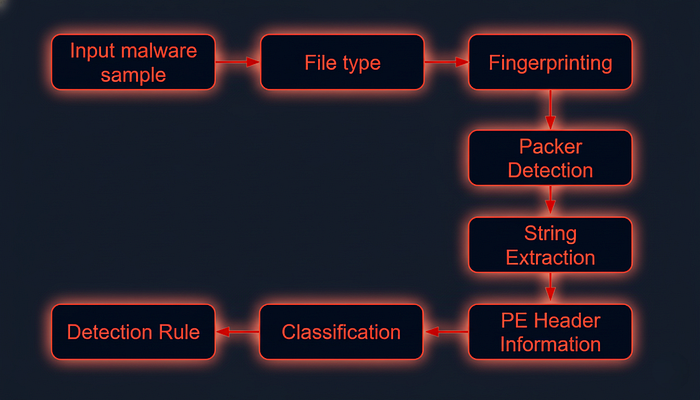
Phase 1: Identifying the File Type
Don't trust the label. If a kid writes "School Project" on a thermal detonator, it's still a detonator. Malware authors love to change extensions. We need to see the actual DNA.
Let's look at Ransomware.wannacry.exe. To see what we're really dealing with, we use the file command:
huzaifahtahirofficial@skeler[/skeler]$ file /home/skeler-student/Samples/MalwareAnalysis/Ransomware.wannacry.exeResult: PE32 executable (GUI) Intel 80386, for MS Windows.
Standard Windows tech. If you want to get your hands dirty, look at the header manually with hexdump. Look for that 4d 5a (MZ) at the start. That stands for Mark Zbikowski, the architect of MS-DOS. It's the the stamp of the Windows executable world.
huzaifahtahirofficial@skeler[/skeler]$ hexdump -C /home/skeler-student/Samples/MalwareAnalysis/Ransomware.wannacry.exe | more
00000000  4d 5a 90 00 03 00 00 00  04 00 00 00 ff ff 00 00  |MZ..............|
00000010  b8 00 00 00 00 00 00 00  40 00 00 00 00 00 00 00  |........@.......|
00000020  00 00 00 00 00 00 00 00  00 00 00 00 00 00 00 00  |................|
00000030  00 00 00 00 00 00 00 00  00 00 00 00 f8 00 00 00  |................|
00000040  0e 1f ba 0e 00 b4 09 cd  21 b8 01 4c cd 21 54 68  |........!..L.!Th|
00000050  69 73 20 70 72 6f 67 72  61 6d 20 63 61 6e 6e 6f  |is program canno|
00000060  74 20 62 65 20 72 75 6e  20 69 6e 20 44 4f 53 20  |t be run in DOS |
00000070  6d 6f 64 65 2e 0d 0d 0a  24 00 00 00 00 00 00 00  |mode....$.......|
00000080  55 3c 53 90 11 5d 3d c3  11 5d 3d c3 11 5d 3d c3  |U<S..]=..]=..]=.|
00000090  6a 41 31 c3 10 5d 3d c3  92 41 33 c3 15 5d 3d c3  |jA1..]=..A3..]=.|
000000a0  7e 42 37 c3 1a 5d 3d c3  7e 42 36 c3 10 5d 3d c3  |~B7..]=.~B6..]=.|
000000b0  7e 42 39 c3 15 5d 3d c3  d2 52 60 c3 1a 5d 3d c3  |~B9..]=..R`..]=.|
000000c0  11 5d 3c c3 4a 5d 3d c3  27 7b 36 c3 10 5d 3d c3  |.]<.J]=.'{6..]=.|
000000d0  d6 5b 3b c3 10 5d 3d c3  52 69 63 68 11 5d 3d c3  |.[;..]=.Rich.]=.|
000000e0  00 00 00 00 00 00 00 00  00 00 00 00 00 00 00 00  |................|
000000f0  00 00 00 00 00 00 00 00  50 45 00 00 4c 01 04 00  |........PE..L...|
00000100  cc 8e e7 4c 00 00 00 00  00 00 00 00 e0 00 0f 01  |...L............|
00000110  0b 01 06 00 00 90 00 00  00 30 38 00 00 00 00 00  |.........08.....|
00000120  16 9a 00 00 00 10 00 00  00 a0 00 00 00 00 40 00  |..............@.|
00000130  00 10 00 00 00 10 00 00  04 00 00 00 00 00 00 00  |................|
00000140  04 00 00 00 00 00 00 00  00 b0 66 00 00 10 00 00  |..........f.....|
00000150  00 00 00 00 02 00 00 00  00 00 10 00 00 10 00 00  |................|
00000160  00 00 10 00 00 10 00 00  00 00 00 00 10 00 00 00  |................|
00000170  00 00 00 00 00 00 00 00  e0 a1 00 00 a0 00 00 00  |................|
00000180  00 00 31 00 54 a4 35 00  00 00 00 00 00 00 00 00  |..1.T.5.........|
00000190  00 00 00 00 00 00 00 00  00 00 00 00 00 00 00 00  |................|
Phase 2: Malware Fingerprinting
Every piece of junk has a fingerprint. We use cryptographic hashes — MD5, SHA1, or SHA256 — to identify it. If I've seen this trash before, I want JARVIS to flag it immediately.
huzaifahtahirofficial@skeler[/skeler]$ sha256sum /home/skeler-student/Samples/MalwareAnalysis/Ransomware.wannacry.exe
24d004a104d4d54034dbcffc2a4b19a11f39008a575aa614ea04703480b1022c
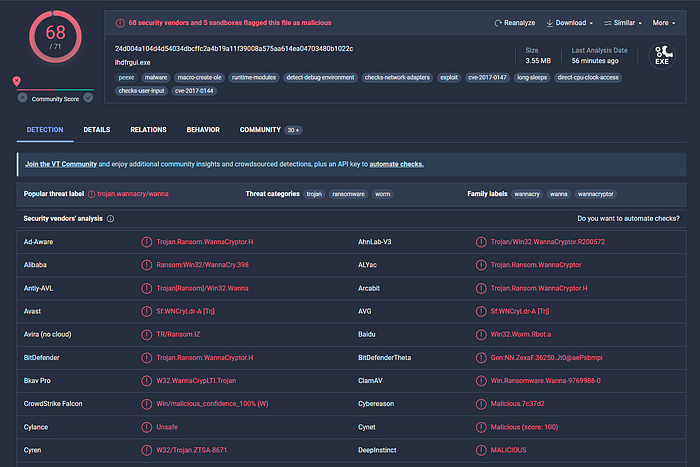
Once we have that hash, we cross-reference it with the global database — VirusTotal. If 68 out of 71 vendors say it's a "Trojan.Wannacry," believe them.
File Hash Lookup
The ensuing step involves checking the file hash produced in the prior step against online malware scanners and sandboxes such as Cuckoo sandbox. For instance, VirusTotal, an online malware scanning engine, which collaborates with various antivirus vendors, allows us to search for the file hash. This step aids us in comparing our results with existing knowledge about the malware sample.
The following image displays the results from VirusTotal after the SHA256 file hash of the aforementioned malware was submitted.
Phase 3: The "Fuzzy" and "Import" Logic
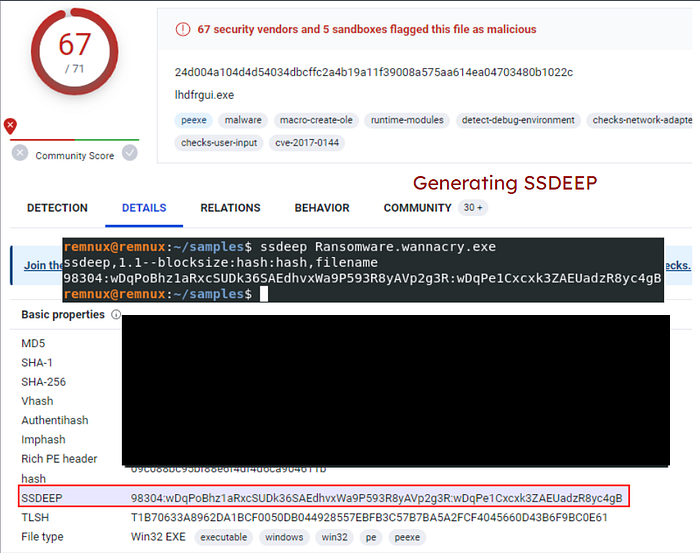
Hackers think they're smart. They change one line of code, and — poof — the SHA256 hash changes. Cute. But we use IMPHASH (Import Hash). It doesn't look at the code; it looks at the dependencies. If it calls the same Windows APIs in the same order, it's the same suit with a different paint job.

We also use SSDEEP (Fuzzy Hashing). It breaks the file into blocks and compares similarity. If potato.exe is a 99% match for svchost.exe, we've got a copycat on our hands.
huzaifahtahirofficial@skeler[/skeler]$ ssdeep -pb *
potato.exe matches svchost.exe (99)
Phase 4: String Analysis
This is where the malware talks to us. We extract ASCII and Unicode strings to find IP addresses, domain names, or even the attacker's file paths.
Standard strings works, but if you want the high-tech version, use FLOSS (FireEye Labs Obfuscated String Solver). It automatically de-obfuscates the stuff the bad guys tried to hide.
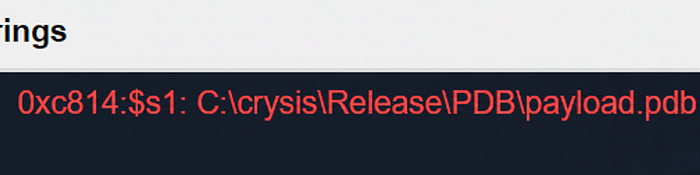
huzaifahtahirofficial@skeler[/skeler]$ floss /home/skeler-student/Samples/MalwareAnalysis/dharma_sample.exeSuddenly, we see things like C:\crysis\Release\PDB\payload.pdb. It's like finding a return address on a letter bomb.
huzaifahtahirofficial@skeler[/skeler]$ floss /home/skeler-student/Samples/MalwareAnalysis/dharma_sample.exe
INFO: floss: extracting static strings...
finding decoding function features: 100%|███████████████████████████████████████| 238/238 [00:00<00:00, 838.37 functions/s, skipped 5 library functions (2%)]
INFO: floss.stackstrings: extracting stackstrings from 223 functions
INFO: floss.results: %sh(
extracting stackstrings: 100%|████████████████████████████████████████████████████████████████████████████████████| 223/223 [00:01<00:00, 133.51 functions/s]
INFO: floss.tightstrings: extracting tightstrings from 10 functions...
extracting tightstrings from function 0x4065e0: 100%|████████████████████████████████████████████████████████████████| 10/10 [00:01<00:00,  5.91 functions/s]
INFO: floss.string_decoder: decoding strings
INFO: floss.results: EEED
INFO: floss.results: EEEDnnn
INFO: floss.results: uOKm
INFO: floss.results: %sh(
INFO: floss.results: uBIA
INFO: floss.results: uBIA
INFO: floss.results: \t\t\t\t\t\t\t\t
emulating function 0x405840 (call 4/9): 100%|████████████████████████████████████████████████████████████████████████| 25/25 [00:11<00:00,  2.19 functions/s]
INFO: floss: finished execution after 23.56 seconds

FLARE FLOSS RESULTS (version v2.0.0-0-gdd9bea8)
+------------------------+------------------------------------------------------------------------------------+
| file path              | /home/skeler-student/Samples/MalwareAnalysis/dharma_sample.exe                        |
| extracted strings      |                                                                                    |
|  static strings        | 720                                                                                |
|  stack strings         | 1                                                                                  |
|  tight strings         | 0                                                                                  |
|  decoded strings       | 7                                                                                  |
+------------------------+------------------------------------------------------------------------------------+

------------------------------
| FLOSS STATIC STRINGS (720) |
------------------------------
-----------------------------
| FLOSS ASCII STRINGS (716) |
-----------------------------
!This program cannot be run in DOS mode.
Rich
.text
`.rdata
@.data
9A s
9A$v
A +B$
---SNIP---
+o*7
0123456789ABCDEF

------------------------------
| FLOSS UTF-16LE STRINGS (4) |
------------------------------
jjjj
%sh(
ssbss
0123456789ABCDEF

---------------------------
| FLOSS STACK STRINGS (1) |
---------------------------
%sh(

---------------------------
| FLOSS TIGHT STRINGS (0) |
---------------------------

-----------------------------
| FLOSS DECODED STRINGS (7) |
-----------------------------
EEED
EEEDnnn
uOKm
%sh(
uBIA
uBIA
\t\t\t\t\t\t\t\t
Phase 5: Unpacking the Suit (UPX)
Sometimes, malware is "packed." It's vacuum-sealed to hide its true form and save space. If you run strings on a packed file, it looks like gibberish. You'll see "UPX0" or "UPX1" labels — that's the Ultimate Packer for Executables.
huzaifahtahirofficial@skeler[/skeler]$ strings /home/skeler-student/Samples/MalwareAnalysis/packed/credential_stealer.exe
!This program cannot be run in DOS mode.
UPX0
UPX1
UPX2
3.96
UPX!
8MZu
HcP<H
VDgxt
$ /uX
OAUATUWVSH
%0rv
o?H9
c`fG
[^_]A\A]
> -P
        fo{Wnl
c9"^$!=
v/7>
07ZC
_L$AAl
mug.%(
#8%,X
e]'^
---SNIP---
We need to let it breathe. We use the -d (decompress) flag:
huzaifahtahirofficial@skeler[/skeler]$ upx -d -o unpacked_sample.exe credential_stealer.exe
huzaifahtahirofficial@skeler[/skeler]$ upx -d -o unpacked_credential_stealer.exe credential_stealer.exe
                       Ultimate Packer for eXecutables
                          Copyright (C) 1996 - 2020
UPX 3.96        Markus Oberhumer, Laszlo Molnar & John Reiser   Jan 23rd 2020

        File size         Ratio      Format      Name
   --------------------   ------   -----------   -----------
     16896 <-      8704   51.52%    win64/pe     unpacked_credential_stealer.exe

Unpacked 1 file.
Now, when we run strings again… Bingo. lsass.exe, MiniDumpWriteDump, SeDebugPrivilege. It's not just a file; it's a credential stealer designed to dump memory.
huzaifahtahirofficial@skeler[/skeler]$ strings unpacked_credential_stealer.exe
!This program cannot be run in DOS mode.
.text
P`.data
.rdata
`@.pdata
0@.xdata
0@.bss
.idata
.CRT
.tls
---SNIP---
AVAUATH
@A\A]A^
SeDebugPrivilege
SE Debug Privilege is adjusted
lsass.exe
Searching lsass PID
Lsass PID is: %lu
Error is - %lu
lsassmem.dmp
LSASS Memory is dumped successfully
Err 2: %lu
Unknown error
Argument domain error (DOMAIN)
Overflow range error (OVERFLOW)
Partial loss of significance (PLOSS)
Total loss of significance (TLOSS)
The result is too small to be represented (UNDERFLOW)
Argument singularity (SIGN)
_matherr(): %s in %s(%g, %g)  (retval=%g)
Mingw-w64 runtime failure:
Address %p has no image-section
  VirtualQuery failed for %d bytes at address %p
  VirtualProtect failed with code 0x%x
  Unknown pseudo relocation protocol version %d.
  Unknown pseudo relocation bit size %d.
.pdata
AdjustTokenPrivileges
LookupPrivilegeValueA
OpenProcessToken
MiniDumpWriteDump
CloseHandle
CreateFileA
CreateToolhelp32Snapshot
DeleteCriticalSection
EnterCriticalSection
GetCurrentProcess
GetCurrentProcessId
GetCurrentThreadId
GetLastError
GetStartupInfoA
GetSystemTimeAsFileTime
GetTickCount
InitializeCriticalSection
LeaveCriticalSection
OpenProcess
Process32First
Process32Next
QueryPerformanceCounter
RtlAddFunctionTable
RtlCaptureContext
RtlLookupFunctionEntry
RtlVirtualUnwind
SetUnhandledExceptionFilter
Sleep
TerminateProcess
TlsGetValue
UnhandledExceptionFilter
VirtualProtect
VirtualQuery
__C_specific_handler
__getmainargs
__initenv
__iob_func
__lconv_init
__set_app_type
__setusermatherr
_acmdln
_amsg_exit
_cexit
_fmode
_initterm
_onexit
abort
calloc
exit
fprintf
free
fwrite
malloc
memcpy
printf
puts
signal
strcmp
strlen
strncmp
vfprintf
ADVAPI32.dll
dbghelp.dll
KERNEL32.DLL
msvcrt.dll
The bottom line? They can try to hide, they can try to pack, but once we put their code under the microscope, the game is over.
Stay sharp.
Author: Huzaifah Tahir