

Your Website Is Being Scanned Right Now
Understanding Automated Internet Bots and How to Protect Your Infrastructure
If you deploy a website on the public internet and check your logs for the first time, you may notice something surprising. Requests like these often appear almost immediately:
GET /xmlrpc.php
GET /wp-includes/wlwmanifest.xml
GET /blog/wp-includes/wlwmanifest.xml
GET /wordpress/wp-includes/wlwmanifest.xml
GET /wp/wp-includes/wlwmanifest.xml
GET /shop/wp-includes/wlwmanifest.xml
GET /cms/wp-includes/wlwmanifest.xml
This raises obvious questions:
- Who is making these requests?
- Is my website under attack?
- Did my server leak somewhere?
Most of the time, none of those things happened. What you are seeing is the background radiation of the internet: automated scanning bots probing servers for vulnerabilities.
The Internet Is Constantly Being Scanned
The moment a server becomes reachable through a public IP or domain, it becomes visible to automated scanners. Attackers run large-scale tools such as:
- Masscan
- ZMap
These tools can scan millions of IP addresses per second. Their objective is simple:
discover servers
identify technologies
probe for vulnerabilities
If a vulnerable system is found, attackers may attempt exploitation. Most of the time, however, scanners simply move on.
Visual: How Internet-Wide Scanning Works

Attackers rarely target a single system manually. Instead they scan huge portions of the internet automatically, searching for easy targets.
Example: WordPress Discovery Scans
One of the most common automated scans attempts to detect WordPress installations. Bots request well-known WordPress files:
GET /xmlrpc.php
GET /wp-includes/wlwmanifest.xml
These files exist in almost every WordPress deployment. If the server returns a valid response, the scanner confirms:
WordPress detectedThe attacker may then attempt:
- login brute-force attacks
- plugin vulnerability probes
- credential harvesting
If the endpoint does not exist, the bot stops scanning and moves on.
Why Bots Probe Multiple Paths
WordPress is often installed in subdirectories. Bots therefore test several common locations:
/blog/
/wordpress/
/wp/
/site/
/cms/
/shop/
/test/
This produces requests like:
GET /blog/wp-includes/wlwmanifest.xml
GET /site/wp-includes/wlwmanifest.xml
GET /cms/wp-includes/wlwmanifest.xml
The scanner is essentially asking: "Is WordPress installed anywhere on this server?"
Why Even Small Websites Get Scanned
Developers often assume attackers only target large companies.
In reality, scanners sweep the entire internet continuously.
Even small or brand-new deployments quickly receive probes such as:
GET /.env
GET /.git/config
GET /phpmyadmin
GET /admin
GET /server-status
These are automated scripts looking for common configuration mistakes.
Visual: Secure Web Architecture
A secure production architecture places defensive layers between the internet and the application.
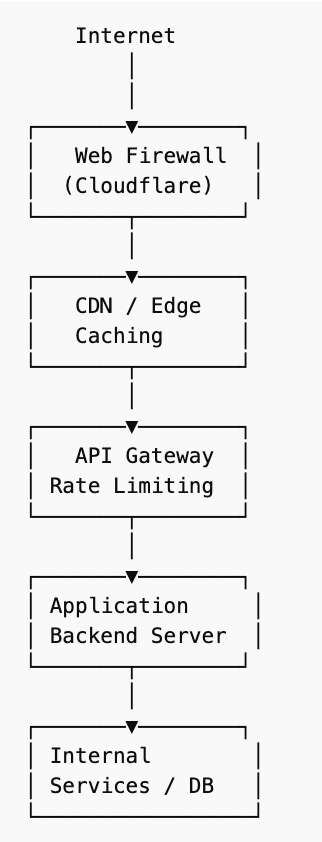
The goal is simple: Most malicious traffic should never reach the application layer.
How to Protect Your Website
Automated scans cannot be completely stopped, but their impact can be minimized.
The goal is to make your infrastructure resilient and uninteresting to attackers.
1. Use a Web Application Firewall
A Web Application Firewall (WAF) filters malicious traffic before it reaches your server. Common platforms include:
Cloudflare
Fastly
AWS CloudFront
These services provide:
bot detection
IP reputation filtering
automated attack mitigation
traffic rate limiting
2. Block Known Attack Endpoints
If your application does not use certain endpoints, block them immediately. Example configuration:
location ~* (xmlrpc.php|wlwmanifest.xml|wp-login.php) {
    return 444;
}
This closes the connection instantly.
3. Add Rate Limiting
Public APIs should enforce request limits.
Example rule:
5 requests per second per IP
burst limit of 10
Rate limiting prevents abuse and reduces bot traffic.
4. Protect Public Forms
Contact forms and signup endpoints attract spam bots. Tools such as:
Cloudflare Turnstile
Google reCAPTCHA
hCaptcha
help distinguish human traffic from automated requests.
5. Avoid Leaking Infrastructure Details
Logs and error messages sometimes expose sensitive information.
For example:
DATABASE_URL
JWT_SECRET
AWS_SECRET_ACCESS_KEY
These should never appear in logs or responses. Logs should contain debugging information, not secrets.
Final Thoughts!
Operating a service on the public internet means interacting with automated systems constantly scanning for vulnerabilities. Most scans are harmless reconnaissance. The real objective of secure infrastructure is simply this:
When scanners probe your system, they find nothing useful.When your system blocks unnecessary endpoints, enforces rate limits, and avoids leaking sensitive data, automated bots quickly move on. The safest server is often the one that looks boring to attackers.