
Industrial control systems run the backbone of our modern world — from power grids and water treatment plants to manufacturing floors and transportation networks.
These Operational Technology (OT) environments face cybersecurity threats that traditional IT approaches simply cannot address. If you're responsible for securing industrial systems, asset inventory isn't just a best practice — it's the foundation of everything you do.
What You'll Learn in This Guide
By the end of this article, you'll understand why OT asset inventory differs fundamentally from IT inventory, how to apply CISA's structured methodology to identify and catalog your industrial control system assets, and practical steps you can take immediately to improve your security posture.
We'll cover the unique challenges OT environments present, common mistakes that derail inventory efforts, and how proper asset visibility translates to real-world safety and reliability improvements.
Prerequisites: What You Need to Know First
Before diving in, you don't need to be a cybersecurity expert. This guide assumes you have basic familiarity with industrial control systems concept — whether you work in operations, IT, or security roles.
If you've ever wondered what runs behind the scenes at a manufacturing plant, water treatment facility, or power station, you're in the right place. We'll explain everything in plain terms with practical examples.
Why OT Cybersecurity Demands Special Attention
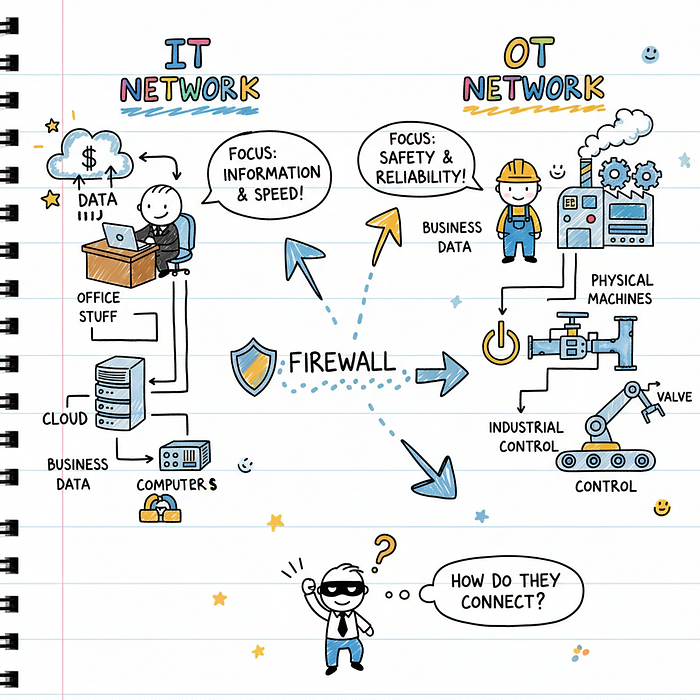
Traditional IT cybersecurity focuses on protecting computers, servers, and data networks. OT cybersecurity protects the physical systems that interact with the real world — motors, valves, sensors, and the controllers that manage them.
The consequences of an OT security breach extend far beyond data theft or service interruption. A compromised industrial control system can cause equipment damage, environmental disasters, worker injuries, or even loss of life.
This fundamental difference shapes everything about how we approach OT security, including asset inventory.
Understanding Asset Inventory in OT Environments
An asset inventory is essentially a comprehensive catalog of everything in your OT environment. This includes physical hardware like PLCs (Programmable Logic Controllers), RTUs (Remote Terminal Units), and HMIs (Human Machine Interfaces).
But inventory extends beyond physical devices. You must also track firmware versions, operating systems, communication protocols, network connections, and the operational software that runs your processes.
In OT environments, assets aren't just inventory items — they're the components that keep facilities running safely. Missing even a single device from your inventory can create a blind spot that attackers exploit.
The Unique Challenges of OT Asset Discovery
OT environments present challenges that make asset discovery significantly harder than IT environments. Understanding these obstacles helps you plan your inventory approach realistically.
24/7 Operations Can't Afford Downtime
Unlike office networks where you can schedule maintenance windows, most industrial facilities run continuously. Active scanning techniques that work in IT environments can disrupt or crash OT devices.
You must balance the need for comprehensive visibility against the risk of disrupting critical operations. This often means using passive monitoring tools that observe network traffic without sending queries to devices.
Legacy Systems Dominate OT Environments
Industrial control systems often run on hardware and software that's decades old. A power plant might still use controllers installed in the 1990s — equipment that was never designed with network security in mind.
These legacy systems may lack authentication, use vulnerable protocols, and provide no logging or monitoring capabilities. Your inventory methodology must account for devices you can't easily query or manage remotely.
Diverse Device Types and Manufacturers
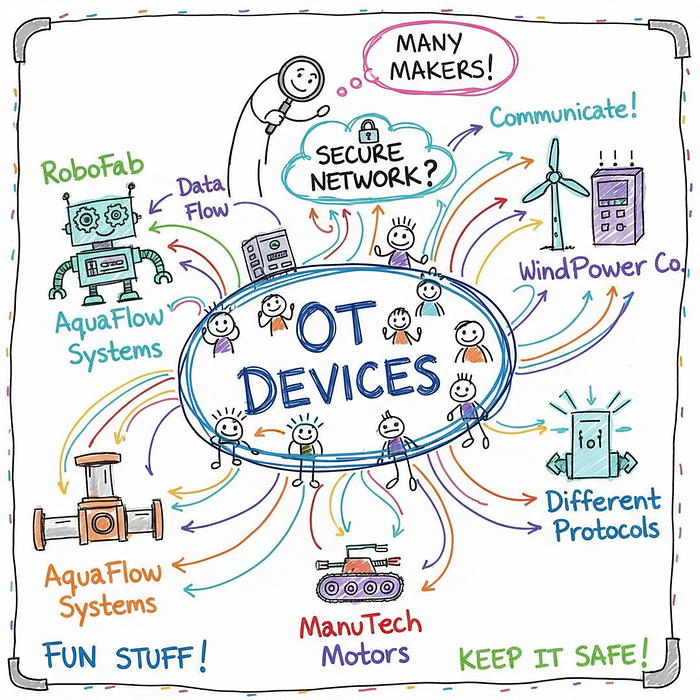
OT environments typically mix equipment from multiple vendors, each with different management interfaces, protocols, and documentation standards. A single facility might run Siemens, Rockwell, Schneider Electric, and Honeywell equipment side by side.
Generic IT discovery tools often fail to identify these specialized devices correctly, producing incomplete or inaccurate inventory data.
CISA's Structured Asset Inventory Methodology
CISA (Cybersecurity and Infrastructure Security Agency) provides foundational guidance for OT asset inventory that balances thoroughness with operational safety. Their methodology breaks the inventory process into clear phases.
Phase 1: Planning and Preparation
Before touching any system, you need clear objectives. Define what assets you're inventorying, why you need this information, and who will use it. Engage stakeholders across operations, engineering, IT, and security teams.
Identify existing documentation — network diagrams, P&ID drawings, maintenance records, and previous inventory attempts. This foundation saves significant time during active discovery.
Establish your inventory scope. Are you covering a single facility, multiple sites, or an entire enterprise? Scope creep destroys inventory projects, so set boundaries explicitly.
Phase 2: Asset Identification
Asset identification combines multiple techniques to discover everything in your OT environment. No single method catches all devices, so use layered approaches.
Network Passive Monitoring: Deploy network monitoring tools that listen to traffic without actively querying devices. This approach reveals devices communicating on your network without risking operational disruption.
Active Discovery (Carefully): Use device-appropriate scanners during maintenance windows when you can tolerate risk. Many modern OT scanners understand industrial protocols and avoid sending disruptive commands.
Physical Inspection: Walk the facility floor. Network monitoring misses air-gapped devices and may not capture all connected equipment. Human inspectors catch what's invisible to network tools.
Documentation Review: Cross-reference discovered assets against engineering drawings, procurement records, and maintenance logs. Gaps reveal undocumented devices or documentation that hasn't been updated.
Phase 3: Asset Cataloging
Once discovered, assets need structured documentation. Create records capturing essential information for each device:
- Device identification (manufacturer, model, serial number)
- Location within the facility
- Network connections and IP addresses
- Firmware and software versions
- Functional role in the control system
- Criticality to operations
- Security vulnerabilities and compensating controls
Store this data in a format accessible to your team. Spreadsheets work for small environments, but specialized OT asset management platforms scale better and provide querying, reporting, and alerting capabilities.
Hardware Assets: What to Catalog
OT hardware spans diverse device categories, each requiring specific cataloging attention. Understanding these categories helps you build a complete picture.
Programmable Logic Controllers (PLCs)
PLCs are the workhorses of industrial automation. These rugged computers execute control logic and interface with sensors and actuators. Cataloging PLCs requires capturing the rack configuration, module types, and firmware versions.
PLCs often control safety-critical processes. A comprehensive inventory helps you prioritize security efforts and understand cascade effects if a PLC is compromised.
Human Machine Interfaces (HMIs)
HMIs provide operators with visual interfaces to monitor and control processes. These typically run on Windows systems with specialized software, making them more similar to traditional IT endpoints than other OT devices.
Catalog HMI systems separately from PLCs, noting the software version, operating system patches, and network connections to both OT and potentially IT networks.
Network Infrastructure
Switches, routers, firewalls, and firewalls separating OT from IT networks all require inventory. These devices often receive less attention than PLCs, but they control lateral movement and are critical to security architecture.
Document firmware versions, access credentials (where applicable), ACL configurations, and routing tables. Network infrastructure inventory often reveals unexpected connections that create security risks.
Firmware and Software: Beyond Physical Devices
Physical asset inventory means nothing without understanding what's running on those devices. Firmware and software inventory exposes vulnerabilities that hardware inventory alone can't reveal.
Firmware Version Tracking
Every PLC, RTU, and network device runs firmware that defines its behavior and often contains security vulnerabilities. Cataloging firmware versions enables vulnerability management and patch planning.
Firmware updates in OT environments require careful planning. You need to know exactly what version each device runs before attempting updates that might disrupt operations.
Operational Software Dependencies
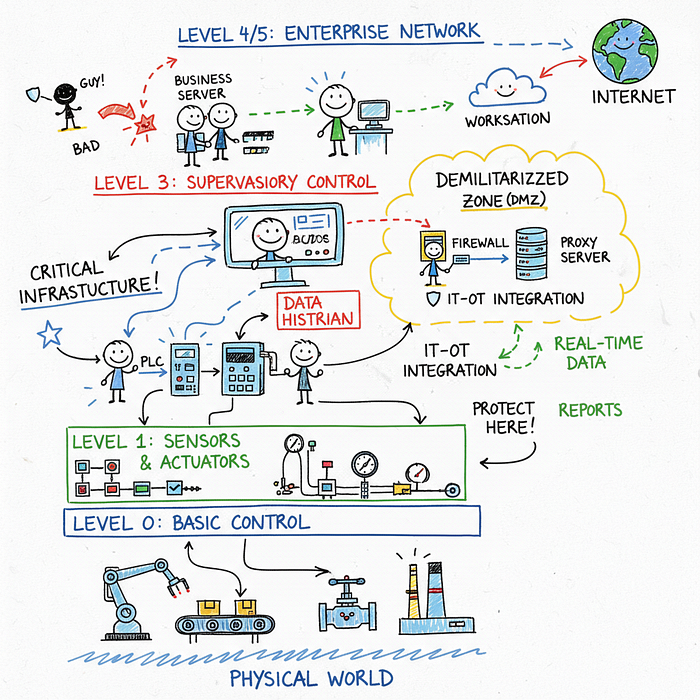
Control systems rarely run in isolation. SCADA servers, historians, engineering workstations, and database systems all support OT operations. These IT-style systems often connect OT components together.
Document the software running on each system, version numbers, patch status, and dependencies between systems. This visibility helps you assess blast radius if any single system is compromised.
Common Mistakes That Derail OT Asset Inventory
Many organizations approach OT asset inventory with IT assumptions that cause problems. Learning from these mistakes saves months of frustration.
One-Time Effort Thinking
Asset inventory isn't a project you complete — it's an ongoing process. New devices get added, firmware gets updated, networks get reconfigured. Your inventory is only valuable if it stays current.
Build inventory maintenance into operational processes. Every device change should trigger an inventory update. Automate where possible using network monitoring and integration with change management systems.
Prioritizing Speed Over Accuracy
Leadership often wants asset lists yesterday, creating pressure to cut corners. Incomplete or inaccurate inventory creates false confidence — your security decisions rest on flawed data.
It's better to have a smaller, accurate inventory than a large one full of errors. Accurate baseline inventories build trust and demonstrate the value of the inventory process.
Ignoring Air-Gapped Networks
Organizations sometimes assume that disconnected networks don't need inventory. This assumption is dangerous — air-gapped systems can still be compromised through infected media, insider threats, or supply chain attacks.
Physical inspection becomes even more critical for air-gapped environments since network monitoring won't help. Include isolated systems in your inventory scope without exception.
Inventory Silos Between IT and OT
When IT and OT security teams don't communicate, both inventories suffer. IT-OT integration points create blind spots where assets fall through the cracks.
Establish unified inventory processes that span both environments. Understand the DMZ architecture and document every system that touches both networks, regardless of which team "owns" it.
Real-World Impact: Why This Matters
The Colonial Pipeline attack in 2021 demonstrated how OT asset visibility could have changed outcomes. Attackers moved laterally from IT systems to OT systems, but the organization lacked complete visibility into their OT environment.
Had they possessed comprehensive asset inventory, they might have identified the intrusion path earlier and understood which OT systems faced exposure. The attack forced a complete shutdown affecting fuel delivery across the Eastern United States.
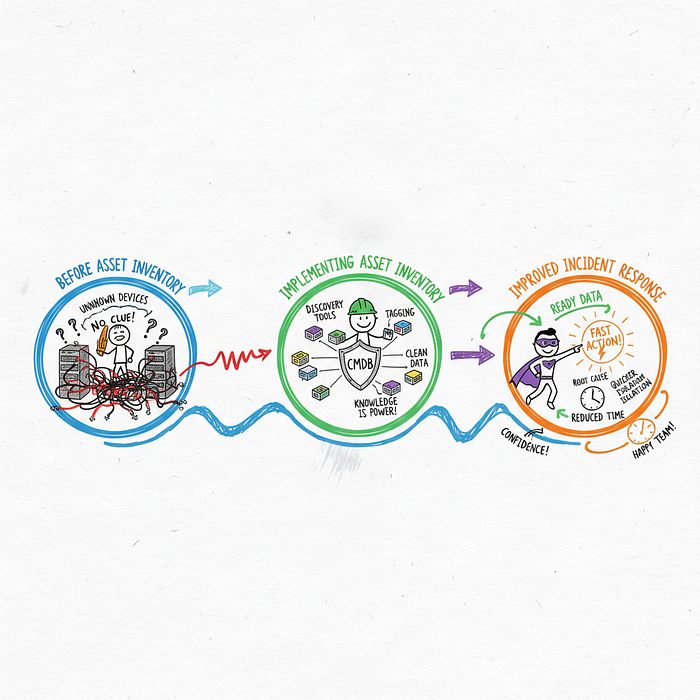
Asset inventory enables rapid incident response. When you know exactly what systems exist and how they connect, you can quickly identify compromised assets, understand blast radius, and make informed containment decisions.
Regulatory frameworks increasingly require asset inventory. NERC CIP for the electric grid, NIST CSF, and industry-specific standards all mandate knowing what assets you have before you can protect them effectively.
Tools and Techniques for OT Asset Discovery
Modern OT asset discovery combines specialized tools that understand industrial protocols with proven IT techniques adapted for OT environments.
Passive Network Monitoring
Tools like network analyzers capture and analyze OT protocol traffic. They identify devices by observing their communications without sending any traffic themselves, making them safe for production environments.
Popular protocols these tools decode include Modbus, DNP3, EtherNet/IP, PROFINET, and BACnet. Passive monitoring excels at discovering devices you didn't know existed.
Active Discovery Scanners
Active scanners send queries to devices and interpret responses. Modern OT scanners understand industrial protocols and adjust their behavior to avoid disrupting sensitive devices.
Always test scanners in non-production environments first. Even careful scanners can cause issues with legacy or malfunctioning devices. Schedule active scanning during maintenance windows when you can tolerate disruption.
Vendor-Specific Tools
Many industrial equipment vendors provide management platforms that include asset discovery. Rockwell Automation's FactoryTalk, Siemens' TIA Portal, and Schneider Electric's EcoStruxure all include device management capabilities.
Vendor tools provide the most accurate information for their specific equipment but require separate tools for multi-vendor environments.
Maintaining Your Asset Inventory Over Time
Initial inventory is only the beginning. Maintaining accuracy requires ongoing processes that keep your data current as your environment evolves.
Integrate with Change Management: Every network change, device addition, or firmware update should trigger an inventory review. Make asset inventory part of your standard change process.
Automate Where Possible: Configure network monitoring tools to alert on new devices appearing on the network. Automated detection catches changes that manual processes miss.
Schedule Regular Validation: Quarterly physical walkthroughs and annual comprehensive reviews ensure your passive monitoring data hasn't drifted from reality.
Document Assumptions: Note when you couldn't verify specific devices or when you relied on outdated documentation. This helps future reviewers understand data confidence levels.
Building Your OT Security Foundation
Asset inventory isn't the end goal — it's the foundation for every other OT security activity. Once you know what assets exist, you can prioritize vulnerability management, establish monitoring baselines, and develop incident response plans that actually work.
Without asset inventory, you're essentially guessing about your security posture. You can't protect what you don't know exists, and attackers specifically look for forgotten devices that lack attention.
Start your inventory effort today, even if you can only cover a small portion of your environment initially. Perfect inventory of some systems beats perfect intentions about comprehensive inventory that never materializes.
Try It Yourself: Exercises to Get Started
Ready to put this knowledge into practice? Here are concrete exercises you can start immediately:
- Map Your Current Documentation: Collect every document that references your OT systems — network diagrams, P&IDs, equipment lists, and maintenance records. Note gaps and outdated information as you go.
- Identify Your Scope Boundaries: Define exactly which facilities, networks, and systems fall within your inventory scope. Document why you included or excluded specific areas.
- Deploy Passive Monitoring: If you have a network tap or span port in your OT environment, deploy a passive monitoring tool for even 24 hours. Note every device you discover that wasn't in your current documentation.
- Interview Operations Staff: Walk through your facility with operators who know the systems. Ask about devices they've seen that aren't documented and about systems that seem forgotten.
- Create Your First Asset Record: Pick one critical system and create a comprehensive asset record following the cataloging guidelines. Use this as a template for remaining systems.
Each of these exercises moves you closer to complete asset visibility. Start with whichever seems most achievable in your situation.