I wrote this article based on generally applied best practices for working with data, architecture, and my own experience. Examples are provided primarily using cloud technologies (especially Azure) and in a scope of clinical or other regulated data. I assume that the reader has general knowledge of cloud technologies, data engineering, and software engineering. Approaches and opinions may vary, as may technology stacks, depending on preferences or imposed decisions. Nevertheless, I invite you to familiarize yourself with this material and join the discussion in the comments. I believe that gaining knowledge or learning about other points of view is always valuable.
Who is this article for?
Data Engineers who work with clinical data or highly regulated industry. Teams who migrate data into cloud, especially focused on compliance. Everyone who works with sensitive data and starts thinking about responsibilities.
When many technical/data teams hear about Good Clinical Practice (GCP), they put the following thought on it: "That's a matter for QA, not the data team." From my point of view — it's a mistake. In practice, clinical data is one of the most frequently audited assets. It can be for example:
· Raw files/data from multiple sources (instruments, machines, lab etc.) · Data analysis result · Data which is reported out of 'technical zone' (regulatory, statistics, safety)
GCP is not just about clinical procedures. If the data you are working with is not immutable, has no history, and it is not known who have/had access to it, then GCP ceases to apply, regardless of the SOPs that are implemented in the organization. Therefore, it's a good idea to answer a few questions using the ALCOA+ principle, which can be crucial and serve as an architectural filter. So before you focus on a stack or service, check this out:

ALCOA+ stands for:
- Attributable — who created/modified the data?
- Legible — is the data readable and reproducible?
- Contemporaneous — are all (at the time) of the events recorded?
- Original — is raw data preserved?
- Accurate — are there any uncontrolled modifications possible?
I've described the main components of the ALCOA+ principle above, but as you can see, there are also plus sign "+" at the end. These are responsible for:
- Complete — all data, its re-runs and failed tests are included
- Consistent — logical, chronological sequence of data processing
- Enduring — data is preserved in a stable format for expected time
- Available — data is accessible for review, audit or inspection
It's important to understand that ALCOA+ isn't an after-the-fact checklist, but rather a decision-making filter at the design stage. Every element of the architecture — from where data is stored, through how it is processed, to user access — must be defensible in the context of these principles. If we can't clearly answer any of the ALCOA+ questions, it means that the architecture is generating risk at that point, not trust and security in our data.
Raw data: important point of risk
As a relatively experienced data engineer, I have the opportunity to work on projects that are still in the development or planning phase, as well as those considered maintenance or even legacy. In all cases, I most often encounter the following issues in the context of raw data:
- Raw data files end up "somewhere", temporarily, or in multiple locations.
- Someone "corrects" them instead of treating them as read-only.
- There's no clear line between raw and processed data.
Based on the previous paragraph, from a GCP/audit perspective, if raw data can be overwritten, the system is unfortunately untenable. If you currently use, or are planning to base your solution on e.g. Azure cloud, you can consider implementing this approach and a few tips that can save time and costs associated with potential changes in the future.
- Plan a separate Raw Data Zone (e.g., Blob Storage).
- Remember about immutability/soft delete.
- No modification permissions for users.
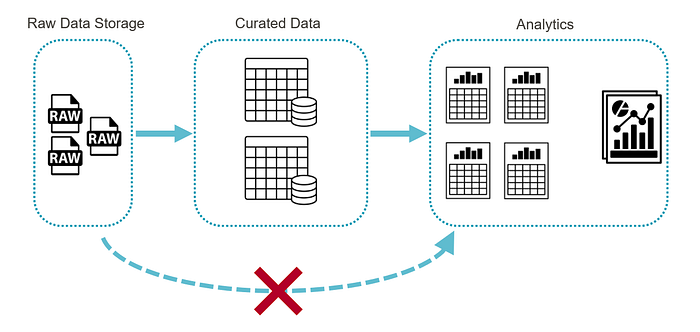
- The Raw Zone should be treated as write-once and read-only. Transformations on this data should be sent to a separate zone/layer (referring to the medallion architecture).
Access control
Another issue worth addressing is access control. Many projects, or even entire departments, lack clear rules defining who has access to resources and to what extent. Sometimes, security requirements require the creation of a service user account that can, for example, authorize access to an on-premises folder containing source data. In theory, this seems correct, but in practice, many unauthorized employees use it to access folders with limited access, and the credentials themselves are shared using Teams or hardcoded in the code. In summary, common problems include:
- Access granted "because someone needs it"
- Shared accounts
- Lack of clear role separation
- Hardcoded credentials
In GCP, the auditor asks who COULD have changed the data, not who actually did. To address this, consider some best practices in Azure:
- RBAC (Role-Based Access Control) based on functional roles
- Divide responsibilities, for example: Ingestion — recording and full control of raw data (without the possibility of modification) Processing — processing data based on functional requirements Analytics — access to processed data (ideally, read-only access wherever possible). No direct access to raw data for analysts
- All passwords, keys, and sensitive constants stored in a secure vault (e.g., Azure Key Vault), not written in code or pipeline configurations
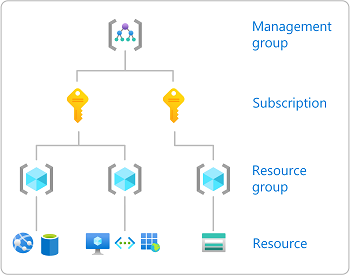
If someone can't describe their role in one sentence, they probably shouldn't have access. In my opinion, access should be granted on a least privilege basis and reviewed regularly (periodic access review).
Audit trail: not only logs
A common engineering mistake is to confuse technical logs with audit trails: "We have logs, after all." Unfortunately, from a GxP (Good x Practice) perspective, this isn't enough. An auditor doesn't analyze stack traces, debug logs, or raw configuration files without context. The auditor wants answers to simple questions:
- Who performed the action?
- What was changed?
- When did it happen?
- Was it possible to bypass the control mechanisms?
What Really Matters in Azure (from a GCP Perspective):
- Activity Logs (administrative operations and configuration changes)
- Pipeline run history (who, when, with what results)
- Versioning and configuration change history
- Role and permission changes (RBAC)
Key Principle — An audit trail should be:
- Central — accessible from a single, controlled location
- Stored long-term — in line with the required retention period
- Non-editable — users should not be able to modify it
If the information required to reconstruct events is scattered across multiple systems and requires manual gluing, this poses a significant risk from a GCP perspective.
Change management: Pipeline is part of the system
Like every data engineer, I work with pipelines daily. And in this case, it's important to remember that any pipeline change that affects data, changes logic, or alters output is a change that can impact GCP. We perform some actions automatically, even reflexively, and forget to record changes. Remember the minimum standard:
- Pipeline versioning
- Description of what changed and why
- Data impact assessment
These don't have to be 50-page documents. Sometimes a single page, paragraph in the documentation or a dedicated wiki page saves an audit and unnecessary stress. Furthermore, it's valuable not only for audit purposes but also for your colleagues and new hires.
Sharing Data for Analysis — Control First, Convenience Second
In a GCP environment, user convenience can never be more important than data integrity and security. Clinical data are not "working materials" — they are part of the study documentation that may be subject to inspection even many years later. Therefore, the way data is shared and retained directly impacts the ability to defend against an audit. This is undoubtedly a high-risk area. In practice, I have encountered the following issues:
- Analysts have direct access to raw data, "because it's faster," "for testing," and "to avoid blocking the presentation layer."
- Furthermore, data changes are often made manually, leaving no trace in the system.
- Source files are copied locally for review or further processing. Aside from the fact that this shouldn't happen, does everyone remember to safely delete them afterwards?
- Data is exported without a version control system.
Given the above points, this can mean losing control over the "single source of truth", and therefore, the inability to accurately recreate the dataset used in analysis. Modifications and manual changes themselves also sometimes remain undocumented. To ensure proper organization and best practices, you can consider a few useful solutions:
- Analysts or others with access to data should work exclusively on the curated data layer. This layer should be the result of data processing in a controlled process and with a version history. This allows for easy linking to raw data versions and changes in logic.
- Raw data should remain intact and separated from analysis. Access to it should be strictly controlled and operationally justified (e.g., for troubleshooting, not analysis). If someone at the data analysis level needs access to raw data, it's worth considering whether your system architecture is properly designed.
- Finally, I'll write again about read-only access. It's very important, and don't get me wrong, but it really helps. This approach, used wherever possible, allows for a clear separation of responsibility for data and its interpretation. Ultimately, it simplifies any potential defenses during an audit.
Let me add one more point about exporting/sharing files. For development or testing purposes, it may be convenient, but in the context of GCP, it creates a parallel, uncontrolled data environment. Therefore, any file sharing (if necessary) should be:
- Logged or noticed
- Have a legitimate purpose
- Be linked to the data version
- Not be used as a substitute for a central repository as a "source of truth"
To summarize, the most common potential problems I see in practice that require checking in the system you're designing or developing:
- A single shared Excel file or local file sharing as the "source of truth" — the lack of a central repository, version control, and change history makes it impossible to clearly recreate which data was the basis for a decision or report.
- Lack of distinction between raw and processed layers — when source and processed data reside in the same space, the risk of uncontrolled modification and loss of the original record increases.
- Shared service accounts — shared accounts prevent the attribution of actions to a specific person, which directly violates the Attributable principle of ALCOA+.
- Lack of Ownership — Unclear administrative responsibility means that changes to configuration or permissions can be made without proper oversight.
- "Temporary access" that has never been revoked — Temporary permissions, left unchecked, become permanent, uncontrolled access extensions over time.
Each of these points can become a potential audit finding because it undermines control over data integrity, availability or accountability.
Summary: Azure won't do GCP for you
Azure itself:
- Doesn't guarantee compliance,
- Doesn't replace the QA team,
- Doesn't solve organizational problems or process gaps.
However:
- It provides clear and well-documented control mechanisms,
- Allows you to reduce the number of risk points in the architecture,
- Facilitates the defense of the system during an audit or inspection.
Ultimately, GCP begins not with cloud selection and tech stack, but with a mindset. It begins when an engineer understands the implications of clinical data processing — not just as a pipeline, but as an element of regulatory responsibility. Keep that in mind and any audit will be fine. Thank You for reading and reaching end of this article.
P.