June 5, 2026
CORS Explained — No More Googling the Same Error
You’ve seen it before.

Sharon
5 min read
You've seen it before.
You're building something. Everything is working fine. You make a fetch request and suddenly your terminal goes quiet but the browser console explodes with this:
Access to fetch at 'https://api.example.com/data' from origin
'https://myapp.com' has been blocked by CORS policy: No
'Access-Control-Allow-Origin' header is present on the
requested resource.
Access to fetch at 'https://api.example.com/data' from origin
'https://myapp.com' has been blocked by CORS policy: No
'Access-Control-Allow-Origin' header is present on the
requested resource.You stare at it. You Google it. You find a Stack Overflow answer from 2014. You add something somewhere. It works. You have no idea why.
Sound familiar?
This article is for you. Let's actually understand CORS — what it is, why it exists, and how to fix it properly.
So what is CORS?
CORS stands for Cross-Origin Resource Sharing.
Let's break that down in plain language.
An origin is the combination of three things — the protocol (HTTP or HTTPS), the domain, and the port. All three together make up an origin.
So these are all different origins:
https://myapp.com         ← your app
https://api.myapp.com     ← different subdomain
http://myapp.com          ← different protocol
https://myapp.com:8080    ← different port
https://myapp.com ← your app
https://api.myapp.com ← different subdomain
http://myapp.com ← different protocol
https://myapp.com:8080 ← different portWhen your page at one origin tries to load something from a different origin — that's a cross-origin request. And when that happens, the browser steps in and asks: is this allowed?
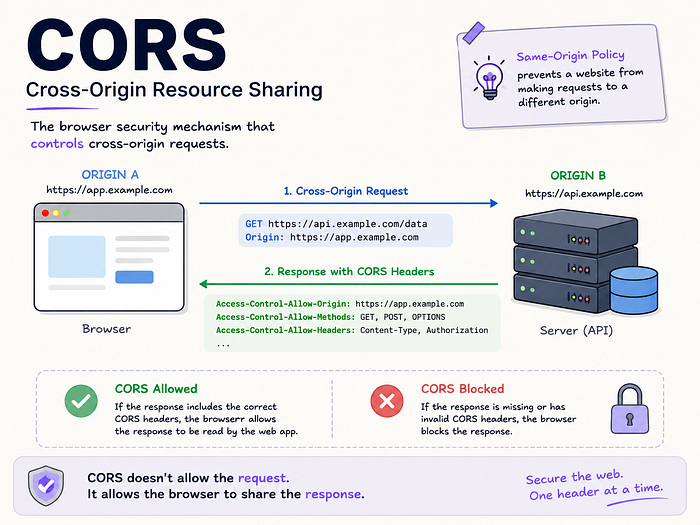
That's CORS. It's the browser checking permission before handing you the response.
Why does the browser even care?
Here's the thing. Without this check, any website could make requests on your behalf without you knowing.
Imagine you're logged into your bank. You open another tab with some random website. Without CORS, that random website could silently fire requests to your bank using your session and your bank would think it's you. That's a real attack called CSRF (Cross-Site Request Forgery).
CORS is the browser's way of stopping that. By default, the browser only lets a page talk freely to its own origin. If you want to allow cross-origin traffic, the server on the other side has to explicitly say so.
This is the most important thing to understand about CORS:
The browser enforces it. Not the server. The server just sends headers back saying what it allows. The browser reads those headers and decides whether your JavaScript gets access to the response.
This is why you never see CORS errors in Postman or curl. Those aren't browsers. They don't enforce CORS. So testing in Postman and then being confused about why the browser breaks that's extremely common and completely understandable.
Two types of CORS requests
Not all cross-origin requests work the same way. There are two types.
Simple requests
These go straight through with no pre-check. A basic GET request with standard headers falls into this category. The browser sends the request, the server responds, the browser checks if the origin is in the Access-Control-Allow-Origin header. If yes — your JavaScript gets the data. If no — blocked.
Preflight requests
For anything more complex — PUT, DELETE, PATCH, or requests with custom headers — the browser doesn't send your real request straight away. It sends a small check first.
This check is called a preflight request. It's an OPTIONS request that basically asks the server: I'm about to send a DELETE with an Authorization header — are you okay with that?
The server has to respond with the right headers saying yes. Only then does the browser send your actual request.
If the preflight gets rejected, your real request never goes out. Your app sees a network error and gets nothing back.
The headers you need to know
These are the CORS headers you'll see most often:
Access-Control-Allow-Origin The most important one. This goes in the server's response and says which origins are allowed. It can be a specific domain like https://myapp.com or a wildcard * to allow everyone.
Access-Control-Allow-Methods Which HTTP methods are allowed — GET, POST, PUT, DELETE, etc.
Access-Control-Allow-Headers Which request headers the browser is allowed to send. If your app sends an Authorization header, it needs to be listed here.
Access-Control-Allow-Credentials Whether cookies and authorization headers are permitted. Must be true if you're sending credentials.
Access-Control-Max-Age How long the browser should cache the preflight result in seconds. Saves unnecessary repeat checks.
Access-Control-Expose-Headers Which response headers your JavaScript is allowed to read. By default JavaScript can only access a handful of headers. Anything extra has to be explicitly exposed here.
The most common mistakes
1. Wrong origin value
Your app is at https://myapp.com but the server's CORS config says http://myapp.com — no S. Or it says https://www.myapp.com but your app doesn't use www. These are different origins. The browser won't accept it.
Fix: Open DevTools, go to the Network tab, click the failing request, find the Origin header in the request. Copy that exact value. That's what your server needs to allow.
2. Wildcard with credentials
You set Access-Control-Allow-Origin: * but your request includes cookies or an Authorization header. The browser won't allow this combination. A wildcard origin and credentials cannot coexist.
Fix: Use a specific origin value instead of * when sending credentials. Also add Access-Control-Allow-Credentials: true to the response.
3. CORS headers on the preflight but not the real response
The preflight passes fine. But the actual response doesn't have CORS headers on it. The browser blocks it anyway.
Both the preflight response and the real response need the CORS headers. Not just one of them.
4. Testing in curl and being confused why the browser breaks
Curl doesn't enforce CORS. It'll happily return the response even if the server sends zero CORS headers. The browser won't.
Use curl to check what headers the server is sending. Use the browser to test if CORS actually works.
5. Mixed content — HTTPS to HTTP
Your app is on HTTPS but you're trying to fetch something over plain HTTP. The browser blocks this completely — nothing to do with CORS config. Always use HTTPS for both your app and your API.
How to actually debug a CORS error
When you see a CORS error, here's the order to go through:
Step 1 — Read the console error. It usually tells you exactly what's missing. No 'Access-Control-Allow-Origin' header means the server isn't sending it. does not pass access control check means a mismatch.
Step 2 — Open the Network tab. Find the failing request. Is there an OPTIONS preflight before it? Look at both the request headers and the response headers.
Step 3 — Check the Origin header. What is the exact value the browser is sending? Does it match what the server is allowing?
Step 4 — Use curl to check the server.
curl -I -X OPTIONS \
  -H "Origin: https://myapp.com" \
  -H "Access-Control-Request-Method: GET" \
  -v \
  https://api.example.com/data
curl -I -X OPTIONS \
-H "Origin: https://myapp.com" \
-H "Access-Control-Request-Method: GET" \
-v \
https://api.example.com/dataThis simulates a browser preflight. Look for Access-Control-Allow-Origin in the response. If it's not there — the server isn't configured for CORS.
Step 5 — Fix the server config. Add the right headers on the server side. If you're using Express:
const cors = require('cors');
app.use(cors({
  origin: 'https://myapp.com',
  methods: ['GET', 'POST', 'PUT', 'DELETE'],
  allowedHeaders: ['Authorization', 'Content-Type']
}));
const cors = require('cors');
app.use(cors({
origin: 'https://myapp.com',
methods: ['GET', 'POST', 'PUT', 'DELETE'],
allowedHeaders: ['Authorization', 'Content-Type']
}));If you're using Nginx:
add_header 'Access-Control-Allow-Origin' 'https://myapp.com';
add_header 'Access-Control-Allow-Methods' 'GET, POST, OPTIONS';
add_header 'Access-Control-Allow-Headers' 'Authorization, Content-Type';
add_header 'Access-Control-Allow-Origin' 'https://myapp.com';
add_header 'Access-Control-Allow-Methods' 'GET, POST, OPTIONS';
add_header 'Access-Control-Allow-Headers' 'Authorization, Content-Type';A note on the wildcard
Using * for Access-Control-Allow-Origin means any website on the internet can make requests to your server. For a public API where that's intentional — fine. For anything that involves user data, authentication, or sensitive information — don't do it.
Use specific origins in production. Use * in local development if you need to, but lock it down before you ship.
Quick summary
- CORS is the browser checking if a cross-origin request is allowed
- The server doesn't enforce CORS — the browser does
- Simple requests go straight through. Complex ones trigger a preflight first
- The key header is
Access-Control-Allow-Origin— it has to match your app's origin exactly - Postman and curl don't enforce CORS — only browsers do
- When something breaks, start with the browser console, then the Network tab, then curl
That's really all there is to it. Once it clicks, you'll never be confused by that red error again.
Found this useful? Follow for more articles on Cloud and DevOps and things that used to confuse me too.