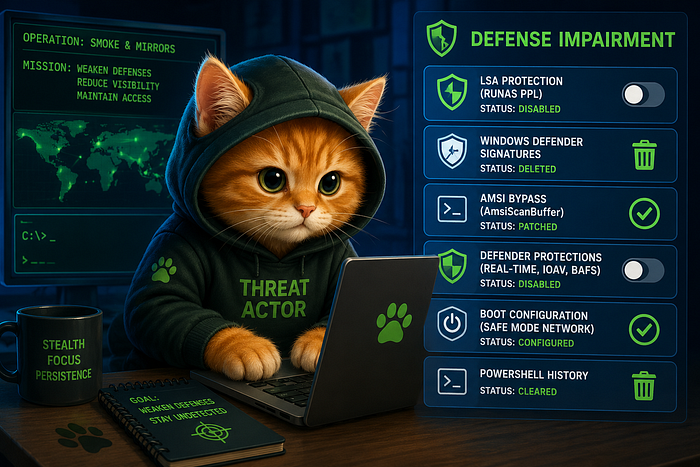
What began as a handful of missing Windows Defender alerts quickly unfolded into a deliberate defense evasion campaign designed to blind the system before executing further actions. Throughout the investigation, the attacker repeatedly weakened Microsoft Defender by deleting signatures, disabling protection features, bypassing AMSI through in-memory patching, and turning off LSA Protection to reduce resistance against credential access. In Smoke & Mirrors, the challenge is not simply finding malicious activity, but reconstructing how the attacker systematically stripped away Windows security controls to operate with minimal visibility while attempting to erase traces of their actions.
I investigated the HackTheBox DFIR Sherlock challenge Operation Blackout 2025 : Smoke & Mirrors. This writeup covers the full forensic process, not just solving the questions. The final answers to the challenge are provided at the end, after the investigation section.
Sherlock Scenario
Byte Doctor Reyes is investigating a stealthy post-breach attack where several expected security logs and Windows Defender alerts appear to be missing. He suspects the attacker employed defense evasion techniques to disable or manipulate security controls, significantly complicating detection efforts.
Using the exported event logs, your objective is to uncover how the attacker compromised the system's defenses to remain undetected.
Investigation
Given 3 Windows Evtx Logs

Retrieve basic information from the logs using Hayabusa.
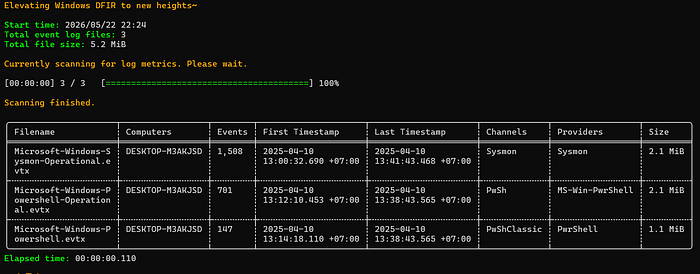
Known that the Hostname is DESKTOP-M3AKJSD, the time spanning from 2025–04–10 13:00 to 2025–04–10 13:41.
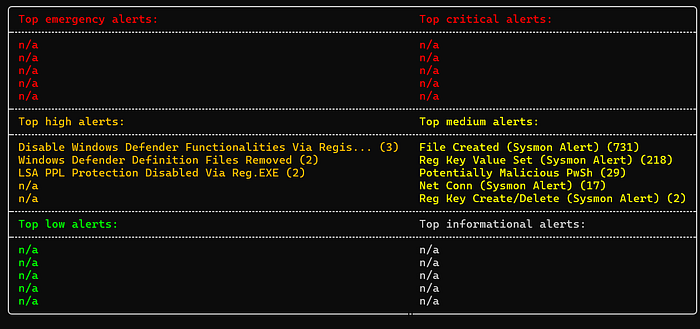
Some high alerts that have been detected by Hayabusa are about Defense Evasion by Disabling Windows Defender. Then the medium alerts are also about registry changing activities.

Another interesting alert shown is this proc injection that runs on 10/04/2025 13.00.33, but the lack of additional activies and logs no conclusion can be made from this log alone.
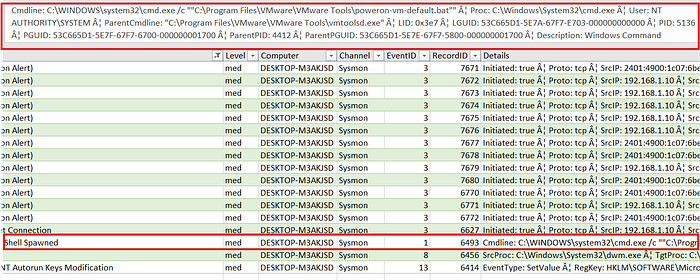
After that proc injection alert there is an activity of turning on a VM using VMWare.
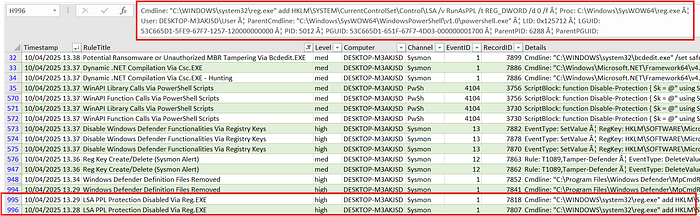
At 10/04/2025 13.28.47 and 10/04/2025 13.29.17, spotted an activity of disabling LSA PPL Protection. The command used is
reg.exe add HKLM\SYSTEM\CurrentControlSet\Control\LSA /v RunAsPPL /t REG_DWORD /d 0 /f
The command is running from powershell session
LSA PPL is basically a feature to protect our system from credentials dumping against tools like mimikatz or procdump. It works by limitting access to protected process to digitally signed process.
There are also Windows Defender signature deletion on 10/04/2025 13.29.57 and 10/04/2025 13.36.55 using cmd.

In the system the threat actor also ran several scripts to weaken the Defender.
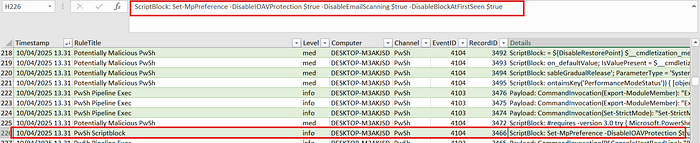
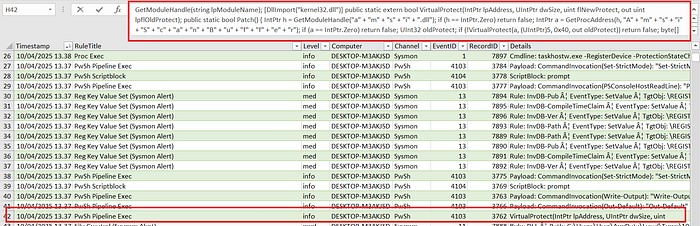
Another logs also shown the activities of disabling the Protection Existed in the system, the activities started from 10/04/2025 13.36.55 to 10/04/2025 13.37.50.
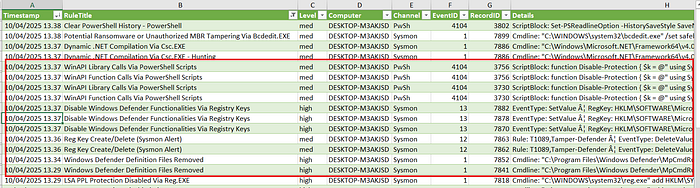
Additional activities recorded are seting safe boot at 10/04/2025 13.38.35 using bcdedit.exe then clear the powershell history at 10/04/2025 13.38.44.
Investigation Summary
Investigation confirmed a coordinated defense evasion campaign focused on weakening, rather than completely disabling, Microsoft Defender and other native Windows security protections. The threat actor modified LSA PPL registry settings to reduce protection against credential dumping, removed Defender signature databases, disabled multiple Defender protection layers through PowerShell, and deployed an AMSI bypass by patching AmsiScanBuffer in memory to reduce PowerShell inspection visibility. Additional anti-forensic actions included enabling Safe Boot configuration changes and clearing PowerShell command history to limit post-incident traceability.
The overall activity demonstrates a staged attempt to systematically reduce detection capability and security visibility before executing further actions on the host.
MITRE ATT&CK Mapping
Execution :
- T1059.001 — PowerShell
- T1059.003 — Windows Command Shell
Defense Evasion :
- T1112 — Modify Registry
- T1027 — Obfuscated Files or Information
- T1685 — Disable or Modify Tools
- T1070.003 — Clear Command History
- T1688 — Safe Mode Boot
HackTheBox Answers
Task 1 The attacker disabled LSA protection on the compromised host by modifying a registry key. What is the full path of that registry key? HKLM\SYSTEM\CurrentControlSet\Control\LSA
Task 2 Which PowerShell command did the attacker first execute to disable Windows Defender? Set-MpPreference -DisableIOAVProtection $true -DisableEmailScanning $true -DisableBlockAtFirstSeen $true
Task 3 The attacker loaded an AMSI patch written in PowerShell. Which function in the DLL is being patched by the script to effectively disable AMSI? AmsiScanBuffer
Task 4 Which command did the attacker use to restart the machine in Safe Mode? bcdedit.exe /set safeboot network
Task 5 Which PowerShell command did the attacker use to disable PowerShell command history logging? Set-PSReadlineOption -HistorySaveStyle SaveNothing
