
Imagine booting up your laptop in a coffee shop, hotel, or enterprise office. Within seconds, you're online — no manual IP configuration, no subnet mask headaches. That seamless magic? It's DHCP at work.
But behind the simplicity lies one of the most critical — and attack-prone — protocols in modern networking. In this definitive deep-dive, we go inside out on DHCP: from packet-level mechanics to the full DORA lease lifecycle, DHCP relay agents, every detail of Option 82, APIPA fallback, dynamic DNS (A and PTR records), Option 53/60, the critical fields chaddr and giaddr, rogue DHCP servers, starvation attacks, and rock-solid defenses.
These topics aren't just theory. They explain the vast majority of real-world "no IP" tickets, multi-subnet headaches, and dynamic DNS problems you actually encounter in the field.
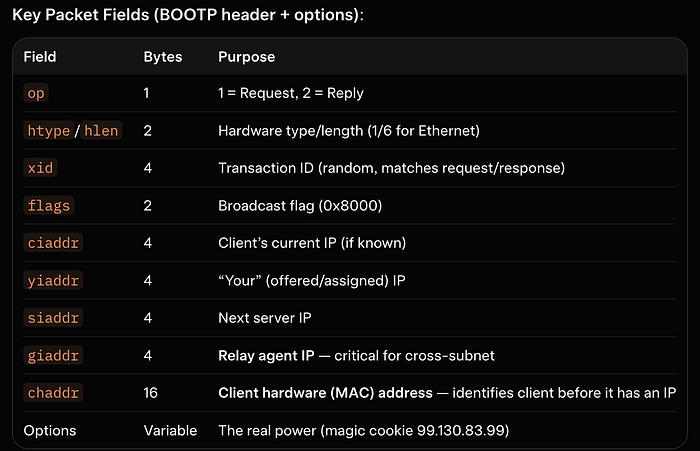
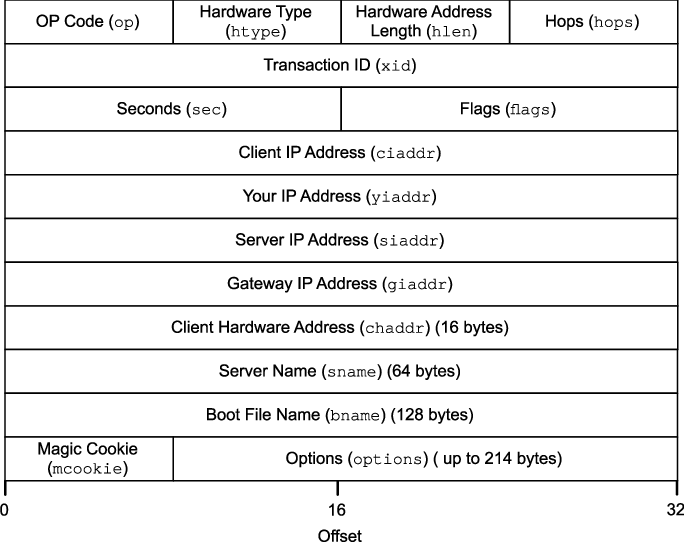
1. DHCP Fundamentals + Packet Structure
Dynamic Host Configuration Protocol (DHCP) is defined in RFC 2131. It automates IP address assignment and delivers critical network parameters (subnet mask, default gateway, DNS servers, lease time, etc.).
- Client-server model over UDP
- Server port: 67 (bootps)
- Client port: 68 (bootpc)
- Backward-compatible with BOOTP
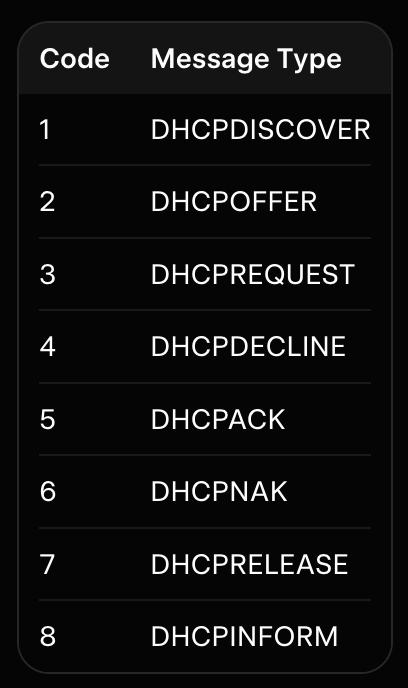
Option 53 (DHCP Message Type — mandatory) tells you exactly what the packet is:
Note :- further reading → GFG
Option 60 (Vendor Class Identifier — VCI) → lets the client say "VCI string: "MSFT 5.0" (Windows), "Cisco Systems, Inc. IP Phone CP-8841" allowing the server to send vendor-specific options.
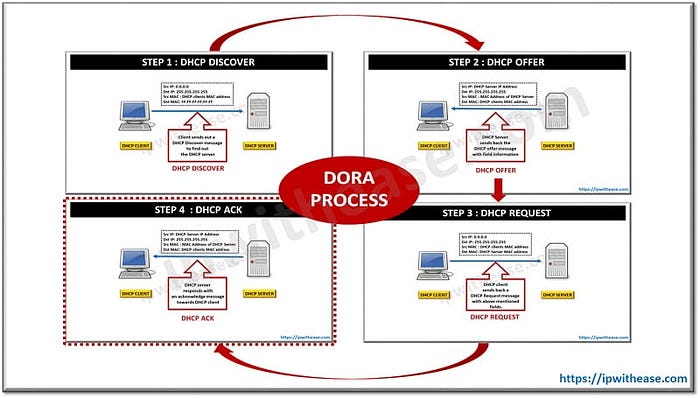
2. The DHCP Lease Process: DORA in Glorious Detail
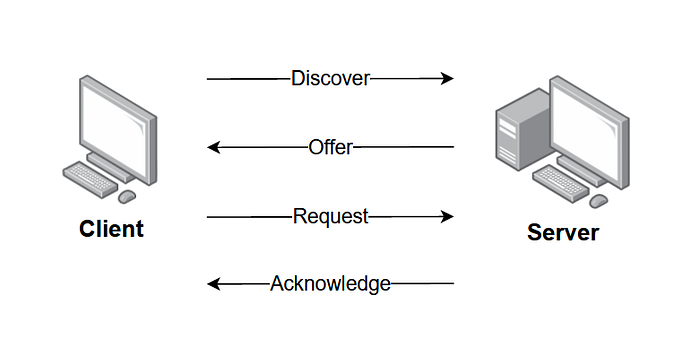
Every new client follows the legendary DORA process:
- DHCPDISCOVER (Client → Broadcast, Option 53 = 1)
- DHCPOFFER (Server → Client/relay, Option 53 = 2)
- DHCPREQUEST (Client → Broadcast, Option 53 = 3)
- DHCPACK (Server → Confirmation, Option 53 = 5)
Client States (RFC 2131): INIT → SELECTING → REQUESTING → BOUND → RENEWING → REBINDING.
Lease Timers:
- T1 (50% lease time) → unicast renew to original server
- T2 (87.5%) → broadcast rebinding
- Expiration → back to INIT
Servers must ARP-probe the offered IP. Clients must ARP the assigned IP after ACK (conflict → DHCPDECLINE).
2. The DHCP Lease Process: DORA in Glorious Detail
Every new client follows the legendary DORA process:
- DHCPDISCOVER (Client → Broadcast, Option 53 = 1)
- DHCPOFFER (Server → Client/relay, Option 53 = 2)
- DHCPREQUEST (Client → Broadcast, Option 53 = 3)
- DHCPACK (Server → Confirmation, Option 53 = 5)
Client States (RFC 2131): INIT → SELECTING → REQUESTING → BOUND → RENEWING → REBINDING.
Lease Timers:
- T1 (50% lease time) → unicast renew to original server
- T2 (87.5%) → broadcast rebinding
- Expiration → back to INIT
Servers must ARP-probe the offered IP. Clients must ARP the assigned IP after ACK (conflict → DHCPDECLINE).
2. The DHCP Lease Process: DORA in Glorious Detail
Every new client follows the legendary DORA process:
- DHCPDISCOVER (Client → Broadcast, Option 53 = 1)
- DHCPOFFER (Server → Client/relay, Option 53 = 2)
- DHCPREQUEST (Client → Broadcast, Option 53 = 3)
- DHCPACK (Server → Confirmation, Option 53 = 5)
Client States (RFC 2131): INIT → SELECTING → REQUESTING → BOUND → RENEWING → REBINDING.
Lease Timers:
- T1 (50% lease time) → unicast renew to original server
- T2 (87.5%) → broadcast rebinding
- Expiration → back to INIT
Servers must ARP-probe the offered IP. Clients must ARP the assigned IP after ACK (conflict → DHCPDECLINE).
3. DHCP Relay Agents — How Broadcasts Cross Subnets (giaddr in Action)
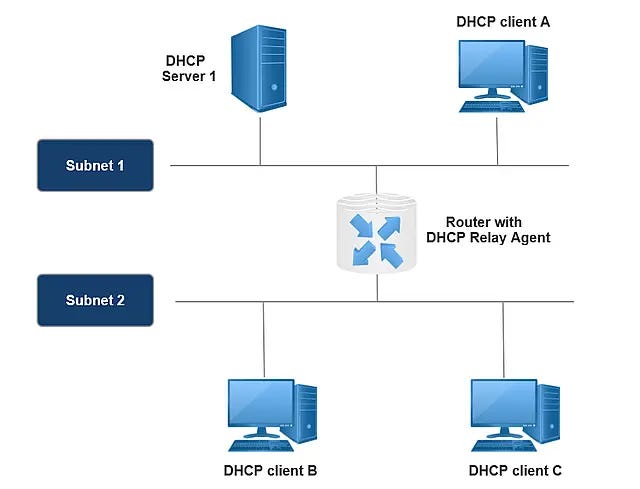
DHCP clients broadcast to 255.255.255.255. Routers drop broadcasts. DHCP relay agents (IP helper/BOOTP relay) solve this.
Step-by-step:
- Client sends DISCOVER (broadcast, giaddr = 0, chaddr = MAC).
- Relay receives it, sets giaddr = its own IP on the client interface.
- Relay converts to unicast and forwards to the configured DHCP server.
- Server replies to giaddr.
- Relay strips extra options (if needed) and forwards locally.
Without relays, you'd need a DHCP server on every subnet. One central server + relays = enterprise scale.
4. Option 82 Deep Dive: Relay Agent Information Option
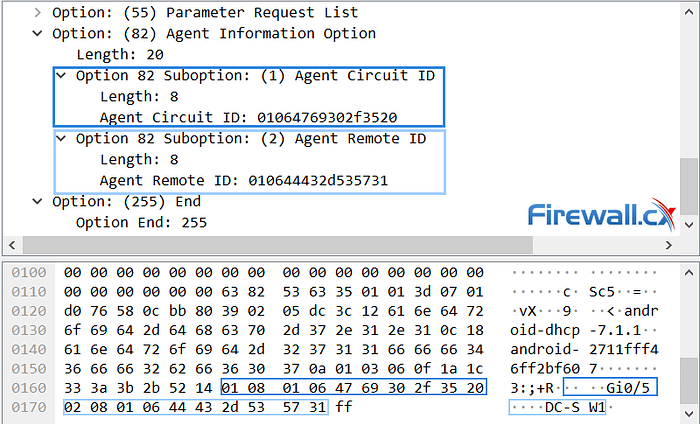
RFC 3046. Option 82 gives the DHCP server circuit-level visibility.
Format:
- Code: 82
- Sub-options:
- 1: Agent Circuit ID → physical port/VLAN (e.g., Gi0/5)
- 2: Agent Remote ID → subscriber/modem identifier
Flow:
- Relay (untrusted port) inserts Option 82 + giaddr.
- Server uses it for policy-based assignment.
- Server echoes Option 82 back in OFFER/ACK.
- Relay removes it before delivering to client.
Modern switches use this with DHCP snooping for port-level binding and anti-spoofing.

5. When DHCP Fails: APIPA (169.254.x.x)
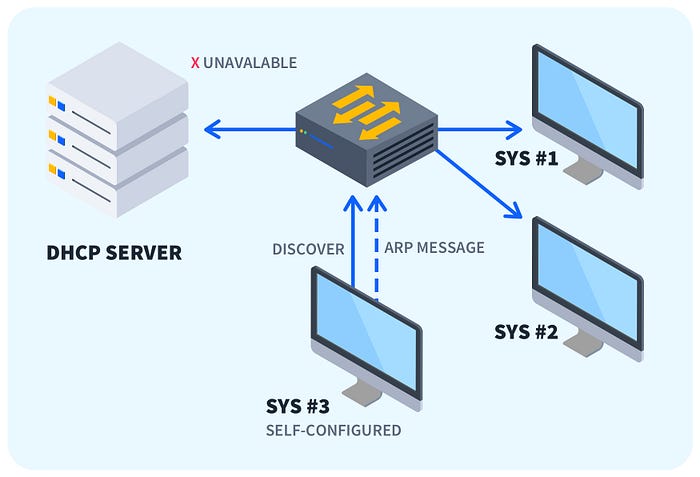
No server response? Modern OSes fall back to Automatic Private IP Addressing (RFC 3927):
- Range: 169.254.0.0/16 (excluding .0 and .255)
- Mask: 255.255.0.0
- No gateway, no DNS
- Devices perform ARP duplicate detection
You get local L2 communication but no Internet. Classic yellow exclamation mark in Windows.
NOTE :- Each /24 within the /16 follows the same rule
Troubleshoot: cable, relay, server reachability, giaddr in captures.
6. Dynamic DNS Updates — A and PTR Records
DHCP + DNS = automatic hostname resolution.
- A record: hostname → IP (forward)
- PTR record: IP → hostname (reverse)
Clients can send Option 81 (Client FQDN). Most enterprises let the DHCP server perform secure updates (RFC 2136) using GSS-TSIG/Kerberos.
Proper A/PTR records mean clean logs, working reverse DNS, and happy security teams.
7. DHCP Attacks: Rogue Servers and Starvation
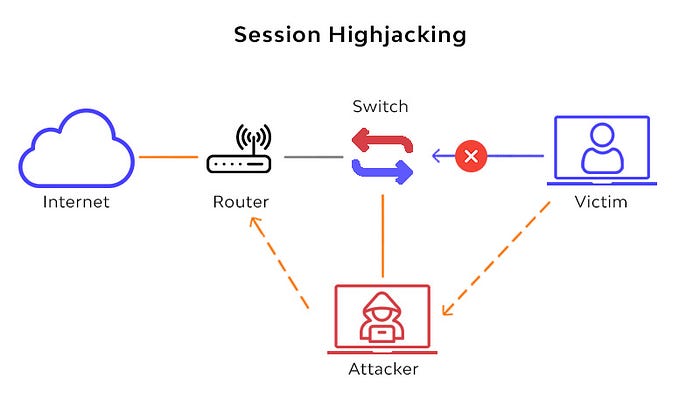
Rogue DHCP (Spoofing): Attacker answers DISCOVER faster, becomes gateway/DNS → MITM, credential theft.
DHCP Starvation: Flood random MAC DISCOVERs → exhaust pool → DoS for legitimate clients.
Both often combined for full network takeover.

8. Defenses: DHCP Snooping + Option 82
Enterprise switches enable DHCP Snooping:
- Ports = untrusted by default
- Only trusted ports send server messages
- Builds MAC-IP-Port binding table
- Validates/inserts Option 82
- Rate-limits to stop starvation
Result: rogue servers blocked, port-level enforcement, policy-based assignment.
9. Troubleshooting Pro Tips
- Wireshark filter: bootp
- Look for giaddr, chaddr, Option 53/60/82
- Cisco: show ip dhcp snooping binding, debug ip dhcp server packet
- Common issues: missing relay, Option 82 not echoed, APIPA after relay misconfig
Conclusion: You Now Know DHCP Inside Out
From chaddr and giaddr to Option 82 policies, APIPA fallback, A/PTR automation, and attack surface — you have the full picture.
DHCP is simple until it isn't. Master it, and you'll never look at a "can't get IP" ticket the same way again.
- RFC 2131 — DHCP
- RFC 3046 — Option 82
- RFC 3927 — APIPA
- RFC 2136 — Dynamic DNS Updates