

User Mode, Kernel Mode and Why It Matters
Before getting into injection techniques, evasion strategies, or shellcode, it is important to understand how Windows actually executes requests made by an application.
Malware does not operate outside the operating system. It relies on the same internal mechanisms that legitimate software uses. The difference lies in intent and execution strategy. To understand that strategy, we need to start with how Windows is structured.
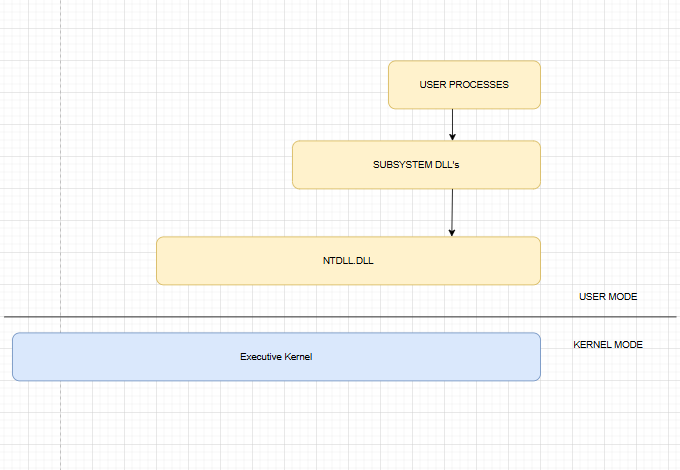
A processor running Windows operates in two modes: user mode and kernel mode. Applications execute in user mode. The operating system core components execute in kernel mode.
This separation exists to maintain system stability. Code running in user mode is restricted. It cannot directly access hardware, execute privileged CPU instructions, or freely manipulate system memory. If an application crashes in user mode, the operating system can terminate it without affecting the entire system.
Kernel mode operates with full privileges. It has unrestricted access to memory and hardware. It manages processes, memory allocation, device drivers, file systems, and scheduling. If code fails in kernel mode, the entire system can crash.
Understanding this separation is fundamental. Every meaningful action performed by an application must cross the boundary between these two modes.
Why Applications Cannot Perform System Tasks Directly
Consider a simple example where an application wants to create a file.
An application running in user mode cannot directly interact with disk drivers or the file system. Only the kernel has the authority to perform those operations. Therefore, the application must request the kernel to perform the task on its behalf.
This request follows a defined internal path.
Understanding that path is critical, especially in malware development, because security monitoring and detection mechanisms are often placed along this flow.
The Windows Function Call Flow
Suppose an application calls:
CreateFile("test.txt", ...);At the surface level, it appears that the file is created directly. Internally, the process is layered.
The application first calls CreateFile, which is exported by kernel32.dll. This library exposes many common Windows API functions and is loaded into most processes.
However, kernel32.dll does not directly communicate with the kernel. Instead, it forwards the request to a lower level function named NtCreateFile, which resides inside ntdll.dll.
The file ntdll.dll is the lowest level available in user mode. It contains implementations of the Native API, commonly referred to as NTAPI. These functions are responsible for preparing the transition from user mode to kernel mode.
When NtCreateFile is executed, ntdll.dll performs a processor instruction called syscall on x64 systems or sysenter on x86 systems. This instruction switches execution from user mode to kernel mode.
At that point, control is transferred to the Windows kernel, largely implemented in ntoskrnl.exe. The kernel receives the request and interacts with internal components such as the I/O manager and file system drivers to perform the actual file creation.
Once completed, the result is returned back through the same chain: from the kernel to ntdll.dll, then to kernel32.dll, and finally to the original application.
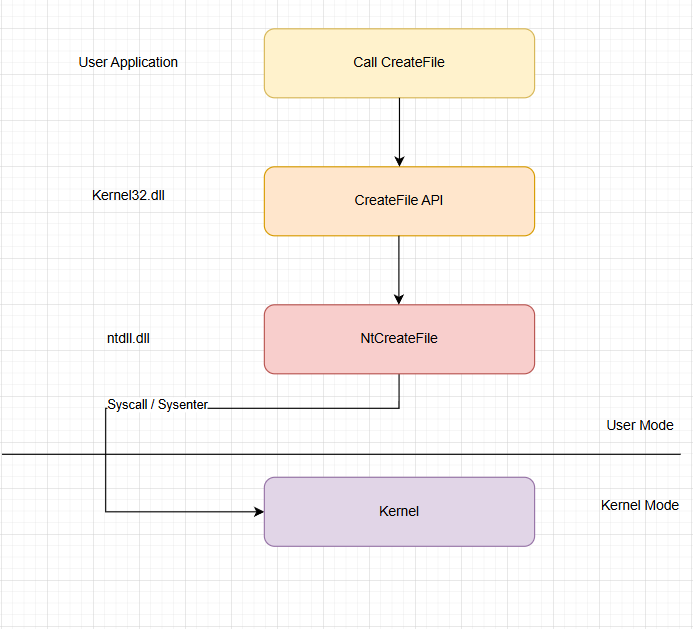
From the perspective of the developer, it was a simple function call. Internally, it was a controlled privilege transition followed by coordinated execution in kernel mode.
Relevance to Malware Development
For malware development, this internal structure is not just theoretical knowledge. It directly affects design decisions.
Many defensive tools monitor high level Windows API calls such as CreateFile, VirtualAlloc, or WriteProcessMemory. Some solutions place hooks inside user mode libraries, including kernel32.dll or ntdll.dll. More advanced mechanisms observe behavior from kernel mode itself.
When you understand the exact flow of execution, you begin to identify where monitoring is likely to occur and what alternatives exist.
Questions like:
- Should the program call the documented WinAPI functions?
- Should it invoke NTAPI functions directly?
- Should it implement direct system calls to bypass user mode hooks?
only make sense after understanding the architecture. Without that foundation, development becomes imitation rather than informed design.
Conclusion
Windows is structured in layers. An application does not communicate directly with the kernel. Instead, requests flow through subsystem libraries, into ntdll.dll, and then transition into kernel mode through a system call instruction.
Every system level action crosses the boundary between user mode and kernel mode.
For anyone serious about malware development or reverse engineering, this boundary is not just a technical detail. It is the central mechanism that governs execution, monitoring, and control.