
Introduction
Modern applications mostly rely on Backend-as-as-Service platforms like Supabase to accelerate development. While these platforms simplify authentication, database access, and API generation, security misconfigurations, especially related to authorization can lead to serious data exposure risks.
During a security assessment, I discovered an access control issue in a Supabase REST API configuration that allowed an authenticated users to query user records beyond their intended access scope due to improper authorization enforcement.
Supabase REST APIs and Authorization
Supabase is an open-source Backend-as-a-Service platform that is built on PostgresSQL that gives developers with ready to use backend capabilities like authentication, database management, storage and automatically generated APIs. One of the most powerful feature is the ability to expose database tables through RESTful endpoints without needed developers to manually build backend APIs.
When a table is created inside Supabase, the platform automatically makes it accessible through endpoints like:
/rest/v1/users
/rest/v1/profiles
/rest/v1/orders
These endpoints allows developers to perform queries directly against the database using HTTP requests. For example, a request like:
GET rest/v1/users?=select=*
can retrieve records from the users table depending on the permissions configured.
To interact with these APIs, Supabase uses two important security components: API key and Row Level Security(RLS).
Supabase provides what is called an anon public API key, which is designed to be used in frontend applications. Unlike traditional API secrets, this key is not meant to be confidential and is typically visible in client-side requests. This means the API key itself should not be treated as a security boundary. Instead, Supabase relies on Row Level Security policies to enforce what data a user is allowed to access.
Row Level Security is a PostgresSQL feature that Supabase uses to restrict which rows a user can read or modify. When RLS is properly configured, even if a user can send requests to the REST API, they should not be able to access data that belongs to them. For example, a properly configured policy might make sure that a user can only access records where their authenticated user ID matches the record owner.
If RLS is not enabled or misconfigured, the REST API may return more data than intended because Supabase will allow queries based only on the request itself without enforcing ownership checks. This makes RLS the primary security control protecting Supabase data rather than the API key itself.
This design is important to understand as many developers might mistakenly assume that keeping the API key hidden is enough for security. However, Supabase documentation makes it clear that the anon key is expected to be exposed and the proper authorization must be enforced through database policies
Vulnerability Summary
The identified issue was a Broken Access Control caused by authorization misconfiguration with the impact being an authenticated users could query multiple user records via the Supabase REST API due to insufficient authorization controls.
Discovery Process
While I was analyzing application traffic in Burp Suite, I noticed Supabase REST API calls being made to retrieve user data. This initiated further testing to determine whether proper authorization checks were enforced.
Step 1 : Identifying the API endpoint
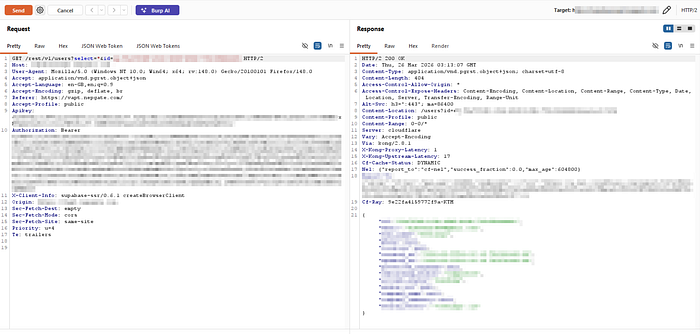
While inspecting authenticated traffic in Burp Suite, the following request was seen:
GET /rest/v1/users?select=*id=eq.[REDACTED]
This request returned an information about a user successfully.
Step 2: Testing parameter manipulation
To test access control enforcement, the id parameter was removed:
GET /rest/v1/users?select=*

This response returned:
406 Not Acceptable
JSON object requested, multiple rows returned.
This suggested multiple records existed.
Step 3: Modifying Accept Header
The request header originally contained:
Accept: application/vnd.pgrst.object+json
This format expects a single object.
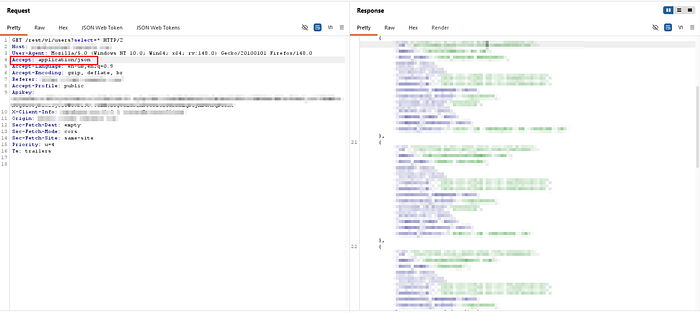
Changing it to:
Accept: application/json
Allowed multiple records to be returned
After modifying the header:
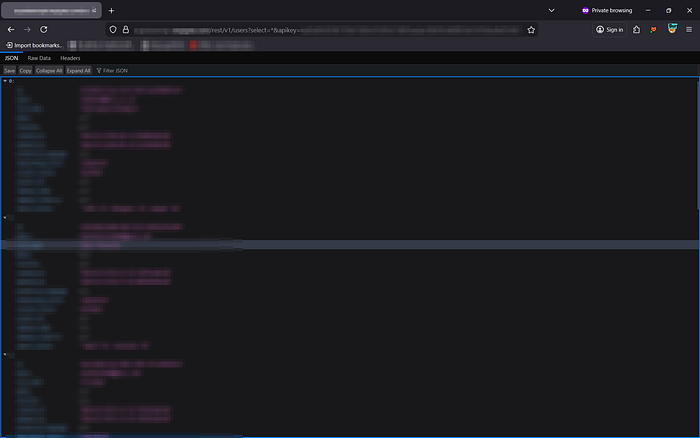
The API returned multiple user records.
Opening this in web:
Technical Root Cause
The issue appears caused by improper Supabase authorization configuration.
Possible causes:
Missing Row Level Security
If RLS is disabled:
Users can query entire tables.
Example dangerous scenario:
GET /rest/v1/users?select=*Without RLS:
Returns all users.
With RLS:
Should only return requesting user.
Improper RLS policy
Example correct policy:
auth.uid() = user_idExample weak policy:
trueWhich allows all access.
Over-reliance on API key secrecy
Supabase anon keys are public by design.
Security must rely on:
- RLS
- JWT claims
- Authorization logic
Not API key secrecy.
Conclusion
This finding shows how improper authorization configuration in Supabase can lead to unintended data exposure even when authentication is correctly implemented. It reinforces the important lesson that authentication alone is not sufficient and that proper Row Level Security (RLS) policies must always be enforced to make sure users can only access authorization control rather than relying only on frontend restrictions.
Disclaimer: This research was conducted during an authorized security assessment. All sensitive information such as domain names, API keys, user data, and identifiers have been redacted to protect the target. This article is shared strictly for educational and awareness purposes to help developers understand common Supabase authorization misconfigurations and improve security practices.