Modern high speed interfaces (Thunderbolt\USB4\CFexpress\etc) grant external peripherals direct access to your system's RAM via DMA (Direct Memory Access). This enables elite performance by bypassing the CPU's oversight (https://medium.com/@boutnaru/dma-direct-memory-access-a1bdc7ee44a3). Thus, exposing the system to "Drive by DMA attacks". In minutes, an attacker can plug a malicious device into an unattended port to steal encryption keys\bypass the lock screen\inject kernel level code all without ever opening the computer's case or needing a password (https://www.kroll.com/en/publications/cyber/what-is-dma-attack-understanding-mitigating-threat).
Overall, Windows secures your system against DMA attacks using KDMA (Kernel DMA Protection), which leverages the hardware's IOMMU (Input Output Memory Management Unit) to enforce memory isolation. The core of this defense is DMA remapping, which assigns peripherals to specific and sandboxed memory regions (rather than allowing unrestricted access to the entire system RAM). While compatible devices run seamlessly, incompatible devices are strictly blocked if the screen is locked or no user is signed in. Once an authorized user authenticates, Windows grants access to these devices (https://learn.microsoft.com/en-us/windows-hardware/drivers/pci/enabling-dma-remapping-for-device-drivers).
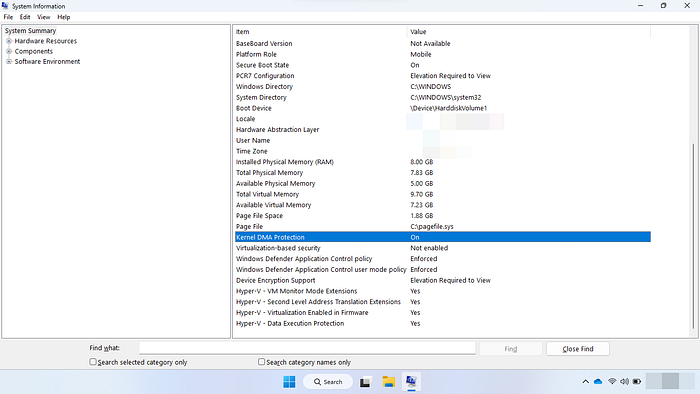
Lastly, to maximize system security and peripheral compatibility, KDMA should be prioritized over legacy BitLocker DMA countermeasures. While it requires UEFI firmware support, it does not depend on VBS (https://medium.com/@boutnaru/the-windows-security-journey-vbs-virtual-based-security-d4d7b1f60475). Because the two features are incompatible, you should disable legacy BitLocker DMA policies on supported hardware. KDMA provides a superior security boundary by using hardware-level isolation while maintaining full usability for external devices. We can check if KDMA is enabled using "msinfo32.exe" as shown in the screenshot below (https://learn.microsoft.com/en-us/windows/security/hardware-security/kernel-dma-protection-for-thunderbolt).
See you in my next writeup ;-) You can follow me on twitter — @boutnaru (https://twitter.com/boutnaru). Also, you can read my other writeups on medium — https://medium.com/@boutnaru. You can find my free eBooks at https://TheLearningJourneyEbooks.com.