

Key Takeaways
- Application security protects software and data from threats, making it critical for modern businesses.
- Common risks often stem from simple gaps such as poor access control, misconfigurations, or outdated components.
- Strong security practices must be applied early and maintained throughout the application lifecycle.
- Continuous monitoring helps detect threats in real time and prevents potential attacks.
- A proactive approach with the right expertise helps reduce risks and ensure long-term security.
Introduction
As software systems grow more complex and cyber threats evolve, application security is no longer optional. With cloud adoption, microservices, rapid development, and rising mobile app security needs, applications are expanding quickly and becoming harder to secure. Without the right practices, businesses risk data breaches, compliance issues, and reputational damage.
Recent reports highlight a growing concern: critical application security findings have increased nearly 4x year over year, rising from 202 to 795 after prioritization. This shows how vulnerabilities are entering software faster, making it harder for teams to keep up and secure applications effectively.
In this blog, we'll walk through what application security is, why it matters, common risks enterprises face, key best practices, and how continuous monitoring helps prevent threats.
What Is Application Security
Application security is the practice of protecting software applications, their code, and the data they handle from both internal and external threats. It includes a set of processes, tools, and best practices applied throughout the entire software lifecycle, from development to deployment. The goal is to identify, fix, and prevent vulnerabilities before attackers can exploit them.
Key Components of Application Security
Key components of application security include the essential practices used to protect applications, code, and data from threats. These areas work together to reduce vulnerabilities, secure access, and ensure continuous protection across the application lifecycle.

- Secure Code Development: Writing, reviewing, and testing code with security practices to prevent vulnerabilities from being introduced early in development.
- Authentication and Authorization: Verifying user identity and controlling access so only authorized users can view or modify specific resources.
- Input Validation and Encoding: Checking and sanitizing user inputs to prevent attacks like SQL injection and cross-site scripting.
- Encryption: Securing sensitive data using encryption methods to protect it both during transmission and while stored.
- Secrets Detection: Identifying and removing exposed credentials such as API keys, tokens, and passwords from code and systems.
- Software Composition Analysis: Scanning third-party and open-source components to detect known vulnerabilities and license risks.
- SBOM Management: Maintaining a detailed inventory of all software components to improve visibility and respond to supply chain threats.
- Infrastructure as Code (IaC) Security: Securing cloud setups created through code by ensuring configurations are correct and access is properly controlled to prevent misconfigurations and unauthorized access.
- Container Image Scanning: Analyzing container images to detect outdated packages, vulnerabilities, or insecure configurations before deployment.
- Security Testing: Continuously testing applications using different methods to identify and fix security weaknesses.
- Web Application Firewall: Monitoring and filtering incoming traffic to block malicious requests and protect applications from common attacks.
Why Modern Enterprises Need Application Security
Enterprise application security is critical because applications are central to business operations and handle sensitive data. Even a small vulnerability can lead to serious financial, operational, and reputational impact, with the average data breach costing around $4.4 million. A proactive approach helps businesses reduce risks, avoid downtime, and maintain trust.
As modern applications become more complex, especially with cloud-native architectures and open-source dependencies, the risk surface continues to grow. Businesses are relying more on digital systems, which makes applications a primary target for cyberattacks. This makes application security a critical part of any enterprise strategy rather than just a technical requirement.
These factors explain the growing importance of application security:
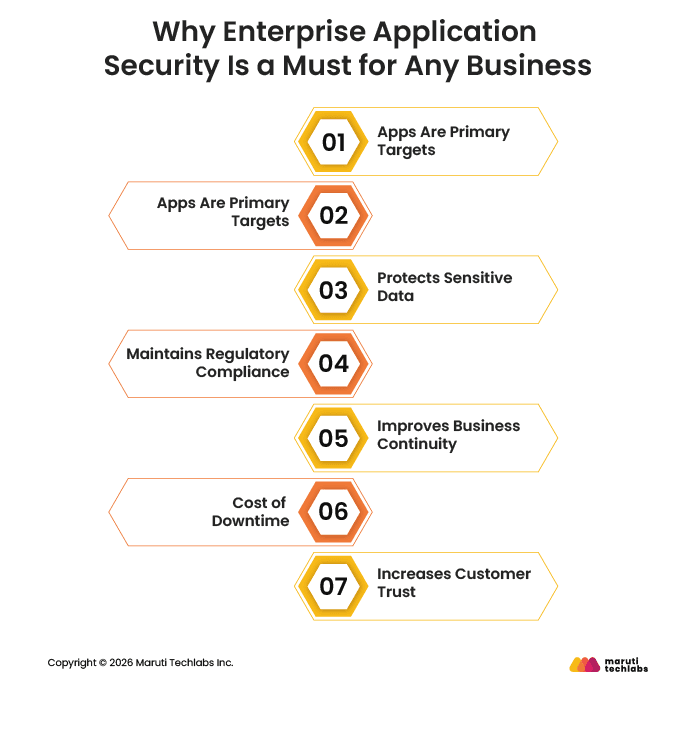
- Apps Are Primary Targets: Attackers mainly target applications to access data, as they are the most exposed layer in modern systems.
- Cloud-Native Risks: Complex cloud setups and dependencies increase the chances of misconfigurations and security gaps.
- Protects Sensitive Data: Secures customer, financial, and business-critical information from unauthorized access.
- Maintains Regulatory Compliance: Helps meet industry regulations and avoid penalties related to data protection failures.
- Improves Business Continuity: Reduces the chances of disruptions and helps systems recover faster after an attack.
- Reduces Downtime Costs: Minimizes revenue loss and operational impact caused by system outages or breaches.
- Increases Customer Trust: Builds confidence by showing a strong commitment to protecting user data.
What Are the Most Common Application Security Risks for Enterprises?
The most common application security risks for enterprises in 2026 and beyond will come from the growing complexity of modern systems, including AI usage, widespread APIs, and heavy reliance on third-party components. These setups create many entry points, where even small gaps can turn into serious vulnerabilities. That's why enterprises need to clearly understand these risks to better protect their applications and reduce overall exposure.
Below are some of the most common application security risks and why they matter:

1. Broken Access Control
Broken access control happens when users can access data or actions they are not supposed to. This usually occurs when permissions are not properly enforced across the application. It can allow attackers to view or modify sensitive information.
Why it is a risk:
This risk can lead to unauthorized access to critical systems or data. For example, a normal user might gain admin-level access and change important settings. Such issues can directly result in data leaks or system misuse.
2. Cryptographic Failures (Sensitive Data Exposure)
This risk occurs when sensitive data is not properly protected using encryption. It can happen due to weak algorithms, poor key management, or no encryption at all. As a result, confidential data becomes easy to access.
Why it is a risk:
Attackers can intercept or steal sensitive information like passwords or financial data. For example, if user data is stored in plain text, it can be easily read after a breach. This leads to serious privacy and compliance issues.
3. Injection Attacks
Injection attacks happen when untrusted input is treated as a command by the system. This includes attacks like SQL injection or script injection. Attackers use this to manipulate databases or execute harmful commands.
Why it is a risk:
It allows attackers to control application behavior or access restricted data. For example, a malicious input in a login field could expose the entire database. This can compromise both data and system integrity.
4. Insecure Design
Insecure design refers to flaws that exist because security was not considered during planning. These issues are part of the application's structure and are harder to fix later. They often lead to long-term vulnerabilities.
Why it is a risk:
Poor design decisions can expose the system to multiple attack paths. For example, missing validation checks in workflows can allow unauthorized actions. Fixing these issues later usually requires major changes.
5. Security Misconfiguration
Security misconfiguration happens when systems are set up incorrectly or left with default settings. This includes open ports, unused features, or weak permissions. It is very common in cloud-based environments.
Why it is a risk:
Attackers can easily find and exploit these gaps. For example, a public cloud storage bucket can expose sensitive files. Such mistakes often lead to avoidable data breaches.
6. Vulnerable and Outdated Components
Applications often use third-party libraries and frameworks to function. If these components are outdated or unpatched, they may contain known vulnerabilities. Attackers actively look for such weaknesses.
Why it is a risk:
Known vulnerabilities are easy targets because fixes are already documented. For example, using an old library with a public exploit can give attackers quick access. Regular updates are essential to reduce this risk.
7. Software and Data Integrity Failures
This risk occurs when applications do not verify the integrity of code or data. It can allow attackers to introduce tampered updates or malicious code. This is especially risky in automated deployment pipelines.
Why it is a risk:
Attackers can inject harmful code without being detected. For example, a compromised software update can spread malware across systems. This can impact multiple users and systems at once.
8. Broken Authentication
Broken authentication happens when login systems are weak or poorly managed. This includes issues like weak passwords or improper session handling. It makes it easier for attackers to impersonate users.
Why it is a risk:
Attackers can gain access using stolen or guessed credentials. For example, a lack of multi-factor authentication increases the chances of account takeover. This can lead to unauthorized actions and data exposure.
9. Security Logging and Monitoring Failures
This risk occurs when systems do not properly track or monitor security events. Without logs, it becomes difficult to detect or investigate attacks. Many breaches go unnoticed due to this gap.
Why it is a risk:
Delayed detection increases the damage caused by an attack. For example, an attacker may stay undetected in a system for weeks. Proper monitoring helps teams respond quickly and reduce impact.
10. Server-Side Request Forgery (SSRF)
SSRF happens when a server makes requests to unintended locations based on user input. This occurs when input URLs are not properly validated. It can expose internal systems that are otherwise protected.
Why it is a risk:
Attackers can use the server to access internal services or sensitive data. For example, they may retrieve confidential information from internal APIs. This can lead to deeper system compromise.
Best Application Security Practices to Protect Enterprise Applications
Application security best practices include a set of measures that help protect applications from development to deployment and beyond. These practices focus on secure coding, access control, data protection, dependency management, and continuous monitoring. Together, they help reduce vulnerabilities, prevent attacks, and maintain a strong security posture.
1. Secure Coding Standards and Practices
Secure coding ensures that applications are built with security in mind from the start, supporting a shift-left security approach within DevSecOps practices. It includes input validation, code reviews, and avoiding common vulnerabilities. This helps reduce issues early in the development lifecycle.
Why it is a best practice:
Fixing vulnerabilities during development is easier and less costly than after deployment. For example, validating user input can prevent attacks like SQL injection or XSS. This reduces the chances of exploitable flaws reaching production.
2. Identity and Access Management (IAM)
IAM focuses on controlling user access and ensuring only authorized users can interact with systems. It includes authentication, authorization, and role-based access controls. This limits unnecessary access across applications.
Why it is a best practice:
Restricting access reduces the risk of unauthorized actions. For example, giving users only the permissions they need prevents misuse of sensitive data. This helps avoid privilege escalation and data breaches.
3. Data Protection and Encryption
This practice ensures that sensitive data is properly secured using encryption methods. It protects data both when stored and when being transferred. This keeps critical information safe from exposure.
Why it is a best practice:
Encrypted data cannot be easily read even if intercepted. For example, using encryption for user credentials protects them during transmission. This reduces the impact of potential data breaches.
4. Secure API Management
APIs need to be secured to prevent unauthorized access and misuse. This includes validating requests, controlling access, and monitoring traffic. Proper API security helps protect connected systems.
Why it is a best practice:
Unsecured APIs can expose sensitive data or system functions. For example, missing authentication on an API can allow attackers to extract data. Securing APIs helps prevent such direct access risks.
5. Securing Containers, IaC, and Serverless Components
Modern environments use containers, infrastructure as code, and serverless functions. These components must be configured securely to avoid vulnerabilities. Proper setup reduces risks across cloud environments.
Why it is a best practice:
Misconfigurations in these components are a common cause of breaches. For example, an exposed cloud configuration can allow public access to data. Securing them helps reduce the overall attack surface.
6. Keeping Components and Dependencies Updated
Applications rely on third-party libraries and dependencies. Keeping them updated ensures known vulnerabilities are patched. This is essential for maintaining a secure environment.
Why it is a best practice:
Outdated components are easy targets for attackers. For example, using a library with a known vulnerability can lead to quick exploitation. Regular updates help prevent such risks.
7. Runtime Security and Continuous Monitoring
Monitoring applications during runtime helps detect threats as they happen. It involves tracking activity, analyzing logs, and identifying unusual behavior. This ensures ongoing protection after deployment.
Why it is a best practice:
Real-time monitoring helps detect and respond to attacks quickly. For example, unusual login activity can signal a potential breach. Early detection reduces damage and downtime.
8. Security Testing (DAST) for Runtime Vulnerabilities
Dynamic testing evaluates applications while they are running. It helps identify vulnerabilities that may not appear during development. This adds an extra layer of security validation.
Why it is a best practice:
Some issues only appear in real-world conditions. For example, runtime misconfigurations can be detected through DAST. This helps uncover hidden vulnerabilities before attackers do.
9. Regular Security Audits and Penetration Testing
Regular audits and testing help evaluate the effectiveness of security measures. Penetration testing simulates real attacks to find weaknesses. This ensures security practices stay effective over time.
Why it is a best practice:
New vulnerabilities can appear as systems evolve. For example, a penetration test can reveal hidden flaws missed by automated tools. Regular testing helps keep applications secure against new threats.
How Does Application Security Monitoring Help Detect and Prevent Threats?
Application security monitoring helps detect and prevent threats by continuously tracking how an application behaves during runtime. It gives real-time visibility into what's happening inside the application, helping detect risks that traditional tools often miss. This allows teams to quickly identify and respond to potential threats.