
What You'll Learn in This Blog Introduction — Why cloud-native file uploads are more complex than they seem Background & Context — Exploring challenges and common solutions Architecture Overview — Key AWS services powering the design File Upload & Download Flow — Step-by-step walkthrough of the process Architecture Comparison — Pros and cons of different approaches Best Practices — Tips to build a secure and scalable system Conclusion — Wrapping up with key takeaways
1. Introduction
Modern applications frequently need to handle file uploads and downloads at scale — images, documents, videos, and more. When building on the cloud, developers often rely on services from Amazon Web Services to implement this functionality. However, the traditional approach of routing uploads through Amazon API Gateway quickly runs into limitations: Payload size limits (10 MB), Increased latency and cost, Additional compute overhead when passing files through backend services. For production-grade systems, we need architectures that are Scalable, Secure, Efficient for large files, Simple for clients
In this article, I share a proof-of-concept architecture that enables secure file uploads and downloads using a single HTTP request, leveraging: * Amazon CloudFront * Amazon S3 * Lambda@Edge * AWS Lambda
This approach avoids API Gateway payload limits, keeps client logic minimal, and provides centralized authorization at the edge.
2. Background / Context
The need to support secure and scalable file uploads directly from clients in modern application, whether it's images, documents, or media files, the system must handle uploads efficiently while maintaining strong authorization, scalability, and minimal latency. When building on Amazon Web Services, there are several architectural patterns to achieve this.
The key challenge is balancing: * Security — ensuring only authorized users can upload files * Scalability — supporting large files and high traffic * Simplicity — keeping client-side logic minimal
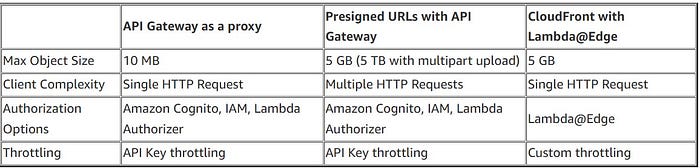
Available Approaches: 1. API Gateway Proxy Upload Clients upload files through an API endpoint implemented using Amazon API Gateway which then forwards the request to Amazon S3. While straightforward, this approach is limited by API Gateway's 10 MB payload limit and can introduce unnecessary overhead.
2. Presigned URL Upload A common approach is generating presigned URLs that allow clients to upload directly to S3. This supports larger uploads and scales well, but requires multiple requests and additional client-side logic.
3. CloudFront with Edge Authorization (This Approach) In this approach, uploads are routed through Amazon CloudFront, where authentication is performed using Lambda@Edge before forwarding the request to S3. This enables single-request uploads, centralized authorization, and avoids exposing S3 directly.
Use Cases This pattern is useful for applications that frequently handle user-generated files, such as: * Chat and messaging platforms * Applications with media or document uploads * Systems requiring secure file storage with post-processing (e.g., thumbnails or scanning) Given these requirements, this architecture provides a secure and scalable alternative to traditional upload patterns while keeping the client workflow simple.
3. Architecture Overview
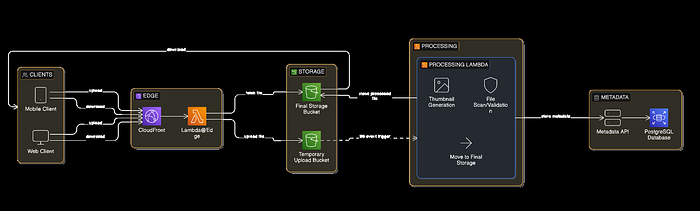
This architecture leverages key Amazon Web Services to build a secure and scalable file upload and processing system:
- Amazon CloudFront — Serves as a global CDN and the entry point for upload and download requests.
- Lambda@Edge — Performs lightweight authentication and authorization at CloudFront edge locations and can rewrite file paths for security.
- Amazon S3 — Durable object storage with separate buckets for temporary uploads and final processed files.
- AWS Lambda — Handles backend file processing tasks like virus scanning and thumbnail generation, triggered by S3 event notifications.
How It Works
- Clients upload files using a single HTTP PUT request to CloudFront.
- CloudFront forwards the request to Lambda@Edge, which: * Validates authentication and authorization * Rewrites the file path to ensure secure storage * Rejects unauthorized requests early
- If authorized, the request is sent to an S3 temporary bucket.
- S3 triggers a processing Lambda that: * Scans the file for viruses * Generates thumbnails * Stores the processed file and thumbnail in the final S3 bucket
- Metadata about the file is stored via an API call for indexing or auditing.
Key Architectural Decisions
1. PUT-based Uploads Uploads use HTTP PUT, storing the request body directly as the S3 object. Advantages: * Avoids multipart form complexity * Simpler client implementation
2. Path-Based Object Mapping CloudFront forwards the request path to S3. Example:
https://cdn.example.com/file/image.pngStored in S3 as:
file/{imageName}_{guid}.png
thumbnail/{imageName}_{guid}.png
3. Edge Authorization & Path Rewriting * Authentication occurs at the edge before reaching S3. * Lambda@Edge can rewrite file paths for security and organization. Benefits: * Reduces unnecessary traffic * Improves security * Rejects unauthorized uploads early
File Upload Flow

Processing Stage
Once a file is uploaded: 1. S3 triggers a Lambda function 2. The file is processed: * malware scanning * thumbnail generation 3. Processed outputs are stored in a final S3 bucket 4. Metadata is stored through an API.
File Download Flow

This ensures: * Files are never directly exposed from S3 * Authorization happens at the edge * Downloads benefit from CloudFront caching and CDN performance
Architecture Comparison
Best Practices
1. Use Separate Buckets for Processing Maintain: * Temporary upload bucket * Final storage bucket Benefits: * Provides security isolation between raw and processed files * Simplifies lifecycle and storage management
2️ Scan Files Before Final Storage Always validate files before permanent storage: * File type verification * Malware scanning * Size validation
3️ Use Unique Object Keys Prevent collisions by using structured paths, for example:
uploads/{userId}/{filename}_{uuid}.jpg4️ Enable Lifecycle Policies Automatically clean up temporary files after processing Example: temp-uploads → delete after 1 week
5️ Implement Rate Limiting Use CloudFront's edge logic to throttle requests and prevent abuse
When to Use This Pattern This architecture is ideal when: * Uploads require centralized authorization * Single-request uploads are preferred * API Gateway payload limits must be avoided * Direct S3 access is not acceptable for security reasons
Conclusion Handling file uploads in cloud-native systems is often more complex than it first appears. Traditional API-based uploads may be easy to implement, but they frequently encounter challenges with: * Scalability * Payload size limits * Operational overhead By leveraging key Amazon Web Services services such as Amazon CloudFront, Lambda@Edge, Amazon S3, Lambda, we can build a secure, scalable, and efficient upload pipeline that: * Supports large payloads * Keeps client logic minimal with single-request uploads * Centralizes authentication at the edge * Avoids exposing storage directly to clients
While this pattern doesn't replace multipart uploads for very large files, it offers a clean and practical solution for many real-world applications where security, simplicity, and scalability are priorities.