
What Is Referer-Based Access Control
Every time your browser makes a request it sends a little piece of information called the Referer header. It basically tells the server where the request came from. If you click a link on the admin panel and it takes you somewhere else the browser sends:
Referer: https://example.com/adminSome developers look at this header and think — great, if the request is coming from the admin panel then the person must be an admin. So they build their access control around it.
If Referer is the admin panel — allow it. If Referer is anything else — block it.
Sounds reasonable. The problem is that the Referer header is just text in an HTTP request. And like all text in an HTTP request you can write whatever you want in it. Set it to the admin panel URL, send it with a regular user session, and the server believes you completely.
That is the entire vulnerability. The server is not checking who you are. It is checking where you claim to have come from.
How I Solved It — The Story
Same setup as every lab in this series. Admin account. Non-admin account. Burp Suite running in the background catching everything.
I logged in as admin, went to the admin panel, and promoted carlos. Watched the request in Burp. Immediately noticed something was different from previous labs.
There was no deep session role check happening on the endpoint. The server was glancing at the Referer header and making its decision based on that.
I wanted to confirm. Opened an incognito window, logged in as my regular non-admin user, and tried going directly to:
/admin-roles?username=carlos&action=upgradeBlocked. Unauthorized.
But the reason it was blocked was not my session. It was because I navigated there directly so the Referer header was empty. The browser had no referring page to report.
That told me everything I needed to know.
I went back to Burp Repeater where I had the original admin request saved. Made three small changes:
Swapped the admin session cookie for my non-admin session cookie. Changed the username from carlos to my own username. Made sure the Referer header was set to the admin panel URL.
GET /admin-roles?username=youruser&action=upgrade HTTP/1.1
Cookie: session=NON_ADMIN_SESSION_TOKEN
Referer: https://your-lab-id.web-security-academy.net/admin
Clicked send.
HTTP/1.1 200 OK
Refreshed the app in the incognito window. Admin panel. Full access. Last access control lab. Done.
Step by Step Walkthrough
What you need
- Burp Suite (free edition is fine)
- The lab from PortSwigger Web Security Academy
- Admin and non-admin credentials provided by the lab
Step 1 — Log in as admin and capture the promotion request
Open Burp, log in as admin, go to the admin panel and promote carlos. Find the request in Burp HTTP history and send it to Repeater. It looks like this:
GET /admin-roles?username=carlos&action=upgrade HTTP/1.1
Cookie: session=ADMIN_SESSION_TOKEN
Referer: https://your-lab-id.web-security-academy.net/admin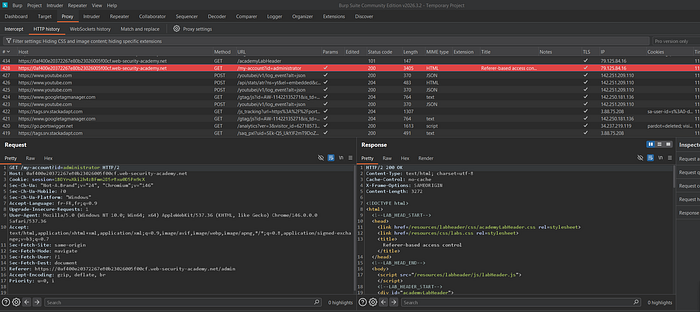
Step 2 — Confirm the block on the non-admin session
Open an incognito window, log in as the non-admin user, and try browsing directly to:
/admin-roles?username=carlos&action=upgradeYou will get an unauthorized response. Notice there is no Referer header in this request because you navigated directly. That is why it was blocked — not your session, just the missing header.
Step 3 — Swap the cookie and spoof the Referer
Back in Burp Repeater, copy your non-admin session cookie and replace the admin cookie. Change the username to yours. Confirm the Referer header is pointing to the admin panel URL.
GET /admin-roles?username=youruser&action=upgrade HTTP/1.1
Cookie: session=NON_ADMIN_SESSION_TOKEN
Referer: https://your-lab-id.web-security-academy.net/admin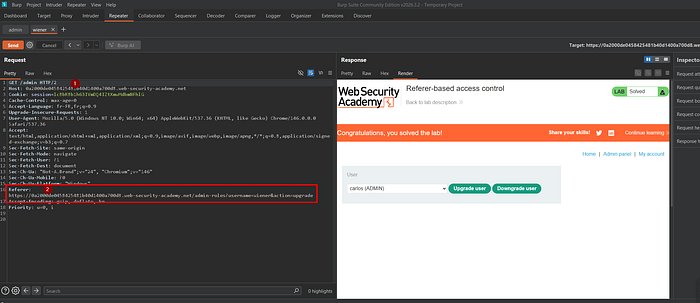
Step 4 — Send and verify
Click send. You should get a 200 OK. Refresh the app in your incognito window and your regular user account now has full admin access.
Real Bug Bounty Payouts — This Has Been Found and Paid
This is not just a lab pattern. Referer-based access control has shown up in real production applications and hunters have been rewarded for finding it.
$2,500 — B2B SaaS platform A researcher found that the entire admin section of a business dashboard was protected only by a Referer check pointing to the main dashboard URL. By spoofing the header with a regular user session the researcher could access billing information, export user data, and modify organization settings. Reported as high severity.
$1,800 — E-learning platform An endpoint that allowed instructors to modify student grades checked the Referer header to confirm the request came from the course management page. A student account with a spoofed Referer could modify their own grades or any other student's grades without ever having instructor access.
$900 — Internal enterprise tool (private program) A configuration export endpoint used the Referer header to confirm the request came from the settings page. Any authenticated employee could spoof the header and download the full application configuration including API keys and database credentials.
The common thread across all of these is that the developer treated the Referer header like a password. It is not. It is a suggestion that anyone can fake in seconds.
Where to Hunt This in Real Apps
Now that you know what to look for here is where it tends to live.
Admin panels with multiple sections — if the admin panel is split into pages and certain actions are only supposed to be reachable from specific pages, check whether the protection is a real session check or just a Referer validation.
API endpoints behind UI flows — backend endpoints that are meant to only be called by specific frontend pages sometimes rely on the Referer to enforce that. Test them directly with a spoofed header.
File download and export endpoints — sensitive data exports sometimes check that the request came from the right page instead of verifying the user's permissions properly.
Payment and checkout flows — any endpoint in a multi-page checkout that trusts the Referer to confirm the user went through earlier steps is worth testing.
The test is always the same. Find the endpoint. Send it directly with no Referer. If it blocks you, try again with a spoofed Referer pointing to the expected source page. If it works you have your finding.