
Disclaimer: The specific cookies, tokens, and data shown throughout this blog post are from my lab environment at the time of execution. Your results will vary depending on the Juice Shop version, user sessions, and database state. Focus on understanding the techniques and methodology rather than copying the exact values.
Introduction

The vulnerable environment (OWASP Juice Shop) used in this lab can be set up locally or accessed via demo instances online.
Cross-Site Scripting (XSS) remains one of the most prevalent web application vulnerabilities, consistently ranking in the OWASP Top 10. Unlike server-side vulnerabilities like SQL injection, XSS targets the client-side, the user's browser, making it uniquely dangerous for stealing sessions, defacing websites, and launching phishing attacks.
In this comprehensive lab report, I'll walk you through my hands-on experience exploiting XSS vulnerabilities in OWASP Juice Shop. From cookie theft to malicious redirection, this journey covers the essential client-side exploitation techniques every security professional should understand.
1. Objectives
The objective of this lab is to provide participants with practical insights into Cross-Site Scripting (XSS) vulnerabilities and exploitation techniques. Through a structured, task-based progression, participants will gain hands-on experience in identifying and exploiting XSS weaknesses in a controlled environment (OWASP Juice Shop).
By the end of the lab, participants will:
- Understand how unvalidated user inputs can be manipulated to execute arbitrary JavaScript code in the context of a victim's browser.
- Learn how XSS can be used to steal sensitive data like cookies.
- Develop a deeper understanding of different types of XSS attacks, such as reflected, stored, and DOM-based XSS, and their role in bypassing application restrictions.
- Gain experience in exploiting XSS to perform attacks like cookie theft, phishing, and redirection.
2. Background
Cross-Site Scripting (XSS) is a vulnerability that occurs when an application fails to properly validate and sanitize user inputs, allowing attackers to inject malicious JavaScript code into a web page. This code can then be executed in the context of the browser of any user who views the page, leading to a wide range of security issues, including session hijacking, defacement, and phishing attacks.
In this lab, participants will work through a series of XSS tasks targeting an intentionally vulnerable web application (OWASP Juice Shop). Each task focuses on different aspects of XSS exploitation, including:
- Reflected XSS: Injecting malicious scripts into URL parameters that are reflected immediately by the server without proper sanitization.
- Stored XSS: Exploiting an application to permanently store malicious scripts in its database, which are then executed whenever a victim accesses the affected page.
- DOM-Based XSS: Manipulating the Document Object Model (DOM) of a webpage on the client side by exploiting client-side scripts.
Understanding XSS: Reflected vs. Stored (Persistent)
Before diving into our tasks, we should understand the difference between Reflected and Stored XSS.
Reflected XSS
Reflected Cross-Site Scripting (XSS) occurs when user-supplied data (such as input from a URL or form) is immediately included in the server's response and executed by the browser without being stored. It is "reflected" off the server and is usually part of a malicious URL or input, executed during the user's request.
Example: In the tasks we've just completed, both were examples of reflected XSS. The malicious payload (e.g., <iframe src="javascript:alert(document.cookie)">) was injected through the URL (in the search query), and the server immediately reflected the injected code in the response. This triggered the XSS attack in the user's browser without being saved or stored on the server.
Characteristics:
- Payload is not stored on the server.
- Typically delivered through user input (e.g., URL or form).
- The attack executes when the user interacts with the malicious URL or input.
- Affected users must click or visit a malicious URL.
Stored (Persistent) XSS
Stored XSS occurs when user input (malicious code) is stored on the server, such as in a database, log, or any persistent storage. Later, when other users or administrators access the stored data, the script is served back to their browsers and executed. This makes the attack persistent since the payload is stored on the server and can affect multiple users over time.
Example: In our previous work with the API (e.g., with the Products and Users API), the XSS payload could be stored as part of the data submitted to the server (e.g., product descriptions or user information). If this data is displayed on a web page without proper sanitization, any user accessing the page could be exposed to the XSS attack.
Characteristics:
- Payload is stored on the server (in a database or other persistent storage).
- The attack affects any user who accesses the stored data.
- Once stored, it can trigger XSS attacks for an extended period, potentially affecting many users.
Task 1: Generate an XSS Attack That Creates a Popup Alert with the User's Cookie Information
The Challenge
In this task, we need to generate an XSS attack that creates a popup alert displaying the user's cookie information. However, there's a critical constraint: "<script>" tags are sanitized by the application, meaning we cannot use the traditional approach of injecting "<script>alert(document.cookie)</script>".
The Solution: Using <iframe> as an Attack Vector
Since "<script>" tags are sanitized, we can use an "<iframe>" element to bypass this restriction and execute JavaScript in the context of the user's browser.
The Payload
<iframe src="javascript:alert(document.cookie)"></iframe>Explanation of the Payload
"<iframe>": This HTML element is used to embed another document (or script) within the current page.src="javascript:alert(document.cookie)": The"src"attribute is typically used to load external content. However, we can inject JavaScript code into it by using the"javascript:"pseudo-protocol."alert(document.cookie)": This JavaScript command triggers an alert displaying the user's cookies.- DOM Manipulation: The injected
"<iframe>"element becomes part of the DOM structure of the webpage. By using this tag with a"javascript:"URL, we manipulate the DOM to execute the malicious JavaScript code in the context of the current page.
How It Works
When this payload is injected into an unfiltered input field or URL parameter, it will cause the browser to execute the JavaScript code within the "src" of the "<iframe>", displaying the cookies in a popup alert.
Results
In the example below, the administrator ("admin@juice-sh.op") was logged in, and the payload successfully displayed their cookies:
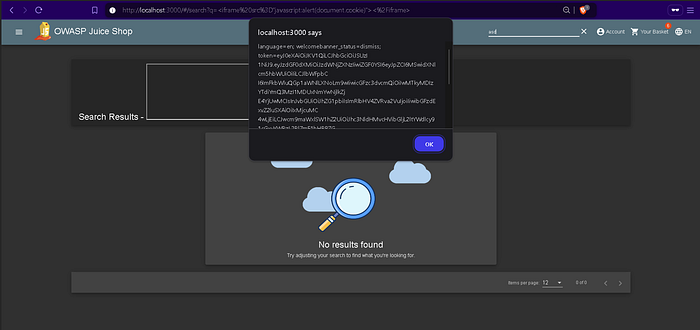
Sample of the Administrator Cookies
The extracted cookie data contains sensitive information, including the user's authentication token:
localhost:3000 says
language=en;
welcomebanner_status=dismiss;
token=eyJDeXAiOiJKV1QiLCJhbGciOiJSUzI1NiJ9.eyJzdGF0dXMiOiJzdWNjZXNzIiwiZGF0YSI6eyJpZCI6MSwidXNlcm5hbWUiOiIiLCJlbWFpbCI6ImFkbWluQGp1aWNlLXNoLm9wIiwicGFzc3dvcmQiOiIxOTIwMjNhN2JiZDczMjUwNTFmMDYyZGYxOGI1MDAiLCJyb2xlIjoiYWRtaW4iLCJkZWx1eGVUb2tlbiI6IiIsImxhc3RMb2dpbklwIjoiMTI3LjAuMC4xIiwicHJvZmlsZUltYWdlIjoiYXNzZXRzL3B1YmxpYy9pbWFnZXMvdXBsb2Fkcy9kZWZhdWx0QWRtaW4ucG5nIiwidG90cFNlY3JldCI6IiIsImlzQWN0aXZlIjp0cnVlLCJjcmVhdGVkQXQiOiIyMDI0LTEwLTI0IDEzOjA3OjI2LjM5NzArMDA6MDAiLCJ1cGRhdGVkQXQiOiIyMDI0LTEwLTI0IDEzOjI3OjU4LjUzNyswMDowMCIsImRlbGV0ZWRBdCI6bnVsbH0sImlhdCI6MTczMjQ1NzY3MH0.gMISABvD4YaOvB2usg7ItcRL1MT9DzTK8WXBhkK9-DA-480t_PGUVXodO3ftWzFfrfbvzHf34gj5j7Y95|YC4QtshyUahl2xj5369J1B6vS303Tmwx1Q5Z/9vH7n5BJOWP6uCWdBrzWZIRQASU-g-uAgjZYc-r5wslyaJ_Klfw
Why This Works
The application failed to sanitize the "src" attribute of the "<iframe>" tag, allowing the "javascript:" protocol to execute arbitrary code. This demonstrates how XSS vulnerabilities can bypass simple sanitization filters that only target obvious tags like "<script>".
Task 2: Use XSS to Redirect a User to the AAST College of Computing and Information Technology (CCIT), Sheraton Branch
The Challenge
In this task, we need to use an XSS vulnerability to redirect the user to a specific URL: the AAST College of Computing and Information Technology (CCIT) page for the Sheraton branch.
Again, we're working in a context where certain tags like "<script>" are sanitized or blocked, requiring alternative attack vectors.
The Solution: Using <iframe> with onload Event
We can use an "<iframe>" with an "onload" event handler to achieve the redirection.
The Payload
<iframe src="about:blank" onload="window.location='https://aast.edu/en/colleges/ccit/heliopolis/';"></iframe>Explanation of the Payload
"<iframe>": The iframe is used to embed another HTML document or page within the current page. We use an empty"about:blank"URL to initially load a blank page inside the iframe."onload"Event: The"onload"event handler is triggered when the iframe has finished loading. In this case, once the blank page ("about:blank") is loaded, the JavaScript code executes."window.location='https://aast.edu/en/colleges/ccit/heliopolis/'": This JavaScript command sets the browser's current URL to the target page, effectively redirecting the user to the AAST CCIT Sheraton Branch website.- Redirection: The script inside the
"onload"event changes the"window.location", which is a JavaScript property that determines the current URL of the browser. By setting"window.location"to the desired URL, we force the browser to navigate to the target page.
How It Works
- The malicious
"<iframe>"is injected into the vulnerable page. - The iframe loads a blank page (
"about:blank"), which happens almost instantly. - The
"onload"event fires, executing the redirection JavaScript. - The user's browser navigates to the AAST CCIT website.
Results
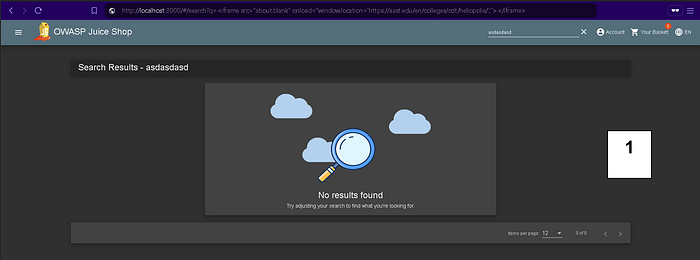

For greater transparency, please view the screen recording at the following link.
Conclusion: We Have Successfully Completed All Tasks
Through these two tasks, we demonstrated:
- Cookie Theft via XSS: Using an
"<iframe>"with a"javascript:"protocol to bypass"<script>"tag sanitization and steal user cookies, including administrator authentication tokens. - Malicious Redirection: Using an
"<iframe>"with an"onload"event handler to automatically redirect users to a target website of our choosing.
Key Takeaways and Mitigation Strategies
What We Learned
- XSS Can Bypass Simple Filters: Blocking
"<script>"tags is not enough. Attackers can use alternative tags like"<iframe>","<img>","<svg>", and event handlers to execute JavaScript. - Cookies Are Prime Targets: XSS can steal authentication tokens, allowing attackers to hijack user sessions without needing passwords.
- Redirection Attacks Can Enable Phishing: By redirecting users to malicious sites, attackers can conduct sophisticated phishing campaigns.
- Client-Side Attacks Are Dangerous: Unlike server-side vulnerabilities, XSS attacks execute in the user's browser, making them difficult to detect and prevent at the network level.
Mitigation Techniques
- Input Validation and Sanitization: Validate and sanitize all user inputs, both on the client and server side.
- Output Encoding: Encode data before rendering it in the browser to prevent script execution.
- Content Security Policy (CSP): Implement CSP headers to restrict which scripts can execute on your pages.
- HttpOnly Cookies: Set the
"HttpOnly"flag on cookies to prevent JavaScript access, mitigating cookie theft via XSS. - Use Modern Frameworks: Modern JavaScript frameworks often have built-in XSS protections when used correctly.
Final Thoughts
Cross-Site Scripting remains a critical vulnerability that affects countless web applications. Understanding how XSS works from an attacker's perspective is essential for building effective defenses. By completing these hands-on tasks in OWASP Juice Shop, we've gained practical experience in:
- Identifying XSS vulnerabilities
- Crafting payloads that bypass common sanitization
- Exploiting XSS for cookie theft and redirection
- Understanding the impact of successful XSS attacks
Remember: The best defense against XSS is a combination of proper input validation, output encoding, and defense-in-depth strategies like Content Security Policy.
This lab was completed as part of the Software Security course using OWASP Juice Shop. All attacks were performed in a controlled educational environment.