

This started from something stupid, doing the same repetitive task again and again. I was spending more time copy-pasting manifests and decompiled files than actually analyzing the APK.
New app comes in. Open JADX. Scroll a bit. Copy something. Paste into chat. Ask a question. Repeat.
At some point felt like I am not even analyzing, I'm just moving data around, trying to go fast, but it still feels slow. And the worst part, Half of the time the model is wrong because I pasted the wrong thing, or not enough of it.
What bothered me more was this - I've already automated parts of DAST using Burp Suite MCP. That flow just makes sense. The tool talks to the model, I just give right prompt.
So naturally the question was:
Why am I still acting like a middleman for Android static analysis?
Why am I feeding APK data manually when JADX already has everything?
That's when I started looking for something similar on this side and turns out, someone had already built it. jadx-mcp-server.
JADX MCP plugs into JADX GUI, the decompiler you already use, and exposes whatever project you have loaded to your AI agents through MCP tools. Same idea as Burp MCP, just a different surface. This is static analysis instead of HTTP traffic.
A few things worth highlighting so you get the idea.
You can pull the merged manifest and components directly. Activities, services, receivers, providers. You can also filter only exported ones when you just want to look at the attack surface first.
You can grab decompiled code on demand. Java or Kotlin for a class, or go lower with smali when needed.
Search and xrefs are there too. Instead of clicking through references again and again in the UI, you can just ask and follow the chain from there.
And then everything else. Resources, strings, the usual stuff you explore in JADX. It's all part of the same flow. You just need to prompt properly. And honestly, you can push this pretty far with some agentic skills and make most of it autonomous. But that's a another topic for another day.
Setting up JADX MCP
Open JADX-GUI, then install the plugin. Easiest path is the one-liner command.
jadx plugins — install "github:zinja-coder:jadx-ai-mcp"
or grab the .jar from releases and use Plugins → Install Plugin, then restart JADX. Exact clicks move between JADX versions.
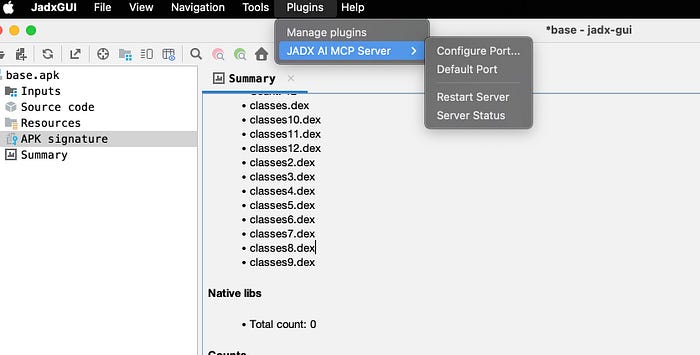
After it's installed, you get a JADX-AI-MCP entry under Plugins. Open it. Start the plugin's HTTP server if it isn't already up, and check Server Status, you want something that reads like server running ( 127.0.0.1:8650 ). That's the bridge the MCP process talks to.
If things don't work, don't overthink it. Just hit Restart Server before debugging anything else. This alone has fixed it for me more than once.
Download MCP server and unzip.
https://github.com/zinja-coder/jadx-ai-mcp/releases/latest/download/jadx-mcp-server.zip
Now install UV
curl -LsSf https://astral.sh/uv/install.sh | sh
Run MCP server
cd jadx-mcp-server
uv run jadx_mcp_server.py
Connect to AI agent (Cursor)
To connect Cursor with Jadx MCP server, you need to configure Cursor's settings. Open Cursor settings and look for MCP configuration. You can edit the mcp.json file directly.
{
  "mcpServers": {
    "jadx-mcp-server": {
      "command": "PATH/TO/jadx-mcp-server/.venv/bin/python",
      "args": [
        "PATH/TO/jadx-mcp-server/jadx_mcp_server.py",
        "--jadx-host",
        "127.0.0.1",
        "--jadx-port",
        "8650"
      ]
    }
  }
}
Save the file and restart Cursor. Once restarted, now you are good to go !
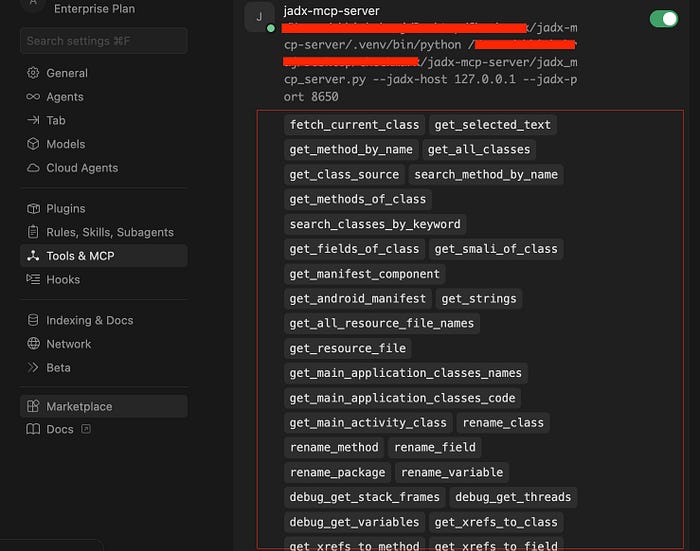
After successful installation, you will see the jadx MCP server connected in Cursor Settings under "Tools & MCP" section and it will show like below image.
Using MCP on actual playground !
Once you have configured MCP and your JADX GUI is loaded with the target application, you're good to start.
But before jumping into actual analysis, I usually ask something small just to verify everything is working fine. Something like:
read Android manifest and tell me minSdk and targetSdk
If this works, everything is in right order and place.
If you get no response, errors, or just irrelevant output, stop. Fix the setup.
Most of the time it's something simple:
- wrong MCP config, especially paths or
--jadx-portnot matching what you set in Plugins → JADX AI MCP Serve - plugin not actually running, check Server Status and just hit Restart Server
- no APK loaded in the JADX window you think you're using
- or your JADX version is outdated.
If you're still stuck after this, just check the official troubleshooting checklist.
https://jadx-ai-mcp.readthedocs.io/en/latest/troubleshooting/#getting-help
How I approach it
Now, it's just you, your prompt, and your creative way of thinking to find vulnerabilities.
You can either give a very guided prompt or simply ask to analyze the entire APK and identify vulnerabilities. Both will give you results, but for better outcomes, you should follow a guided approach like the one below.
Act as a Senior AppSec Engineer using JADX MCP for static analysis. Focus strictly on identifying high-confidence, realistic exploit paths.

Follow this workflow:

1. Surface Mapping: Read `AndroidManifest.xml`. Extract and prioritize exported components (Activities, Services, Receivers, Providers), custom permissions, and Deep Links.
2. Source-to-Sink Analysis: Use JADX to decompile high-priority classes. Trace user-controlled inputs (e.g., Intent extras, Deep Link parameters, IPC payloads) to dangerous sinks.
3. Vulnerability Hunting: Specifically evaluate input validation and authorization. Hunt for Intent Redirection, insecure WebViews, broken IPC/permission enforcement, SQLi in Providers, and Path Traversal.
4. Reporting: For each verified finding, output: description, steps to reproduce
That's one way.
Another thing I've noticed; if you're going deep into pentesting with agentic AI, don't try to scan everything at once.
Pick one area at a time:
- authentication
- obfuscation
- business logic or any direction you want !
It helps you go deeper instead of staying shallow everywhere.
Also, asking the agent to do a quick threat model before starting assessment often leads to much more good findings.
Some tricks that worked for me:
Instead of saying "find a vulnerability", try a bit of false anchoring.
For example:
- I already found one issue in this module, what else am I missing?
- Assume there's a bug in this root detection logic, how would you bypass it?
you can check out more technique like this in below article.
And if you really want to push this further, explore agentic skills. Turn your checklist into reusable skills and let the agent handle repetitive parts while you focus on the actual thinking.
That's it for now.
This alone already makes static analysis a lot less painful. And if you combine it with better prompts, you can push it much further.
I hope this is informative to you, and if you have any doubts or suggestions, reach out to me over Twitter; I'll be happy to assist or learn from you.
Happy Hacking !
Twitter handle :- https://x.com/Xch_eater