

Applications need secrets and credentials, such as database passwords, API keys, or tokens. Hardcoding them in configuration files and storing them in Git is a security risk. The safe approach is to use a dedicated secrets manager.
HashiCorp Vault is a secure server that stores secrets encrypted and controls who can access them.
In this article, you'll learn how Vault works by going through its core concepts step by step.
By the way, I'm planning to write a series about how Vault integrates with Kubernetes. We'll start with the basics, and each article will introduce more advanced concepts. So stay tuned for the updates.
Hashicorp Vault Core Concepts
When you start working with Vault, you'll quickly run into a few key terms. Let's go through them one by one.
Secrets
A secret is any data you want to protect. Vault usually stores secrets as key–value pairs.
- Static secrets
Static secrets are reusable and stay the same until someone changes them manually.
For example:
db_password = "fixed-password"This approach is simple, but risky. If the secret leaks, every application using it is exposed until the password is rotated.
- Dynamic secrets
Dynamic secrets are generated on demand by Vault and have a limited lifetime.
Here is an example with databases:
- App asks Vault for DB access.
- Vault creates a new DB user.
- User expires after 1 hour.
- Vault deletes the user automatically.
This approach avoids sharing passwords and removes the need for custom rotation scripts.
Secret Engines
A secret engine defines how secrets are stored or generated in Vault.
Some common secret engines include:
- KV (Key-Value) — used for static secrets.
- Database — generates DB users on demand.
- PKI — creates certificates.
- Cloud — generates AWS/GCP credentials.
Paths
Vault stores secrets at paths. A path works like an address inside Vault.
An example path for KV:
secret/data/app/configOn that path, you might store:
{
  "username": "appuser",
  "password": "supersecret"
}
You can apply access rules to each path to control who can read or write secrets.
Authentication Methods
Before reading secrets, callers must prove their identity.
Vault supports numerous auth methods:
- Token
- Username/password
- GitHub
- Kubernetes
- Cloud IAM
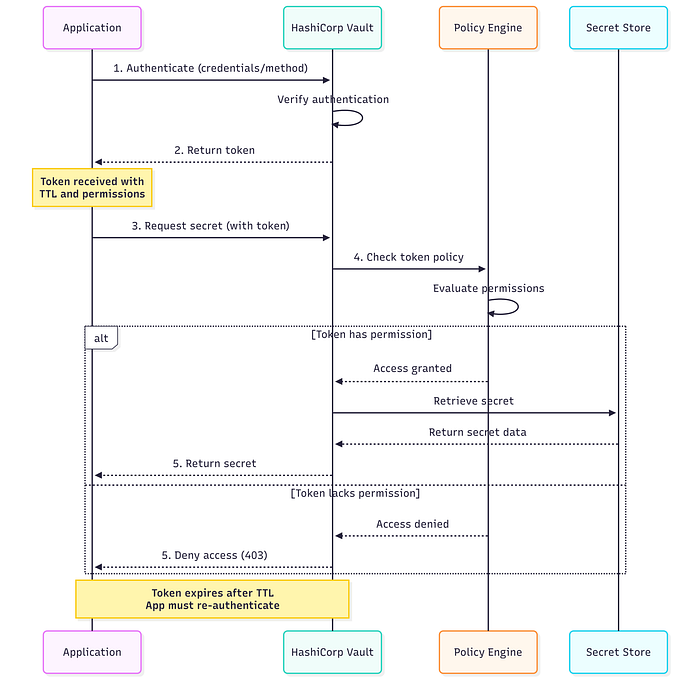
For now, imagine this flow:
You → authenticate → get a tokenThat token represents your identity inside Vault.
Tokens
A token proves that authentication was successful. It's linked to permissions and policies. It's often short-lived for security reasons.
Policies
Policies define what actions are allowed.
A policy specifies:
- Which paths it applies to.
- Which operations are allowed (read, write, list, delete).
path "secret/data/my-app" {
  capabilities = ["read"]
}
This policy allows reading secrets at that path but does not allow writing or accessing other paths.
Vault always checks policies before returning any secret.
Is Vault Free?
The self-hosted, community-supported version is free and contains core secrets management features. It offers paid advanced enterprise features, high-availability, and managed cloud services.
Authentication Request Flow
This diagram summarizes everything you've learned so far:
Conclusion
In this post, you learned the core concepts of Vault and how secret access works end-to-end.
In the next tutorial, we'll look at how to run Vault locally to get hands-on experience.
Thanks for reading, and stay tuned!