
How does the web work ?
What is DNS stand for ?
DNS (Domain Name System) provides a simple way for us to communicate with devices on the internet without remembering complex numbers. Much like every house has a unique address for sending mail directly to it, every computer on the internet has its own unique address to communicate with it called an IP address.
Domain Hierarchy
TLD (Top-Level Domain) — A TLD is the most righthand part of a domain name. So, for example, the tryhackme.com TLD is .com. There are two types of TLD, gTLD (Generic Top Level) and ccTLD (Country Code Top Level Domain).
Second-Level Domain — Taking tryhackme.com as an example, the .com part is the TLD, and Tryhackme is the Second Level Domain. When registering a domain name, the second-level domain is limited to 63 characters + the TLD and can only use a-z 0–9 and hyphens (cannot start or end with hyphens or have consecutive hyphens).
Subdomain — A subdomain sits on the left-hand side of the Second-Level Domain using a period to separate it; for example, in the name admin.tryhackme.com the admin part is the subdomain. A subdomain name has the same creation restrictions as a Second-Level Domain, being limited to 63 characters and can only use a-z 0–9 and hyphens (cannot start or end with hyphens or have consecutive hyphens).
DNS Record Types — DNS isn't just for websites though, and multiple types of DNS record exist. We'll go over some of the most common ones that you're likely to come across.
A Record
These records resolve to IPv4 addresses, for example 104.26.10.229
AAAA Record
These records resolve to IPv6 addresses, for example 2606:4700:20::681a:be5
CNAME Record
These records resolve to another domain name, for example, TryHackMe's online shop has the subdomain name store.tryhackme.com which returns a CNAME record shops.shopify.com(opens in new tab). Another DNS request would then be made to shops.shopify.com(opens in new tab) to work out the IP address.
MX Record
These records resolve to the address of the servers that handle the email for the domain you are querying.
TXT Record
TXT records are free text fields where any text-based data can be stored. TXT records have multiple uses, but some common ones can be to list servers that have the authority to send an email on behalf of the domain (this can help in the battle against spam and spoofed email).
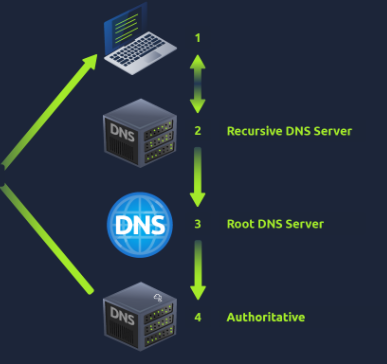
What happens when you make a DNS request
HTTP in detail
What is HTTP? (Hyper Text Transfer Protocol)
HTTP is what's used whenever you view a website, developed by Tim Berners-Lee and his team between 1989–1991. HTTP is the set of rules used for communicating with web servers for the transmitting of webpage data, whether that is HTML, Images, Videos, etc.
What is HTTPS? (Hyper Text Transfer Protocol Secure)
HTTPS is the secure version of HTTP. HTTPS data is encrypted so it not only stops people from seeing the data you are receiving and sending, but it also gives you assurances that you're talking to the correct web server and not something impersonating it.
What is a URL? (Uniform Resource Locator)
If you've used the internet, you've used a URL before. A URL is predominantly an instruction on how to access a resource on the internet. The below image shows what a URL looks like with all of its features (it does not use all features in every request).
HTTP methods are a way for the client to show their intended action when making an HTTP request. There are a lot of HTTP methods but we'll cover the most common ones, although mostly you'll deal with the GET and POST method.
GET Request
This is used for getting information from a web server.
POST Request
This is used for submitting data to the web server and potentially creating new records
PUT Request
This is used for submitting data to a web server to update information
DELETE Request
This is used for deleting information/records from a web server.
Headers are additional bits of data you can send to the web server when making requests.
Although no headers are strictly required when making a HTTP request, you'll find it difficult to view a website properly.
Common Request Headers
These are headers that are sent from the client (usually your browser) to the server.
You've probably heard of cookies before, they're just a small piece of data that is stored on your computer. Cookies are saved when you receive a "Set-Cookie" header from a web server. Then every further request you make, you'll send the cookie data back to the web server. Because HTTP is stateless (doesn't keep track of your previous requests), cookies can be used to remind the web server who you are, some personal settings for the website or whether you've been to the website before.