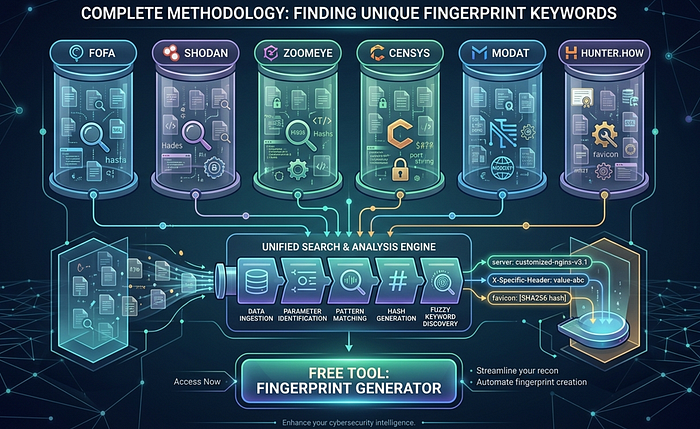

⚠️ Disclaimer: This article is strictly for ethical security research, bug bounty programs, and authorized penetration testing only. Always obtain written permission before testing any system. The author is not responsible for any misuse of this information.
1. Introduction
Internet-wide scanning platforms like FOFA, Shodan, ZoomEye, Censys, MODAT, and Hunter.how have fundamentally changed how security researchers discover exposed infrastructure. These tools continuously scan the entire public internet, indexing HTTP responses, banners, certificates, and metadata — creating a searchable database of every internet-connected device and service.
But here's the problem most beginners face: generic queries like title="Login" or body="admin" return millions of irrelevant results. To find your exact target — a specific application, a specific version, or a specific company's exposed services — you need unique fingerprint keywords.
The core idea is simple: every website leaves fingerprints. From the exact title text, to custom CSS class names, to HTTP headers revealing the framework — all of it can become a precise FOFA or Shodan query that returns only the hosts you care about.
This article teaches you a complete 8-step methodology for extracting these fingerprints from any target.
2. Platform Comparison
Platform Best For Unique Feature Free Tier FOFA Asian infra, IoT, banner search Favicon hash, is_cloud filter 10 queries/day Shodan IoT, ICS/SCADA, CVE-linked search CVE database integration 2 pages results ZoomEye App fingerprinting, Asian coverage app:"" operator for frameworks Limited queries Censys Cert transparency, structured data Academic-grade JSON API 250 queries/month MODAT South Asia, regional targeting Clean UI, country coverage Generous free tier Hunter.how Quick validation, recent scans Fast indexing Limited queries
FOFA (fofa.info)
FOFA is arguably the most powerful of the six platforms, with the largest database and strongest coverage of Asian internet infrastructure. Its syntax is expressive:
body=""        title=""        domain=""       header=""
icon_hash=""   port=""         country=""      status_code=""
is_cloud=""    cert=""         is_honeypot=""  asn=""
Key advantage: FOFA supports favicon hash searches (icon_hash=""), making it the most accurate platform for fingerprinting specific applications. It also has a is_cloud="false" filter to remove CDN-protected hosts, and is_honeypot="false" to exclude traps.
Shodan (shodan.io)
Shodan is the oldest and most well-known internet scanner, particularly strong for IoT devices, industrial control systems, and CVE-linked searches. Syntax:
http.html:""       http.title:""     hostname:""
port:              country:          os:
org:               http.status:      ssl.cert.subject.cn:
http.favicon.hash: asn:              net:""
Key advantage: Direct integration with CVE database. Search vuln:CVE-2021-44228 to find Log4Shell-vulnerable hosts.
ZoomEye (zoomeye.org)
ZoomEye (by Knownsec) excels at application-level fingerprinting and has strong Asian internet coverage. Syntax:
app:""      title:""     hostname:""
port:       country:     service:
os:         ver:         iconhash:""
Key advantage: The app:"" operator matches application names from their database of known software signatures.
Censys (search.censys.io)
Censys takes a more academic, structured approach with detailed JSON data and excellent certificate transparency integration. Syntax:
services.http.response.html_title=""
services.http.response.body:""
services.port=
services.http.response.headers.server:""
services.tls.certificates.leaf_data.subject.common_name=""
location.country_code=""
autonomous_system.asn=
ip=""
Key advantage: Best for certificate-based recon. Finds all servers sharing the same SSL certificate.
MODAT (modat.io)
A newer platform with clean UI and good South Asia/Bangladesh coverage. Syntax:
body=""    title=""    domain=""
port=""    country=""  status=""
Key advantage: Regional targeting for any infrastructure, good for bug bounty research.
Hunter.how (hunter.how)
Fast results with good coverage of recent scans. Syntax:
body=""     title=""    domain=""
ip.port=""  country=""  ip=""
Key advantage: Quick keyword validation before committing to deeper searches on other platforms.
3. The Fingerprint Methodology
Step 1 — Page Source Analysis
The first and most accessible source of unique keywords is the raw HTML source of the target page.
How to access:
view-source:https://target.comOr press Ctrl+U in any browser.
What to extract:
Title tag (Medium uniqueness)
<title> Example.com Largest Online Bookstore</title>
FOFA:    title=" Example.com Largest Online Bookstore"
Shodan:  http.title:"Example.com"
ZoomEye: title:"Example.com"
Meta generator (HIGH uniqueness — reveals CMS/framework)
<meta name="generator" content="Laravel Framework v9.48.0">
FOFA:   body="Laravel Framework v9.48.0"
Shodan: http.html:"Laravel Framework v9.48.0"
Custom CSS class names (HIGH uniqueness — unique to custom-built apps)
Look for hyphenated classes that don't match Bootstrap/Tailwind patterns:
<div class="rm-product-card rm-featured">
<nav class="exmaple-navbar">
FOFA: body="rm-product-card"
FOFA: body="example-navbar"
Static file paths with build hashes (VERY HIGH uniqueness)
<script src="/static/js/main.a8f3b2c1.chunk.js"></script>
FOFA: body="/static/js/main."
FOFA: body="/static/js/main.a8f3b2c1"
Even without the hash, the directory structure is often unique.
HTML comments (HIGH uniqueness — developers forget to remove these)
<!-- Built with example.com v2.4.1 on 2024-01-15 -->
<!-- TODO: remove debug endpoint /api/internal/debug -->
FOFA: body="Built with example v2.4.1"
Data attributes (MEDIUM–HIGH uniqueness)
<div data-app="example-shop" data-region="[county]">
FOFA: body="data-app=\"exmaple-shop\""
Custom font paths (HIGH uniqueness)
@font-face { src: url('/fonts/exmapleSans.woff2'); }
FOFA: body="/fonts/exmapleSans"
Worked example:
Raw HTML source:
<html>
<head>
  <title>BookShop — Buy Books Online</title>
  <meta name="generator" content="Laravel/9.0">
  <link rel="stylesheet" href="/static/css/bs-theme.a1b2c3.css">
</head>
<body>
  <div class="bs-product-grid" data-app="bookshop">
    <!-- BookShop Frontend v3.1 -->
Extracted FOFA queries:
title="BookShop — Buy Books Online"
body="Laravel/9.0"
body="/static/css/bs-theme."
body="bs-product-grid"
body="data-app=\"bookshop-any\""
body="BookShop Frontend v3.1"
Best combined query:
body="bs-product-grid" && body="Laravel/9.0" && country="[]"Step 2 — HTTP Header Extraction
HTTP response headers often leak more information than developers realize.
How to get headers:
curl -I https://target.comOr: F12 → Network tab → Click any request → Headers tab → Response Headers
What each header means for fingerprinting:
Content-Security-Policy mining:
The Content-Security-Policy header often reveals internal infrastructure:
Content-Security-Policy: default-src 'self';
  connect-src https://api.internal.company.com https://logs.company.com;
  img-src https://cdn.company-internal.net;
Those internal domains become:
FOFA: body="api.internal.company.com"
FOFA: body="company-internal.net"
Step 3 — Favicon Hash (Most Powerful Technique)
The favicon hash is the single most reliable fingerprint for identifying a specific application or framework across all its deployed instances.
Why it works: The favicon.ico file for any specific application version is always identical. Whether the app is deployed on AWS in Singapore or a bare metal server in Germany, the favicon hash will be the same.
Python method:
pip install requests mmh3
python3 -c "
import requests, mmh3, base64
r = requests.get('https://target.com/favicon.ico', verify=False)
favicon = base64.encodebytes(r.content)
hash_value = mmh3.hash(favicon)
print(hash_value)
"
Platform queries:
FOFA:    icon_hash="-297558949"
Shodan:  http.favicon.hash:-297558949
ZoomEye: iconhash:"-297558949"
Censys:  services.http.response.favicons.md5_hash="..."
Pro tip: In FOFA, clicking any favicon thumbnail in search results automatically appends icon_hash="" to your query. This is the fastest way to find all instances of a specific application.
Step 4 — JavaScript File Analysis
Modern single-page applications pack a lot of configuration into their bundled JS files.
How: F12 → Sources tab → look inside .js files → search for:
apiEndpoint: "https://api.internal.company.com/v2"
baseURL: "/rm/api/v3/"
appName: "example-frontend"
__APP_CONFIG__ = { version: "2.4.1", env: "production" }
BUILD_ID: "a8f3b2c1d4e5"
These become:
FOFA: body="/rm/api/v3/"
FOFA: body="example-frontend"
FOFA: body="BUILD_ID"
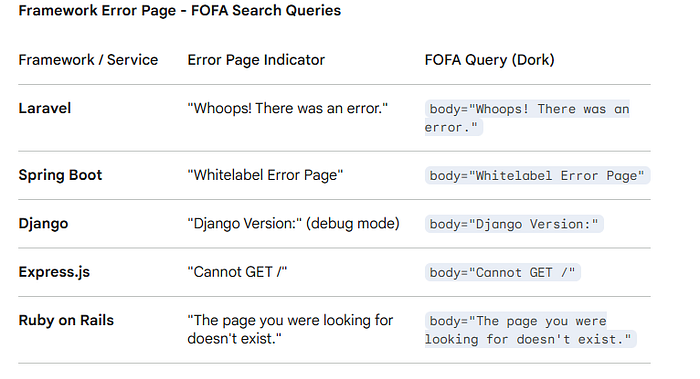
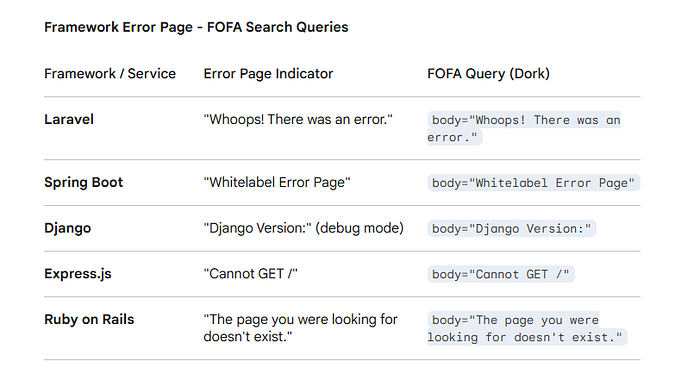
Step 5 — Error Page Fingerprinting
Intentionally trigger error responses to reveal the underlying framework:
https://target.com/this-page-does-not-exist-12345
https://target.com/.env
https://target.com/admin
https://target.com/wp-login.php
Framework error signatures:
Step 6 — Robots.txt and Sitemap Mining
These files are explicitly designed to reveal site structure:
https://target.com/robots.txt
https://target.com/sitemap.xml
https://target.com/sitemap_index.xml
Example robots.txt revealing hidden paths:
User-agent: *
Disallow: /rm-admin/
Disallow: /internal-api/
Disallow: /staging/
Disallow: /api/v2/debug/
FOFA: body="/rm-admin/"
FOFA: body="/internal-api/"
Step 7 — SSL Certificate Analysis
SSL certificates are indexed by all major platforms and are one of the most reliable ways to find ALL servers belonging to a target organization.
Online method: https://crt.sh/?q=target.com
Platform queries:
FOFA:    cert="target.com"
Shodan:  ssl.cert.subject.cn:"target.com"
ZoomEye: ssl:"target.com"
Censys:  services.tls.certificates.leaf_data.names:"target.com"
Why it matters: Certificate Subject Alternative Names (SANs) often include staging servers, internal APIs, and development environments that are not publicly advertised:
SAN: *.target.com
SAN: api.target.com
SAN: staging.target.com
SAN: dev-internal.target.com   ← found it!
Step 8 — Uniqueness Validation
Before using any keyword in production searches, validate it:
Google test:
"your_extracted_keyword" -site:target.com- Fewer than 100 results → unique enough ✅
- Thousands of results → too generic, refine it ❌
FOFA test: Search the keyword alone. If results are under 1,000 — excellent. Under 100 — perfect.
Combine for precision:
# Two keywords = much more precise than one
body="rm-product-card" && body="Laravel/9.0"
# Add country for regional targets
body="rm-product-card" && body="Laravel/9.0" && country="[]" && status_code="200"
# Exclude cloud to find raw servers
body="rm-product-card" && is_cloud="false" && country="[]"
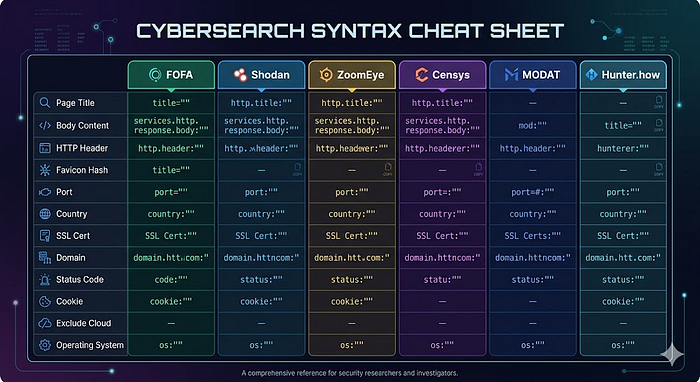
4. Query Syntax Cheatsheet
5. Real-World Worked Example
Target: A fictional e-commerce site "Shopx" (shopx.com)
Step 1 — Page source findings:
<title>Shop - Online Shopping Bangladesh</title>
<meta name="generator" content="Django/4.2">
<div class="shopx-product-tile" data-app="shopx-v3">
<!-- Shop Frontend Build 20240115 -->
<script src="/static/js/shopx.main.c7d8e9f0.js"></script>
Step 2 — HTTP header findings:
X-Powered-By: Python/3.11
X-Framework: Django/4.2
Set-Cookie: shopx_session=; Path=/
Step 3 — Favicon hash: -887654321
Step 4 — Combined queries:
# FOFA — most precise
icon_hash="-887654321" && country="any" && status_code="200"
# FOFA — keyword based
body="shopx-product-tile" && body="Django/4.2" && country="x"
# Shodan
http.favicon.hash:-887654321 country:any
# ZoomEye
title:"Shopx" country:"x" port:443
# Censys
services.http.response.html_title="Shopany" and location.country_code="x"
What a researcher might find:
staging.shopx.com.[country]— staging server with debug mode ONadmin.shopx.com.[country]:8080— admin panel exposed without authapi.shopx.com.[country]— internal API with verbose error messages
6. Tips & Tricks
- Favicon hash is king. It's the most reliable single-operator fingerprint. Always try it first.
is_cloud="false"in FOFA removes Cloudflare/Akamai-protected hosts, revealing origin servers.status_code="200" && is_honeypot="false"in FOFA gives you clean, live results only.- Cross-validate every interesting finding across at least two platforms before reporting.
- Check FOFA's favicon click feature: clicking any favicon in FOFA results auto-generates the
icon_hash=""query. - SSL cert recon first —
cert="company.com"on Censys often reveals more subdomains than DNS brute-forcing. - Document everything — save all queries, timestamps, and findings. Bug bounty reports need evidence.
- Never access found systems — finding a misconfigured server in FOFA ≠ permission to access it.
7. Legal & Ethical Disclaimer
This methodology is published for educational purposes and authorized security research only.
- Only use these techniques on systems you own or have explicit written permission to test.
- Participating in a bug bounty program (HackerOne, Bugcrowd, etc.) constitutes permission within the defined scope.
- Finding an exposed system in FOFA or Shodan does not grant you permission to access it.
- Unauthorized access to computer systems is illegal under laws including the Computer Fraud and Abuse Act (US), Computer Misuse Act (UK).
- If you find a vulnerability, follow responsible disclosure: notify the vendor privately, give them time to fix, then disclose publicly.
- The author and publisher accept no liability for misuse of any technique described in this article.
Thanks for reading. If this helped you, follow for more OSINT and recon content.
About the author: WolfSec is a bug hunter and a pentester focused on web application security. Writing about the techniques that actually work — not just the ones that look good in tutorials.