
Giriş (Introduction)
İnternet üzerinde gezinirken verilerinizin güvenliğini sağlayan temel mekanizma HTTPS'tir. Bu güvenliğin arkasındaki kahraman ise Taşıma Katmanı Güvenliği Protokolü (TLS), eski adıyla SSL'dir (Güvenli Yuva Katmanı). TLS, internet üzerinden iletişim güvenliğini sağlamak amacıyla tasarlanmış bir kriptografik protokoldür. E-posta, anlık mesajlaşma ve özellikle HTTPS gibi uygulamalarda yaygın olarak kullanılır. Amacı, gizlilik (confidentiality), bütünlük (integrity) ve orijinallik (authenticity) sağlamaktır.
When browsing the internet, the fundamental mechanism ensuring your data security is HTTPS. The hero behind this security is the Transport Layer Security Protocol (TLS), formerly known as SSL (Secure Sockets Layer). TLS is a cryptographic protocol designed to provide communications security over the internet. It is widely used in applications like email, instant messaging, and especially HTTPS. Its primary aim is to provide confidentiality, integrity, and authenticity.
Temel Kavramlar (Key Concepts)
TLS protokolü, genellikle sunum katmanında çalışır ve iki ana katmandan oluşur: TLS Kayıt Protokolü ve TLS El Sıkışma Protokolü. Uygulamalar bir ağ üzerinden izinsiz dinlemeyi ve kurcalamayı önleyecek şekilde iletişim kurmak için TLS kullanır. TLS, güvenilir bir taşıma protokolü (örneğin TCP) üzerinde çalışır.
The TLS protocol generally runs in the presentation layer and is composed of two main layers: the TLS Record Protocol and the TLS Handshake Protocol. Client-server applications use TLS to communicate across a network in a way designed to prevent eavesdropping and tampering. TLS runs "on top of some reliable transport protocol (e.g., TCP)."
Bir sunucuya şifreli bağlantı talep etmenin ana yollarından biri farklı bir port numarası kullanmaktır. Şifrelenmemiş HTTP trafiği genellikle Port 80'i kullanırken, şifreli HTTPS trafiği için yaygın olarak Port 443 kullanılır. Diğer bir mekanizma ise bazı posta protokollerinde olduğu gibi bağlantıyı TLS'ye geçirmek için sunucuya protokole özgü bir STARTTLS isteği göndermektir.
One of the main ways to request an encrypted connection is to use a different port number. Unencrypted HTTP traffic typically uses Port 80, while Port 443 is commonly used for encrypted HTTPS traffic. Another mechanism is to make a protocol-specific STARTTLS request to the server to switch the connection to TLS, such as when using some mail protocols.
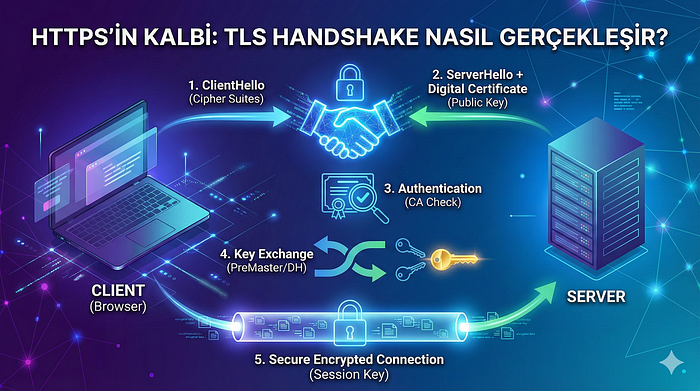
Nasıl Çalışır? TLS Handshake Adımları (How It Works? The TLS Handshake Steps)
TLS Handshake (El Sıkışma), istemci (tarayıcınız) ve sunucunun güvenli bir oturum kurmak için anlaştığı durum odaklı bir prosedürdür. Bu süreç, iletişim parametrelerini ve oturum için kullanılacak ortak bir şifreleme anahtarını belirler. Süreç başarılı olursa, bağlantı aşağıdaki özelliklere sahip olacaktır: gizlilik, bütünlük ve kimlik doğrulama.
The TLS Handshake is a stateful procedure where the client (your browser) and the server negotiate to establish a secure session. This process determines the communication parameters and a shared encryption key to be used for the session. If successful, the connection will have the properties of confidentiality, integrity, and authentication.
1. ClientHello
İstemci (örneğin, web tarayıcısı), güvenli bir bağlantı talep ederek ve desteklediği şifre paketleri (kullanabileceği şifreler ve hash fonksiyonları) listesini sunarak el sıkışmayı başlatır.
The client (e.g., web browser) begins the handshake by requesting a secure connection and presenting a list of supported cipher suites (ciphers and hash functions) that it can use.
2. ServerHello ve Dijital Sertifika Gönderimi
Sunucu, bu listeden kendisinin de desteklediği bir şifre ve hash fonksiyonu seçer ve istemciye bildirir. Ardından, sunucu kimliğini Dijital Sertifika biçiminde sağlar. Bu sertifika, sunucu adını, güvenilir Sertifika Yetkilisini (CA) ve sunucunun Açık Anahtarını içerir.
The server picks a cipher and hash function that it also supports from this list and notifies the client of the decision. The server then provides identification in the form of a Digital Certificate. This certificate contains the server name, the trusted Certificate Authority (CA), and the server's Public Key.
3. Sertifika Doğrulama (Authentication)
İstemci, sertifikanın geçerliliğini (CA'nın güvenilirliğini) kontrol eder. Bu adım, sunucunun iddia ettiği kişi olduğunu kanıtlar. Bu doğrulama başarısız olursa, bağlantı hemen kesilir.
The client confirms the validity of the certificate (checking the trustworthiness of the CA). This step authenticates that the server is who it claims to be. If this validation fails, the connection is immediately terminated.
4. Anahtar Değişimi (Key Exchange)
Güvenli iletişim için kullanılacak Oturum Anahtarlarını oluşturmak üzere istemci ve sunucu bir anahtar değişimi yapar:
To generate the Session Keys used for secure communication, the client and server perform a key exchange:
- Eski Yöntem (TLS 1.2 ve altı): İstemci, rastgele bir sayı (Ön-Ana Sır / PreMasterSecret) oluşturur ve bunu sunucunun Açık Anahtarı ile şifreler. Şifrelenmiş bu sırrı sunucuya gönderir. Sunucu, sadece kendisinin sahip olduğu Gizli Anahtarı ile bu sırrı çözer.
- Yeni Yöntem (TLS 1.3 ve İleri Gizlilik): İstemci, Diffie–Hellman anahtar değişimini (veya varyantlarını) kullanarak ortak bir anahtar oluşturur. Bu yöntem, İleri Gizlilik (Forward Secrecy) sağlar; yani, sunucunun Gizli Anahtarı gelecekte ifşa edilse bile, o anki oturumun deşifre edilmesi mümkün değildir.
- Older Method (TLS 1.2 and below): The client generates a random number (PreMasterSecret) and encrypts it with the server's Public Key. It sends this encrypted secret to the server. The server decrypts this secret using its Private Key.
- Newer Method (TLS 1.3 and Forward Secrecy): The client uses the Diffie–Hellman key exchange (or variants) to securely generate a shared key. This method provides Forward Secrecy, meaning that even if the server's Private Key is disclosed in the future, the current session cannot be decrypted.
5. Şifreli Bağlantının Başlatılması
Her iki taraf da ortak sırrı (PreMasterSecret veya DH sonucu) kullanarak tekil, geçici bir Oturum Anahtarı oluşturur. El sıkışma sona erer ve sonraki tüm iletişim, bu simetrik şifreleme anahtarı kullanılarak şifrelenir ve deşifre edilir.
Both parties use the shared secret (PreMasterSecret or DH result) to generate a unique, temporary Session Key. The handshake concludes, and all subsequent communication is encrypted and decrypted using this symmetric cipher key.
Kod Örneği: Python ile Güvenli İstek (Code Example: Secure Request with Python)
Modern programlama dillerinde TLS Handshake süreci genellikle ağ kütüphaneleri tarafından otomatik olarak yönetilir. Aşağıdaki Python kodu, requests kütüphanesi kullanarak bir HTTPS isteği yapar. Kütüphane, arka planda TLS'yi başlatır, sertifikayı doğrular ve veri transferini şifreler.
In modern programming languages, the TLS Handshake process is usually managed automatically by networking libraries. The following Python code performs an HTTPS request using the requests library. The library initiates TLS in the background, validates the certificate, and encrypts the data transfer.
import requests
# Güvenli bir HTTPS adresine istek gönderme
try:
    # Python, bu satırda TLS Handshake sürecini otomatik olarak başlatır:
    # 1. Sunucuya ClientHello gönderilir.
    # 2. Sunucunun Sertifikası alınır ve CA tarafından doğrulanır.
    # 3. Şifrelenmiş Oturum Anahtarı oluşturulur.
    response = requests.get('https://www.wikipedia.org/', timeout=5)
    if response.status_code == 200:
        print("HTTPS isteği başarılı.")
        print(f"Kullanılan bağlantı şifrelemesi (Varsayılan): TLS 1.2 veya TLS 1.3")

        # Sertifika hakkında ek bilgi alınabilir (Gelişmiş kütüphane ayarlarıyla)
        # requests kütüphanesi otomatik olarak Gizlilik ve Bütünlük sağlar.

    else:
        print(f"Hata Kodu: {response.status_code}")
except requests.exceptions.SSLError as e:
    # Eğer sertifika doğrulama başarısız olursa bu hata alınır
    print(f"TLS/SSL Hatası: Sertifika doğrulama başarısız oldu. {e}")
except requests.exceptions.RequestException as e:
    print(f"İstek Hatası: {e}")
import requests
# Sending a request to a secure HTTPS address
try:
    # Python automatically initiates the TLS Handshake process in this line:
    # 1. ClientHello is sent to the server.
    # 2. The server's Certificate is received and validated by the CA.
    # 3. An encrypted Session Key is established.
    response = requests.get('https://www.wikipedia.org/', timeout=5)
    if response.status_code == 200:
        print("HTTPS request successful.")
        print(f"Connection encryption used (Default): TLS 1.2 or TLS 1.3")

        # Additional information about the certificate can be retrieved (via advanced library settings)
        # The requests library automatically ensures Confidentiality and Integrity.

    else:
        print(f"Error Code: {response.status_code}")
except requests.exceptions.SSLError as e:
    # This error occurs if certificate validation fails
    print(f"TLS/SSL Error: Certificate validation failed. {e}")
except requests.exceptions.RequestException as e:
    print(f"Request Error: {e}")